BlindOwl
Members
-
Joined
-
Last visited
-
Thank you @Junker der Provinz , this is really informative. The issue has now been resolved by updating OpenCloud to 7.5.0. Bugfix: https://github.com/opencloud-eu/opencloud/pull/3347
-
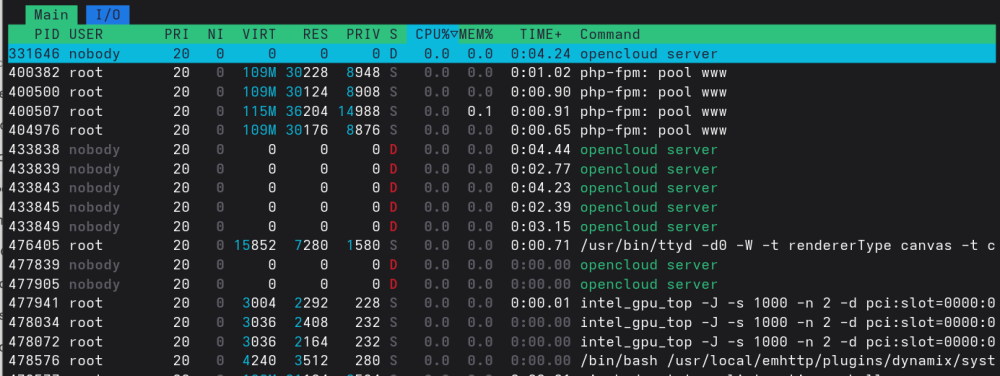
I have the syslog server running but I forgot to attach it. I have now done so. Related timestamps: Aug 7 15:14 - Starting the opencloud stack 15:23 - Opening the opencloud website 15:34 - Syncing of Personal folder - Success 15:41 - Syncing of Work folder - Fail 16:04 - powerdown -r The diagnostics command does not work properly when this occurs, what I've attached is all it generated. Do you have any suggestions for how I can reboot the system without triggering an array check? Currently, the only way I have found is: echo 1 > /proc/sys/kernel/sysrq echo s > /proc/sysrq-trigger echo u > /proc/sysrq-trigger echo b > /proc/sysrq-trigger syslog-192.168.1.6.log Addition: The docker stack should be stopped, but opencloud server processes still appear in htop.
-
Here's a small update: I started the Opencloud stack with all other docker containers stopped and the VM powered off. Everything ran fine. I could access the Opencloud web UI without issues as was able to upload and downloaded files sucessfully. I have three shares in Opencloud: personal, work and shares. Personal - I started syncing this folder. All files synced as expected, though it only contained a few files. Shares - This folder is empty, no issues. Work - This share contains over 2000 files (50-1000 kB each) and over 100 files (100-200 MB each) waiting to be uploaded to the server. Syncing this folder failed within seconds. I suspect that Opencloud attempts to sync too many files simultaneously and somehow saturates something in Unraid, leading to these issues. The last output from docker logs -f opencloud-opencloud-1 is attached to opencloud-docker-log.txt. The diagnostics command did not finish, I have attached what it managed to collect. Perhaps this is an Opencloud issue and would be better suited for their community. However, I have three Unraid-related questions: Why does this cause the web UI to eventually become unresponsive? Why don't commands like diagnostics and powerdown -r work after the issue occurs? Is is possible to do a graceful reboot of the system in this state? opencloud-docker-log.txt weymouth-diagnostics-20260807-1606.zip
-
Hi, I have been running Opencloud on my Unraid server for a few weeks without any issues. I am using the official docker compose stack (I followed the official guide) with the Compose Manager Plus plugin. Last week I upgraded Unraid from 7.3.1 to 7.3.2 and added another drive (disk5, no shares so far) to the array. During an Opencloud sync from my laptop the transfers stopped. It seems like the Traefik container had stopped while the other parts of the stack continued to run. At the same time the Unraid interface became sluggish. On the Dashboard page, the System and Interface graphs stopped working while the Processor graph continued to work. The VMs tab did not work at all. Changing browser from Firefox to Chrome briefly worked (not the VMs tab), until the GUI become completely unresponsive. I am still able to access the server through SSH. I tried powerdown -r, waited a few minutes but nothing. I eventually run, echo 1 > /proc/sys/kernel/sysrq echo s > /proc/sysrq-trigger echo u > /proc/sysrq-trigger echo b > /proc/sysrq-trigger which successfully rebooted the server, but of course triggered an array check. My other dockers (Immich, LubeLogger, Homepage, Jellyfin, restic-rest-server) and my Home Assistant VM continues to run fine while Opencloud and the GUI stops working. The appdata and domains shares are on the cache with exclusive access. The Opencloud share, which the config and data directories are mounted to, is on cache->array. I waited until the array check completed, changed the docker btrfs-image to directory, and started the Opencloud stack again. My laptop tried to sync but did not even manage to start a file transfer and the Unraid GUI once again become unresponsive. The only form of error I have managed to find so far in the logs are: Aug 3 17:45:17 Weymouth nginx: 2026/08/03 17:45:17 [error] 14583#14583: *10730 upstream timed out (110: Connection timed out) while reading response header from upstream, client: 10.253.0.8, server: , request: "GET /sub/session,var,notify?last_event_id=1785770904%3A-%2C%5B0%5D%2C- HTTP/1.1", subrequest: "/auth-request.php", upstream: "fastcgi://unix:/var/run/php-fpm.sock", host: "192.168.1.6" Aug 3 17:45:17 Weymouth nginx: 2026/08/03 17:45:17 [error] 14583#14583: *10730 auth request unexpected status: 504 while sending to client, client: 10.253.0.8, server: , request: "GET /sub/session,var,notify?last_event_id=1785770904%3A-%2C%5B0%5D%2C- HTTP/1.1", host: "192.168.1.6" Aug 3 17:47:01 Weymouth nginx: 2026/08/03 17:47:01 [error] 14583#14583: *10781 upstream timed out (110: Connection timed out) while reading response header from upstream, client: 10.253.0.8, server: , request: "GET /sub/session,var,notify?last_event_id=1785770904%3A-%2C%5B0%5D%2C- HTTP/1.1", subrequest: "/auth-request.php", upstream: "fastcgi://unix:/var/run/php-fpm.sock", host: "192.168.1.6" Aug 3 17:47:01 Weymouth nginx: 2026/08/03 17:47:01 [error] 14583#14583: *10781 auth request unexpected status: 504 while sending to client, client: 10.253.0.8, server: , request: "GET /sub/session,var,notify?last_event_id=1785770904%3A-%2C%5B0%5D%2C- HTTP/1.1", host: "192.168.1.6" Aug 3 17:47:42 Weymouth php-fpm[9908]: [WARNING] [pool www] server reached max_children setting (50), consider raising it Aug 3 17:54:18 Weymouth nginx: 2026/08/03 17:54:18 [error] 14583#14583: *11535 upstream timed out (110: Connection timed out) while reading response header from upstream, client: 10.253.0.8, server: , request: "GET /sub/session,var,notify?last_event_id=1785770904%3A-%2C%5B0%5D%2C- HTTP/1.1", subrequest: "/auth-request.php", upstream: "fastcgi://unix:/var/run/php-fpm.sock", host: "192.168.1.6" Aug 3 17:54:18 Weymouth nginx: 2026/08/03 17:54:18 [error] 14583#14583: *11535 auth request unexpected status: 504 while sending to client, client: 10.253.0.8, server: , request: "GET /sub/session,var,notify?last_event_id=1785770904%3A-%2C%5B0%5D%2C- HTTP/1.1", host: "192.168.1.6" I have attached my diagnostics, which were generated after a reboot since the diagnostics command fails when these issues occur. My syslog server is running, so those logs are included as well. I would very much appreciate it if someone has any suggestions on how to resolve this issue. weymouth-diagnostics-20260803-1818.zip syslog-192.168.1.6.log
-
Unraid can now mount the disk and access all the files. Thank you! It was also interesting to learn something new. Do you have any idea what might have caused the issue in the first place?
-
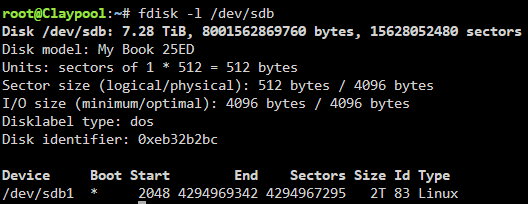
This is the output:

-
I have recovered all files with UFS Explorer, so if any further actions destroys the data that wont be a problem. The drive is now removed from the array and appears as an unassigned disk with the correct filesystem. When I try to mount the disk i get the following error in the log: Dec 27 12:57:20 Claypool unassigned.devices: Mounting partition 'sdb1' at mountpoint '/mnt/disks/WD_My_Book_25ED'... Dec 27 12:57:20 Claypool unassigned.devices: Mount cmd: /sbin/mount -t 'xfs' -o rw,relatime '/dev/sdb1' '/mnt/disks/WD_My_Book_25ED' Dec 27 12:57:20 Claypool kernel: mount: attempt to access beyond end of device Dec 27 12:57:20 Claypool kernel: sdb1: rw=4096, sector=15628048383, nr_sectors = 1 limit=4294967295 Dec 27 12:57:20 Claypool kernel: XFS (sdb1): last sector read failed Dec 27 12:57:21 Claypool unassigned.devices: Mount of 'sdb1' failed: 'mount: /mnt/disks/WD_My_Book_25ED: can't read superblock on /dev/sdb1. dmesg(1) may have more information after failed mount system call.' Dec 27 12:57:21 Claypool unassigned.devices: Partition 'WD My_Book_25ED' cannot be mounted.

-
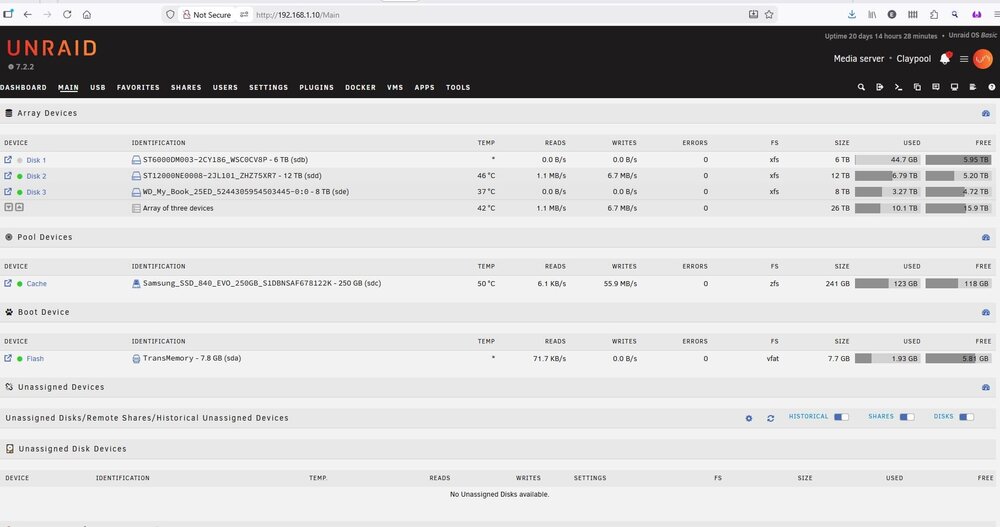
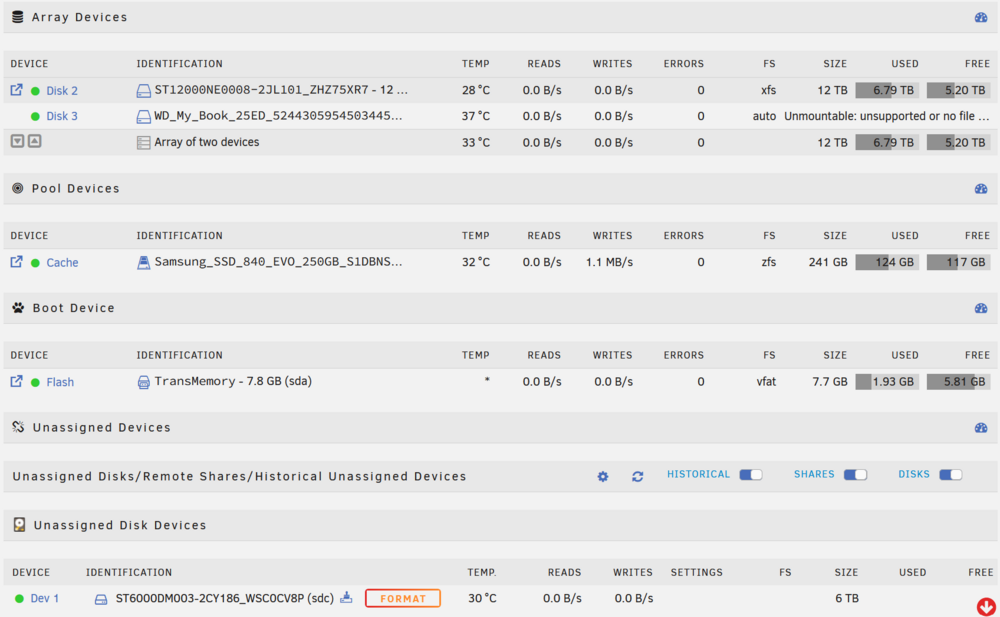
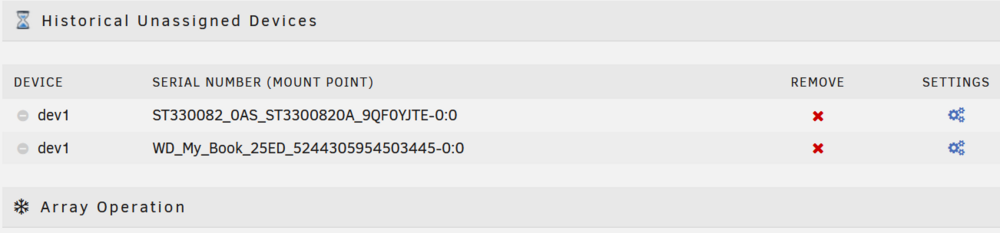
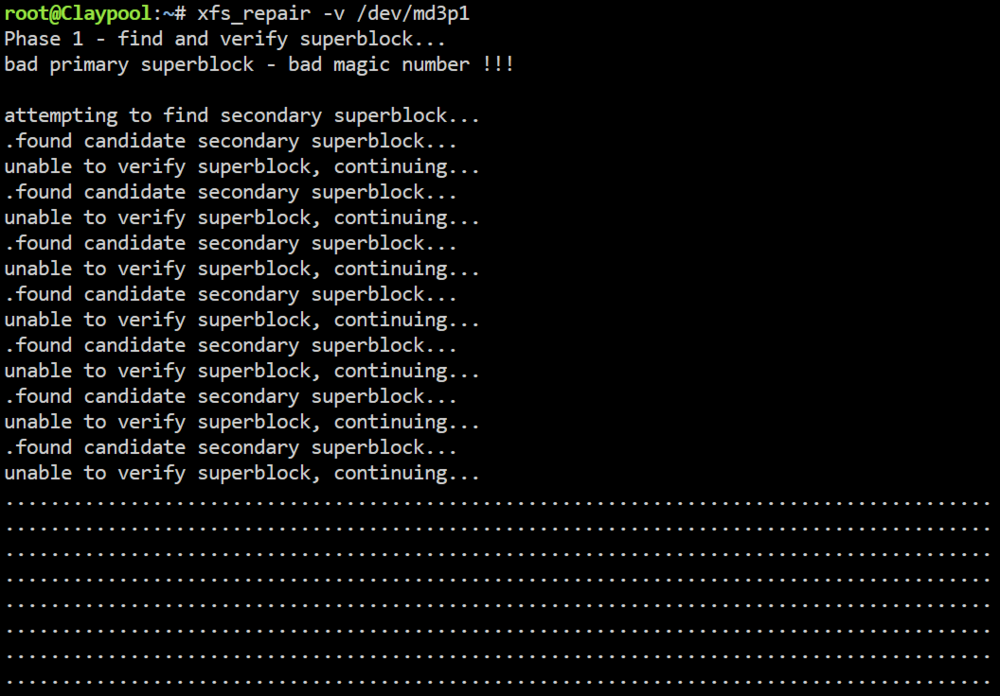
Hi! Below is a screenshot of how my array used to look. I recently added Disk 3 and moved all the data from Disk 1 to this new drive. Before adding Disk 3, I ran preclear to test it since it was brand new. I did not notice any issues with it, except that I could not get it to spin down, even when pressing the green button next to it with all VMs and Dockers shut down. I do not remember exactly what happened next. I created a new config, removed Disk 1 and started a preclear on that drive, which I later stopped to continue at another time. At some point I noticed that Disk 3 had changed its filesystem from xfs to auto, with the additional text "Unmountable: unsupported or no file system", as seen in the screenshot below. At the same time as Disk 3 is listed in the started array, it also appears in "Historical Unassigned Devices". I restarted the array in maintenance mode and run xfs_repair with the command 'xfs_repair -v /dev/md3p1'. The result can be seen below, it has printed dots for an hour and I am not sure for how long this should go on. I have also added the drive to a computer running Windows. I ran PhotoRec which managed to find and restore files, but not with their original file name. Any idea on how to restore the drive to xfs and make it work again? I do have backups, but it would be much more convenient if I just could get the drive working again and also understand why this issue occurred in the first place. Please see the attached diagnostics file. Thank you claypool-diagnostics-20251225-1111.zip