





nfsmohi
Members
-
Joined
-
Last visited
-
Hi, seems like problem solved. Thanks Magician.
-
Hi, Please find the diagnostics galactica-diagnostics-20240212-0926.zip
-
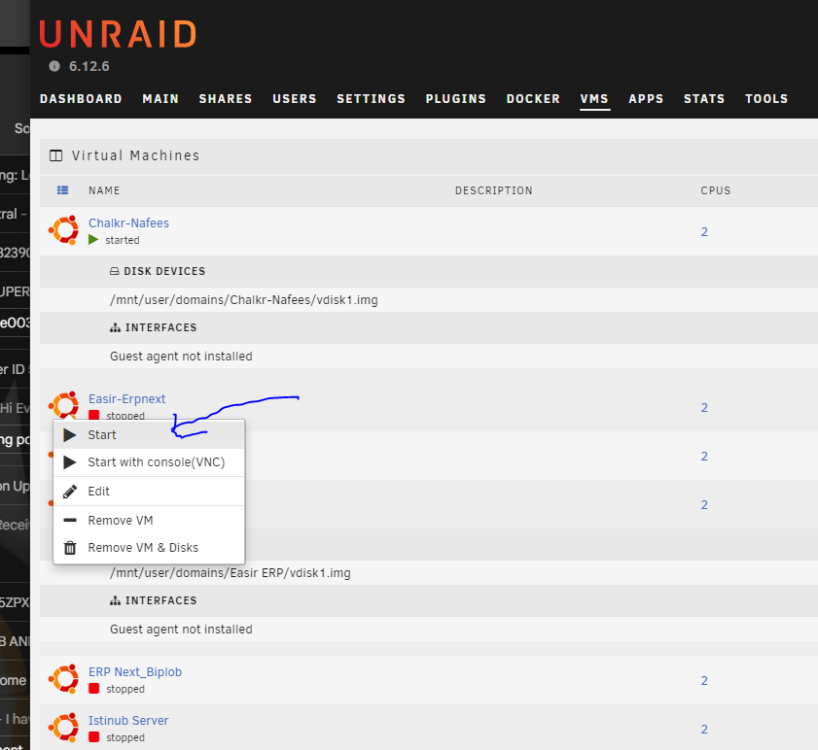
I'm experiencing difficulties performing operations such as starting, stopping, or deleting VMs and Docker containers. Despite the options being active and visible, clicking on them does not result in the intended action. For instance, when attempting to start a VM, it remains unresponsive. The same issue occurs when trying to delete a VM. I would greatly appreciate any assistance in resolving this matter. Thank you for your help.
-
It was working perfectly before we have installed unraid. we was running windows and it was having two drive. But we will swap the drive and get back to you. Thank you for your time
-
Dear Sir, both are in board, but 1t is in pcie other one in a module card connected to mother board. Lenevo p510. No partition. Separate two drives
-
Dear Sir Please help me out. galactica-diagnostics-20221105-2237.zip
-
Dear Sir, I go two NvME in my system. One is 1t and the other is 500g. But it is picking only 1t drive not the 500g drive under dev4. But one thing I can see is that dev4 is showing both drives. After assigning it is only showing 1t. Not able to Please suggest. I have tried to post on plugin support but it was not allowing to do so.

-
Dear Sir, I go two NvME in my system. One is 1t and the other is 500g. But it is picking only 1t drive not the 500g drive under dev4. But one thing I can see is that dev4 is showing both drives. Please suggest.



