





Steelgrave
Members
-
Joined
-
Last visited
-
The Parity-sync finished and did not find any error. This is what happened last time too after re-enabling the disabled drive. Time will tell if this error will show up again. Thank you for your help so far @trurl. nas-diagnostics-after-succesful-paritysync-20221109-1309.zip
-
Thank you for this. I updated the BIOS in hope to get the IOMMU to adjust, since i saw it on a gigabyte BIOS on Youtube (apparently also named IOMMU in Gigabytes BIOS) but no luck. I'm now doing the "rebuild" but since only the parity is disabled i guess thats just called a parity-sync.
-
I can't find anything close to an IOMMU or Device Address or I/O Address entry in the BIOS. There are no splitters involved but before the restart i did switch HDDs from SATA III (Marvell) to SATA II ports (different chipset) and reseated all the power cables. This Motherboard is a replacement that ran on my private server with different drives for a year without any errors. I attached the new diagnotstics but did not yet do a new config to re-enable the disabled Parity drive. nas-diagnostics-20221108-1606.zip
-
and here is the smart extended self-test. On one side Completed without error message. On the other side there are errors in the log part of the document. What should i do next? nas-smart-20221105-0527.zip
-
Had to force reboot via reset button. On first reboot i did get diagnostics, which are attached. I did not see my two HDDs but both SSDs. I shut the PC down properly and plugged the sata cables of both HDDs into different ports. Now all drives can be seen but Parity is still disabled. I am now running an extended smart self-test on the paritry drive. nas-diagnostics-20221104-1808.zip As a side note: The chirping is gone, the activity led isn't lighing up solid anymore and the cpu load has returned to normal.
-
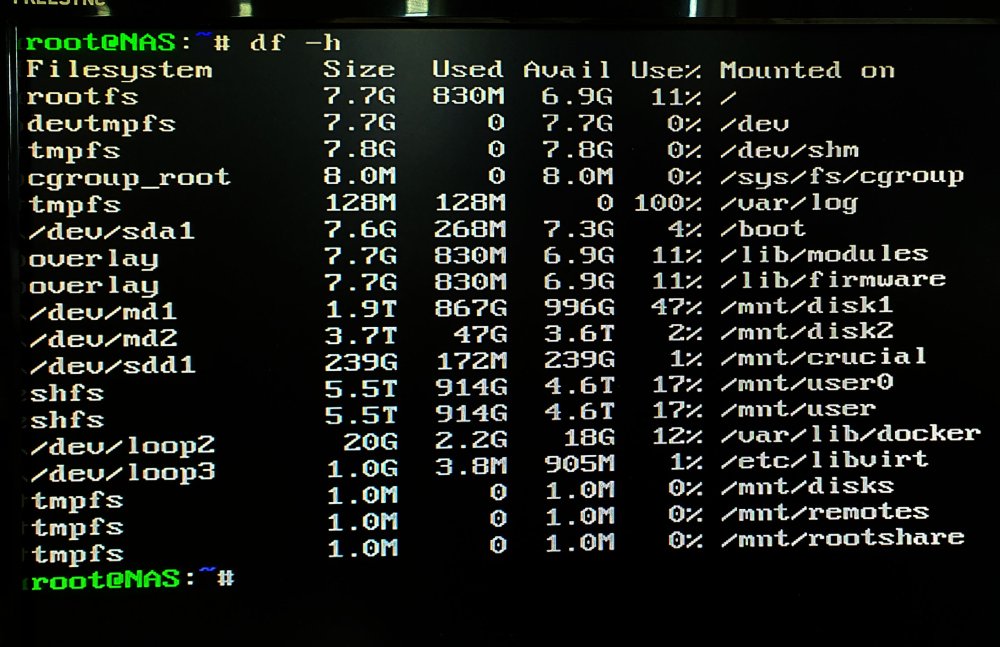
Here is what df -h reports. Do i see this correct in that my 8GB usb drive is not full? Is it possible that the logfile is too big in the first place to get written to the stick?
-
So i logged in as root on the server and just typed "diagnostics" which will prompt "Starting diagnostics collection..." but it does not stop. I'm leaving it running in case it takes more than 30minutes. I used the web terminal to ls into /boot/logs which does not show any files, but the dashboard in the web GUI is still reporting that the Log is 100% full. Did i break the command line operation on the server when i simultaneously use the web terminal to use ls? edit: diagnostics is running for more than 2hrs and not completing. I stopped it and try it one more time without interfering or interacting with the server in any way. Also i noticed that the hard drive is chirping and the activity led is solid lighting up one the case while the last CPU thread is still at 100%
-
Hi, this is the situation of the server i use at work for only my data. A month ago FixCommonProblems reported that my parity disk has read errors. However s.m.a.r.t. did not show any errors and a parity check (after the popup message) revealed no issues. A bit later it reported that another HDD also has read errors that can't be verified. Unraid disabled both drives. My cache and main workdrive (both SSDs) remained enabled without errors. I shut down unraid (lost diagnostics) replugged all sata cables and made sure that instead of cable managing the computer, i spaced out the sata cables. After a restart another parity check passed without warnings. Now i have the same errors plus one CPU thread being at 100%, my Parity is disabled, read check is running for 3 days longer than all previous ones, VPN access stopped working and syslog filled my 8GB Boot drive. I cant download diagnostics and i cant stop the read check. All my Data is still accessible via SMB so i make daily backups. My slow response to those errors is because the affected HDD are just parity and the other one, that had read errors a month ago, is empty. In what order i should go from here? i'd appreciate some input from you guys. Since i cant download diagnostics. i attached the syslog UnRaid V.6.9.2 Intel i7-3770K / 16GB Ram nas-syslog-20221102-1250.zip
