





Ethan McDonnell
Members
-
Joined
-
Last visited
-
Alright, I let memtest run for a good 3 hours, 2 passes completed, no errors found. I had to burn a new unraid usb sitck to get memtest to boot though, my normal boot usb stick was giving the error booting kernel failed bad file number, the unraid os boots fine just wouldn't boot memtest. Could that signify a failing/corrupted usb stick? Appriecate your help so far.
-
I cleared the stats and the errors came back within a few hours. tower-diagnostics-20260611-0543.zip
-
Here is the completed scrub. No errors found. Scrub started: Wed Jun 10 08:24:22 2026 Status: finished Duration: 0:16:02 Total to scrub: 302.26GiB Rate: 321.68MiB/s Error summary: no errors found
-
I am having corruption? errors on my cache drive that I cannot track down the cause of. I have tried a simple reboot, a check with the array in maintainence mode and running memtest to see if RAM is going bad to no avail. I'm not seeing anything in the SMART data for the drive to indicate it's failing either. I've attached diagnostics for the people smarter than me lol. Any help is appreciated. tower-diagnostics-20260609-1455.zip
-
So I've discovered that the crashes don't happen after switching my Plex Docker to Host for networking. Does anybody know why running this docker on a bridge would be causing crashes? All of my other Dockers are all running on bridges and do not cause these issues. syslog tower-diagnostics-20240514-0942.zip
-
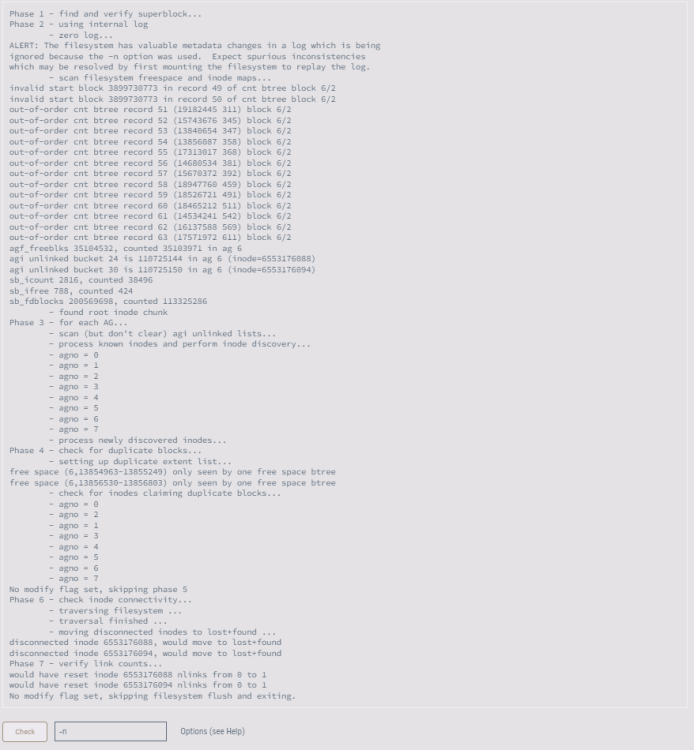
This is the output I get from the filesystem check. I'm not sure what to do here as it's not asking for any options to be set although it would have fixed something? Is it safe to run with -L?
-
Hi, I just attempted to restart my Plex container as it was inaccessible on the network but after stopping it I was getting execution error 403 while trying to start it. I attempted to stop the array and restart it just to see if that would solve the problem but am now getting Unmountable unsupported or no file system on Disk 1 when starting the array. I've attached diagnostics from immediately after stopping the array again and from after a reboot. For now I have the array stopped. Any help is appreciated. tower-diagnostics-20240425-1824 - Before Reboot.zip tower-diagnostics-20240425-1836 - After Reboot.zip
-
I just pulled the syslog again after another crash and this time it looks like it logged a lot of errors from nchan & nginx but I do not know what they mean. I've attached the new syslog if anyone is able to take a look. Thanks for the help so far. syslog
-
I enabled syslog server as suggested and just experienced another crash. I have attached the syslog file from immediately after rebooting. syslog
-
For the past week every couple of days I have been experiencing random crashes recently and am unsure if it's hardware or software causing it. The entire system will crash, stays powered on but can't be accessed via the web GUI + all services go down, also I can't see it listed on my routers devices screen, so I assume it is disconnecting. Seems to mostly happen while playing content on Plex both direct play and transcoding but it has also happened while doing nothing. I've attached diagnostics but they are from after a reboot. Any help is appreciated. tower-diagnostics-20240331-2000.zip
-
Reseating SATA/Power Cables on all drives fixed the issue. Thank you for the help.
-
I've never had issues with the power delivery/PSU on parity operations before although it is possible it's going bad. I'm going to try reseating all SATA and power cables to the drives and restarting the Parity-Sync. Will update if the issue returns.
-
EDIT: I guess I'm not doing an actaul parity swap procedure, I'm just building new parity onto a drive. I can't have more than 6 drives connected as I only have Unraid Basic
-
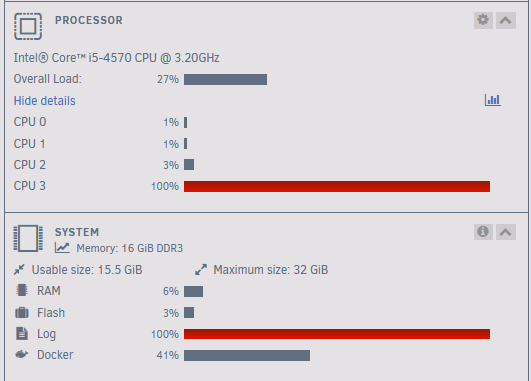
I was doing a parity swap procedure to replace my current 4TB parity drive with my new 8TB drive and then replace disk 1 with the 4TB. It was running fine at 90-100 MB/s but has now fallen down to 1.4 MB/s and seems to be staying there, I can't seem to find a cause for this. All Dockers are stopped and the 1 VM I have is shutdown. I've attached diagnostics. 1 CPU core seems to pegged at 100%, I assume this is normal during a rebuild? The log also seems to be taking a large amount of memory. Any help is appreciated. tower-diagnostics-20240228-2226.zip
-
Ah thank you, it's been increasing over the past few weeks, guess it's time for a drive replacement. 😪

