





exus
Members
-
Joined
-
Last visited
-
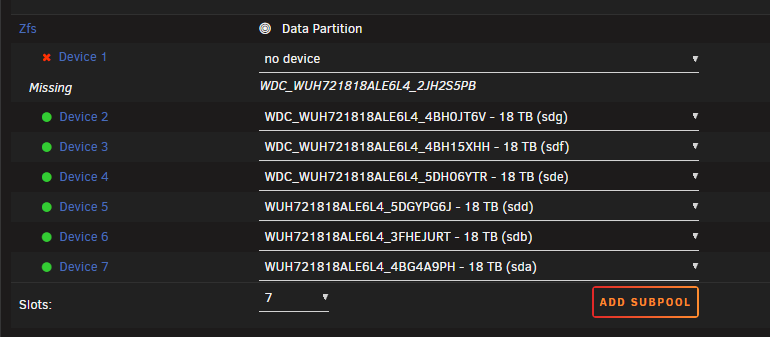
Hi, I'm opening this thread to ask about a problem I encountered. My ZFS pool (raidz1 with seven 18TB disks) was originally from patch ~6.12, and if I remember correctly, I created it following the instructions in one of SpaceInvader's videos. One of the disks started showing read/pending sector errors, so I decided to replace it. At the time, I didn't think about the fact that I had an old pool that hadn't been created via the GUI (I honestly didn't even remember). Anyway, I shut down the array, powered off the server, and replaced the defective disk (2JH2S5PB). Once powered back up, I simply performed the swap via the GUI as shown in the image. From that point on, after starting the array, the pool was imported in a DEGRADED state, but from the logs it appears that emhttpd/Unraid then initiated a replace against a member that was ONLINE, rather than against the missing device. Furthermost, a few seconds later, the logs also show a GPT/wipefs write to another disk in the same pool that ZFS had just reported as ONLINE. Unfortunately, I read later in some posts that "potential issues" are mentioned when using the GUI with ZFS pools created before 7.0 using cli, so I don't know if what happened falls under this category. I should point out right away that the data was recovered and the pool was subsequently recreated, so I'm not asking for help with data recovery. I'd just like to understand if the following chain of events is "expected behavior" with a legacy/imported pool, or if it's something that deserves attention/reporting. I didn't save the diagnostic report and can only attach the most recent one from the machine (which I've now recreated to RAIDZ2 for peace of mind). :( However, I do have the syslog and some other files from those moments during the disk replacement. This is what the GUI showed moments before selecting the replacement disk and pressing start. Jun 2 14:33:56 Serverini emhttpd: pool: zfs Jun 2 14:33:56 Serverini emhttpd: state: DEGRADED Jun 2 14:33:56 Serverini emhttpd: config: Jun 2 14:33:56 Serverini emhttpd: #011NAME STATE READ WRITE CKSUM Jun 2 14:33:56 Serverini emhttpd: #011zfs DEGRADED 0 0 0 Jun 2 14:33:56 Serverini emhttpd: #011 raidz1-0 DEGRADED 0 0 0 Jun 2 14:33:56 Serverini emhttpd: #011 4298119360728290295 UNAVAIL 0 0 0 was /dev/sdh1 Jun 2 14:33:56 Serverini emhttpd: #011 /dev/sdg1 ONLINE 0 0 0 Jun 2 14:33:56 Serverini emhttpd: #011 /dev/sdf1 ONLINE 0 0 0 Jun 2 14:33:56 Serverini emhttpd: #011 /dev/sde1 ONLINE 0 0 0 Jun 2 14:33:56 Serverini emhttpd: #011 /dev/sdb1 ONLINE 0 0 0 Jun 2 14:33:56 Serverini emhttpd: #011 /dev/sda1 ONLINE 0 0 0 Jun 2 14:33:56 Serverini emhttpd: #011 /dev/sdd1 ONLINE 0 0 0 Jun 2 14:33:56 Serverini emhttpd: errors: No known data errors root@Serverini:~# zpool status -v zfs pool: zfs state: DEGRADED status: One or more devices is currently being resilvered. The pool will continue to function, possibly in a degraded state. action: Wait for the resilver to complete. scan: resilver in progress since Tue Jun 2 14:34:02 2026 603G / 72.3T scanned at 11.8G/s, 0B / 72.3T issued 0B resilvered, 0.00% done, no estimated completion time config: NAME STATE READ WRITE CKSUM zfs DEGRADED 0 0 0 raidz1-0 DEGRADED 0 0 0 4298119360728290295 UNAVAIL 0 0 0 was /dev/sdh1 replacing-1 ONLINE 0 0 0 sdg ONLINE 0 0 0 sdh1 ONLINE 0 0 0 sdf ONLINE 0 0 0 sde ONLINE 0 0 0 sdb ONLINE 0 0 0 sda ONLINE 0 0 0 sdd ONLINE 0 0 0 errors: No known data errors pool: zfs id: 9756493019432944573 state: FAULTED status: One or more devices contains corrupted data. action: The pool cannot be imported due to damaged devices or data. The pool may be active on another system, but can be imported using the '-f' flag. config: zfs FAULTED corrupted data raidz1-0 DEGRADED sdh ONLINE replacing-1 DEGRADED sdg ONLINE sdh1 FAULTED corrupted data sdf ONLINE ata-WDC_WUH721818ALE6L4_5DH06YTR ONLINE ata-WUH721818ALE6L4_3FHEJURT ONLINE sda UNAVAIL invalid label ata-WUH721818ALE6L4_5DGYPG6J ONLINE I used AI support to check the logs during those moments, so if I've written anything stupid, I apologize in advance (I'm no expert on ZFS at all). :D syslog_before_reboot.txt by-id.txt serverini-diagnostics-20260606-0937.zip
-
Same issue, I tried to use wireshark and there are spamming requests on multiple files every xx seconds to http://myunraidserver/zfs/.... I found that the process sending requests was svchost.exe on my pc and the related service was WebClient. I stopped and disabled it and it looks like I'm no longer sending those requests I've no idea why or how or what those requests were based on (there were also requests to old shares that do not exist anymore on my server)
-
Same issue with homeassistant VM after migration, recreating the VM (same vdisk) was the solution
-
same result on jellyfin docker [AVHWDeviceContext @ 0x55f3adf6e680] Failed to initialise VAAPI connection: -1 (unknown libva error). Device creation failed: -5. Failed to set value 'vaapi=va:/dev/dri/renderD128' for option 'init_hw_device': Input/output error Error parsing global options: Input/output error 😔
-
I'm using the windows vm for both emby server and steam link remote gaming I'll try with jellyfin thank you
-
I'm running emby inside a windows VM but it's using a 3060 that I'm passing through
-
I tried but I'm still getting the error time="2023-05-02T12:02:08Z" level=error msg="[AVHWDeviceContext @ 0x150d3b132e40] Failed to initialise VAAPI connection: -1 (unknown libva error)." time="2023-05-02T12:02:08Z" level=error msg="Failed to set value '/dev/dri/renderD128' for option 'vaapi_device': I/O error"
-
thank you serverini-diagnostics-20230429-1959.zip
-
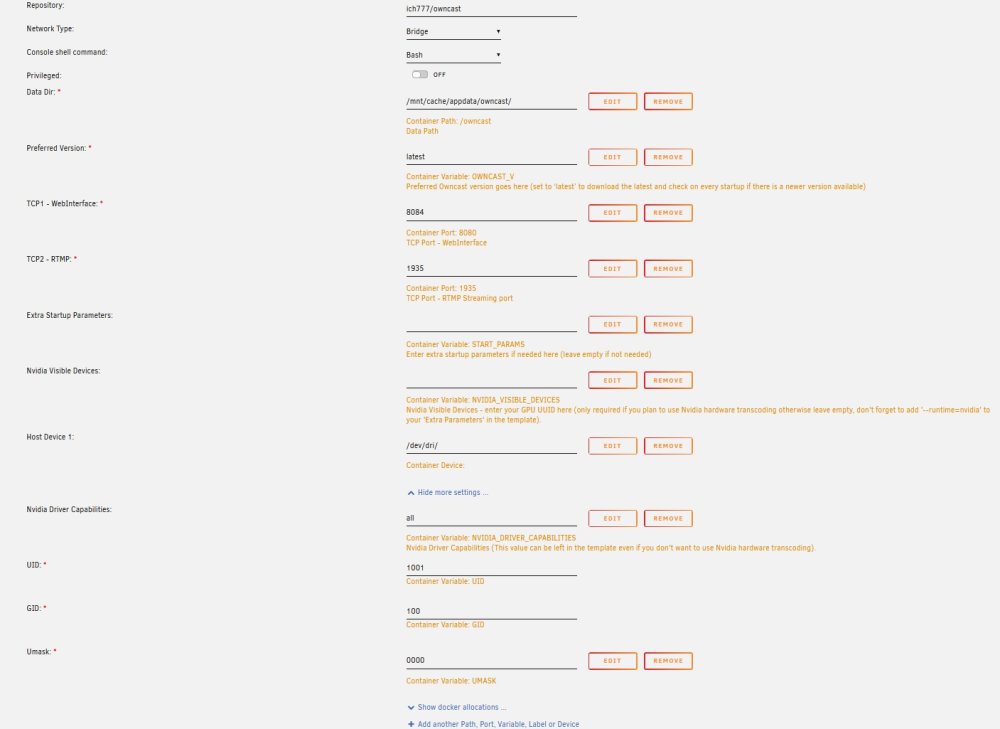
I'm trying to run owncast docker with intel hardware transcoding (13600k) but I'm getting this error: ---Version Check--- ---Owncast v0.0.13 up-to-date--- ---Preparing Server--- ---Starting Server--- time="2023-04-29T18:49:51+02:00" level=info msg="Owncast v0.0.13-linux-64bit (1d6151c867ebb2f766815d3b116358085bc1c25e)" time="2023-04-29T18:49:51+02:00" level=info msg="Video transcoder started using VA-API with 1 stream variants." time="2023-04-29T18:49:51+02:00" level=info msg="RTMP is accepting inbound streams on port 1935." time="2023-04-29T18:49:51+02:00" level=info msg="Web server is listening on IP 0.0.0.0 port 8080." time="2023-04-29T18:49:51+02:00" level=info msg="The web admin interface is available at /admin." time="2023-04-29T18:49:51+02:00" level=error msg="[AVHWDeviceContext @ 0x564939606400] libva: /usr/lib/x86_64-linux-gnu/dri/iHD_drv_video.so init failed" time="2023-04-29T18:49:51+02:00" level=error msg="[AVHWDeviceContext @ 0x564939606400] Failed to initialise VAAPI connection: -1 (unknown libva error)." time="2023-04-29T18:49:51+02:00" level=error msg="Failed to set value '/dev/dri/renderD128' for option 'vaapi_device': Input/output error" time="2023-04-29T18:49:51+02:00" level=error msg="transcoding error. look at data/logs/transcoder.log to help debug. your copy of ffmpeg may not support your selected codec of h264_vaapi https://owncast.online/docs/codecs/" I installed igputop, edited permissions chmod -R 777 /dev/dri, and added device /dev/dri/ in docker config. How can I fix this error? thank you
-
Hi, I'm new to Unraid and ZFS. When using zfs is there something to configure about power outage scenarios (with Ups) or I can just put my settings inside the standard UPS Settings page?
-
I installed unraid on my new server for the first time two days ago and I've the same error every 10 minutes
-
+1

