





sapphireone
Members
-
Joined
-
Last visited
-
bolt error installation text error warn system array login 14103 │ const shellHighlighter = await createHighlighter(highlighterOpt... ╵ ~~~~~ ✘ [ERROR] This require call is not allowed because the transitive dependency "../build/server/index.js" contains a top-level await ../node_modules/.pnpm/[email protected]/node_modules/core-js/modules/web.dom-collections.iterator.js:8:30: 8 │ var wellKnownSymbol = require('../internals/well-known-symbol'); ╵ ~~~~~~~~~~~~~~~~~~~~~~~~~~~~~~~~ The file "../node_modules/.pnpm/[email protected]/node_modules/core-js/internals/well-known-symbol.js" imports the file "../.wrangler/tmp/pages-9jhyUl/functionsRoutes-0.8354650061724911.mjs" here: ../node_modules/.pnpm/[email protected]/node_modules/core-js/internals/well-known-symbol.js:1:0: 1 │ 'use strict'; ╵ ~~~~~~~~~~~~ The file "../.wrangler/tmp/pages-9jhyUl/functionsRoutes-0.8354650061724911.mjs" imports the file "[[path]].ts" here: ../.wrangler/tmp/pages-9jhyUl/functionsRoutes-0.8354650061724911.mjs:1:53: 1 │ ...uest as ____path___ts_onRequest } from "/app/functions/[[path]].ts" ╵ ~~~~~~~~~~~~~~~~~~~~~~~~~~~~ The file "[[path]].ts" imports the file "../build/server/index.js" here: [[path]].ts:2:43: 2 │ ... { createPagesFunctionHandler } from '@remix-run/cloudflare-pages'; ╵ ~~~~~~~~~~~~~~~~~~~~~~~~~~~~~ The top-level await in "../build/server/index.js" is here: ../build/server/index.js:14103:25: 14103 │ const shellHighlighter = await createHighlighter(highlighterOpt... ╵ ~~~~~ ✘ [ERROR] Could not resolve "path" ../node_modules/.pnpm/[email protected]/node_modules/istextorbinary/edition-browsers/index.js:2:26: 2 │ import * as pathUtil from 'path'; ╵ ~~~~~~ The package "path" wasn't found on the file system but is built into node. Are you trying to bundle for node? You can use "platform: 'node'" to do that, which will remove this error. ✘ [ERROR] This require call is not allowed because the transitive dependency "../build/server/index.js" contains a top-level await ../node_modules/.pnpm/[email protected]/node_modules/raf/index.js:1:18: 1 │ var now = require('performance-now') ╵ ~~~~~~~~~~~~~~~~~ The file "../node_modules/.pnpm/[email protected]/node_modules/performance-now/lib/performance-now.js" imports the file "../.wrangler/tmp/pages-9jhyUl/functionsRoutes-0.8354650061724911.mjs" here: ../node_modules/.pnpm/[email protected]/node_modules/performance-now/lib/performance-now.js:1:0: 1 │ // Generated by CoffeeScript 1.12.2 ╵ ^ The file "../.wrangler/tmp/pages-9jhyUl/functionsRoutes-0.8354650061724911.mjs" imports the file "[[path]].ts" here: ../.wrangler/tmp/pages-9jhyUl/functionsRoutes-0.8354650061724911.mjs:1:53: 1 │ ...uest as ____path___ts_onRequest } from "/app/functions/[[path]].ts" ╵ ~~~~~~~~~~~~~~~~~~~~~~~~~~~~ The file "[[path]].ts" imports the file "../build/server/index.js" here: [[path]].ts:2:43: 2 │ ... { createPagesFunctionHandler } from '@remix-run/cloudflare-pages'; ╵ ~~~~~~~~~~~~~~~~~~~~~~~~~~~~~ The top-level await in "../build/server/index.js" is here: ../build/server/index.js:14103:25: 14103 │ const shellHighlighter = await createHighlighter(highlighterOpt... ╵ ~~~~~ ✘ [ERROR] Could not resolve "stream" ../node_modules/.pnpm/[email protected]/node_modules/stream-slice/index.js:3:24: 3 │ var Transform = require('stream').Transform; ╵ ~~~~~~~~ The package "stream" wasn't found on the file system but is built into node. Are you trying to bundle for node? You can use "platform: 'node'" to do that, which will remove this error. ✘ [ERROR] Failed to build Functions at ./functions.
-
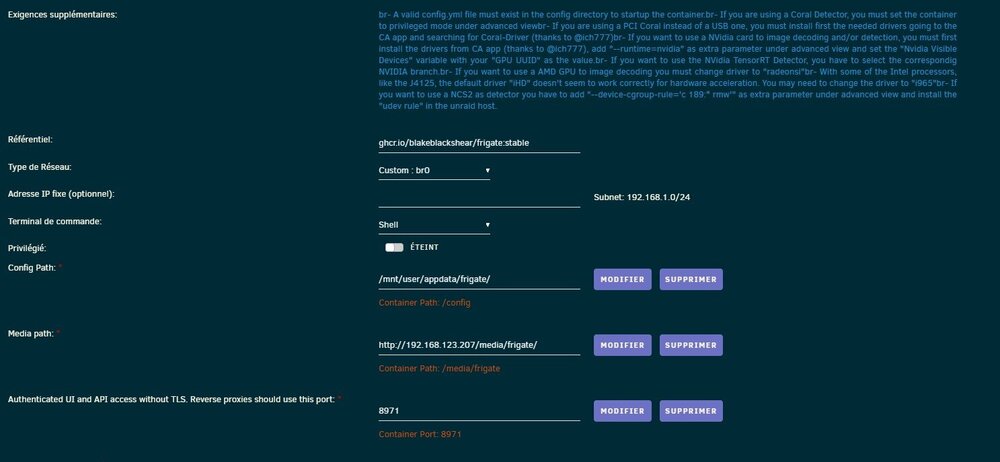
Hello, is it possible to change the image saving path with an http host?
-
I come back, I spent too much time to make this pci card from Google Coral work on unraid so I switched to proxmox no problem it all recognizes its problem is I emulated unraid which coexists and it works very well
-
no boot
-
<hostdev mode='subsystem' type='pci' managed='yes'> <driver name='vfio'/> <source> <address domain='0x0000' bus='0x03' slot='0x00' function='0x0'/> <address domain='0x0000' bus='0x04' slot='0x00' function='0x0'/> <source> </hostdev>
-
I hope the next unraid version will be much more
-
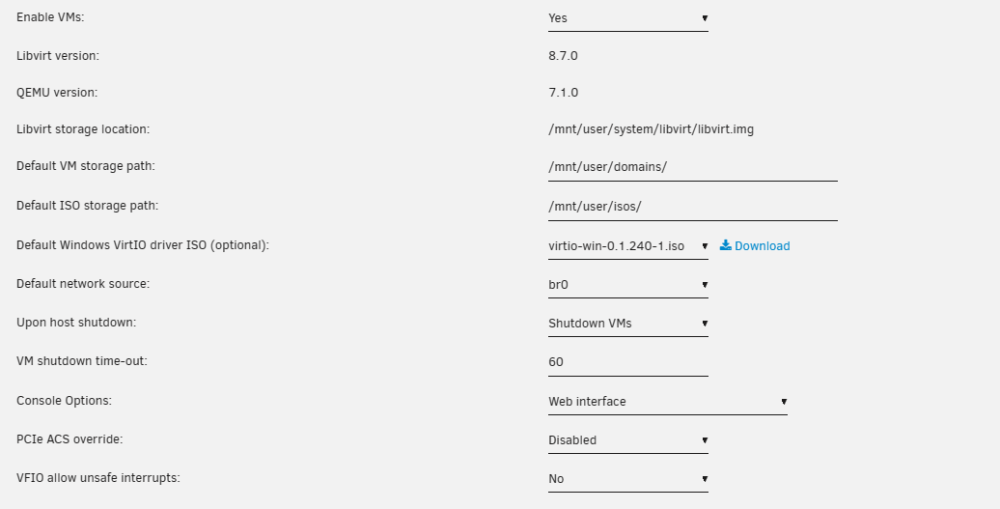
for info in vm manager I didn't check anything
-
😞
-
I don't have any error it happens but in the creation of the vm it is not in other pci
-
I saw that this address is used <cache mode='passthrough'/> <feature policy='require' name='topoext'/> </cpu> <clock offset='utc'> <timer name='rtc' tickpolicy='catchup'/> <timer name='pit' tickpolicy='delay'/> <timer name='hpet' present='no'/> </clock> <on_poweroff>destroy</on_poweroff> <on_reboot>restart</on_reboot> <on_crash>restart</on_crash> <devices> <emulator>/usr/local/sbin/qemu</emulator> <disk type='file' device='disk'> <driver name='qemu' type='qcow2' cache='writeback'/> <source file='/mnt/disk1/domains/homeassistant/haos_ova-10.5.qcow2'/> <target dev='hdc' bus='virtio'/> <serial>vdisk1</serial> <boot order='1'/> <address type='pci' domain='0x0000' bus='0x03' slot='0x00' function='0x0'/>It does not work <?xml version='1.0' encoding='UTF-8'?> <domain type='kvm'> <name>Linux</name> <uuid>bb16ddac-d277-68e8-2020-87e29e70d5f1</uuid> <description>Homeassistant</description> <metadata> <vmtemplate xmlns="unraid" name="Linux" icon="linux.png" os="linux"/> </metadata> <memory unit='KiB'>8388608</memory> <currentMemory unit='KiB'>8388608</currentMemory> <memoryBacking> <nosharepages/> </memoryBacking> <vcpu placement='static'>4</vcpu> <cputune> <vcpupin vcpu='0' cpuset='0'/> <vcpupin vcpu='1' cpuset='1'/> <vcpupin vcpu='2' cpuset='2'/> <vcpupin vcpu='3' cpuset='3'/> </cputune> <os> <type arch='x86_64' machine='pc-q35-7.1'>hvm</type> <loader readonly='yes' type='pflash'>/usr/share/qemu/ovmf-x64/OVMF_CODE-pure-efi.fd</loader> <nvram>/etc/libvirt/qemu/nvram/bb16ddac-d277-68e8-2020-87e29e70d5f1_VARS-pure-efi.fd</nvram> </os> <features> <acpi/> <apic/> </features> <cpu mode='host-passthrough' check='none' migratable='on'> <topology sockets='1' dies='1' cores='2' threads='2'/> <cache mode='passthrough'/> <feature policy='require' name='topoext'/> </cpu> <clock offset='utc'> <timer name='rtc' tickpolicy='catchup'/> <timer name='pit' tickpolicy='delay'/> <timer name='hpet' present='no'/> </clock> <on_poweroff>destroy</on_poweroff> <on_reboot>restart</on_reboot> <on_crash>restart</on_crash> <devices> <emulator>/usr/local/sbin/qemu</emulator> <disk type='file' device='disk'> <driver name='qemu' type='qcow2' cache='writeback'/> <source file='/mnt/disk1/domains/homeassistant/haos_ova-10.5.qcow2'/> <target dev='hdc' bus='virtio'/> <serial>vdisk1</serial> <boot order='1'/> <address type='pci' domain='0x0000' bus='0x03' slot='0x00' function='0x0'/> </disk> <controller type='usb' index='0' model='ich9-ehci1'> <address type='pci' domain='0x0000' bus='0x00' slot='0x07' function='0x7'/> </controller> <controller type='usb' index='0' model='ich9-uhci1'> <master startport='0'/> <address type='pci' domain='0x0000' bus='0x00' slot='0x07' function='0x0' multifunction='on'/> </controller> <controller type='usb' index='0' model='ich9-uhci2'> <master startport='2'/> <address type='pci' domain='0x0000' bus='0x00' slot='0x07' function='0x1'/> </controller> <controller type='usb' index='0' model='ich9-uhci3'> <master startport='4'/> <address type='pci' domain='0x0000' bus='0x00' slot='0x07' function='0x2'/> </controller> <controller type='sata' index='0'> <address type='pci' domain='0x0000' bus='0x00' slot='0x1f' function='0x2'/> </controller> <controller type='pci' index='0' model='pcie-root'/> <controller type='pci' index='1' model='pcie-root-port'> <model name='pcie-root-port'/> <target chassis='1' port='0x10'/> <address type='pci' domain='0x0000' bus='0x00' slot='0x02' function='0x0' multifunction='on'/> </controller> <controller type='pci' index='2' model='pcie-root-port'> <model name='pcie-root-port'/> <target chassis='2' port='0x11'/> <address type='pci' domain='0x0000' bus='0x00' slot='0x02' function='0x1'/> </controller> <controller type='pci' index='3' model='pcie-root-port'> <model name='pcie-root-port'/> <target chassis='3' port='0x12'/> <address type='pci' domain='0x0000' bus='0x00' slot='0x02' function='0x2'/> </controller> <controller type='pci' index='4' model='pcie-root-port'> <model name='pcie-root-port'/> <target chassis='4' port='0x13'/> <address type='pci' domain='0x0000' bus='0x00' slot='0x02' function='0x3'/> </controller> <controller type='pci' index='5' model='pcie-root-port'> <model name='pcie-root-port'/> <target chassis='5' port='0x14'/> <address type='pci' domain='0x0000' bus='0x00' slot='0x02' function='0x4'/> </controller> <controller type='virtio-serial' index='0'> <address type='pci' domain='0x0000' bus='0x02' slot='0x00' function='0x0'/> </controller> <interface type='bridge'> <mac address='52:54:00:0a:a7:4f'/> <source bridge='br0'/> <model type='virtio-net'/> <address type='pci' domain='0x0000' bus='0x01' slot='0x00' function='0x0'/> </interface> <serial type='pty'> <target type='isa-serial' port='0'> <model name='isa-serial'/> </target> </serial> <console type='pty'> <target type='serial' port='0'/> </console> <channel type='unix'> <target type='virtio' name='org.qemu.guest_agent.0'/> <address type='virtio-serial' controller='0' bus='0' port='1'/> </channel> <input type='tablet' bus='usb'> <address type='usb' bus='0' port='3'/> </input> <input type='mouse' bus='ps2'/> <input type='keyboard' bus='ps2'/> <graphics type='vnc' port='-1' autoport='yes' websocket='-1' listen='0.0.0.0' keymap='fr'> <listen type='address' address='0.0.0.0'/> </graphics> <audio id='1' type='none'/> <video> <model type='qxl' ram='65536' vram='65536' vgamem='16384' heads='1' primary='yes'/> <address type='pci' domain='0x0000' bus='0x00' slot='0x01' function='0x0'/> </video> <hostdev mode='subsystem' type='pci' managed='yes'> <driver name='vfio'/> <source> <address domain='0x0000' bus='0x03' slot='0x00' function='0x0'/> </source> <address type='pci' domain='0x0000' bus='0x05' slot='0x00' function='0x0'/> </hostdev> <hostdev mode='subsystem' type='usb' managed='no'> <source startupPolicy='optional'> <vendor id='0x1a86'/> <product id='0x55d4'/> </source> <address type='usb' bus='0' port='1'/> </hostdev> <hostdev mode='subsystem' type='usb' managed='no'> <source startupPolicy='optional'> <vendor id='0x2357'/> <product id='0x0604'/> </source> <address type='usb' bus='0' port='2'/> </hostdev> <memballoon model='virtio'> <address type='pci' domain='0x0000' bus='0x04' slot='0x00' function='0x0'/> </memballoon> </devices> </domain>do you think this will work?? <driver name='vfio'/> <source> <address domain='0x0000' bus='0x03' slot='0x00' function='0x0'/> <source> </hostdev>yes I saw that but it doesn't work or is it just me who doesn't know how to do it very well??



