




Skip to content
View in the app

A better way to browse. Learn more.

Unraid

A full-screen app on your home screen with push notifications, badges and more.

To install this app on iOS and iPadOS
  1. Tap the Share icon in Safari
  2. Scroll the menu and tap Add to Home Screen.
  3. Tap Add in the top-right corner.
To install this app on Android
  1. Tap the 3-dot menu (⋮) in the top-right corner of the browser.
  2. Tap Add to Home screen or Install app.
  3. Confirm by tapping Install.

Stefan Stein

Members
  • Joined

  • Last visited

  1. Superklasse! 1000 Dank!!!
  2. Hallo zusammen, ich habe eine VM für Windows 10 angelegt. Leider habe ich den Festplattenspeicherplatz dabei zu gering vergeben. Gibt es eine nachträgliche Möglichkeit, diesen zu erweitern? Besten Dank!
  3. Vielen lieben Dank! So hat es funktioniert. 😀
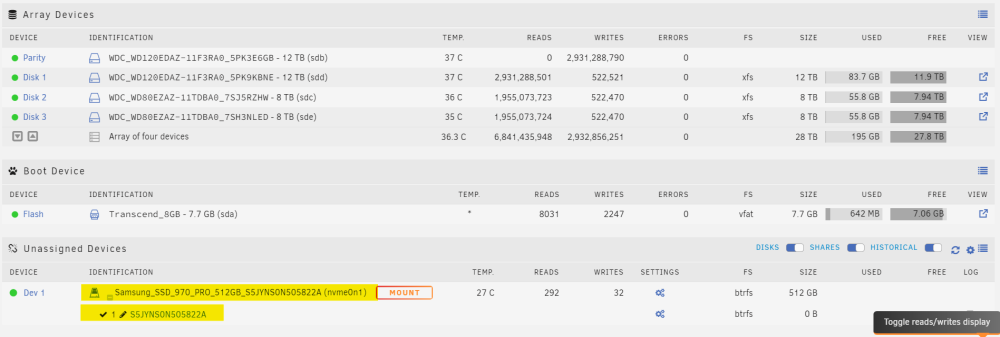
  4. Hallo zusammen! Ich bin ganz neu in der Unraid-Welt und habe ein Problem: Nachdem ich das Array aufgelöst habe um alle Platten zu tauschen, ist der SSD Cache nicht mehr "eingebunden", sondern er wird nur noch unter "Unassigned Devices" aufgelistet. GIbt es eine Möglichkeit, die SSD wieder als Cache mit den vorhandenen Daten einzubinden? Lieben Dank, Stefan

Account

Navigation

Search

Search

Configure browser push notifications

Chrome (Android)
  1. Tap the lock icon next to the address bar.
  2. Tap Permissions → Notifications.
  3. Adjust your preference.
Chrome (Desktop)
  1. Click the padlock icon in the address bar.
  2. Select Site settings.
  3. Find Notifications and adjust your preference.