





Trackpads
Members
-
Joined
-
Last visited
Everything posted by Trackpads
-
No, same result.
-
I am at a loss, it has to be unraid. I just swapped the cable going to the Windows machine on Eth5 and it still doesnt work. Why would it work to a windows machine but not another unraid device? Cannot two unraid servers be directly connected? Do I need a crossover cable instead?
-
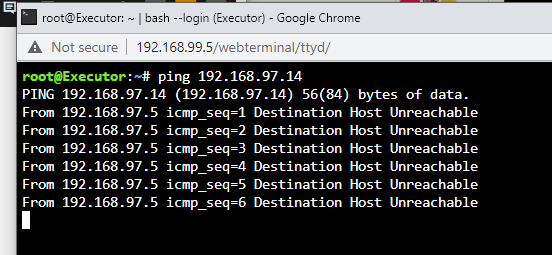
But on unraid1 I do get an error:
-
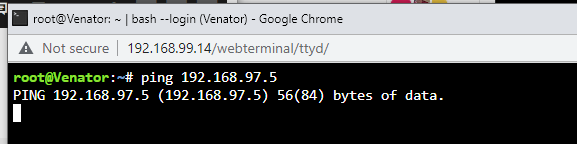
When I try to ping unraid to unraid it just hangs, not errors:
-
Correct, on Unraid1 Eth5 is connected to the windows machine and works fine. Eth4 is connected with a cable to Unraid2 and does not work. The cable is there and link is connected. Any reason why it cant see the other unraid but can see windows host?
-
Thanks! It helped me find them when I missed them. Appreciate it!
-
*bump please
-
Thanks! I did as you asked. I had left the .txt on the nvidia file and fixed it. I also removed the vfio mapping. Still the same. As for the NVS I have it as a basic card for the machine, a left over from my T320. I just want to use the P4 with a VM. Is that going to be possible or am I wasting my time? That is the only reason I am trying the open source driver. If I am going about this wrong please let me know. I am using a Dell Precision T6710 so it doesnt have an onboard video. I was told that If I pass through a GPU I could use it for the unraid output to a monitor. That is why I am using cards that are single slot only. I have no spare slots. Please correct me on this. I just a vm to do video encoding for videos I work on. I really appreciate your assistance. I uploaded the new diags. executor-diagnostics-20230118-2254.zip
-
Same here
-
Hello all. I have two NVidia cards installed and followed the directions in the plugin with the Opensource driver. I had tried the others but I still get the "NVIDIA-SMI has failed because it couldn't communicate with the NVIDIA driver. Make sure that the latest NVIDIA driver is installed and running." I rebooted as well. I am using a Tesla P4 and a an NVS 310. The 310 is the display card in the primary slot and the P4 is secondary. Both show up in devices. Thanks so much in advance! diags.zip
-
Well thats not gonna happen lol. I will work on my plan b. Move the directories with unbalance to a new drive and overwrite. Thanks again though.
-
No, not my issue. I used it and it will find duplicates within the shares. Unraid has several of the same files spread across the actual disks. In the shares it shows only the 1 file. for example, 'file1' is on Disk 1 and Disk 2 under Videos. Looking at the Share it only shows 'file1'. Yet it is taking 2x the disk space. Does that make sense?
-
*bump please
-
In Unraid Box#1 I have a 4 port 2.5 ethernet card directly connected to two other machines. The purpose of this is a directly connected netowrk to each device for backups and Blueiris on the Win machine. Machine 1 is a Windows11 Blue Iris box and it works fine. I am using 192.168.98.5 on Unraid1 and 98.11 on Windows. Both can ping. The second connection is between 2 Unraid boxes and it is not working. Unraid1 is connected via 97.5 and the Unraid 2 is connected via 97.11. Ping from Unraid1 to 2 I get ' Destination Host Unreachable'. Ping from Unraid 2 to 1 It just stalls and doesnt ping. I checked the routes on both and they look fine. Attaching the diags for both. Unraid1 is Executor and Unraid2 is Venator. Thanks again!! unraid2.zip Unraid1.zip
-
Fixed it! Thanks!!!
-
Also, fix common problems keeps referring to an 'eth2' and I dont have one. May have been from the last server?
-
I moved to a new server and cannot connect to internet. This is my secondary unraid. I can connect to the device to manage it but it cannot get to the internet. I can ping the gateway but that is it. Verified it is not the gateway blocking it. Attached are the diagnostics. Any ideas would be appreciated. Thanks! venator-diagnostics-20230116-0057.zip
-
First, thank you both for replying. But I literally dont understand. I think I can copy the xml data to the new one and will try. I should have said 'for dummies' above lol
-
I recently moved to a new array with drives and use unbalance to copy data on to the new drives. I now notice that there are duplicate files on different disks as shown in the attachments. Is there a script or plugin to sort this out or do I manually go in there and find them and delete them from the disks? thanks!



-
I tried moving them to various places but the gui doesnt seem to have an 'open' vm prompt, it only lets you create one. Thanks again
-
I used the backup script so I have the .fd, the .xml, and the img for each machine
-
Is there a simple or step by step tutorial for backing up and restoring VMs? I used the plugin to backup some drives but cannot find an understandable procedure on how to restore them. The spaceinvader video is 6 years old and the Vm Backup support thread link for restoring doesnt make sense.
-
Weirdly that fixed it. Moving to a different slot. Have to check the book on the slots lol. Thanks!
-
I purchased the card below and installed it but it is not showing in Unraid. It shows during boot and in the bios. I needed the 4 ports and 2.5gb. Am I boned? Attached are my diags just in case. https://www.amazon.com/gp/product/B09V28PXMR/ref=ppx_yo_dt_b_asin_title_o03_s00?ie=UTF8&psc=1 Thanks!! executor-diagnostics-20230111-1758.zip
-
Would this support multiple VMs? Has anyone used it? It says its for virtualization. NVIDA Grid K2: https://www.nvidia.com/fr-fr/design-visualization/technologies/grid-technology/ Amazon: (You can find cheaper): https://www.amazon.com/PNY-Grid-K2-Graphic-Card/dp/B00IUBV2PS/ref=sr_1_3?content-id=amzn1.sym.f03eb388-6553-42c1-88e5-7e00d0e3d16b&keywords=nvidia+grid+k2&pd_rd_r=10a9fdca-de78-4f39-855a-ee0f2aa2112d&pd_rd_w=4cYNc&pd_rd_wg=Luw3K&pf_rd_p=f03eb388-6553-42c1-88e5-7e00d0e3d16b&pf_rd_r=W1TQ5FZC16CDZK49Q3JG&qid=1672890675&sr=8-3&ufe=app_do%3Aamzn1.fos.17f26c18-b61b-4ce9-8a28-de351f41cffb



