Oldsand
Members
-
Joined
-
Last visited
Everything posted by Oldsand
-
I managed to solve this problem myself! Just leave some notes in case for someone google this issue again. The reason for this error is because the office linux static builds are linking to glibc, so it will cause DNS issues. See the stack overflow post here: FFMPEG "Segmentation fault" with network stream source - Stack Overflow In my case, I downloaded the build from BtbN/FFmpeg-Builds (github.com). Just get the gpl variant and good to go.
-
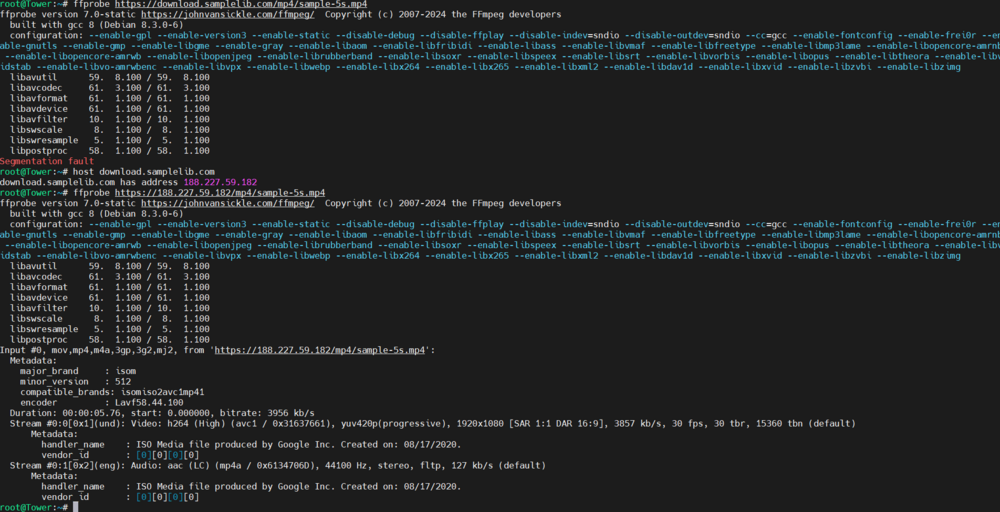
I'm trying to set up a script using ffprobe to scan a long list of web video urls and I find some pretty interesting ffprobe behavior. Here is a screenshot demonstrating everything. First run: ffprobe https://download.samplelib.com/mp4/sample-5s.mp4 -> segmentation fault Then try to get the ip: host download.samplelib.com Finally run with the IP: ffprobe https://188.227.59.182/mp4/sample-5s.mp4 -> success Here is the syslog: Jun 6 23:33:30 Tower kernel: ffprobe[17031]: segfault at 23550 ip 0000000000023550 sp 00007ffc6540eec8 error 14 in ffprobe[400000+1000] likely on CPU 0 (core 0, socket 0) Jun 6 23:33:30 Tower kernel: Code: Unable to access opcode bytes at 0x23526. I "installed" ffmpeg by downloading latest static build from John Van Sickle - FFmpeg Static Builds and unzip then make a symlink to /usr/bin I tried different old versions and all ended with the same error. ffmpeg docker works correctly, however it loads a lot slower than the native ffprobe executable. Considering I need scan thousands urls, using ffmpeg docker would be my very last choice. Does anybody know how to solve this error?