





yukonhijack
Members
-
Joined
-
Last visited
-
JESUS! I just went and updated the plugin and now everything works fine. Thanks!
-
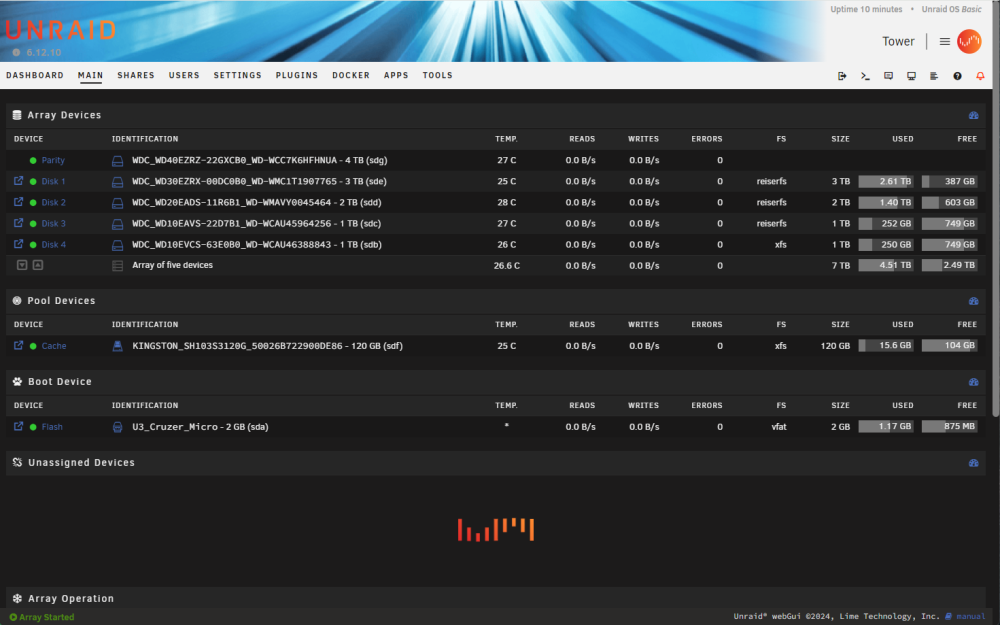
I upgraded Unraid a few days ago and now my unassigned devices aren't showing and when I move to the Apps tab, it it also not showing and locks up the GUI. Anyone have any tips on how to fix this? tower-diagnostics-20240414-1547.zip.crdownload
-
I submitted a ticket to CP to ask them to consider a Home Lite version that is a cheaper alternative for those of us that want to sync/backup between PCs (or in my case two UnRaid servers). Not really a fan of cloud backup after some bad experiences.
-
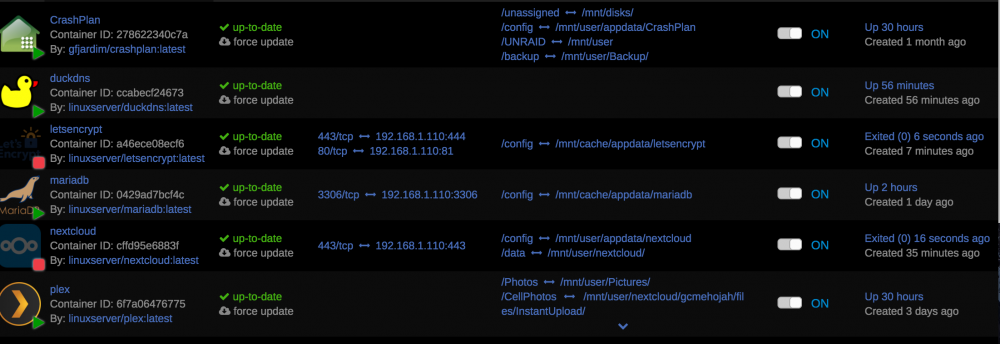
BTW, Letsencrypt keeps stopping on me. WTF?
-
So if I set Letsencrypt to host port 444, then I would go to my router and forward 444 to 443 (the container port)? I have an ASUS router and tried that but it wont take it. I currently have Nextcloud set to 443 to 443, should I delete that entry until I get the cert?
-
I already have port 443 forwarded to 443 in my router port forward setup. That is for nextcloud.
-
So I am setting up Letsencrypt, and I have a question about container ports. My Nextcloud is set to 443 for the container port, but Letsencrypt is on the same port. Is that ok?
-
NVM, went to DuckDNS.....more dumb questions to follow I'm sure.
-
Oh boy. Here goes, I'm going to ask you a super dumb question: Where/how do I get my own domain? I'm not running any kind of domain server or anything.
-
Nuts, I was following the old guide. Do I need to install LetsEncrypt to get this working outside my network or can I skip that part?
-
I may be having a similar issue. I can access my Nextcloud Server from within my network, through the webui, but cannot get to it externally. I have the ports open because my setup is the same, though my external IP address has changed. When I try to access the server through the OSX NC client, I get a timeout error. Do I need to mess with the config.php file to add trusted domains?
-
OK, so I made sure to clean out the old install of MariaDB, rebooted the server, reinstalled MariaDB, and it now works!
-
OK, I think I found everything, including in the appdata folder. I'll try to reinstall and see what happens.
-
Is there a way to ensure I nuked every part of MariaDB?
-
OK, so I tried all kinds of things, but I will nuke it again and see what happens. Thanks for your help and patience!

