





Orion83
Members
-
Joined
-
Last visited
-
Thanks but unfortunately that didn't do the trick. I am still able to download torrents from deluge if I upload them manually by accessing the container via 10.30.x.x which would suggest to me that the VPN is working.
-
Hello, I’m encountering an issue with my DelugeVPN (using NordVPN) and ARR (Radarr/Sonarr) setup that was functioning correctly until earlier this week. I have Deluge and the ARR applications running in VLAN 30, each with its own IP address on Unraid. These applications connect directly to each other via their 10.30.x.x IP addresses. Deluge is also configured behind a reverse proxy for WebUI access. The problem is that I can no longer access Deluge WebUI through its URL, nor can Radarr/Sonarr connect to Deluge using its 10.30.x.x IP address. However, I’m still able to access Deluge from my desktop on VLAN 10 by using its 10.30.x.x IP address, but not via the URL. Seems like Radarr/Sonarr can ping it as well and it can ping Radarr/Sonarr as well. I've tried configuring a new container for deluge and I've also tried to use qbittorrent-vpn, but am running into the same exact issue with both. Would you have any insights into what might be causing this issue? Thank you! deluge log.txt
-
Thanks. Unplugged Crucial drive from server and plugged it into Windows. Updated firmware to M3CR046. Plugged back into server, performed a scrub, and haven't seen any errors since.
-
Background: My old server was running into a lot of unexpected shutdowns. I then decided to build a new one and swapped all components except for the drives (3 HDDs and 2 SSDs - an 870evo and a crucial MX500). Upon startup today I got a lot of BTRFS errors. Ran a scrub and was able to correct them all... A few hours later started getting a lot of errors again. When I try to run the scrub I get millions of uncorrectable errors. Almost sure it is the crucial drive - can't even run SMART scans on it. See attached for syslog. Any ideas on what I should do next? syslog.txt
-
That seemed to do the trick. Thank you!
-
Getting an "Unraid API Error - CLOUD: Client closed connection" Error. One thing I changed in the last 48 hours is I bypassed my ISP's modem and introduced an OPNsense firewall. Thanks tars-diagnostics-20230310-2220.zip
-
Found this old response you gave back in 2018 and it solved the problem for me. Thanks!
-
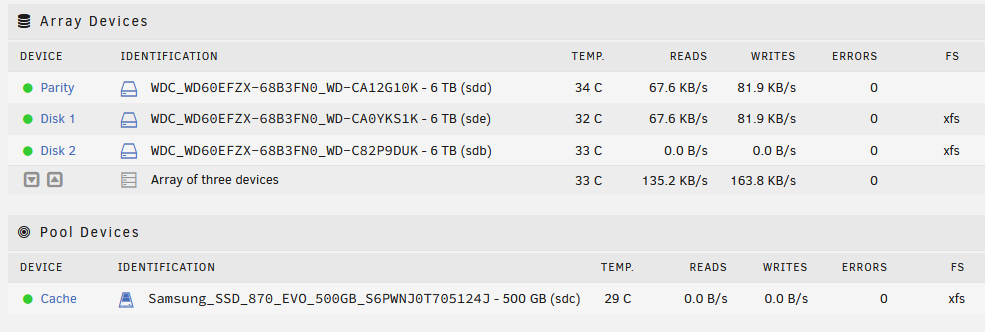
Every time I shut off all my docker containers and VMS and while not accessing any data, the server continues to initiate a read/write at very small speeds (a couple dozen kb/s at most) every 3 seconds or so from disk 1 + parity (no reading on disk 2 at all). How can I find out what is causing these readings? My appdata, domains, and system shares are all solely in the cache drive.
-
I've added a parity drive now and I'm fluctuating between 4-10 MBps. Both PC and Server are wired with CAT6 to a gigabit switch. I've attached the diagnostics. OpenSpeedTest from PC shows 1000Mbps download, 200Mbps upload. I've attached the diagnostics zip. tower-diagnostics-20221213-2030.zip
-
I'm new to Unraid and just set up a server with 1 HDD (no parity/no cache). I can read/copy from the server to my windows at speeds of 125MBps over a gigabit connection. However, when I am writing to the server I can only get do 6MBps average on Windows. Looking for some help troubleshooting this. Thanks.

