.jpg.326ea0c77fe4d2ae0180229889036b74.jpg)

Loggy
Members
-
Joined
-
Last visited
-
Thank you @itimpi!! I didn't pick up on this! Glad it's straightforward....
-
Hi team! Hoping you can assist. Since updating to 6.12.10 (I also took the step to 6.12.9 briefly) my system appears to have issues creating new files / folders, identified when I went to create a new VM today. I assumed it was a permission issue and tried running the safe new perms function, but this did not resolve it. I also tried creating a folder in multiple shares via the Krusader docker, which also did not work. Any ideas? I'm no expert, so appreciate any thoughts / suggestions! Diagnostics & syslog files attached! tower-diagnostics-20240415-1123.zip tower-syslog-20240415-0203.zipIn terms of closing out this support thread, I can now update with resolution. Again, thank you all for the assistance with troubleshooting. I ended up going through a motherboard RMA, with it being replaced like for like despite no fault with the board being found. However this did not resolve the issue. I then went through a CPU RMA on the i7-13700k, with it being found faulty. Once replaced, everything was back up and running fine! Very glad to have my Unraid machine back...as it took close to 6 months to resolve! CPU was the culprit...no idea how it became faulty after 6 months of solid operation...But fingers crossed I don't experience something like that again! 😀Hi @equ1nt1s - I actually gave up on it at the point above, scratching my head, after following the guidance above to ensure all the data was on the correct disks etc. However at some point later, it had resolved itself and I was again getting the full speed via SABNzbd. I can't explain why. Possibly the mover function still had some activity to complete that I had overlooked in terms of moving SABNzbd download data off the array and onto the NVMe cache. Sorry I cant be more specific!Hmmmm.... Considering I tried booting it with simply the motherboard, RAM & CPU installed I guess that points at motherboard or CPU, considering the memory test results. I'll have to look into how to best troubleshoot from here! Unfortunately I don't have another CPU that's compatible that I could swap in.Thanks for the suggestion. I have just finished running memtest86 with no errors. Any suggestions on what I should test next?Further troubleshooting based on researching the error messages, all with the same result: Tried another new USB flash disk with a fresh install of Unraid (no config at all from existing system). Tried removing 1 stick of memory. Tried removing GPU. Tried removing HBA card. Tried removing all SATA drives. Image of the error I'm getting is attached.
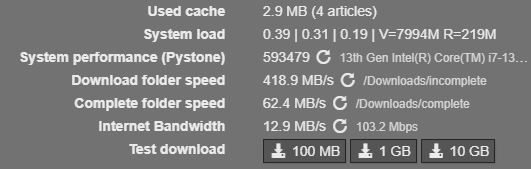
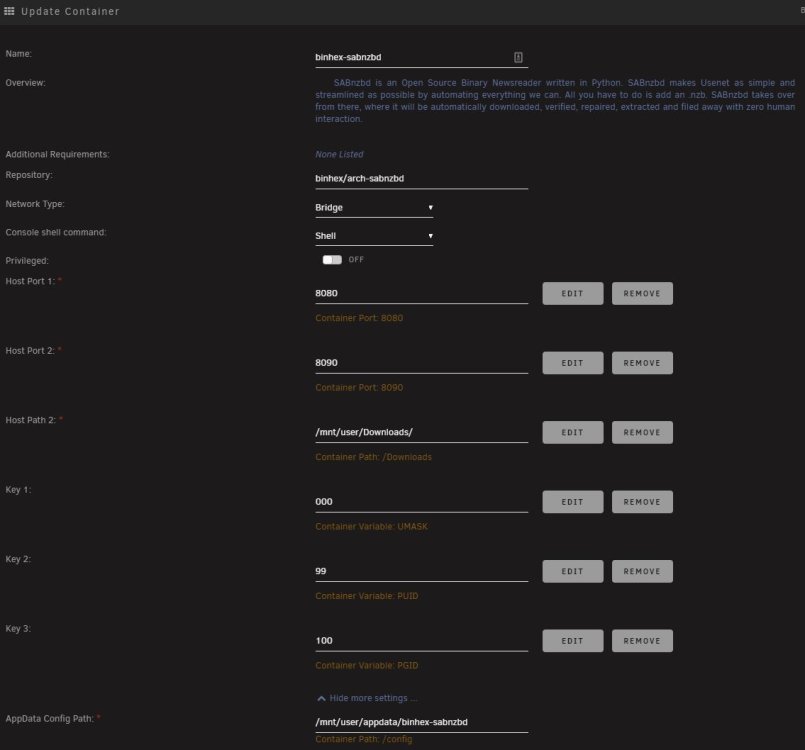
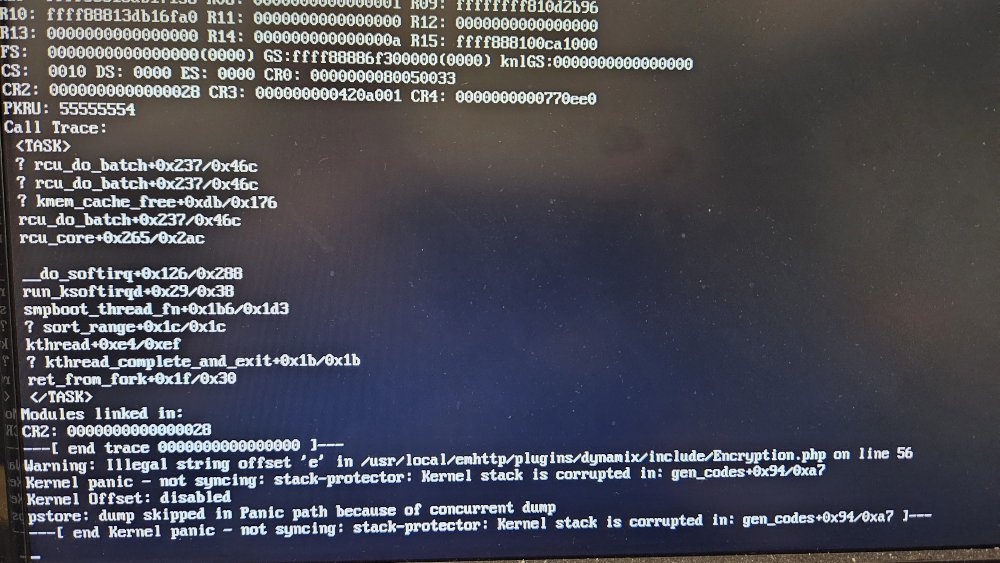 Hi team, I've run into an issue resulting in my Unraid server not being able to start up. The process seems to end with the message: "---[ end Kernel panic - not syncing : stack-protector : Kernel stack is corrupted in : gen_codes+0x94/0xa7 ]---" This started happening after an ungraceful shutdown and now I cant seem to get back into the OS. I have tried starting Unraid in safe mode. I have tried rebuilding the USB key and manually restoring the config file. I have tried changing to a new USB key and copying over the license file. I need some more ideas, as I'm not experienced enough to know how to troubleshoot this! If there is any information / logs I can gather, I'm just not sure how to go about that without access to the OS. As it stands the server is offline with no way to get back on. Thanks in advance!Ok, thanks for both the suggestions. The downloads are all going to the share Downloads. As you pointed out Squid, I had some data on disk 7. So I moved all of it onto the cache and restarted SABNZBD. Unfortunately no speed improvement. I also remapped from /mnt/user/Downloads to /mnt/cache/Downloads. Also unfortunately with no significant improvement in speed. I'm really scratching my head as this should ensure it is going straight to the new NVMe cache. Is it possible that Unraid isn't able to properly utilise the read-write speed of the new drive? Something hardware based / driver based?Does anyone have any thoughts? I can only think that there is something wrong in my configuration resulting in the docker using the array for downloads and not the NVMe disk.Loggy changed their profile photoNow with diagnostics! Apologies! tower-diagnostics-20221214-1128.zipHi brains trust! I've been using Unraid for a couple of years now and have recently upgraded my server to an i7-13700k (new motherboard, ram etc) and at the same time put in a new NVMe PCIe cache drive. Previous cache drive was a regular sata SSD. The upgrade process all went smoothly as did the transfer to the new cache. I won't claim to be an expert, but with the help of guides and these forums I've been able to get everything working the way I wanted, at least up until this point! Since recreating the dockers using the previous templates and starting them up, I've noticed that SABNZBD is not achieving even half the speed it was previously. I have a 1000mbps connection which SABNZBD would normally saturate (100 MB/s) and as I type this it is hovering around 13 MB/s. I need some help trying to diagnose the speed issue as I am not sure how to proceed. I was suspecting it was not writing to the cache drive, but that doesn't appear to be the case and I am not sure how to best further diagnose. What else can I check or look into? I have checked: Downloads share setup to Prefer Cache. binhex-sabnzbd configured to present /mnt/user/Downloads/ to container as /Downloads. SABNZBD configured to use /Downloads for temporary and completed downloads. Checked File Activity during a download and it appeared to only be on /mnt/cache/Downloads/ Internet connection speed via the speedtest-tracker docker container (942.78 Mbps). During the transfer from the old cache SSD to the new NVMe drive, I did change the cache configuration of a number of shares and I also noticed after recreating the dockers that a number of them didn't have their network type set. Below is a screenshot of the SABNZBD speed test results. For some reason it lists the internet bandwidth as 12.9MB/S, which reflects the speeds I'm currently getting. Below is the config of the docker container. I am running Unraid Version 6.11.5 and have now attached the diagnostic dump. tower-diagnostics-20221214-1128.zip I appreciate any assistance you can provide!!