thezepter
Members
-
Joined
-
Last visited
-
This Fix works ! Thx
-
thanks. I have now also removed it for the time being. But it's not a permanent solution. Hope this will be fixed.
-
I also had this error today for the first time since I've been on 7.1.2 and never experienced it before in years. The containers were all still running, but nothing to see in the frontend with the same error. Even stopping Docker under settings did not help. Stopping the Arrya did not work properly either. Had to use the console afterwards to be able to reboot. Now everything is working again. As soon as I get this error again, I'll let you know.
-
Lösung gefunden: - Enable privileged mode 😁 Folgende Pfade reichen für Cups: /var/run/dbus /dev/bus/usb
-
Danke auch Dir ! Das werde ich in ein paar ruhigen Minuten die Tage mal ausprobieren und Rückmeldung geben bzw. dann direkt als Lösung kennzeichnen
-
thezepter changed their profile photo
-
Danke Dir für den Tip ! Ich schau mir das mal näher an.
-
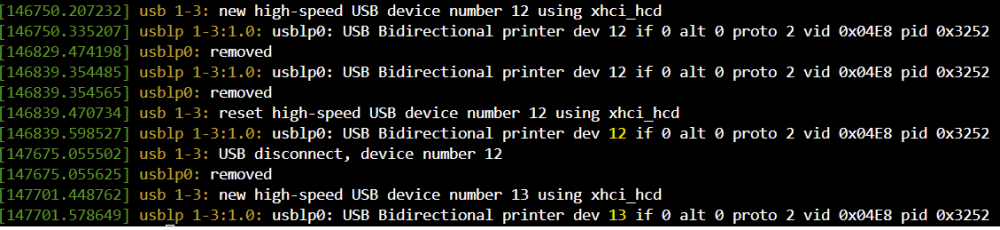
Hallo zusammen, habe meine ersten Tage mit Unraid verbracht (bin Umsteiger von XPenology) und bin mega Happy. Ich benötige einmal eure Hilfe, da ich hier aktuell nicht weiter komme. Es ist kein spezifischen Unraid Problem, sondern eher ein Linux typisches. Ich habe ein USB Drucker am Unraid Server welcher mit folgenden Pfaden an den Docker Container Cups-Airprint durchgereicht wird. /dev/bus/ /dev/usb /var/run/dbus Um Strom zu sparen wird der Drucker immer nach 30 min Inaktivität vom Netz getrennt. Wird dieser wieder per Hausautomation (Alexa) ans Netz genommen bekommt er jedes mal eine andere Device Nummer zugewiesen. Der Drucker ist mal mit 006 gestartet und mittlerweile bei 013 😛 Kann man die Device ID 04e8:3252 nicht fest mit einer Device Nummer z.B. 006 verknüpfen ? die ID bleibt ja immer gleich. Der Cups-Server erkennt den Drucker erst wieder wenn ich den Container neu starte, da er zuvor ja denkt er hängt am ursprünglichen Device. lsusb dmesg Danke Gruß Christian