





PXLCoarl
Members
-
Joined
-
Last visited
-
also no luck, same as before. The docker containers that were on autostart are all starting correctly tho, i can connect to npm and jellyfin, but the web gui still not working.
-
homecenter-diagnostics-20230302-1946.zip
-
-
-
that did kinda work. Atleast it boots now, but i cant connect to my webpanel
-
-
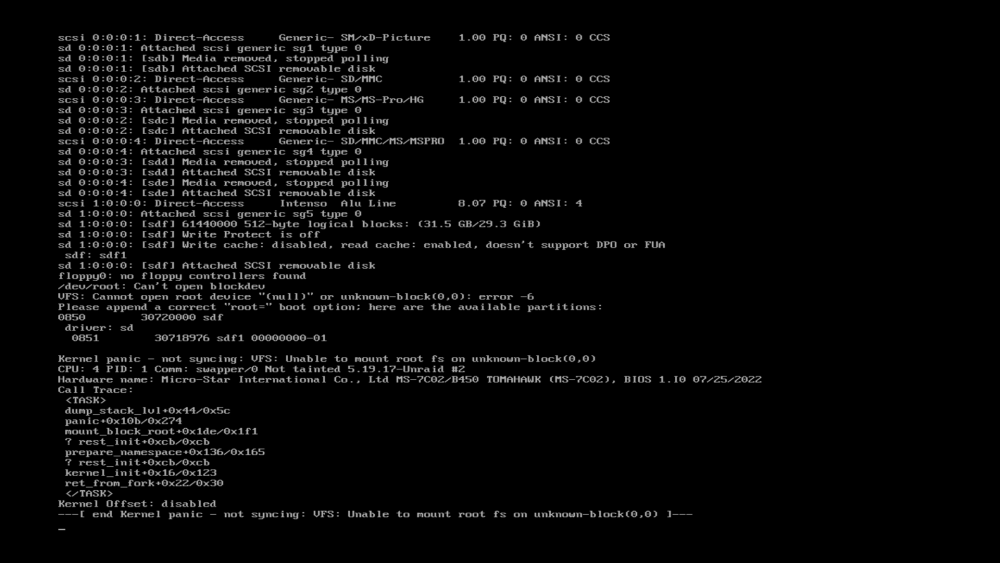
When i start the server, it shows the normal unraid boot screen (like the boot unraid os, boot unraid gui etc), i just let that run through to boot unraid normally and then this happens. When i checked the usb drive on windows it showed up without errors, but i also have a complete backup of the usb drive.
-
I did that already, the issue is the server wont boot.
-
I honestly dont even know where to start. I used the free trial and didnt realize that it was about to run out when i restarted my server to activate the nvidia drivers for jellyfin. Now the server wont boot and i can't activate the license. Is there anything i can do?
