Bahamut___
Members
-
Joined
-
Last visited
-
i wasn't sure which one was the most accurate but yes, it's both prefill and lancache itself that don't work properly at this point, the prefill not being able to start a download, i believe, is most likely a consequence. I always check that the containers are stopped before doing operations like these but in the process i must've forgotten... i'm going to try to start over and reinstall everything from scratch and learn from my mistakes! but if there's a problem on my network configuration i have the feeling this could not fix the issue so i would like to investigate first and see where the problem(s) is(are). I appreciate you pointing out that this is not a safe procedure and i felt like it wasn't as well but i couldn't find another way to achieve what i wanted to and went down that way... In the previous message i've forgot to mention that if i set the dns in the client to the google one (8.8.8.8) the download starts and proceed regularly, same if i only use my Pi Hole DNS so i guess there's something messed up in the Lancache dns or in the Lancache monolithic container.
-
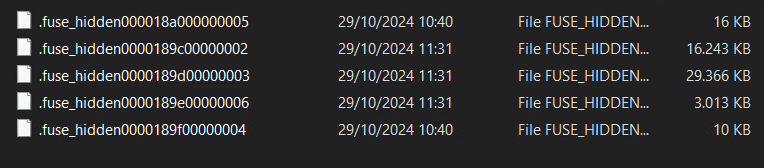
Hello, i've tried asking on the lancache discord about this, i'll try asking here too since no one could help me and this is driving me crazy. So basically all started when i ran out of space on my cache drives, what i did was (probably not the smartest idea) a " rm /cache/path/ -r" and rebuilt the containers, since there were some games i'm not playing anymore and i wanted to delete the cached data and start over with the prefill. Since then on BattleNet and Epic there's an error everytime (both the prefill and direct download from a client) try to connect, on Steam what i see is that it manages to "connect" to the servers but the download speed is so low, we're talking about tens of bits when it spikes up and the falls down to zero and the cache is not getting filled as the occupied space on the share stays the same. The error that i'm getting on Epic and BN is the following: Unexpected download error : An error occurred while sending the request. Skipping app... I have the dns configured so the clients have the lancache one as primary dns that has an upstream connection to my pi hole. I've tryed reverting the order, bypassing pihole entirely, but nothing helped. What i could see in the logs were a mix of error 504, in the stream error.log, then there were "access denied" to the cache files (there was none, as it was empty), then time outs on the requests like this one: " *654 upstream timed out (110: Connection timed out) while reading response header from upstream, client: 192.168.1.67, server: , request: "GET /depot/431241/chunk/ff9cf8205553e9ec0c8f396a67a153b5931f331f HTTP/1.1", upstream: "http://127.0.0.1:3128/depot/431241/chunk/ff9cf8205553e9ec0c8f396a67a153b5931f331f", host: "cache6-fra1.steamcontent.com" " . in one of the dozens of reboots/rebuilds of the lancache, lancache-dns and prefill containers my log files turned into this: So i can't access them anymore, at least i don't know how to. If there's any test/command to run/check i can do i would really appreciate anyone's help because i feel like i've done everything i could to get it to work but sadly with no avail... I am not very skilled in the docker side of things but i'm pretty sure all my containers are set up correctly as well...
-
Seems like a "double reboot" fixed the issue, don't know if the network stuff is related to some operations i was doing on a container but everything else was working fine that i could see. Thanks a lot for the help anyway 🙏
-
Here, i forgot to attach that diagnostics.zip
-
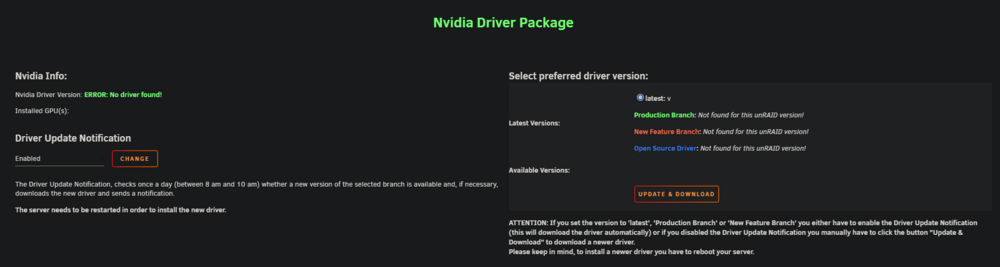
Hello, i've just realized my gpu is not being recognized anymore in UNRAID, this is what i see If i click on "Update & Download" i get this message: how can i solve it? I've tried restarting the server to see if it was going to dowload an update but nothing, if it matters my gpu is a P4000. Nedless to say i obviously have (had?) the nvidia drivers installed and everything was working fine.