





soulvoid86
Members
-
Joined
-
Last visited
Everything posted by soulvoid86
-
Mines on the left, not the top right. I just found it..
-
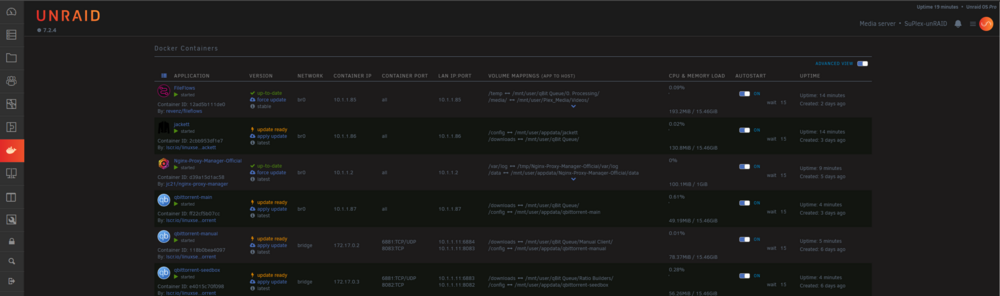
Such a dumb question but everything I see says to look for a lock icon. Literally no where on my system to be found.. How the hell do you reorder docker startup on v7.2.4? Not at the bottom, not at the top. There's no relevant button at the bottom. Zero info in the documentation.. All I want to do is have my nginx start first..
-
But what do you do when the app doesn't let you change it? What is the point of removing this? It doesn't make any sense to me, yet everyone seems to think this is the obvious way to go.
-
Well, I fixed it.. Changed the vdisk to SATA, which was not working previously and was causing the VM to crash at boot, but now it's booting and the disk is showing up properly. Thanks anyway!
-
I'm very new to unRAID/Linux, so I apologize for my ignorance. My day job is Windows environments, and I don't have a lot of personal experience with linux. I'm sure there's something very basic I'm overlooking, but I've been trying for hours to get a 2019 Windows Server VM to run. I finally have the VM starting, am at the disk selection, but am having the classic no storage devices issue due to drivers. The 30GB vdisk is connect as a SCSI device, and both the Windows iso and viritio 1.240-1 are connected as SATA. Machine is set to Q35-7.2 and BIOS is set to OVMF. HyperV I left on yes, USB left on 2.0 but I'm not using USB, or any PCI-e devices. Just a bare bones Windows VM so I can test my applications. I also used the WinServer 2016 template. I've tried both drivers under vioscsi and viostor, which also show up as "unsupported" and don't work anyway when tested. If it matters, this is currently running on a HPE DL360p Gen8 server, with HP SAS disks setup as just individual RAID0 disks, and then the array is built in unRAID as anyone else would. This will be different in my final system, this is just my test system, but I'd expect it to work all the same. At a loss here and have no idea where to go next. Tried searching the forms/google, which is what helped me get to where I am, but can't seem to get past this.

