





ninjaroll
Members
-
Joined
-
Last visited
-
Update: I just saw this line in the latest 0.33.2 that answers my question. If you've been using browserless (e.g. on unraid), you're not impacted by this, and you don't need to migrate. Update 2: Rolling back to ghcr.io/browserless/chromium:2.57.0 Solved the issues I was having below. Hi, for the new Version: v0.34.0 of Karakeep, I'm curious if it's advised to migrate from using Browserless to Karakeep Chrome. I'm running into a crawling issue that I first noticed after updating to the latest Browserless version. The webpage bookmarked fine, however none of the tags or meta data of the page carried over to the bookmark Karakeep logs after hoarding a page: 2026-10-22T17:24:18.991Z warn: [Crawler][8779:5] Blocking sub-request to disallowed URL "https://cdn-channels-pixel.ex.co/events/0012000001fxZm9AAE?integrationType=DEFAULT&template=design%2Farticle%2Fplatypus_two_column.tpl": Refusing to access disallowed resolved address 0.0.0.0 for host cdn-channels-pixel.ex.co 2026-10-22T17:24:19.252Z info: [Crawler][8779:5] Successfully navigated to "https://www.sfgate.com/la/article/waterman-ski-resort-sale-22487443.php". Waiting for the page to load ... 2026-10-22T17:24:19.353Z warn: [Crawler][8779:5] Blocking sub-request to disallowed URL "https://u927.sfgate.com/script.js": Refusing to access disallowed resolved address 0.0.0.0 for host u927.sfgate.com 2026-10-22T17:24:19.357Z warn: [Crawler][8779:5] Blocking sub-request to disallowed URL "https://s.ntv.io/serve/load.js": Refusing to access disallowed resolved address 0.0.0.0 for host s.ntv.io 2026-10-22T17:24:19.357Z warn: [Crawler][8779:5] Blocking sub-request to disallowed URL "https://ak.sail-horizon.com/spm/spm.v1.min.js": Refusing to access disallowed resolved address 0.0.0.0 for host ak.sail-horizon.com 2026-10-22T17:24:19.358Z warn: [Crawler][8779:5] Blocking sub-request to disallowed URL "https://cdn.p-n.io/sdk/web/[email protected]": Refusing to access disallowed resolved address 0.0.0.0 for host cdn.p-n.io 2026-10-22T17:24:19.359Z warn: [Crawler][8779:5] Blocking sub-request to disallowed URL "https://hearstnews.solutions.cdn.optable.co/public-assets/hearstnews-sdk.js": Refusing to access disallowed resolved address 0.0.0.0 for host hearstnews.solutions.cdn.optable.co 2026-10-22T17:24:19.359Z warn: [Crawler][8779:5] Blocking sub-request to disallowed URL "https://b-code.liadm.com/b-028s.min.js": Refusing to access disallowed resolved address 0.0.0.0 for host b-code.liadm.com 2026-10-22T17:24:19.360Z warn: [Crawler][8779:5] Blocking sub-request to disallowed URL "https://fid.agkn.com/f?apiKey=2831332485": Refusing to access disallowed resolved address 0.0.0.0 for host fid.agkn.com 2026-10-22T17:24:19.362Z warn: [Crawler][8779:5] Blocking sub-request to disallowed URL "https://htlbid.com/v3/sfgate.com/hnpbid.js": Refusing to access disallowed resolved address 0.0.0.0 for host htlbid.com 2026-10-22T17:24:19.362Z warn: [Crawler][8779:5] Blocking sub-request to disallowed URL "https://assets.revcontent.com/master/delivery.js": Refusing to access disallowed resolved address 0.0.0.0 for host assets.revcontent.com 2026-10-22T17:24:19.363Z warn: [Crawler][8779:5] Blocking sub-request to disallowed URL "https://player.ex.co/player/30b0aaf4-cc13-4972-9cf9-ad9a05e5e62d": Refusing to access disallowed resolved address 0.0.0.0 for host player.ex.co 2026-10-22T17:24:19.652Z warn: [Crawler][8779:5] Blocking sub-request to disallowed URL "https://js-agent.newrelic.com/nr-spa-1.324.0.min.js": Refusing to access disallowed resolved address 0.0.0.0 for host js-agent.newrelic.com 2026-10-22T17:24:19.654Z warn: [Crawler][8779:5] Blocking sub-request to disallowed URL "https://sb.scorecardresearch.com/beacon.js": Refusing to access disallowed resolved address 0.0.0.0 for host sb.scorecardresearch.com 2026-10-22T17:24:19.660Z warn: [Crawler][8779:5] Blocking sub-request to disallowed URL "https://js-agent.newrelic.com/nr-spa-1.324.0.min.js": Refusing to access disallowed resolved address 0.0.0.0 for host js-agent.newrelic.com 2026-10-22T17:24:22.253Z info: [Crawler][8779:5] Finished waiting for the page to load. 2026-10-22T17:24:22.263Z warn: [Crawler][8779:5] Failed to capture the screenshot. Reason: Error: page.screenshot: Target page, context or browser has been closed Call log: - taking page screenshot - waiting for fonts to load... - fonts loaded 2026-10-22T17:24:22.278Z error: [Crawler][8779] Crawling job failed: Error: page.content: : expected object, got undefined page.content: : expected object, got undefined at /app/apps/workers/dist/index.js:86887:37 at /app/apps/workers/dist/htmlUtils-BD5G4eAU.js:56010:25 at NoopContextManager$1.with (/app/apps/workers/dist/esm-B3VTaKWS.js:783:19) at ContextAPI$1.with (/app/apps/workers/dist/esm-B3VTaKWS.js:867:49) at NoopTracer$1.startActiveSpan (/app/apps/workers/dist/esm-B3VTaKWS.js:1094:26) at ProxyTracer$1.startActiveSpan (/app/apps/workers/dist/esm-B3VTaKWS.js:1118:19) at withSpan (/app/apps/workers/dist/htmlUtils-BD5G4eAU.js:56005:16) at /app/apps/workers/dist/index.js:86886:23 at /app/apps/workers/dist/htmlUtils-BD5G4eAU.js:56010:25 at NoopContextManager$1.with (/app/apps/workers/dist/esm-B3VTaKWS.js:783:19) at ContextAPI$1.with (/app/apps/workers/dist/esm-B3VTaKWS.js:867:49) at NoopTracer$1.startActiveSpan (/app/apps/workers/dist/esm-B3VTaKWS.js:1094:26) at ProxyTracer$1.startActiveSpan (/app/apps/workers/dist/esm-B3VTaKWS.js:1118:19) at withSpan (/app/apps/workers/dist/htmlUtils-BD5G4eAU.js:56005:16) at capturePageAssets (/app/apps/workers/dist/index.js:86885:15) at /app/apps/workers/dist/index.js:87051:49 at async file:///app/apps/workers/dist/htmlUtils-BD5G4eAU.js:56010:19 at async crawlPage (/app/apps/workers/dist/index.js:86974:9) at async file:///app/apps/workers/dist/index.js:87239:19 at async file:///app/apps/workers/dist/htmlUtils-BD5G4eAU.js:56010:19 at async crawlAndParseUrl (/app/apps/workers/dist/index.js:87214:9) at async runCrawler (/app/apps/workers/dist/index.js:87691:25) at async file:///app/apps/workers/dist/index.js:514:10 at async file:///app/apps/workers/dist/htmlUtils-BD5G4eAU.js:56010:19 at async Object.run (/app/apps/workers/dist/index.js:505:10) at async Object.wrappedRun (/app/apps/workers/dist/queue-liteque-GGSbtRjQ.js:61:12) at async Runner.runOnce (/app/apps/workers/node_modules/.pnpm/[email protected]_@[email protected]_@[email protected]_@[email protected]_68af49f16378d90569b26d604b41bd4b/node_modules/liteque/dist/index.js:261:19) 2026-10-22T17:24:44.916Z info: <-- HEAD /api/health 2026-10-22T17:24:44.916Z info: --> HEAD /api/health 200 0ms 2026-10-22T17:25:14.953Z info: <-- HEAD /api/health 2026-10-22T17:25:14.953Z info: --> HEAD /api/health 200 0ms
-
Hi, just installed SearXNG yesterday and having a bit of difficulty routing traffic from SearXNG through my Gluetun container. Has anyone been able to do this? I have no issues running my *arr stack as well as Overseerr and qBittorrent through Gluetun and have been successfully for quite some time. When setting the SearXNG container "Extra parameters" to --network=container:GluetunVPN and "Network type" to "None", the SearXNG container will not start. Running without routing through Gluetun works fine. Any help would be great! Unraid: 6.12.15 SearXNG: 2025.6.12+a6d0333 Here are the logs that I'm getting: [uWSGI] getting INI configuration from /etc/searxng/uwsgi.ini [uwsgi-static] added mapping for /static => /usr/local/searxng/searx/static *** Starting uWSGI 2.0.30 (64bit) on [Fri Jun 13 16:20:13 2025] *** compiled with version: 14.3.0 on 03 June 2025 19:30:19 os: Linux-6.1.126-Unraid #1 SMP PREEMPT_DYNAMIC Sun Jan 19 15:51:34 PST 2025 nodename: f42734efbf89 machine: x86_64 clock source: unix detected number of CPU cores: 8 current working directory: /usr/local/searxng detected binary path: /usr/local/searxng/venv/bin/uwsgi !!! no internal routing support, rebuild with pcre support !!! setgid() to 977 setuid() to 977 chdir() to /usr/local/searxng/searx/ your processes number limit is 126890 your memory page size is 4096 bytes detected max file descriptor number: 40960 building mime-types dictionary from file /etc/mime.types...1390 entry found lock engine: pthread robust mutexes thunder lock: disabled (you can enable it with --thunder-lock) probably another instance of uWSGI is running on the same address ([::]:8080). bind(): Address in use [core/socket.c line 769] SearXNG 2025.6.12+0b877f1 ... ... INFORMATION ... Update available for "/etc/searxng/uwsgi.ini" ... It is recommended to update the configuration file to ensure proper functionality ... ... New version placed at "/etc/searxng/uwsgi.ini.new" ... Please review and merge changes ... ... ... INFORMATION ... Update available for "/etc/searxng/settings.yml" ... It is recommended to update the configuration file to ensure proper functionality ... ... New version placed at "/etc/searxng/settings.yml.new" ... Please review and merge changes ... ** Press ANY KEY to close this window **
-
OK so after scrubbing, SMART diagnosis, and memtest, everything passed. I also checked all cables. Next, I moved all the files in my cache pool to another SSD drive via rsync and changed all settings under each docker container and share to point to the new cache pool and rebuilt docker.img. It's been almost 24 hours now and everything is running flawlessly. I'm filing this under a hardware failure. For the record, the old SATA SSD cache drive was a Crucial MX500 1tb purchased in 2023 (2 years ago). New cache drive is a Samsung 870 EVO 2tb SATA SSD.
-
Thanks @trurl .. I've just finished running the scrub and this is the result on the cache drive: UUID: XXXXXXXXXXXXXXXXXXXXXXXXXXXXX Scrub started: Wed Mar 19 21:57:38 2025 Status: finished Duration: 0:05:45 Total to scrub: 152.66GiB Rate: 453.10MiB/s Error summary: csum=5 Corrected: 0 Uncorrectable: 0 Unverified: 0 I'm guessing the checksum mismatch is an issue... but would this be the root cause of all the errors and permission issues?
-
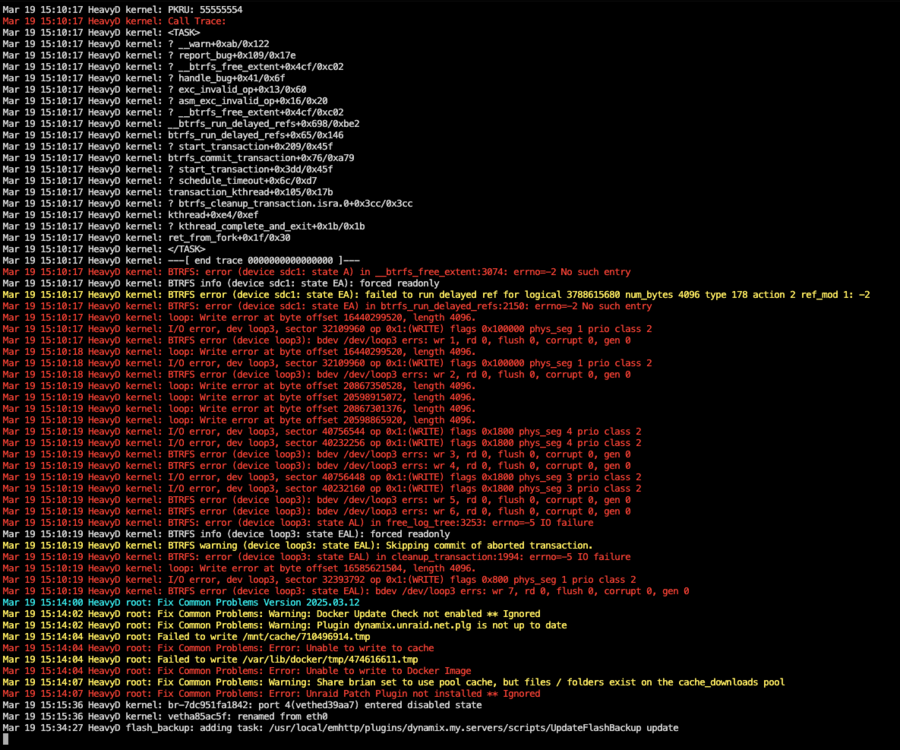
Today started off great. I was removing duplicate photos from Immich when suddenly, I got an error within the application. I then noticed that some exposed services (Overseerr, File Browser, etc.) were down. The first thing I did was restart Traefik. While restarting, I received a popup error: 403. I tried restarting other containers and received the same error. Rebooting unRaid helped for a minute, but the errors returned. It seemed that the recommended next step was to recreate the docker.img. Deleting it via the GUI and command line did nothing... the image file was read-only. After rebooting again, I was able to delete the docker.img file and recreate it. After reinstalling almost all my containers using "Previous Apps," I received a popup that I believe read, "Server error." Checking the unRaid log, I saw a lot of red. The Fix Common Problems plugin also reported that the cache drive was unwritable, although that error is no longer showing after a reboot. MemTest seemed to have passed, although I stopped it as soon as I saw the large, green "PASSED" message and did not leave it running for very long. I'm wondering if there's anything I'm missing before I start checking physical connections. I haven't moved or physically touched the server in months. Any help would be greatly appreciated! Attached are the diagnostics. heavyd-diagnostics-20250319-1522.zip
-
OK, so for anyone interested, I was able to specify exactly which server I wanted to connect to by utilizing the 'custom' option under VPN_SERVICE_PROVIDER which I totally overlooked. https://github.com/qdm12/gluetun-wiki/blob/main/setup/providers/custom.md
-
Hi, this is probably more of a general Gluetun question.. I have it setup and working via Wireguard and using AirVPN as a provider (Thanks for maintaining this container BTW!) and passing a handful of containers through it. The closest server I'm able to connect to is 6 hours away from me. I know for certain AirVPN has closer servers as I'm using one of them on my desktop. The list of servers also has the specific city and server that I want to connect to. However when I put that into the env variable in the settings, it throws an error and gives me a list to choose from: choices available are Alblasserdam, Atlanta Georgia, Auckland, Barcelona, Belgrade, Berlin, Brussels, Bucharest, Chicago Illinois, Dallas Texas, Dublin, Frankfurt, Jacksonville Florida, Kiev, London, Los Angeles, Madrid, Manchester, Miami, Montreal, Munich, New York City, Oslo, Pennsylvania, Phoenix Arizona, Prague, Riga, Sao Paulo, Singapore, Sofia, Stockholm, Tallinn, Tokyo, Toronto Ontario, Uppsala, Vancouver, Vienna, Zurich I also tried leaving the SERVER_CITIES variable blank and putting in the server host name, which didn't work as well and gave me a list to choose from. Any idea how I can specify a city/server outside of the list on the error log?
-
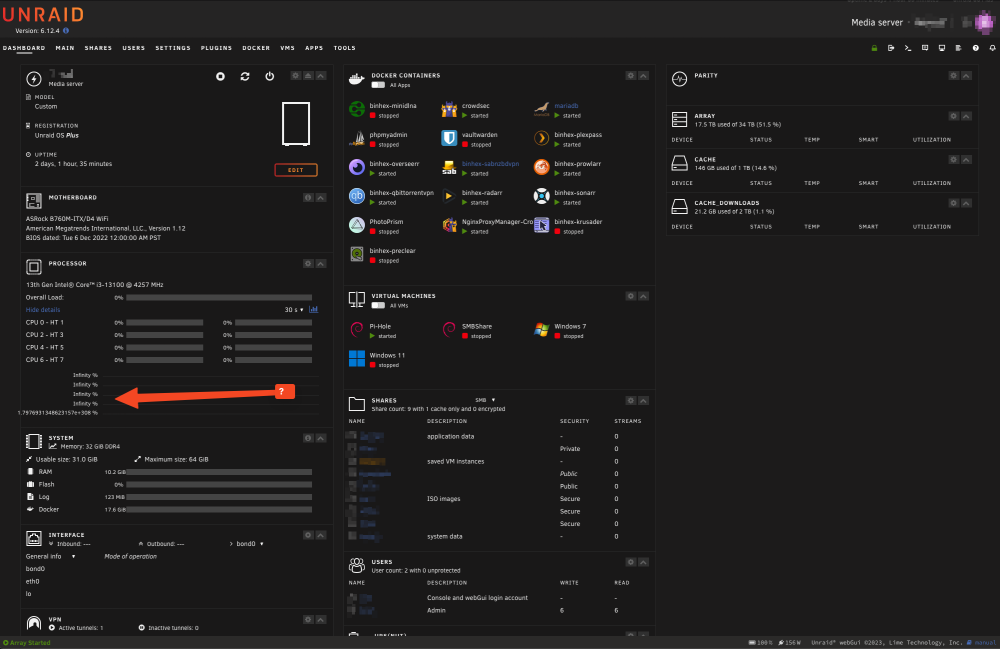
Same here on 6.12.4. Dashboard Processor bars don't move, and Array is empty. All dockers and VMs are still up and running. I did notice that the Processor section shows a strange "Infinity %" label. Clearing browser cache and changing browsers don't help.
-
Thanks. I am not. I had both the dashboard and the main tab open to check if anything was going on, and nothing was out of the ordinary.
-
Hello all, I've been using Unraid for almost a year now from old parts (AMD A10-7850K 3.7 GHz, Gigabyte GA-F2A88XN motherboard). I recently upgraded to newer hardware (13th Gen Intel i3) and kept the same unraid configuration and drives. Even before the upgrade, I had no complaints.... I just wanted the machine to be more power efficient and utilize Intel Quick Sync for hardware transcoding in Plex. The upgrade went smoothly, Plex is now hardware transcoding. However, streaming videos via SMB is now not a great experience. I'm using a Meta Quest 2 to view 6k videos (10-18gb videos) with the Skybox video player. This used to work on my old hardware from 2014 and streamed smoothly... but not brand new hardware? All network settings are exactly the same. I'm wondering if this is an SMB issue, or possibly something in the new motherboard BIOS? Any help would be great. Hardware Info Model:Custom M/B:ASRock B760M-ITX/D4 WiFi s/n M80-XXXXXXXXX BIOS:American Megatrends International, LLC. Version 1.12 Dated 12/06/2022 CPU:13th Gen Intel® Core™ i3-13100 @ 4257 MHz HVM:Enabled IOMMU:Enabled Cache:L1 Cache: 192 KiB, L1 Cache: 128 KiB, L2 Cache: 5 MiB, L3 Cache: 12 MiB Memory:32 GiB DDR4 (max. installable capacity 64 GiB) Network:bond0: fault-tolerance (active-backup), mtu 1500 Kernel:Linux 6.1.49-Unraid x86_64 OpenSSL:1.1.1v Uptime:2 days, 29 minutes
-
It wouldn't be limited to just the WebUI. It would be a feature that would be added to the WebUI under Settings or Tools. The variables can then be used anywhere including from within the GUIs on other containers. It's probably a long shot, but doesn't hurt to ask...
-
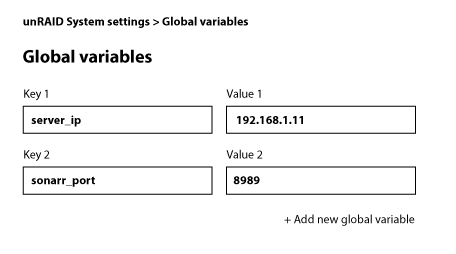
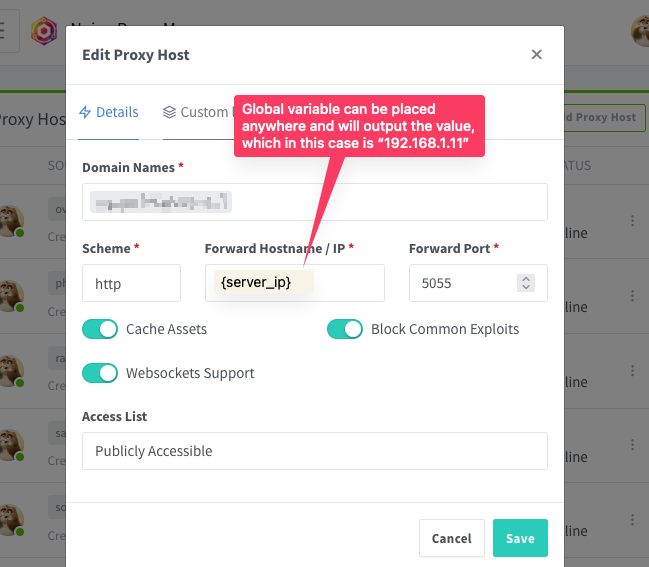
Hello, I've been on unRAID for just a few months and enjoying it. I seem to enjoy tweaking and optimizing the server more than sitting down and just enjoying the content that I'm serving from it 😆 With that said, I decided that adding a VPN for my *arr and torrent/usenet services would be a good idea. I had to reconfigure my "Network type" on these containers to get things talking together again and had the pleasure of manually changing out all host names from something like http://binhex-sonarr:8989 to my actual server ip address http://192.168.1.xx:8989. These were often hidden away in some obscure place that I would often forget... and then spending the next hour troubleshooting what went wrong. It would be great if there was a feature in unRAID that would allow for global variables. Something like: Key 1: server_ip Value 1: 192.168.1.xx And then allow them to be injected anywhere, in the container template, in the application settings like so: Host: {server_ip}
-
I feel like I've tried that a million times, but it seemed to work after your comment 🤨 Anyway, thank you!
-
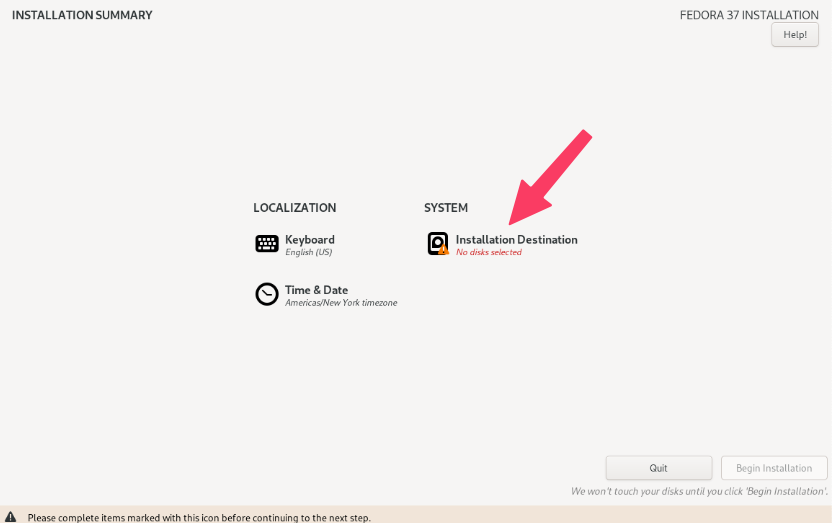
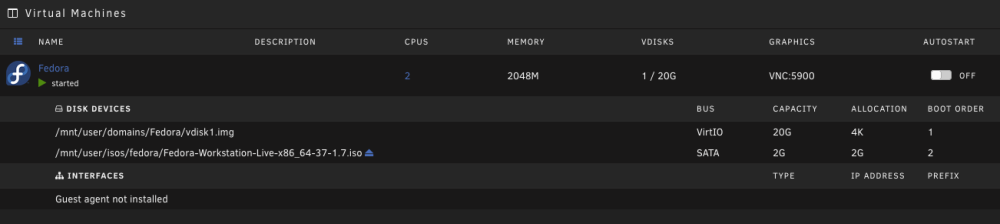
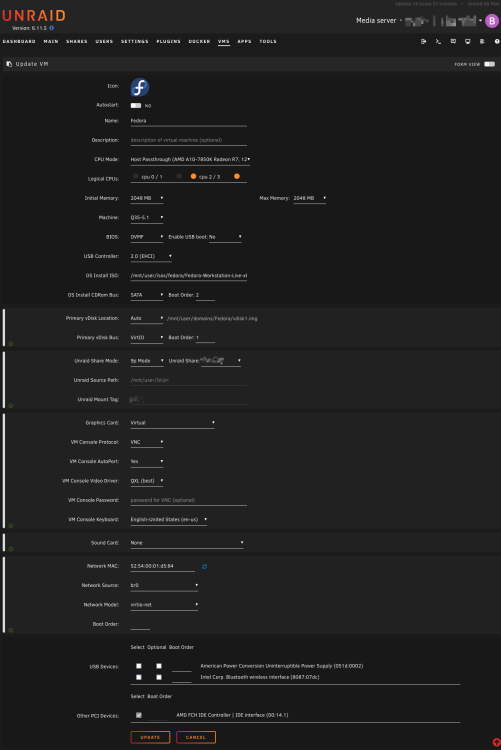
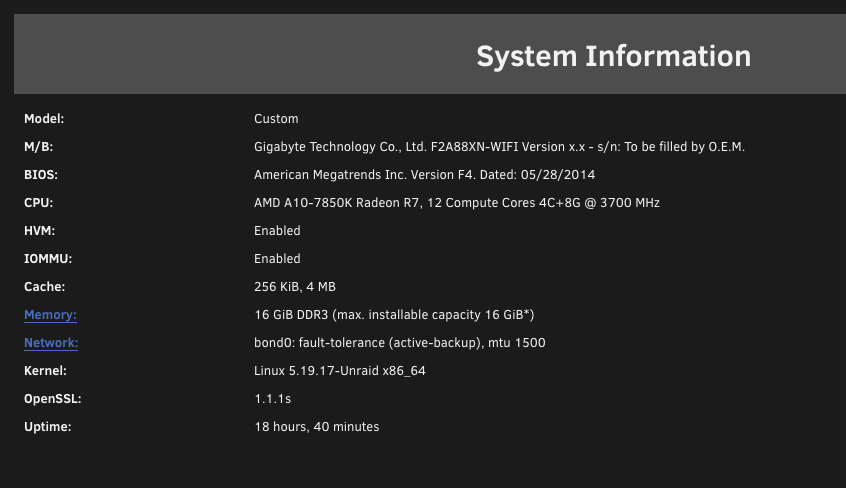
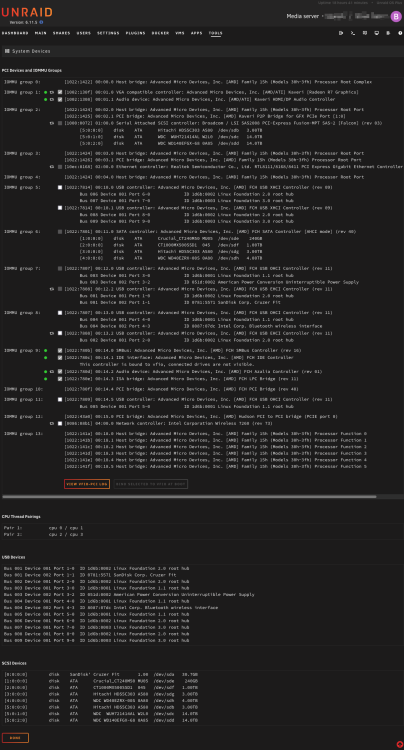
Hi, I'm currently digging into the world of VMs. After successfully installing Ubuntu Desktop, I wanted to experiment with different Linux distros. Hearing good things about Fedora so why not give it a shot as a VM? The Live CD booted successfully and I wanted to install it, however no drives were found under my system. I've burned a few hours through trial and error as well as Googling, but can't find a solution. I have a hunch it has to do with the hardware mapping, although I don't know exactly what to look for. Any help would be great.. I've attached a few screen grabs.
-
Hello, I have a few of my containers accessible to the public (plex, overseerr, bitwarden, *arrs, etc) and thought it was time to take security more seriously. Cloudflare is my registrar and I'm forwarding subdomains to NGINX Proxy Manager on my unRaid (eg., https://sonarr.domain.com). I've been doing some reading about Crowdsec and thought I've give it a shot. The Crowdsec container installation from the unRaid App section went fairly smoothly, although documentation was sourced from multiple places due to my particular setup. There's a ton of moving parts, but I BELIEVE I have it set up correctly, but wanted to run it past you fine folks to see if I did it correctly. Currently, I have it setup where Cloudflare is the 'bouncer'. I'm able to manually block my IP, so that seems to be working. The one area that I'm still not quite sure about is the part where Crowdsec analyzes the logs on my machine. Questions: Since all external connections coming in run through NPM, is it safe to say that Crowdsec only needs to analyze NPM logs? Or does it need logs from the other containers as well? Can Crowdsec analyze symlinks for the logs? #Inside /mnt/user/appdata/shared/crowdsec ln -s /mnt/user/appdata/NginxProxyManager/logs/proxy-host-6_error.log proxy-host-6_error.log How can I check if Crowdsec is seeing my logs correctly? Thank you! I'm still wrapping my head around Crowdsec and would definitely appreciate some guidance.



