TransformedBG
Members
-
Joined
-
Last visited
-
When I log into Unriad under my dashboard I see my ZFS pool has 2 Smart Errors on drive 1 and 5, Not exactly sure how to read the smart report, and these drives have warranty on them currently. So if I need to I need to do it asap. mulgore-smart-20240330-1915.zip mulgore-smart-20240330-1918.zip
-
Ive already ran it.. short of trying to change my cable / hard drive. I think my array is going to die.
-
yeah that the problem... that's the part I'm trying to figure out. would i need to add another card to add the drive? im using 6.11.5 , but im not using the Unraid ZFS yet. I had this going since 6.9 mulgore-diagnostics-20230506-1024.zip
-
does this mean i can unplug the bad device and plug in a new device and then it will copy the data?
-
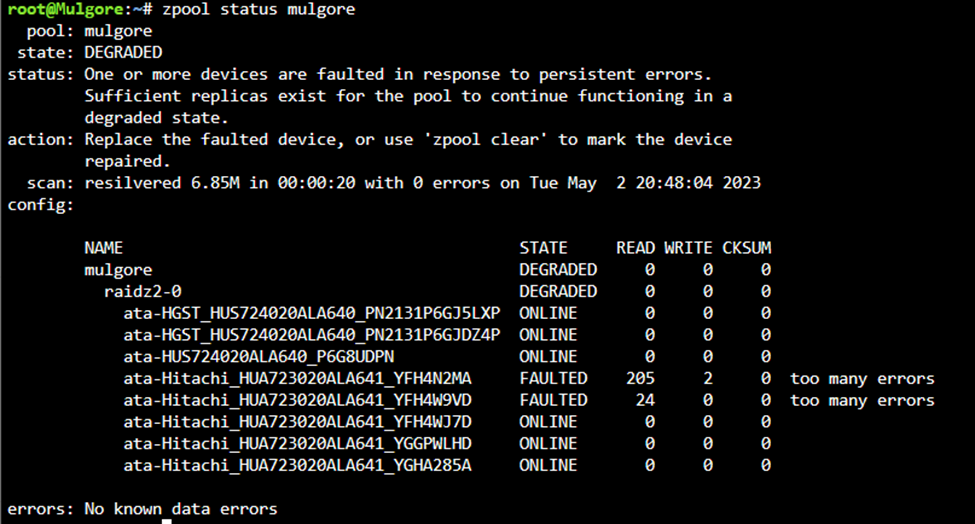
SO i got a warning that my ZFS pool was degraded. Luckily im running ZFSZ2 but i need to replace these drives and thats the part i need help with. I have all 8 drives on one card, and need to replace the 2 drives that are faulted. I keep searching for an answer online, but its for other things like FreeNAS or whatever. Im just trying to figure out can i just bring the drives offline , swap the new drive in its place and replace it? is there a good guide to do this? any help would be appreciated im fairly new to ZFS, and was lucky enough to get this going a few years back.