The_Holocron
Members
-
Joined
-
Last visited
Everything posted by The_Holocron
-
Generating this error: "Macvlan and bridging has been found. This might cause issues with stability on your server. More Information..." And as I understand, this is no longer an issue.
-
Is the previously identified issues with MACVLAN and Bridging--aka call trace--still an issue? I had to re-enable the bridging to create br0 because Macinabox wouldn't work for me on vbr0. Now, the "fix common problems" is giving me a warning with a link to this: https://docs.unraid.net/unraid-os/release-notes/6.12.4/#fix-for-macvlan-call-traces I recall this issue, but is it still an issue in 7.x?
-
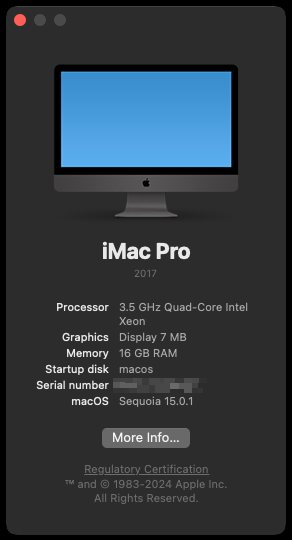
This was unexpected. Upgrade from Sonoma... I assume running macinabox again would break this if I made a change, like allocating more memory?
-
Okay, I keep getting this alert: I suspect this something is checking but it sees the "failed to initialize NVML...." aka fails to see installed GPU because the GPU is in use by a VM: Otherwise, I'm not sure what it is about, because the driver is current, regardless of the GPU usage.
-
Trying to start one of my VM's: 2024-10-04 20:18:50.366+0000: 36053: error : virCommandWait:2773 : internal error: Child process (/usr/libexec/virtiofsd --print-capabilities) unexpected exit status 2: error: invalid value '' for '--fd <FD>': cannot parse integer from empty string This.
-
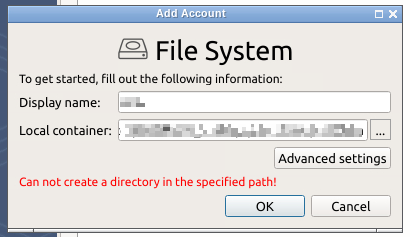
Okay, I am trying to set up a backup to local file system (either on Unraid or a Remote mount) and I keep getting this error: Searched the thread and did not find anything related to this. I tried setting the container to Privileged with no luck. UPDATE: Belay that. Realized I needed to add some RW paths to the container.
-
I have a Win 11 VM that is throwing the following error when starting: Execution error internal error: unable to execute QEMU command 'query-rx-filter': net client(net0) doesn't support rx-filter querying Logs: 2024-06-28 15:43:29.991+0000: Starting external device: TPM Emulator /usr/bin/swtpm socket --ctrl type=unixio,path=/run/libvirt/qemu/swtpm/6-Torchwood-VM-swtpm.sock,mode=0600 --tpmstate dir=/var/lib/libvirt/swtpm/xxxxxxxxxxxxxxxxxxxxxxxxxxxxxxxxxx/tpm2,mode=0600 --log file=/var/log/swtpm/libvirt/qemu/Torchwood-VM-swtpm.log --terminate --tpm2 2024-06-28 15:43:30.026+0000: starting up libvirt version: 10.0.0, qemu version: 8.2.2, kernel: 6.8.12-Unraid, hostname: coruscant LC_ALL=C \ PATH=/bin:/sbin:/usr/bin:/usr/sbin \ HOME=/var/lib/libvirt/qemu/domain-6-Torchwood-VM \ XDG_DATA_HOME=/var/lib/libvirt/qemu/domain-6-Torchwood-VM/.local/share \ XDG_CACHE_HOME=/var/lib/libvirt/qemu/domain-6-Torchwood-VM/.cache \ XDG_CONFIG_HOME=/var/lib/libvirt/qemu/domain-6-Torchwood-VM/.config \ /usr/local/sbin/qemu \ -name guest=Torchwood-VM,debug-threads=on \ -S \ -object '{"qom-type":"secret","id":"masterKey0","format":"raw","file":"/var/lib/libvirt/qemu/domain-6-Torchwood-VM/master-key.aes"}' \ -blockdev '{"driver":"file","filename":"/usr/share/qemu/ovmf-x64/OVMF_CODE-pure-efi-tpm.fd","node-name":"libvirt-pflash0-storage","auto-read-only":true,"discard":"unmap"}' \ -blockdev '{"node-name":"libvirt-pflash0-format","read-only":true,"driver":"raw","file":"libvirt-pflash0-storage"}' \ -blockdev '{"driver":"file","filename":"/etc/libvirt/qemu/nvram/01707edc-3f99-21d7-ea34-6a1800239b1a_VARS-pure-efi-tpm.fd","node-name":"libvirt-pflash1-storage","auto-read-only":true,"discard":"unmap"}' \ -blockdev '{"node-name":"libvirt-pflash1-format","read-only":false,"driver":"raw","file":"libvirt-pflash1-storage"}' \ -machine pc-i440fx-7.2,usb=off,dump-guest-core=off,mem-merge=off,memory-backend=pc.ram,pflash0=libvirt-pflash0-format,pflash1=libvirt-pflash1-format,hpet=off,acpi=on \ -accel kvm \ -cpu host,migratable=on,hv-time=on,hv-relaxed=on,hv-vapic=on,hv-spinlocks=0x1fff,hv-vpindex=on,hv-synic=on,hv-stimer=on,hv-vendor-id=none,host-cache-info=on,l3-cache=off \ -m size=16777216k \ -object '{"qom-type":"memory-backend-ram","id":"pc.ram","size":17179869184}' \ -overcommit mem-lock=off \ -smp 4,sockets=1,dies=1,cores=4,threads=1 \ -uuid xxxxxxxxxxxxxxxxxxxxxxxxxxxxxxxxxxx \ -display none \ -no-user-config \ -nodefaults \ -chardev socket,id=charmonitor,fd=39,server=on,wait=off \ -mon chardev=charmonitor,id=monitor,mode=control \ -rtc base=localtime \ -no-shutdown \ -boot strict=on \ -device '{"driver":"ich9-usb-ehci1","id":"usb","bus":"pci.0","addr":"0x7.0x7"}' \ -device '{"driver":"ich9-usb-uhci1","masterbus":"usb.0","firstport":0,"bus":"pci.0","multifunction":true,"addr":"0x7"}' \ -device '{"driver":"ich9-usb-uhci2","masterbus":"usb.0","firstport":2,"bus":"pci.0","addr":"0x7.0x1"}' \ -device '{"driver":"ich9-usb-uhci3","masterbus":"usb.0","firstport":4,"bus":"pci.0","addr":"0x7.0x2"}' \ -device '{"driver":"ahci","id":"sata0","bus":"pci.0","addr":"0x4"}' \ -device '{"driver":"virtio-serial-pci","id":"virtio-serial0","bus":"pci.0","addr":"0x5"}' \ -blockdev '{"driver":"file","filename":"/mnt/user/domains/tvm/TORCHWOOD.img","node-name":"libvirt-2-storage","auto-read-only":true,"discard":"unmap","cache":{"direct":false,"no-flush":false}}' \ -blockdev '{"node-name":"libvirt-2-format","read-only":false,"cache":{"direct":false,"no-flush":false},"driver":"raw","file":"libvirt-2-storage"}' \ -device '{"driver":"ide-hd","bus":"sata0.2","drive":"libvirt-2-format","id":"sata0-0-2","bootindex":1,"write-cache":"on","serial":"vdisk1"}' \ -blockdev '{"driver":"file","filename":"/mnt/user/isos/virtio-win-0.1.240.iso","node-name":"libvirt-1-storage","auto-read-only":true,"discard":"unmap"}' \ -blockdev '{"node-name":"libvirt-1-format","read-only":true,"driver":"raw","file":"libvirt-1-storage"}' \ -device '{"driver":"ide-cd","bus":"ide.0","unit":1,"drive":"libvirt-1-format","id":"ide0-0-1"}' \ -netdev '{"type":"tap","fd":"40","id":"hostnet0"}' \ -device '{"driver":"e1000","netdev":"hostnet0","id":"net0","mac":"52:54:00:75:a1:63","bus":"pci.0","addr":"0x3"}' \ -chardev pty,id=charserial0 \ -device '{"driver":"isa-serial","chardev":"charserial0","id":"serial0","index":0}' \ -chardev socket,id=charchannel0,fd=37,server=on,wait=off \ -device '{"driver":"virtserialport","bus":"virtio-serial0.0","nr":1,"chardev":"charchannel0","id":"channel0","name":"org.qemu.guest_agent.0"}' \ -chardev socket,id=chrtpm,path=/run/libvirt/qemu/swtpm/6-Torchwood-VM-swtpm.sock \ -tpmdev emulator,id=tpm-tpm0,chardev=chrtpm \ -device '{"driver":"tpm-tis","tpmdev":"tpm-tpm0","id":"tpm0"}' \ -audiodev '{"id":"audio1","driver":"none"}' \ -device '{"driver":"vfio-pci","host":"0000:00:02.0","id":"hostdev0","bus":"pci.0","addr":"0x2"}' \ -sandbox on,obsolete=deny,elevateprivileges=deny,spawn=deny,resourcecontrol=deny \ -msg timestamp=on 2024-06-28 15:43:30.026+0000: Domain id=6 is tainted: high-privileges char device redirected to /dev/pts/0 (label charserial0) 2024-06-28 15:43:32.168+0000: shutting down, reason=failed 2024-06-28T15:43:32.168593Z qemu-system-x86_64: terminating on signal 15 from pid 14664 (libvirtd)
-
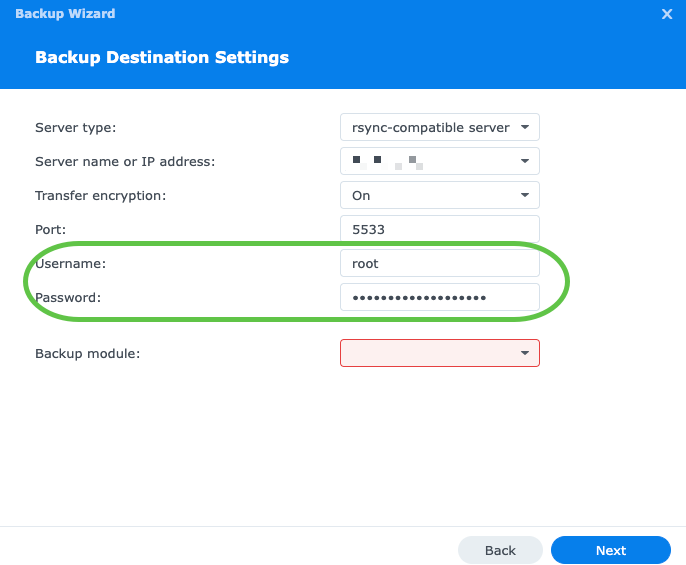
I am looking for a viable solution to do a local backup of data on my Synology NAS to my Unraid box. I'd like to test the rsync options, but the setup on the Synology requests a user/password. I've noticed that some of the other docker images for an rsync-server include username/password fields. thoughts?
-
Cool. If you need to test something, let me know. Happy to help. Works great otherwise. Any possibility of adding temperature attributes?
-
I think the issue is that when the template runs with the default settings, it is creating a folder named "conf.yml" at /mnt/user/appdata/unraid-simple-monitoring-api/ because the "conf.yml" file doesn't exist. In my opinion, it would be better to just point to the folder, rather than the file directly. I would change it to: - container path: /app - host path: /mnt/user/appdata/unraid-simple-monitoring-api or - container path: /app/config - host path: /mnt/user/appdata/unraid-simple-monitoring-api/config But. I will try the notes above and let you know if it works. UPDATE: The default settings work on restart, but you have to delete the erroneous "conf.yml" folder that the template automatically creates.
-
I think there is an error in the container image and it's getting confused looking in a folder named "conf.yml".
-
Okay, I'm clearly being dense today. I keep getting this error: text error warn system array login 2024/04/08 21:59:59 ERROR Cannot read conf.yml error="read /app/conf.yml: is a directory" ** Press ANY KEY to close this window ** I have a text file named "conf.yml" inside the folder "/mnt/user/appdata/unraid-simple-monitoring-api/conf.yml" and I get the error above. I tried to move it to "/mnt/user/appdata/unraid-simple-monitoring-api/" but same.
-
At a minimum, I think this needs to have the following variables added to the template: OPENPROJECT_SECRET_KEY_BASE=secret OPENPROJECT_HOST__NAME=localhost:8080 OPENPROJECT_HTTPS=false Once you know the IP of the container you can then reset the host name variable and configure your reverse proxy. Then you can change the HTTPS to True. This is all in accordance with the very basic docker compose recommendations from the OpenProject website. Sure, not everything is "one click install" but the install template could be improved. At the least, these variables should be added to the template because they are needed. Additionally, the WebUI should be changed to http://[IP]:[PORT:80] and a WebUI PORT variable with HOST defaulting to 8080 and CONTAINER to 80. cheers
-
This template is half baked.
-
Can you add an option to ignore start delay if set up? I have delay set on my autostart containers, but the delay isn't needed during backup stop/start sequencing.
-
I started trying to sort out a transcoding issue. Basics: I have Plex Pass Intel® Xeon® CPU E3-1220 v3 @ 3.10GHz NVIDIA Quadro P4000 transcoding fails and I find this in the logs: Jul 14, 2023 07:27:26.000 [22714707979064] ERROR - [Req#18400/Transcode/bcc643af-2bf9-44d9-aa3a-acd90a145758/1c99bc4a-7c0a-4946-9901-dde19247fa87] [eac3_eae @ 0x14b17a841040] EAE timeout! EAE not running, or wrong folder? Could not read '/tmp/pms-a106105e-84f9-4e1e-ba05-48254908b13e/EasyAudioEncoder/Convert to WAV (to 8ch or less)/bcc643af-2bf9-44d9-aa3a-acd90a145758_16882-0-2282.wav' Jul 14, 2023 07:27:26.000 [22714679372600] ERROR - [Req#183ff/Transcode/978fbdf6-addd-40d2-aefc-b6b491ff9e44/7cbad210-1e84-4939-9d01-0196d1ffb394] [eac3_eae @ 0x14ec12450600] EAE timeout! EAE not running, or wrong folder? Could not read '/tmp/pms-a106105e-84f9-4e1e-ba05-48254908b13e/EasyAudioEncoder/Convert to WAV (to 8ch or less)/978fbdf6-addd-40d2-aefc-b6b491ff9e44_20019-0-1712.wav' I've tried restarting the container. Updating NVIDA drivers and checking other variables. All appear good. Everything else works fine. Thoughts? Actually, I think I solved it with this: DELETE CODEC FOLDER
-
Thanks. I've been fighting this issue for a day now. Will try your suggestions. UPDATE: Seems to have worked. PITA.
-
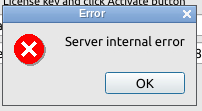
When trying to activate my license, I keep getting this error: "Server internal error." I've tried Offline Activation and when I go through the process, it just takes me right back to the initial activation popup. I've tried reaching out to MSP360 support on this, but they have not been helpful. Thoughts?