





almighty7lurch
Members
-
Joined
-
Last visited
-
while i don’t enjoy FOSS drama, schadenfreude, or rumors, i will post this recent Reddit discussion about BookLore here, because i believe it’s of interest to Unraid users who may be using BookLore or struggling with bugs and the like: https://www.reddit.com/r/selfhosted/comments/1rs275q/psa_think_hard_before_you_deploy_booklore/ edit: just to keep everyone in the loop, because this situation has been so volatile and confusing... today, a moderator in the BookLore discord sent a message to all users explaining that the original dev (ACX10/WorldTraveler101) was leaving the project and handing it off to other maintainers. that user included an invite to a new booklore server, named “booklore2.0”. there was about fifteen minutes of chatter in a channel in the server and everyone watched as all the other channels were slowly deleted in real time, including the channel containing the aforementioned invite link, and then the server was deleted or deactivated. around the same time, the BookLore github repository (https://github.com/booklore-app/booklore) was either deleted or taken private. if you come to this thread trying to figure out what’s going on with your container, hope this helps.
-
i know the purpose of this thread is to discuss the unraid template for the app rather than being designed for discussion of the app itself, so this is slightly off-topic, but... @jmztaylor i feel you, i’ve been losing faith in booklore over the past few months. i think the project is getting away from the (i believe well-intentioned) creator and it’s been growing more and more unstable and unreliable. recently, i experienced the “all book covers have disappeared, and it fails to regenerate them” bug described here: https://github.com/booklore-app/booklore/issues/2508 hope they can right the ship, but it’s crazy how much time i’ve had to spend massaging this one service just to keep it running right.
-
i think i’m onto something. i’ve posted an update in the support thread for the container template: https://forums.unraid.net/topic/190366-booklore-template-support-thread/page/2/#findComment-1606049 basically... the upstream application’s dockerfile invokes a wrapper script (https://github.com/booklore-app/booklore/blob/master/Dockerfile#L64), which runs as PID 1 inside the container. such a wrapper script -- if not written properly -- can completely prevent the container from processing signals sent to it from the kernel. here’s one of the several blogs and forum posts i wound up on while trying to diagnose this issue: https://petermalmgren.com/signal-handling-docker/ its author suggested adding --init to the container’s startup parameters. i had tried this earlier on in my troubleshooting, and i’m guess it was “fixed” then but for some reason, i didn’t realize at the time that it was the solution, so i mistakenly moved past it and kept troubleshooting. after rediscovering the info about docker PID 1 signal handling, i tried adding --init again and am now quite confident that the issue is solved (at least, for me). ps run from inside the container supports this: PID USER TIME COMMAND 1 root 0:00 /sbin/docker-init -- /__cacert_entrypoint.sh /start.sh 7 root 0:00 {start.sh} /bin/sh /start.sh 11 root 0:00 nginx: master process nginx -g daemon off; 12 root 0:15 java -jar /app/app.jar 13 nginx 0:00 nginx: worker process 51 root 0:00 sh 58 root 0:00 psand from the docker documentation (https://docs.docker.com/reference/cli/docker/container/run/#init): anyway, i’ve marked this as the solution to this post, and i hope this information helps others who may encounter a container that’s misbehaving. the real solution is to get an application maintainer to fix their wrapper script, if they’re using one. for booklore, i’ve opened an issue on the project’s github repo.
-
i think i may have solved this issue? i would like input from other users, though -- when you stop booklore, does it return exit code 137? i’ve found that modifying the container (Unraid > Docker > BookLore > Edit, enable Advanced View) by adding --init fixes this behavior. that is to say, when run with --init and subsequently stopped, unraid now returns an exit code of 143 for that container. in bash, this equals signal 15 (143 - 128 = 15), which is a SIGTERM, and is what should be happening. again, without --init stopping the container returns 9 (SIGKILL, 137 - 128 = 9). i’ll update my issue on the upstream github project for booklore to see what the dev has to say, since it appears to actually be a booklore problem and not a jmztaylor unraid template problem.
-
yes — in safe mode, this container still fails to stop gracefully. if i set the docker stop timeout to (say) 52 seconds, the container will be terminated 52 seconds after hitting “stop” in the web ui. interestingly, the “execution error” modal i provided a screenshot of in my original post no longer appears. i have updated Unraid since the original post. but the SIGKILL still occurs. i’m now also noticing that once the container has been killed, the web ui gives a status of "Exited (137)” which, for docker, seems to indicate an out-of-memory error. problem with that idea is that the server has 32GB of memory, and i’ve never noticed the server’s memory usage going above even 25%. also, doing docker inspect BookLore i get the following State information: "State": { "Status": "exited", "Running": false, "Paused": false, "Restarting": false, "OOMKilled": false, "Dead": false, "Pid": 0, "ExitCode": 137, "Error": "", "StartedAt": "2026-02-02T23:21:51.011608134Z", "FinishedAt": "2026-02-02T23:24:28.129274308Z" },so, it wasn’t actually oom killed. so i think in this case, “137” is actually from the shell. from the bash manpage: 137=128+9 i’m super aware this is just one bizarre edge case, from (apparently only) one user… it’s not some widespread, critical bug that demands a ton of urgent attention. but i do believe in being a good internet citizen, and to me part of that is documenting these weird edge cases so that somebody who comes after me may find a fix to their own confusing problem. i’ll keep trying to track down this issue and will report back any info that seems useful, and i would definitely appreciate further help and ideas on what to try next.
-
diagnostic bundle attached: exai-diagnostics-20260201-1821.zip i’ve already asked the unraid container maintainer, who says they do not have the issue i’m having. other users also chimed in to say that they also have not run into this issue. i would just like to be pointed in the right direction for further actionable troubleshooting steps. are there system-level docker logs i can be looking at?
-
the problem isn't container installation -- this container installs with no issue on my existing flash drive. it's just that Unraid docker subsystem (dockerman, i think it's called?) can't stop the running container properly. however, i did perform a completely fresh, brand-new installation of Unraid 7.2.3 on a completely fresh, brand-new samsung flash drive, and then restored my current Unraid install from a backup. this would rule out some freak NAND issue with the old flash drive. with the new flash drive, the issue still occurs. then, i decided to completely delete the docker.img file and recreate it, reinstalling all my docker containers. the issue still persists. considering that i've repeatedly deleted/purged/reinstalled both the mariadb and booklore containers, images, and appdata dirs, and performed a new Unraid install, and recreated my docker.img file... what "config/settings issue" could remain? i still don't know where Unraid stores its docker logs -- not container logs, which are obvious and easy to find, but docker logs -- because the Log Viewer only ever shows a 0-byte file. what else should i be looking for or deleting or recreating?
-
i'm trying to troubleshoot a longstanding issue that i've been having with this container. i'm aware that @jmztaylor is not the developer of booklore, and i've already posted about this in the booklore github issue where jmztaylor gave out their link to the Unraid template... a few people replied and said that they do not experience this issue. so, this seemed like the best place to post and ask for solutions and troubleshooting help. i've also already posted a topic in the Unraid "General Support" forum here: https://forums.unraid.net/topic/196573-one-single-container-consistently-fails-to-stop-cleanly/ and one person has responded so far but i'm really not getting any closer to figuring out this issue. tl,dr; the booklore container will not stop cleanly. whether a "stop" command is issued during the container update process, me clicking the "stop" button in the Unraid web ui, or i do docker stop booklorein the console, it never stops cleanly and will be forcibly SIGKILLed when Unraid's global docker stop timeout has been exceeded (Settings > Docker > Docker Stop Timeout). i've done countless "delete the container, delete the appdata dir, delete the metadata xml, reinstall from scratch" routines; i've done the same to my mariadb container; i've installed unraid on a brand-new flash drive; i've completely deleted and rebuilt the docker.img file; nothing has solved this issue. i do not understand it, and i don't understand why my setup seems to be the only one experiencing this issue. what i'd really like is some help with the troubleshooting -- i haven't found anything revealing in any system logs. does Unraid even keep system-level docker logs? Settings > Docker (as well as /boot/config/docker.cfg) has configuration options for docker log file rotation, size, etc., but i don't know where the log file is supposed to live. Tools > Log Viewer (New) has a "docker.log" dropdown, but it says "docker.log (0 bytes)" and is empty. i don't know what else to check and i'm losing my mind over this, because it doesn't seem to make sense. we all love Unraid but it really needs some damn work, especially when it comes to the web ui giving helpful diagnostic/error output.
-
yeah, several times now i’ve entirely deleted the container and the image, along with the appdata directory, then subsequently reinstalled it from scratch. i haven’t done a full, truly “fresh install” on a new flash drive because i think that would be far too many variables (containers, drives, etc) changing at once for it to be enlightening. one of the things that i’m struggling with is that i can’t seem to find good docker logs in unraid. using docker system events, i don’t get much beyond the stop request, and the eventual kill signal (attached as booklore-log.txt). in the webui, Tools > Log Viewer (New) > docker.log is always empty, and i’ve never been able to find it on the filesystem. i do intend to replace the flash drive this weekend with a brand-new one, just for giggles… but i’ve installed, removed, and replaced numerous other containers since i first started experiencing this issue and it’s consistently only ever booklore. i would expect that if the flash drive is truly corrupted, i would be seeing far more widespread and “consistently inconsistent” issues than simply trying to stop one particular container. so it feels like something’s up with the unraid dockerman system. i think if it was an issue with booklore itself, reports of this issue would be more widespread on the booklore github page, etc. it’s been consistently a problem for like the past 20 versions i’ve updated through… it makes no sense to me. at this point, there’s just not enough data to point the finger at either some unraid or booklore, so i feel like i really want to keep troubleshooting and working on diagnostics. booklore-log.txt
-
i have one docker container (let’s call it “whoops”) set with a static ip address (172.16.0.18) to accommodate a specific tunneling application. yesterday, i rebooted my unraid server. i noticed that “whoops” had failed to start up, so i manually started it. the web ui gave me a modal saying: Execution Error Error code 403 after about an hour of troubleshooting, i finally realized that another container earlier in the container startup order had been handed 172.16.0.18. this is what had been preventing “whoops” from starting up. i have reassigned “whoops” the address 172.16.0.99, in the hope that no other container starting before it will be given an ip address incremented that high. however, i think it’s reasonable to assume that when a container is given a static IP address, this would prevent other containers from being given this IP address. additionally, the error message in the web UI really could be more clear and specific!
-
in effect, i’ve already done so — i posted a comment explaining this issue in the github issue where the unraid template was created (https://github.com/booklore-app/booklore/issues/299#issuecomment-3294623660), and the author (and several other users) replied that they do not have this same issue. one of my goals with this post is to ask for assistance in troubleshooting the issue, because i’ve run out of ideas.
-
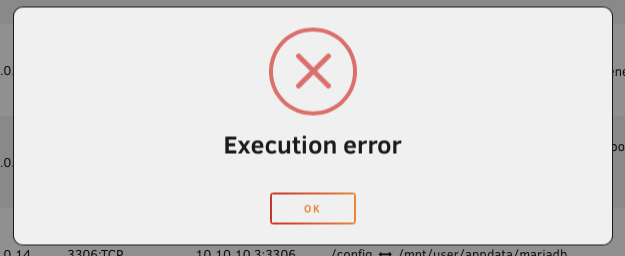
i’ve spent a good deal of time searching the web, posting in the Unraid discord server, and so on… and i haven’t found any conclusive answers so far. i’ve come across two forum topics that seem to be somewhat related but not exactly: https://forums.unraid.net/topic/171402-docker-updates-fail/ https://forums.unraid.net/topic/146853-docker-containers-not-updating/ i have one container, Booklore (the official Unraid package, from the CA repository), that will not stop cleanly. not when using the Stop button in the web GUI (either explicitly/manually or by updating the container), and not when issuing a docker stop command in the terminal. when i stop it via the web GUI, the container’s status icon animates the spinning “stopping” icon, and then eventually i get a modal that just says “Execution error” and gives me an OK button: i see no relevant errors or other messages in docker logs or in /var/log/syslog. i’ve tried upping the docker stop timeout from the default 30 seconds to 90 seconds, all the way up to 300 seconds, but no matter what, that timeout is eventually exceeded and the system winds up sending a SIGKILL to the container. i’ve deleted the container, the image, the appdata directory and then subsequently reinstalled (i’ve done this a few times) but the issue persists. the other day, i added --init to the container’s Extra Parameters field after reading it as a possible solution to other issues, but now when i issue a stop to it, it shuts down almost instantaneously — like... too fast, in under a second, where every other container on this server seems to shut down more gracefully, taking a few seconds to exit and clean up. something seems really wrong here but i have not been able to figure it out. i can test and provide logs.
-
thank you for taking the time to reply i played around with gluetun the other day, and it does allow you to feed it a list of mullvad endpoints (you can even punch in preferred countries, or cities) and upon each container startup, it will pick a random one from that list!
-
i know that this is more a question about wireguard itself than it is about this package, but i figure someone else here must know the answer: i want to ensure that if, for some reason, the endpoint specified in my wg0.conf file is unavailable, it tries another endpoint. does wireguard support adding a list of multiple endpoints in one config file to accomplish this? or, can i otherwise have qbittorrent-vpn connect to one (chosen at random) endpoint by feeding it multiple config files? mullvad will spit out like twenty config files for a given country, and i just want qbittorrent-vpn to pick one of a handful, since i don't care which specific city or host it connects to. i couldn't find any solid information about this in the wireguard docs. thanks!

