




Skip to content
View in the app

A better way to browse. Learn more.

Unraid

A full-screen app on your home screen with push notifications, badges and more.

To install this app on iOS and iPadOS
  1. Tap the Share icon in Safari
  2. Scroll the menu and tap Add to Home Screen.
  3. Tap Add in the top-right corner.
To install this app on Android
  1. Tap the 3-dot menu (⋮) in the top-right corner of the browser.
  2. Tap Add to Home screen or Install app.
  3. Confirm by tapping Install.

nathanlee0118

Members
  • Joined

  • Last visited

Everything posted by nathanlee0118

  1. Sorry spoke too soon, I was able to get it going. I wiped my appdata folder for ark-se and rebuilt it in the cache (way faster). It seemed to like that much better. I also used SteamCMD login as "Anonymous" to download the server files from steam, did not need to use my Steam login credentials.
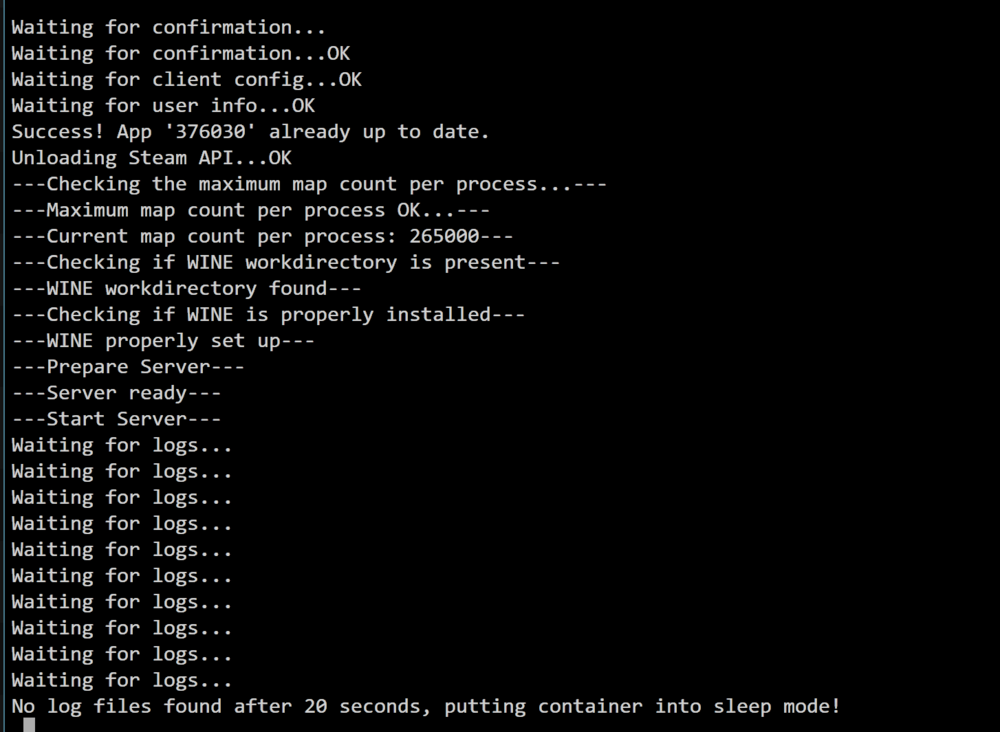
  2. I'm seeing this as well on an x99 platform, I've made the change for permit exclusive shares to "yes" and also switched my data to my cache drive. Unfortunately It's still in this "waiting for logs..." state after rebooting multiple times. Let me know if I can provide anything.
  3. Having the same output from the log, Hardware HP Proliant DL385 G7 2xAMD Opteron 6176 SE 60gb ECC Ram

Account

Navigation

Search

Search

Configure browser push notifications

Chrome (Android)
  1. Tap the lock icon next to the address bar.
  2. Tap Permissions → Notifications.
  3. Adjust your preference.
Chrome (Desktop)
  1. Click the padlock icon in the address bar.
  2. Select Site settings.
  3. Find Notifications and adjust your preference.