





gustyScanner
Members
-
Joined
-
Last visited
-
2 in a row is unlucky. I wish there was actual supply to buy. I had to buy through a 3rd party Amazon seller and it was pretty much the only option. Thanks yall
-
I was finally able to source a USB keyboard and was able to boot into the bios with the new harddrive plugged directly into the motherboard. The HDD does not appear in the bios when connected directly to the motherboard. I do see the drives provided by my HBA card as well, but not the new Seagate hard drive. I can use this same cable and power cord and it works on all my existing drives, including the drive I was trying to replace with the SMART errors. The motherboard is on the older side (I believe at least 8 years old), could it be due to an incompatibility? I do not think it could be related to the size of the hard drive because I have other drives the same size which work great.
-
Thank you both, I am going to need to get a USB keyboard to try booting my server into the BIOS. Weirdly if I plug in the HDMI to the PC right now I do not see anything on the monitor, but the server is working as it appears on my local network.
-
Hello, I have a brand new Seagate IronWolf Pro, 20 TB hard drive which is failing to appear in Unraid. I am using this drive to replace one which was throwing many SMART errors. I have never had an issue with a drive being detected before. I have this HBA controller: OEM LSI 9201-16i https://www.ebay.com/itm/394355635243 Motherboard: Gigabyte Z270P-D3-CF (Intel Z270, LGA1151) I have also attached my diagnostics. I think this may be an issue on my end. I had gotten one of these drives in a week ago but it made odd noises and did not appear so I thought it was faulty. This 2nd drive is also not appearing in Unraid. Thank you! tower-diagnostics-20260413-1057.zip
-
Hello! I have been using wireguard successfully for a long time with this container, today though when the container restarted I got the following error: 2025-06-27 10:35:26,490 DEBG 'start-script' stderr output: [#] ip link add dev wg0 type wireguard 2025-06-27 10:35:26,492 DEBG 'start-script' stderr output: [#] wg setconf wg0 /dev/fd/63 2025-06-27 10:35:26,493 DEBG 'start-script' stderr output: [#] ip -4 address add 10.2.0.2/32 dev wg0 2025-06-27 10:35:26,499 DEBG 'start-script' stderr output: [#] ip link set mtu 1420 up dev wg0 2025-06-27 10:35:26,501 DEBG 'start-script' stderr output: [#] resolvconf -a wg0 -m 0 -x 2025-06-27 10:35:26,508 DEBG 'start-script' stderr output: could not detect a useable init system 2025-06-27 10:35:26,521 DEBG 'start-script' stderr output: resolvconf: signature mismatch: /etc/resolv.conf 2025-06-27 10:35:26,522 DEBG 'start-script' stderr output: resolvconf: run resolvconf -u to update 2025-06-27 10:35:26,529 DEBG 'start-script' stderr output: [#] ip link delete dev wg0 2025-06-27 10:35:26,623 DEBG 'start-script' stdout output: [warn] Failed to bring 'up' WireGuard kernel implementation I am unsure what I should do to fix this, I see issues with resolvconf but since this is on startup am unsure what I should do. For now I switched to OpenVPN which is working successfully. EDIT: If I open the console of the container and do cat /etc/resolv.conf I see several different IP addresses listed. I recognize some like 1.1.1.1 as GOogle's DNS nameserver 84.200.69.80 nameserver 37.235.1.174 nameserver 1.1.1.1 nameserver 37.235.1.177 nameserver 84.200.70.40 nameserver 1.0.0.1 EDIT 2: I was able to resolve this by removing the DNS portion of my wg0.conf file
-
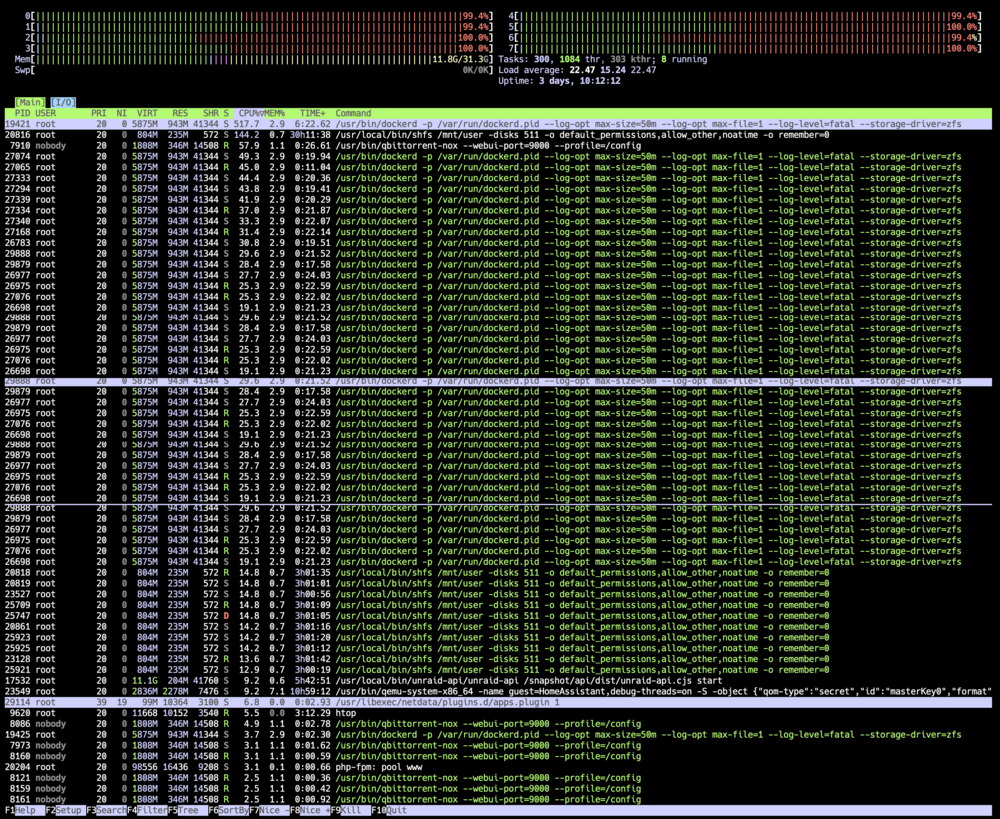
Hello, An issue has started for me where if I enable Docker in the Unraid GUI my CPU usage spikes to 100%, even without a container running. I have attached logs as well. Has anyone seen this before? Thank you! tower-diagnostics-20240722-2156.zip
-
Did you figure out your issue? I have been having the same thing, even with all containers stopped.
-
I wish I'd gathered that. For now, I have created a brand new VM of HomeAssistant and used it's backup/restore functionality to see if that solved the issue. So far, so good with the new image. If I see this with the new image I will definitely follow-up.
-
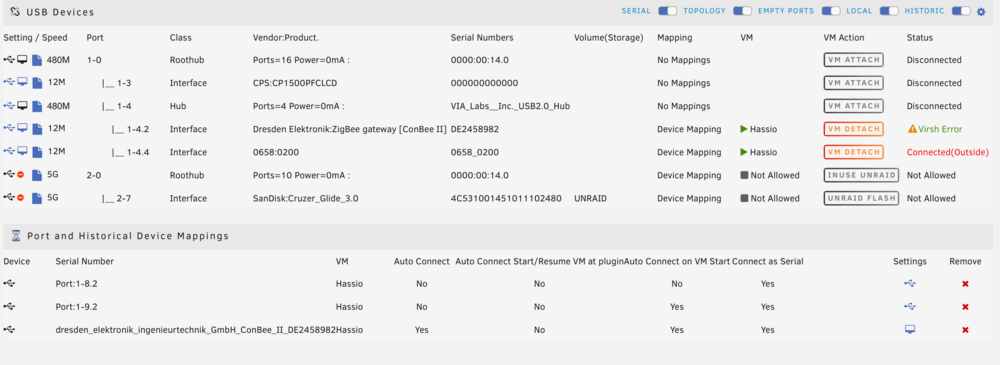
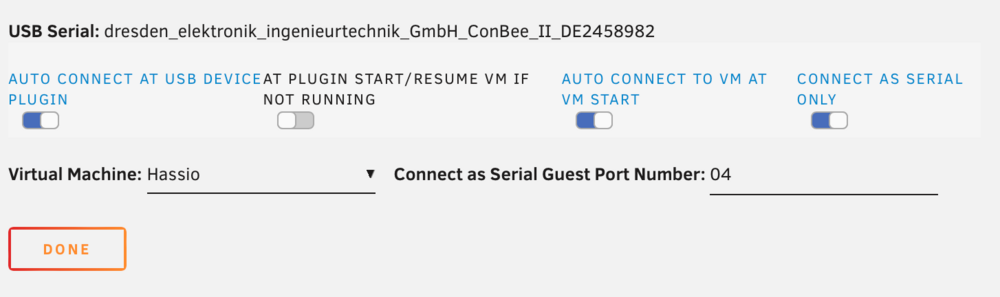
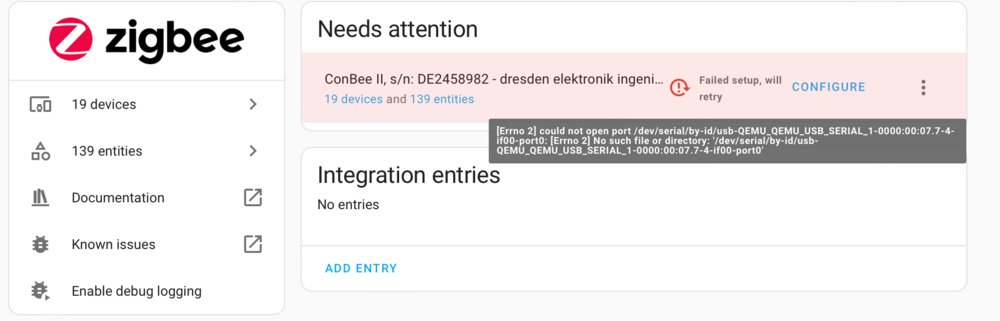
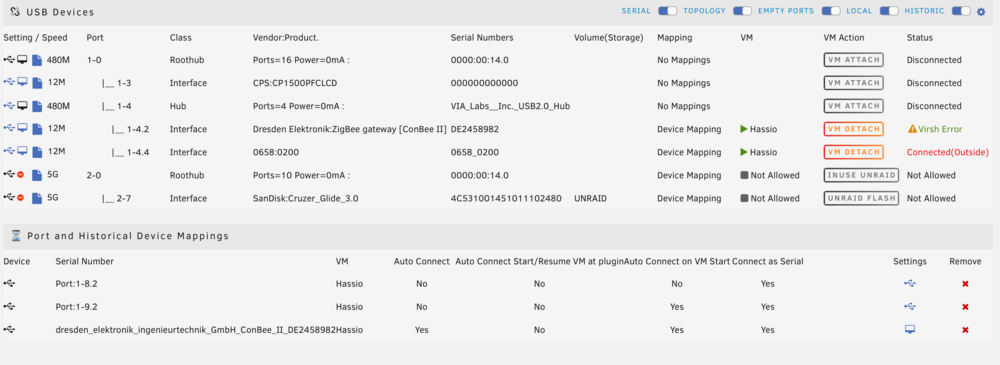
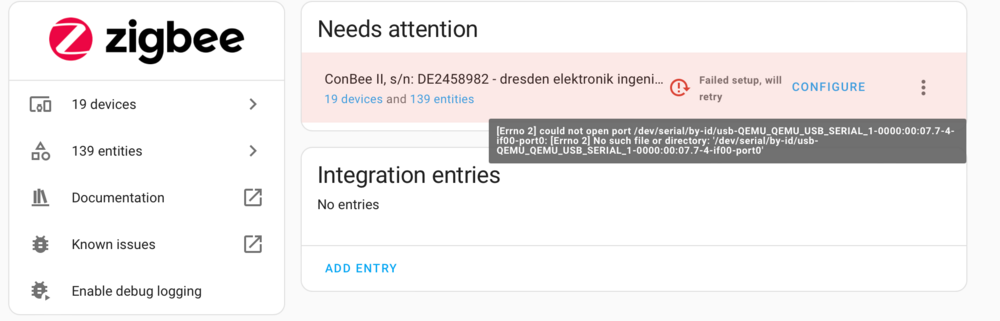
I have been having issues where my HomeAssistant VM will run well for several days. At some point the Zigbee USB stick will no longer be detected (or it has an error accessing it, HomeAssistant states "Could not open port ... no such file or directory" I've attached a screenshot). I recently moved the pools on my cache drives, which my VM was on, from btrfs to zfs by moving all data to the array, reformatting, and moving the data back. This error has been happening since then, but everything else on the drive (docker) is working as expected. During my zfs move, I did have issues moving the "/user/system/libvirt/libvirt.img" file, and found a post saying that it would likely be safe to remove as it would be recreated. Which it was, but I'm not sure if that is the reason these errors started. I see these in my USB Manager logs, which makes me think it is connecting and then becoming disconnected repeatedly until it stops. May 2 09:12:54 Tower kernel: usb 1-4.2: new full-speed USB device number 32 using xhci_hcd May 2 09:12:54 Tower kernel: cdc_acm 1-4.2:1.0: ttyACM0: USB ACM device May 2 09:12:58 Tower kernel: usb 1-4.2: USB disconnect, device number 32 May 2 09:12:58 Tower kernel: usb 1-4.2: new full-speed USB device number 33 using xhci_hcd May 2 09:12:58 Tower kernel: cdc_acm 1-4.2:1.0: ttyACM0: USB ACM device
-
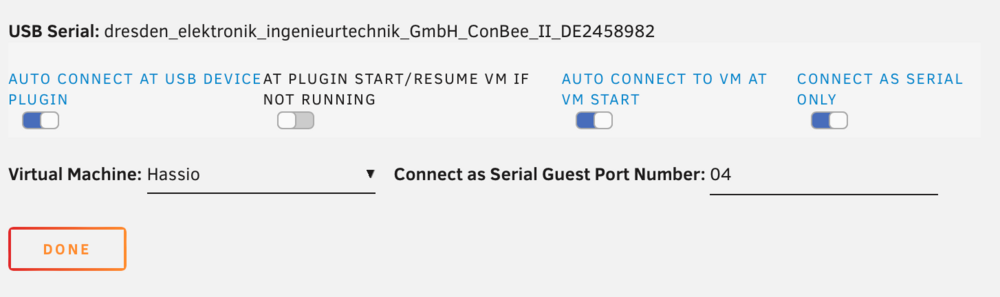
I have been having issues where my HomeAssistant VM will run well for several days. At some point the Zigbee USB stick will no longer be detected (or it has an error accessing it, HomeAssistant states "Could not open port ... no such file or directory" I've attached a screenshot). I recently moved the pools on my cache drives, which my VM was on, from btrfs to zfs by moving all data to the array, reformatting, and moving the data back. This error has been happening since then, but everything else on the drive (docker) is working as expected. I also see these logs in USB Serial Manager plugin since for this device I need to set it to "Connect as serial only" May 2 09:12:54 Tower kernel: usb 1-4.2: new full-speed USB device number 32 using xhci_hcd May 2 09:12:54 Tower kernel: cdc_acm 1-4.2:1.0: ttyACM0: USB ACM device May 2 09:12:58 Tower kernel: usb 1-4.2: USB disconnect, device number 32 May 2 09:12:58 Tower kernel: usb 1-4.2: new full-speed USB device number 33 using xhci_hcd May 2 09:12:58 Tower kernel: cdc_acm 1-4.2:1.0: ttyACM0: USB ACM device During my zfs move, I did have issues moving the "/user/system/libvirt/libvirt.img" file, and found a post saying that it would likely be safe to remove as it would be recreated. Which it was, but I'm not sure if that is the reason these errors started.
-
Hello, this has begun happening over the past few days. There have not been any significant changes to my setup but my VM has begun to "stop" and when viewing the logs I can see it is due to a crash. From the logs I am unsure if the crash is on Unraid's side or on Home Assistant Operating System, https://github.com/home-assistant/operating-system, which is what the VM is running. Here are the logs: -rtc base=utc,driftfix=slew \ -global kvm-pit.lost_tick_policy=delay \ -no-hpet \ -no-shutdown \ -boot strict=on \ -device '{"driver":"pcie-root-port","port":16,"chassis":1,"id":"pci.1","bus":"pcie.0","multifunction":true,"addr":"0x2"}' \ -device '{"driver":"pcie-root-port","port":17,"chassis":2,"id":"pci.2","bus":"pcie.0","addr":"0x2.0x1"}' \ -device '{"driver":"pcie-root-port","port":18,"chassis":3,"id":"pci.3","bus":"pcie.0","addr":"0x2.0x2"}' \ -device '{"driver":"pcie-root-port","port":19,"chassis":4,"id":"pci.4","bus":"pcie.0","addr":"0x2.0x3"}' \ -device '{"driver":"pcie-root-port","port":20,"chassis":5,"id":"pci.5","bus":"pcie.0","addr":"0x2.0x4"}' \ -device '{"driver":"ich9-usb-ehci1","id":"usb","bus":"pcie.0","addr":"0x7.0x7"}' \ -device '{"driver":"ich9-usb-uhci1","masterbus":"usb.0","firstport":0,"bus":"pcie.0","multifunction":true,"addr":"0x7"}' \ -device '{"driver":"ich9-usb-uhci2","masterbus":"usb.0","firstport":2,"bus":"pcie.0","addr":"0x7.0x1"}' \ -device '{"driver":"ich9-usb-uhci3","masterbus":"usb.0","firstport":4,"bus":"pcie.0","addr":"0x7.0x2"}' \ -device '{"driver":"virtio-serial-pci","id":"virtio-serial0","bus":"pci.2","addr":"0x0"}' \ -blockdev '{"driver":"file","filename":"/mnt/user/domains/HomeAssistant/haos_ova-9.5.vmdk","node-name":"libvirt-1-storage","cache":{"direct":false,"no-flush":false},"auto-read-only":true,"discard":"unmap"}' \ -blockdev '{"node-name":"libvirt-1-format","read-only":false,"cache":{"direct":false,"no-flush":false},"driver":"vmdk","file":"libvirt-1-storage","backing":null}' \ -device '{"driver":"virtio-blk-pci","bus":"pci.3","addr":"0x0","drive":"libvirt-1-format","id":"virtio-disk2","bootindex":1,"write-cache":"on"}' \ -netdev tap,fd=35,id=hostnet0 \ -device '{"driver":"virtio-net","netdev":"hostnet0","id":"net0","mac":"52:54:00:ad:6a:98","bus":"pci.1","addr":"0x0"}' \ -chardev pty,id=charserial0 \ -device '{"driver":"isa-serial","chardev":"charserial0","id":"serial0","index":0}' \ -chardev socket,id=charchannel0,fd=33,server=on,wait=off \ -device '{"driver":"virtserialport","bus":"virtio-serial0.0","nr":1,"chardev":"charchannel0","id":"channel0","name":"org.qemu.guest_agent.0"}' \ -device '{"driver":"usb-tablet","id":"input0","bus":"usb.0","port":"1"}' \ -audiodev '{"id":"audio1","driver":"none"}' \ -vnc 0.0.0.0:0,websocket=5700,audiodev=audio1 \ -k en-us \ -device '{"driver":"qxl-vga","id":"video0","max_outputs":1,"ram_size":67108864,"vram_size":67108864,"vram64_size_mb":0,"vgamem_mb":16,"bus":"pcie.0","addr":"0x1"}' \ -device '{"driver":"usb-host","hostdevice":"/dev/bus/usb/001/005","id":"hostdev0","bus":"usb.0","port":"2"}' \ -device '{"driver":"virtio-balloon-pci","id":"balloon0","bus":"pci.4","addr":"0x0"}' \ -sandbox on,obsolete=deny,elevateprivileges=deny,spawn=deny,resourcecontrol=deny \ -msg timestamp=on char device redirected to /dev/pts/0 (label charserial0) qxl_send_events: spice-server bug: guest stopped, ignoring qemu: qemu_thread_create: Resource temporarily unavailable 2024-01-09 18:30:52.940+0000: shutting down, reason=crashed tower-diagnostics-20240109-1810.zip
-
I ran it over all disks, and also then the relevant shares but SMB still does not seem to show all the files. I am familiar with the command line if there is anything in particular I could provide that would be useful.
-
Thank you! I have attached my diagnostics file. The share I am having issues with is called `data`. I have Fix Common Problems and a fresh scan does not show any errors/warnings. tower-diagnostics-20230730-1642.zip
-
Hello, I am seeing an issue where if I browse a share in the WebUI, some folders show many more files and folders than I am able to see in the SMB share. I am not really at liberty to share these filenames as they contain PII. What do I need to do to resolve this issue? I'm not sure if its filesystem corruption, as they do appear in the WebUI, or if it is a bug with SMB itself. Thank you
-
Fantastic plugin, thank you for working on it! Exit node as a setting to persist across reboots would be fantastic.





