0edge
Members
-
Joined
-
Last visited
Everything posted by 0edge
-
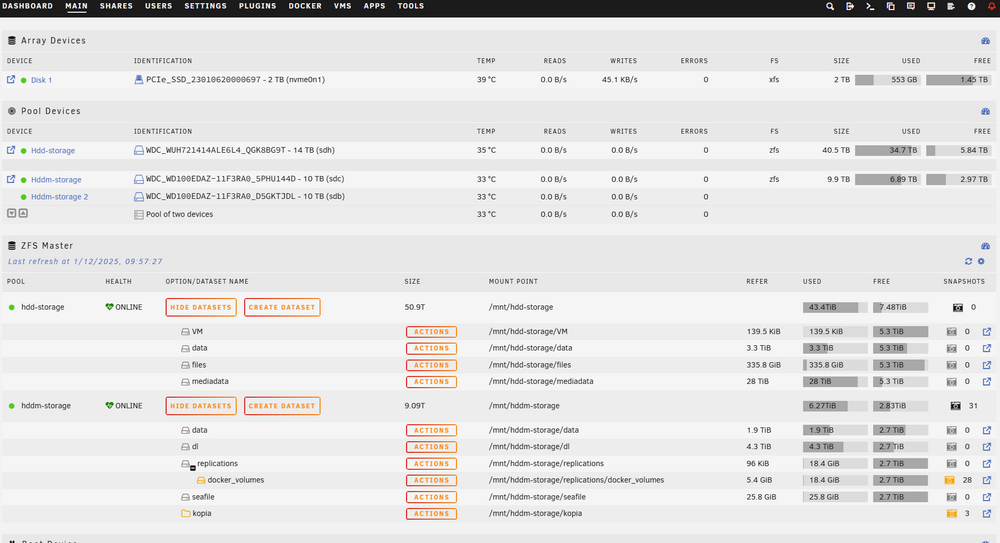
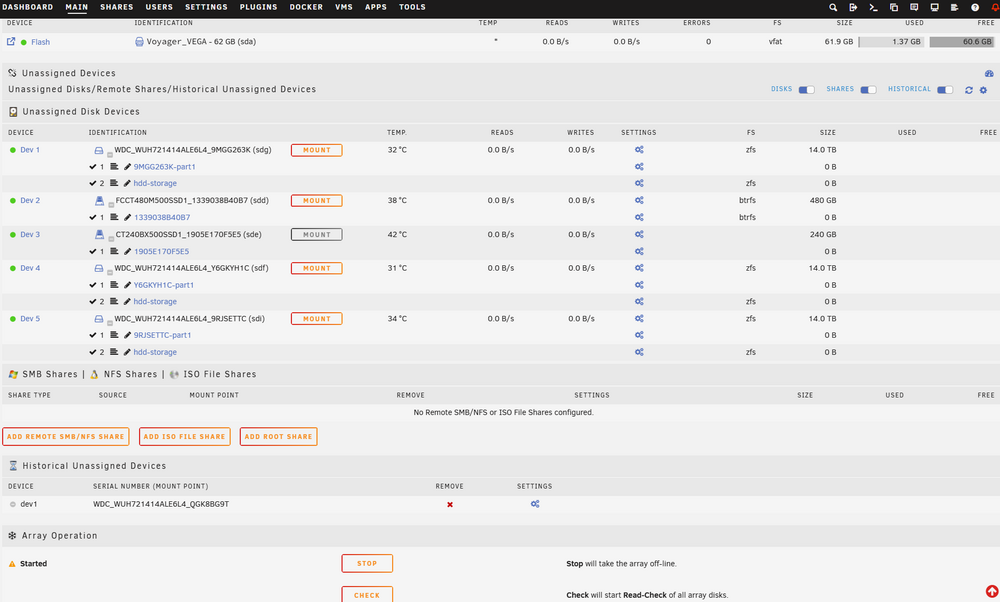
It works, it’s the UNRAID UI that displays it weird. My mirror says “this is a pool of 2 drives”, but the RAIDZ1 just shows the single sdh drive and the other 3 show up under “unassigned”
-
I need to know if it’s enough for all of them to go by-partuuid before I replace the sdh drive with my spare to force it to be by-partuuid from the beginning. This will take time and resilvering. I suspect that’s the only thing that would work, if Unraid doesnt fix this bug. The offlining does not work because at the very least the replace command leads to a resilver, and i’m not resilvering 3 drives instead of just the 1 to make it by-partuuid like the others.
-
You get an error that you can’t replace a drive with itself, like I said. However, are you saying Unraid will simply not detect any drive that does not go by /dev/sdX? I’m starting to think that’s the case (i thought surely if they were all the same aka by partuuid, unraid would not be confused). This is pretty shortsighted, especially since /dev/sdX is not actually recommended and people may be migrating their ZFS pools from elsewhere. Unraid should detect all drives as provided by the zpool status command…
-
I tried offlining sdh and replacing with itself with its by-partuuid like the others. It said you can’t replace a drive with itself. Sdh is different because it is the drive that failed and i had to replace back under 6.11.5 i did a manual replace with another disk and it ended up going by dev/sdh instead of partuuid. i can’t recreate the whole pool. Should be possible to remove the drive and add it back as a new drive but by its by-partuuid. It would have to resilver all over again. Would that work, Does unraid just want them all by partuuid?
-
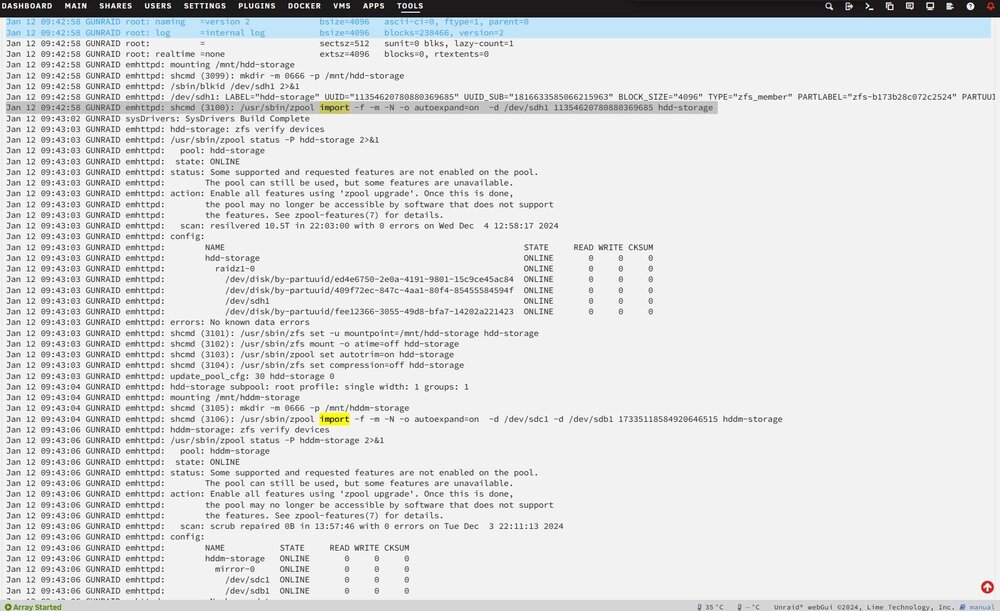
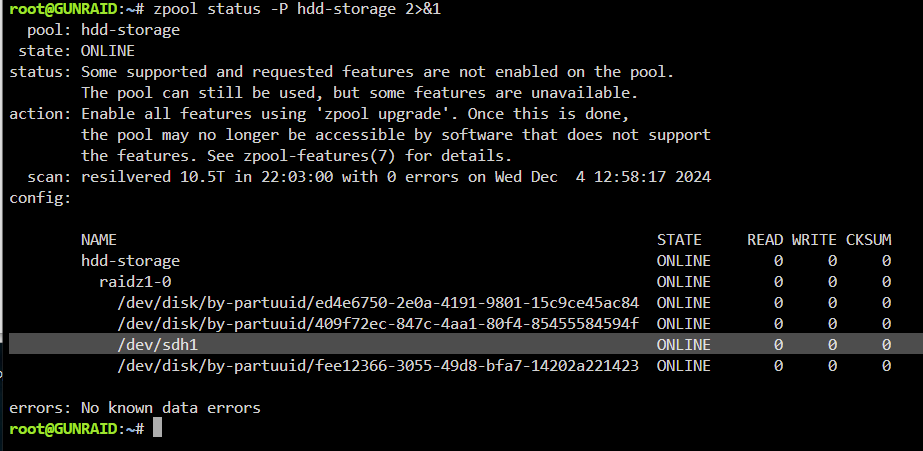
I've upgraded from 6.11.5 to 7.0, and after a lot of debugging here is what I see is happening. Everything works, but the UI shows my 4-drive RAIDZ1 incorrectly. The reason is because it maps the /dev/sdh1 drive in the UI but not the /by-partuuid/ drives. In the syslog, the zfs import command only includes /dev/sdh1 . You can see for the "hddm-storage" mirror import command it includes both /dev/sdc1 and /dev/sdb1 . I figured out that it simply needs to import the pool like this "zpool import -d /dev/disk/by-id <pool-name>" but it doesn't and i can't force it to. The best I was able to do was start a new config with just the hddm-storage and not the hdd-storage 4-drive RAIDZ1, and manually import hdd-storage with "-d /dev/disk/by-id" , THEN add the pool, and THEN the UI shows all 4 drives BUT to the right it says "unable to mount this pool" so it's bugged THAT way instead. How can I make it import the hdd-storage pool with "by-id" or at least all uniformly so that one drive (sdh1) isn't different from the others which then confuses the UI reporting?
-
Thanks, tried 6.12 this morning (also interested in the newer kernel for my quicksync issues), but it detected my ZFS mirror but not my RADIZ1. I selected the 4 drives, and identified it as a RAIDZ1 but wouldn't work. So i updated the BIOS as you pointed out and back on 6.11.5 re-running scrubs. I will try memtest at some point too thanks.
-
I underclocked it to 3200mhz, it's a 3600mhz kit.I opened up the PC and reseated RAM, lowered RAM from 3600mhz to 3200mhz, reseated HBA card, replaced HBA card SATA cables and moved cables to other slot. I have the RAIDZ4 on the LSI HBA card, and the mirror on the motherboard SATA, all with brand new cables. Why do I keep getting CKSUM errors? Every time it's a different random file with an error. Also the mirror should be rock solid running off the mobo (even if HBA is bad) and brand new cables and barely used drives. What is going on here?
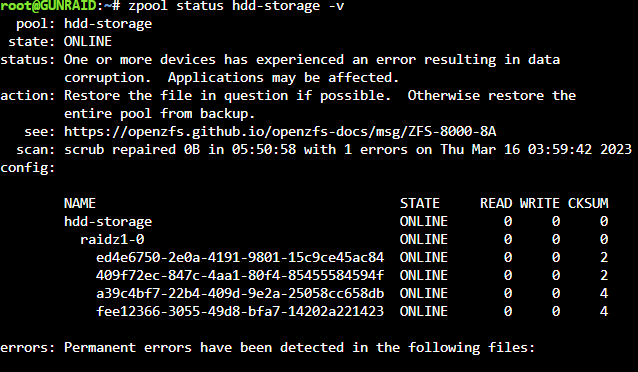
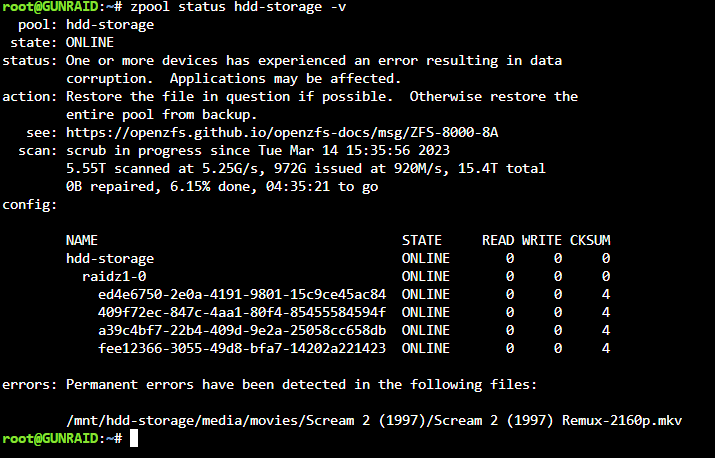
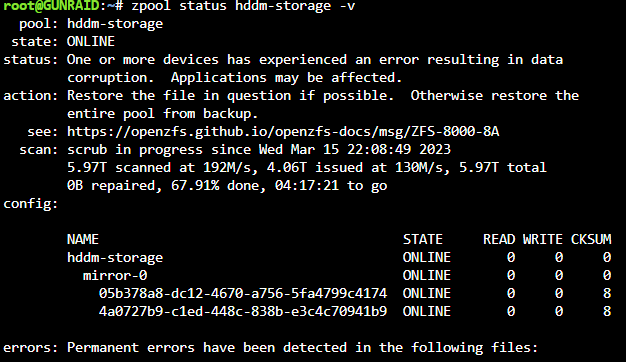 Ugh i also had a weird situation where radarr could not copy a movie over from my downloads folder due to some "IO error", it would fail at 13gb copied every time. I had to delete the file. These are 4x14tb in RAIDZ1 ( Western Digital Ultrastar DC HC530 WUH721414ALE6L4 0F31284 14TB ). here's some more info I deleted the file and a scrub is running. This 4x14tb RAIDZ1 array is the only 4 disks running off a 9211-8i 6Gbps LSI HBA. Disks are all at 33-34C with fans in their face, the HBA does not have a dedicated fan but I do have a fan on the side panel which should be hitting it....
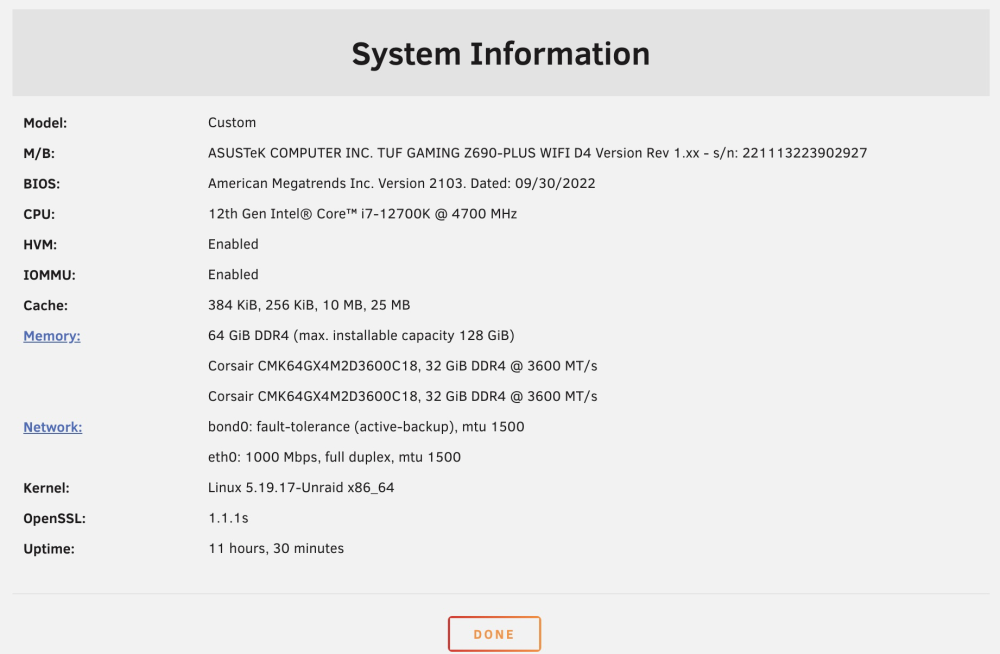
 Got home to a false degraded pool error and lots of "ereport.fs.zfs.deadman" in the logs. Restarted and everything is fine. Also been having a lot of the ACPI error. This is a brand new 12700k system, any input? Mar 14 15:06:22 GUNRAID kernel: ACPI BIOS Error (bug): Failure creating named object [\_SB.PC00.PEG1.PEGP._DSM.USRG], AE_ALREADY_EXISTS (20220331/dsfield-184) Mar 14 15:06:22 GUNRAID kernel: ACPI Error: AE_ALREADY_EXISTS, CreateBufferField failure (20220331/dswload2-477) Mar 14 15:06:22 GUNRAID kernel: ACPI Error: Aborting method \_SB.PC00.PEG1.PEGP.\_DSM due to previous error (AE_ALREADY_EXISTS) (20220331/psparse-529) Mar 14 15:06:47 GUNRAID zed[21232]: Diagnosis Engine: error event 'ereport.fs.zfs.deadman' Mar 14 15:06:47 GUNRAID zed[21232]: Diagnosis Engine: error event 'ereport.fs.zfs.deadman'It was my own stupidity, another IOT device in my network was grabbing the same IP as my unraid box, it's solid smooth now! Please close this thread.I'm running Unraid on this new system below and every once in a while I am unable to connect to the Unraid UI or docker containers (lasts 10-20 seconds) in the browser. I have attached my logs, the issue had just happened (UI hung and came back) when I downloaded them. I was watching corefreq-cli when it froze so I know exactly when it happened. I don't know what triggers the issue or how often it happens. I also had the syslog open which doesn't seem to show anything when the hangs happen. Is there any known issues with the intel 2.5gb nic in the Z690 TUF? Anyone using this motherboard? Any help appreciated. gunraid-diagnostics-20230311-0952.zip
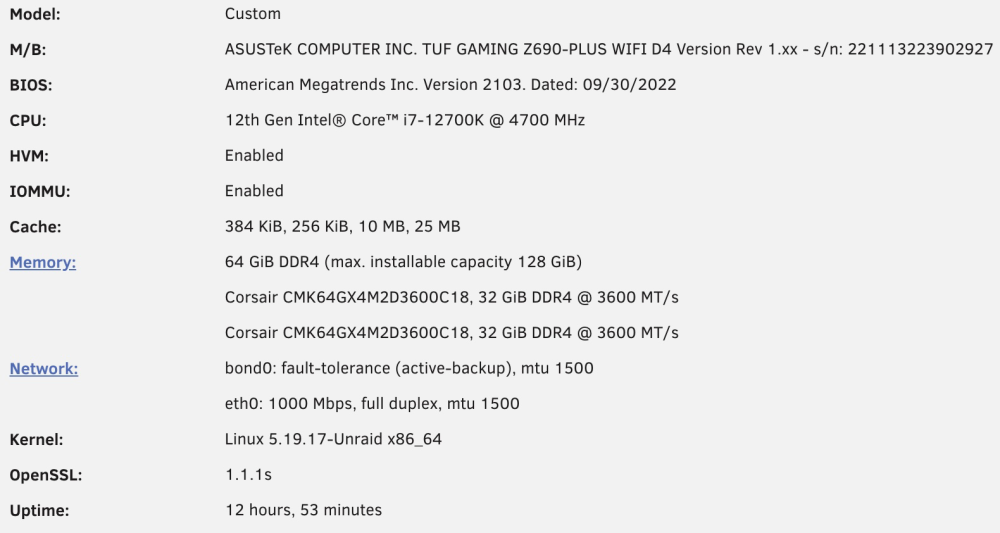 Anyone getting slowdowns where UI becomes unresponsive and won't reload, same with containers, and even the terminal won't respond for 10-30 seconds? I just put this system together, any input appreciated. I even disabled e-cores. What settings are you guys using in the bios with regards to over/underclocking, power states etc? Is there maybe some incompatibility with c-states or something?
 So putting my docker and docker_volumes in my ZFS NVME drive can cause issues? Do we know what issues and why that is? Is it more stable on say 6.11.0 or another version? What storage driver is being used automatically right now, and how did you go about selecting overlay2?I was able to import my ZFS pools from Scale, which is awesome. Only question is what storage-driver is being used (i'm pointing docker directory and docker appdata at a NVME I have under ZFS). Typically I would edit the /etc/docker/daemon.json to make it look like this, however there's nothing in /etc. How does this work in Unraid, where is the daemon.json or equivalent? How do I set it to use overlay2?
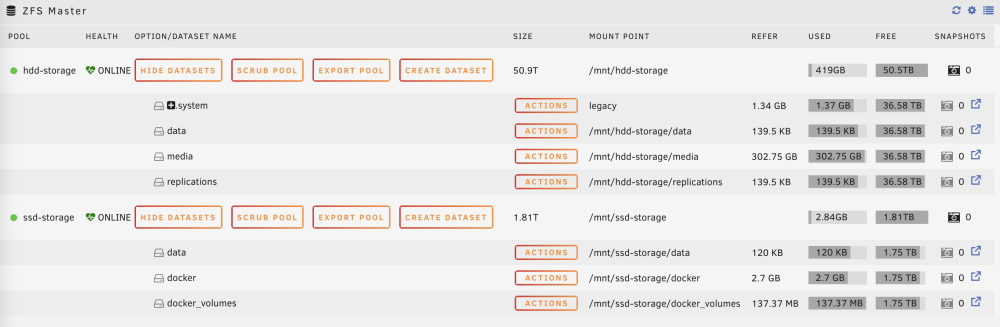
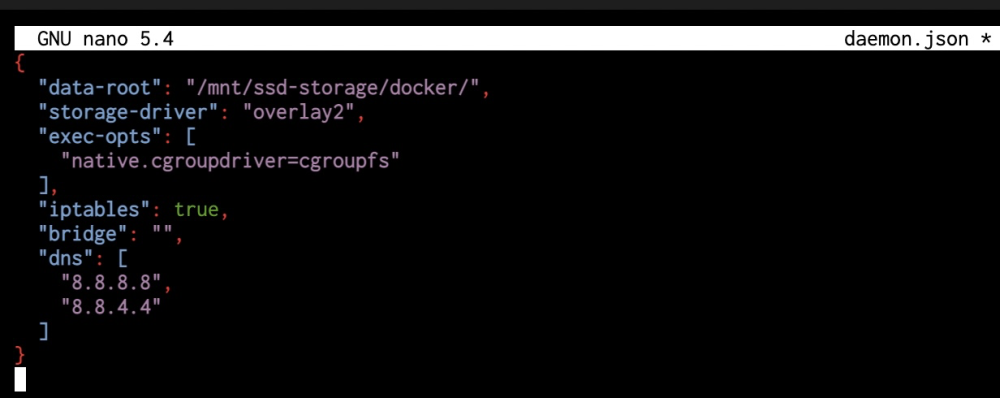 That would be amazing thank youThanks, must be an emby bug then. I’m just gona have to hope they fix it. Anyone here use Emby?Hey guys are people able to hardware transcode while also tonemapping (hardware or software tonemapping) on Alder Lake in unraid via docker (Jellyfin / Plex / Emby)? I put together a 12700k rig to hopefully replace my GPU with quicksync, but i'm only getting hardware transcoding on Emby if I leave tonemapping completely off. I would love to hear from anybody with a 12600k - 12900k who has been able to hardware transcode 50gb 4K HDR mkv's while also tonemapping. Which app are you using, what settings etc? ThanksAnybody with QSV experience on Alder Lake at all?A big reason for building a new NAS for me is to replace my 1050ti with quicksync entirely. Unfortunately, when trying it out with Emby docker container, i'm only getting quicksync hardware transcoding if I turn off tonemapping completely. I was wondering if other people are able to hardware transcode 4K HDR files while also hardware (or software) tonemapping, preferably on Emby but Plex / Jellyfin works too. I don't know if it's a bug, not possible, or what? I really would like to replace my 1050ti with the 12700k's quicksync!So I was able to import my ZFS pools from Truenas Scale successfully with the ZFS plugin (excited and patiently waiting for 6.12), which is awesome. The way you do it in Scale (after disabling their horrible apps and running docker bare-metal) is basically set up a pool (NVME for me) with a /docker dataset and /docker_volumes dataset (appdata I guess). I was able to replicate this in UNRAID after importing my ZFS pools, by setting the docker directory to directory mode and pointing at my existing docker and docker_volumes datasets as shown below. I then installed portainer and everything came right up. I'm pretty sure I could even dual boot into Scale and it would still work since the data structure is untouched (haven't tried, but pretty cool/interesting). My question is that I don't see a /etc/docker/daemon.json file. I may have read it's because UNRAID runs off RAM that /etc/ gets wiped. I'm guessing there must still be a docker daemon.json file somewhere? Where does it reside, and/or how do I make sure "storage-driver" is set to overlay2? Overlay2 is important when running docker on ZFS because other drivers have bad performance and/or generate tons of snapshot/image files. What storage driver is the docker daemon set to right now? Thanks in advance.