





secretstorage
Members
-
Joined
-
Last visited
Everything posted by secretstorage
-
Nope, it's just hit and miss and crashes from time to time when USB devices fall out. For the moment mine has been stable for about a months, as I've not used the 3D printer much, nor had much to do with Frigate, but I am sure that a day will come. At the moment I am looking at upgrading my rig with an X870E motherboard, so will have a lot more USBs under a single controller. Hopefully should be able to minimize the probability of these crashes, but not entirely sure if it will help.
-
@spants would you envision updating the docker image to include the new camera stack? https://octoprint.org/blog/2023/05/24/a-new-camera-stack-for-octopi/ https://plugins.octoprint.org/plugins/camerastreamer_control/ It would be fantastic to have RTC support for the buttery smooth streaming. Thanks in advance!
-
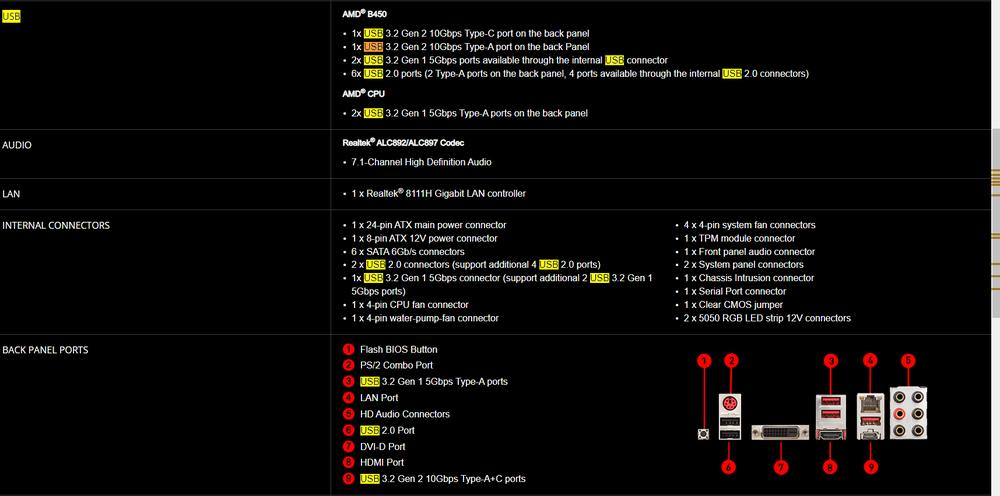
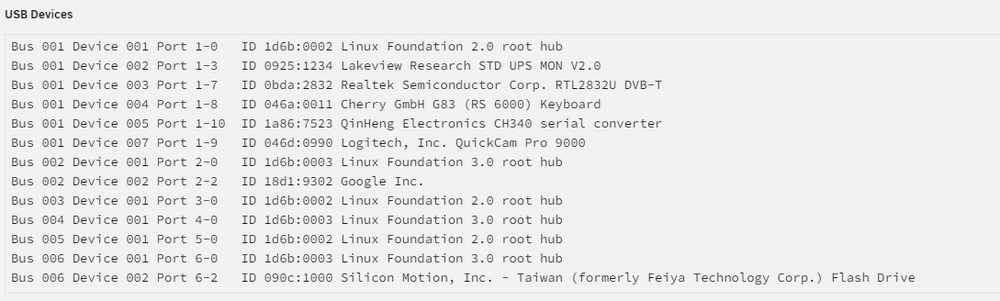
How would you read this: Looks like there are two and I am currently using both. I couldn't use only the back sockets because devices would fight for allocations and oscillate back and forth ON/OFF.
-
Just to clarify, "different USB controller" would be a physical USB hub? I am using 5 different ports on my B450 Tomahawk board, with all but one being allocated with the Unraid USB, 3D printer, SDR-adapter, Webcam and UPS. Should I buy a hub and get it transferred to it?
-
Looks to be mostly exactly the same errors for two users with completely different vintage and type of equipments. How should we proceed with seeking the Unraid's team help on this? Thank you!
-
Almost identical to my logs from a crash minutes ago - a pattern?? ``` Jun 6 18:17:10 Server dhcpcd-run-hooks[29674]: br0: Invalid domain name: .local Jun 6 18:47:10 Server dhcpcd-run-hooks[31956]: br0: Invalid domain name: .local Jun 6 19:17:10 Server dhcpcd-run-hooks[2210]: br0: Invalid domain name: .local Jun 6 19:47:10 Server dhcpcd-run-hooks[4298]: br0: Invalid domain name: .local Jun 6 20:17:10 Server dhcpcd-run-hooks[5781]: br0: Invalid domain name: .local Jun 6 20:43:36 Server kernel: usb 2-2: reset SuperSpeed USB device number 2 using xhci_hcd Jun 6 20:43:36 Server kernel: usb 2-2: LPM exit latency is zeroed, disabling LPM. Jun 6 20:47:10 Server dhcpcd-run-hooks[7601]: br0: Invalid domain name: .local Jun 6 21:17:10 Server dhcpcd-run-hooks[10055]: br0: Invalid domain name: .local Jun 6 21:47:10 Server dhcpcd-run-hooks[12527]: br0: Invalid domain name: .local Jun 6 22:17:10 Server dhcpcd-run-hooks[16036]: br0: Invalid domain name: .local Jun 6 22:47:10 Server dhcpcd-run-hooks[19282]: br0: Invalid domain name: .local Jun 6 23:17:10 Server dhcpcd-run-hooks[21925]: br0: Invalid domain name: .local Jun 6 23:47:10 Server dhcpcd-run-hooks[24961]: br0: Invalid domain name: .local Jun 7 00:17:10 Server dhcpcd-run-hooks[27826]: br0: Invalid domain name: .local Jun 7 00:26:23 Server kernel: xhci_hcd 0000:03:00.0: WARN Set TR Deq Ptr cmd failed due to incorrect slot or ep state. Jun 7 00:26:24 Server kernel: xhci_hcd 0000:03:00.0: WARN Successful completion on short TX Jun 7 00:26:24 Server kernel: xhci_hcd 0000:03:00.0: ERROR Transfer event TRB DMA ptr not part of current TD ep_index 2 comp_code 1 Jun 7 00:26:24 Server kernel: xhci_hcd 0000:03:00.0: Looking for event-dma 0000000103b91a90 trb-start 0000000103b91aa0 trb-end 0000000103b91aa0 seg-start 0000000103b91000 seg-end 0000000103b91ff0 Jun 7 02:13:45 Server unassigned.devices: Mounting 'Auto Mount' Devices... Jun 7 02:13:45 Server unassigned.devices: Error: Device '/dev/sdb1' mount point 'spare' - name is reserved, used in the array or a pool, or by an unassigned device. Jun 7 02:13:45 Server unassigned.devices: Disk with serial 'ST4000DX001-1CE168_Z30195RK', mountpoint 'spare' cannot be mounted. Jun 7 02:13:46 Server emhttpd: Starting services... ``` @JorgeB I've currently switched off in config all the cameras that previously were rebooting and causing errors in Frigate, so they are no longer present in logs. This may thus be strictly related to USB resetting? https://github.com/google-coral/edgetpu/issues/166
-
Thank you very much for taking the time to look into it. Would you mind elaborating on what re-test would mean? Since it's often 2-4 weeks between crashes (before) and 3-4 happening today, I wonder how would I go about testing it. I would have to disable my NVR, 3D printer monitoring and many automations for weeks/months to confirm anything... hmm what to do.... In the meantime, I've found the following thread, which seems very close to what is going on for me. Would you agree?
-
@JorgeB would you mind taking a look? It failed 3 times just today and while there are still USB errors attributable to my UPS which for some reason seems to disconnect all the time, there are other docker related errors (blocked mode). Not sure where to look for next steps.... syslog-10.10.10.99.log
-
And again died this morning, just 30-45 min ago. From what I can see there are a lot of GPU errors as well, which starts to make sense in the way the GPU was behaving, but it would this cause a kernel panic issue? syslog-10.10.10.99.log
-
My 3D printer is powering down and up maybe 2-3 times a day and I am running OctoPrint container - so this could be one. Outside of that nothing else is connecting/disconnecting. Need to remove the GPU as it's been giving me grief recently and try to run it headless. The issue with that is that I will not know what state the server is in when it locks up.
-
It happened 3 times in the last two weeks, with the latest one about 20 minutes ago. I can look up the other two, which took place when I was on leave. Thanks for looking into it. syslog-10.10.10.99.log
-
OK, I'll continue logging and will come back to this thread upon another crash. It's typically every 10-14 days. Thanks for looking into it!
-
The crash occurred today around 22.20 CET and I've recovered around 0:20 CET, so rough 2h later. Please see the logs attached syslog-10.10.10.99.log
-
Thanks very much for looking into it so quickly! 1) You may have missed that in an earlier post, I've migrated ALL hardware (including case 😉) bar the USB drive and the issue continues happening as it had before. 2) I understand it may be a route for some but since Unraid is hosting my home automation server it's not an option to bring it down for several days as it would affect many systems. I don't have hardware to host it in parallel unfortunately. 3) With many threads on this and people having corrected the mcvlan issues already, it's really difficult to understand how everyone is having a hardware issue that produces the same outcome. I understand it's very difficult to chaise down such intermitent problems but I also fell there is a lot of 'it works on my end' vibes going around. I'll await another kernel panic crash and send in the logs, as it haven't happened yet. This may allow us additional information. Fingers crossed! 🤞
-
syslog-10.10.10.99.logserver-diagnostics-20240213-1804.zip Please see the diagnostics attached. Second, I am including the logs from the last 24 hours, which may provide some clues or further confusion. What have not happened before, for an unknown reason my whole docker simply stopped yesterday and was disabled until I enabled it about an hour ago. The logs are also flooded with Server kernel: device vethe9dd15e entered promiscuous mode Please feel free to have a look, if you see anything relevant. Thank you in advance!!
-
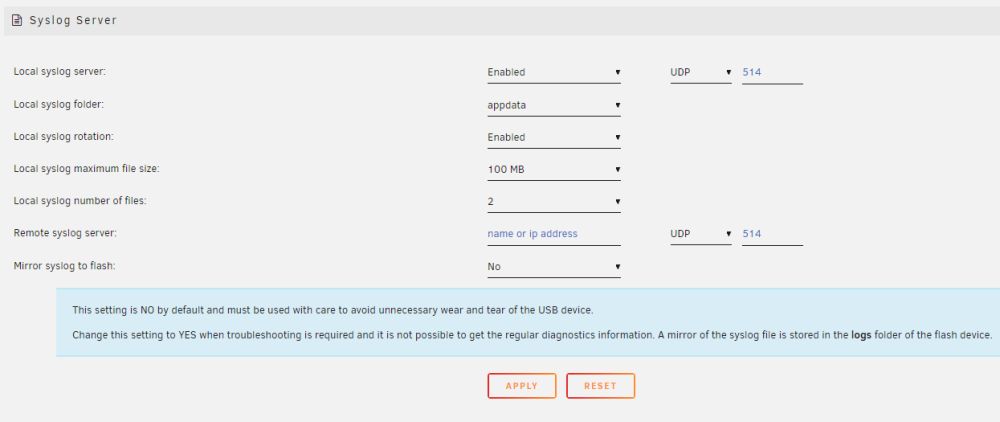
One additional question: Since it's not boot related, would you still recommend mirroring the logs to flash, or `appdata` storage will suffice in this instance?
-
Thank you for the prompt reply. Will do!!
-
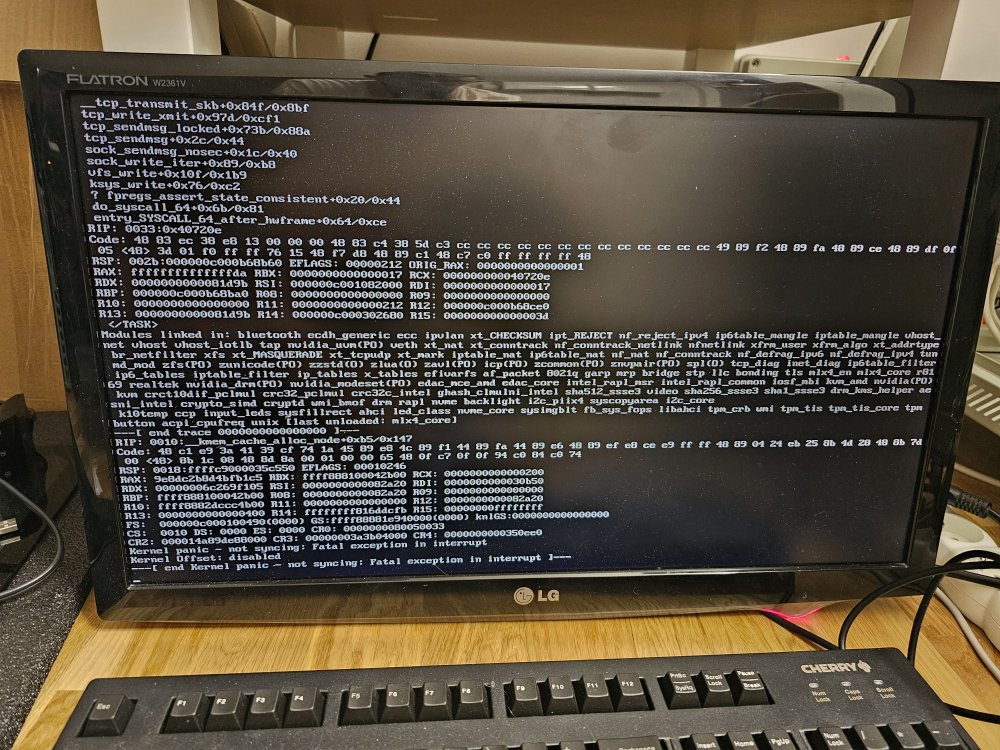
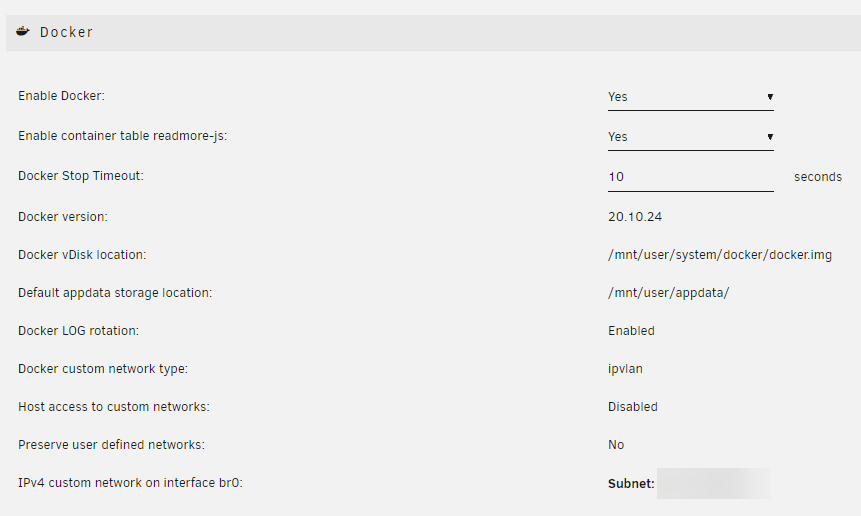
Hi all, Assuming it's not macvlan issue, and someone (i.e. me) have gone over countless existing threads concerning the same kernel panic issue - what would be the next step in troubleshooting? My docker doesn't seem to have any macvlan entries: root@Server:~# docker network ls NETWORK ID NAME DRIVER SCOPE 49a19b8efe85 br0 ipvlan local fcf8b97dc48a bridge bridge local 8aef9fee9896 host host local d6284db37b39 none null local 9dcd05e2c5a4 pihole_unraid_default bridge local 68560f9ac751 rrmedia bridge local cdd1d30a2ba1 wg0 bridge local I am on: I've migrated hardware last year, and it continues happening. Most likely every 2–3 weeks (without an unraid reboot), but lately it happened 4 times in 3 days. The thing I haven't changed in a while (1 year) is my USB stick, though I am not sure if this could be related. It's a Samsung 32GB BAR Plus Titan Gray 200MB/s I'd greatly appreciate some assistance! Thanks in advance

-
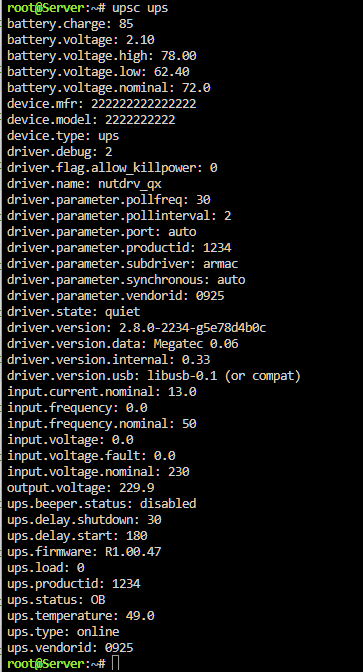
This is just to let everyone know, there has been a lot of troubleshooting done on the armac subdriver since last night, and it seems like different devices need different approaches to data collection. The current state of affairs is that with a frankenstein setup and a custom compiled driver majority of variables are collected fine, though there is strangness related to batery charge/voltage (which is the same on the device display). The battery at 0W load goes down then up and down (100%, to 72% and now at 85%, while it shows 2.10V from 72V rating), though this may be an RMA for my unit. Various commands to switch the UPS operation mode are executed correctly though. Thank you all!
-
@SimonF, I did try the new package, but my issue persists, as it's most probably driver related. I am seeking assistance in an issue reported under the NUT repo https://github.com/networkupstools/nut/issues/1978, but if someone here has any pointers, I'd appreciate the help: Simultaneously, while I have you, the package you shared as an attachment to test, was about half the size of a file under the exact same name, that was loaded to my folder most probably by the 2.8.0 installer for the NUT package shared earlier by @Rysz. To this end, there could be a few scenarios where something went wrong. Same name, but different contents, is rarely a good thing in coding. What I had in the ./config/plugins/nut/ folder: What yours looked like: Thank you!


-
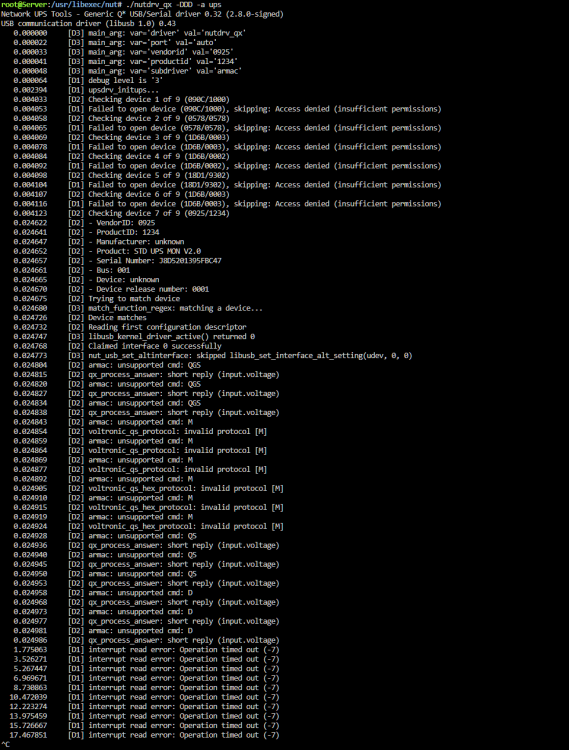
I've installed the latest version and so far (without a reboot) suffer from the same issue. It's really strange that the ancient Power Manager software works just fine with this newer model (PF1 generation), while the driver and subdriver indicated to work for others with Armac UPSs fails. Is there any way to troubleshoot, further down the rabbit hole, why the driver doesn't work? It may be something trivial they changed in the unit, as compared to older variants, and thus it is not recognized.
-
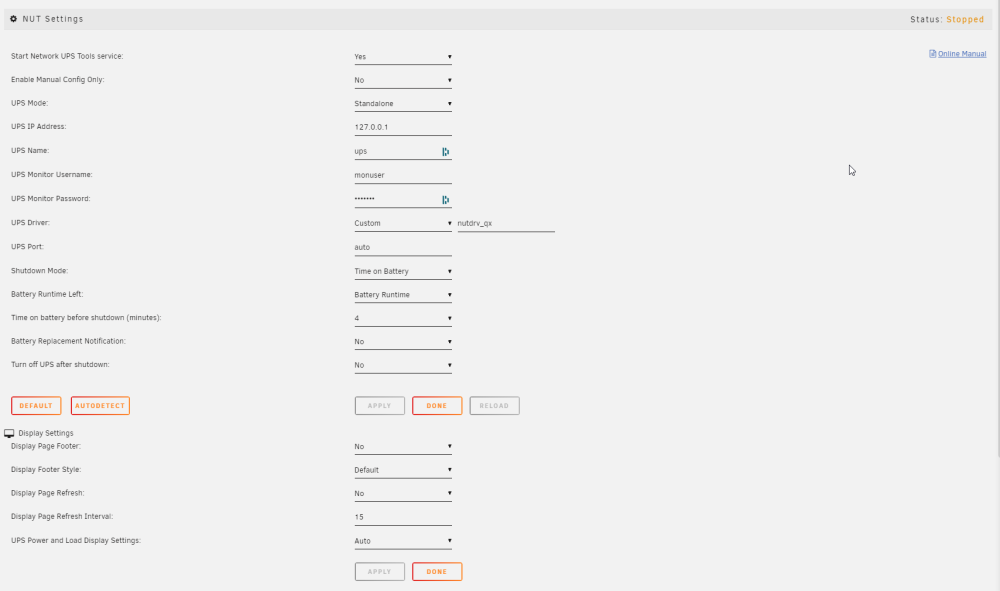
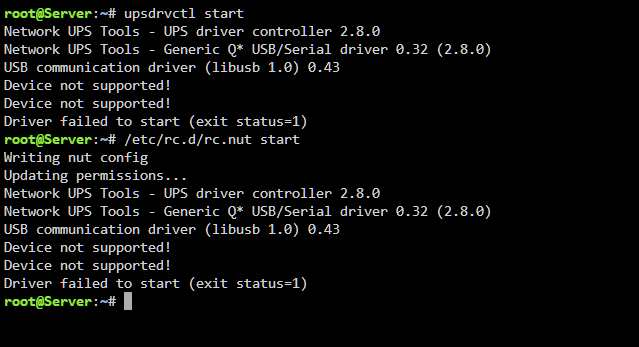
I've followed all the steps as indicated, minus disabling the NUT service via the NUT settings, since it was stopped when I reinstalled it and couldn't 'disable' it anymore. The outcome is unfortunately exactly the same, even when I try it from CLI as well.
-
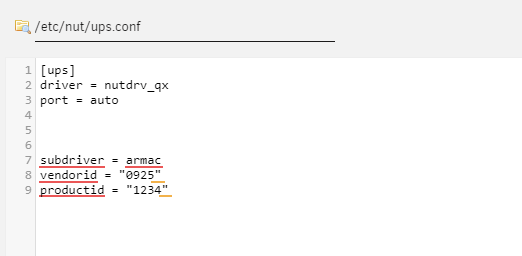
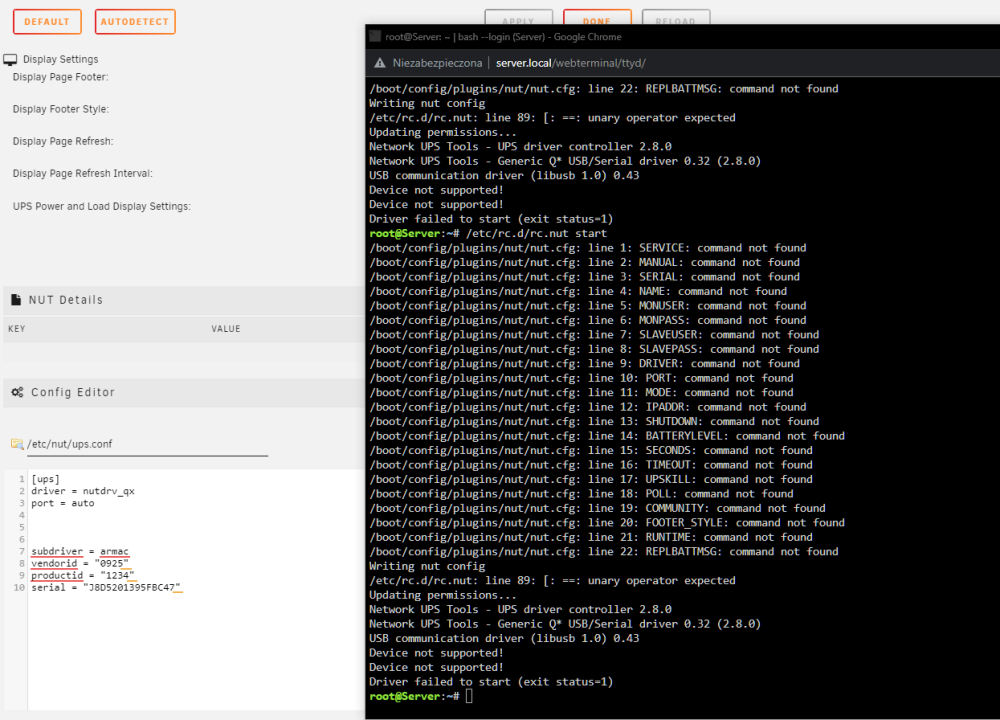
Tried both with serial and without, and with the records in specific lines, as indicated – no dice!
-
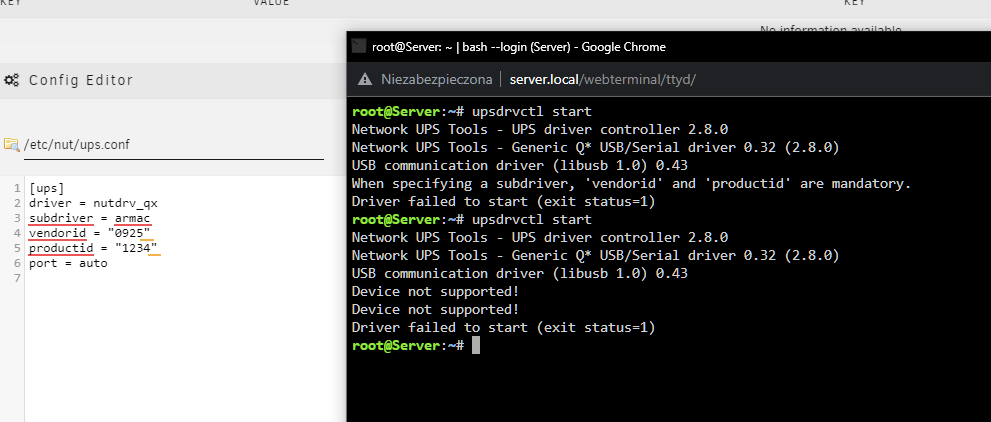
No luck! root@Server:~# chown root:nut /var/state/ups root@Server:~# chmod 0770 /var/state/ups root@Server:~# /etc/rc.d/rc.nut stop Writing nut config Updating permissions... Stopping the UPS services... Network UPS Tools - UPS driver controller 2.8.0 Can't open /var/state/ups/nutdrv_qx-ups.pid: No such file or directory Can't open /var/state/ups/nutdrv_qx-auto.pid either: No such file or directory root@Server:~# /etc/rc.d/rc.nut start Writing nut config Updating permissions... Network UPS Tools - UPS driver controller 2.8.0 Network UPS Tools - Generic Q* USB/Serial driver 0.32 (2.8.0) USB communication driver (libusb 1.0) 0.43 ^[[ADevice not supported! Device not supported! Driver failed to start (exit status=1) root@Server:~# upsdrvctl start Network UPS Tools - UPS driver controller 2.8.0 Network UPS Tools - Generic Q* USB/Serial driver 0.32 (2.8.0) USB communication driver (libusb 1.0) 0.43 Device not supported! Device not supported! Driver failed to start (exit status=1) root@Server:~# Tried also with the specific subdriver, but the outcome was the same:
-
Thank you!! Fingers crossed it's released soon. I have this UPS in place and if it's not going to work out, I can return it to the seller in 14 days. Hopefully, the fix will resolve that issue and another is not right behind it. Knowing my luck, it won't be that easy...


