raiderbert
Members
-
Joined
-
Last visited
Everything posted by raiderbert
-
Thank you very much! Disabling magic dns resolved the issue with all my br0 docker containers!
-
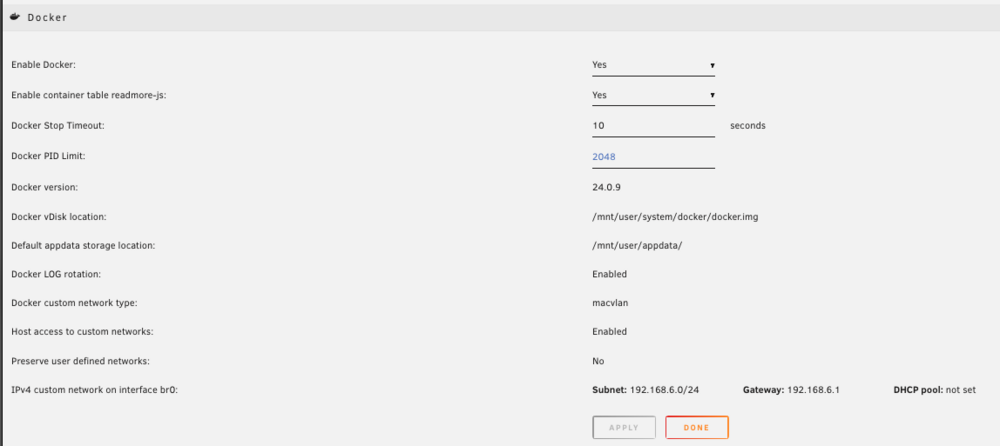
Thank you very much for your answer. My Docker network was still running with the network type “ipvlan” until just now. I changed it to “macvlan”, but unfortunately this did not bring any improvement.
-
I have now been able to narrow down the problem somewhat. I tested with a chromium container. With network type “Bridge”, the connection to websites in this browser works perfectly, regardless of Tailscale. If I set the container to “Custom: br0”, I can only call up websites in the browser if I first use tailscale down to close the connection to the tailscale network, then start the container. I can then use tailscale up to re-establish the connection to Tailscale without affecting already running/functioning containers. Unfortunately, all containers with custom network br0 are actually affected. If I reboot them while connected to the Tailscale network, the containers do not get a connection to the internet. Does anyone have an idea how I can further analyze the problem?
-
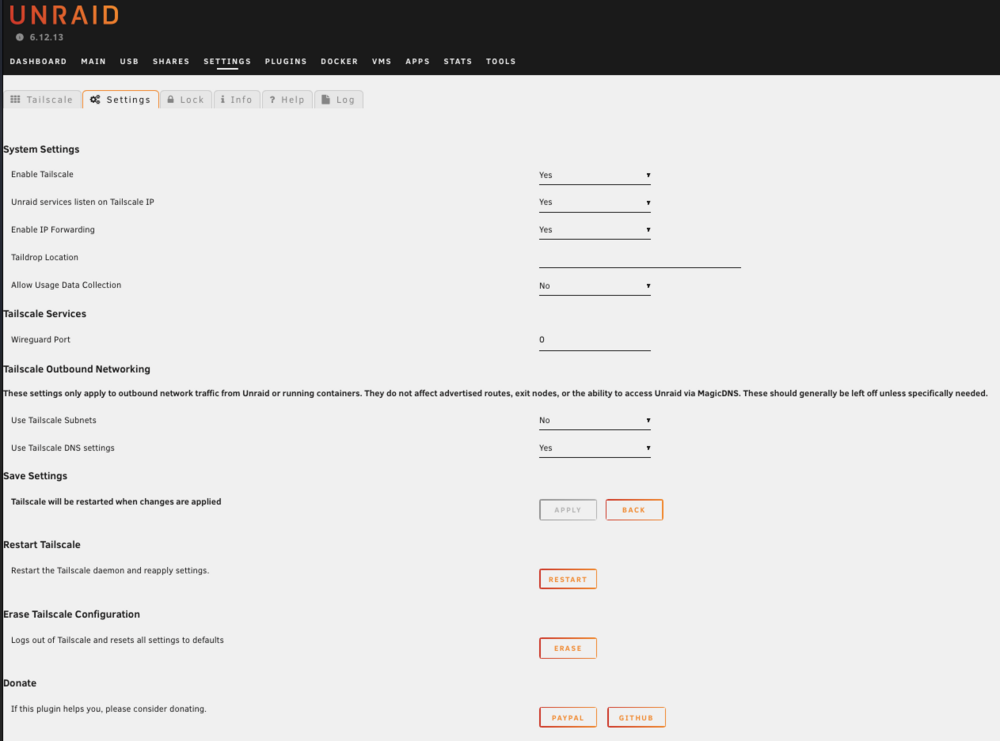
ADDITION: Disabling magic dns resolved the issue. Hello, I have successfully installed and set up the Tailscale plugin, which allows me to remotely access my Unraid server and the individual Docker containers. Since then, however, various Docker containers have been behaving strangely (network type: custom br0). It looks like a connection to the internet is no longer possible. Errors when the tailscale plugin is activated: Jellyfish: The plugin catalogue and meta data can no longer be loaded: [2024-10-04 12:05:15.192 +02:00] [ERR] [17] MediaBrowser.Providers.Movies.MovieMetadataService: Error in "The Open Movie Database" System.Net.Http.HttpRequestException: Resource temporarily unavailable (www.omdbapi.com:443) ---> System.Net.Sockets.SocketException (11): Resource temporarily unavailable SABnzbdVPN: Restart of the container no longer possible (see If I deactivate the tailscale plugin in the settings, all containers work as desired again after I restart them. Settings: (it makes no difference whether DNS settings are activated/deactivated) Does anyone know a way to solve this error? Or do I have to explicitly use my Unraid server as an ‘exit node’ in this case so that the Docker containers can continue to access the Internet? I haven't activated this function yet because I don't need it.
-
ADDITION: Disabling magic dns resolved the issue. Hello, I have been using this awesome binhex - SABnzbdVPN container on my Unraid server for a long time without any errors. Today I successfully installed and set up the Tailscale plugin, which allows me to access my Unraid server and the individual Docker containers remotely. Since then, however, my SABnzbdVPN container no longer (re)starts, but remains in the logs here: 2024-10-03 22:22:15.945030 [info] Host is running unRAID 2024-10-03 22:22:15.973547 [info] System information: Linux 33db1ddc1cd9 6.1.106-Unraid #1 SMP PREEMPT_DYNAMIC Wed Aug 21 23:36:07 PDT 2024 x86_64 GNU/Linux 2024-10-03 22:22:16.001699 [info] Image tags: INT_RELEASE_TAG=2024073001,IMAGE_RELEASE_TAG=4.3.3-1-01 2024-10-03 22:22:16.033218 [info] PUID defined as '99' 2024-10-03 22:22:16.069592 [info] PGID defined as '100' 2024-10-03 22:22:16.144328 [info] UMASK defined as '000' 2024-10-03 22:22:16.175167 [info] Permissions already set for '/config' 2024-10-03 22:22:16.207825 [info] Deleting files in /tmp (non recursive)... 2024-10-03 22:22:16.244691 [info] VPN_ENABLED defined as 'yes' 2024-10-03 22:22:16.277611 [info] VPN_CLIENT defined as 'wireguard' 2024-10-03 22:22:16.308856 [info] VPN_PROV defined as 'airvpn' 2024-10-03 22:22:16.352572 [info] WireGuard config file (conf extension) is located at /config/wireguard/wg0.conf 2024-10-03 22:22:16.397093 [info] VPN_REMOTE_SERVER defined as 'gb3.vpn.airdns.org' 2024-10-03 22:22:16.430539 [info] VPN_REMOTE_PORT defined as '1637' 2024-10-03 22:22:16.458991 [info] VPN_DEVICE_TYPE defined as 'wg0' 2024-10-03 22:22:16.487447 [info] VPN_REMOTE_PROTOCOL defined as 'udp' 2024-10-03 22:22:16.519622 [info] USERSPACE_WIREGUARD not defined (via -e USERSPACE_WIREGUARD), defaulting to 'no' 2024-10-03 22:22:16.571073 [info] NAME_SERVERS defined as '84.200.69.80,37.235.1.174,1.1.1.1,37.235.1.177,84.200.70.40,1.0.0.1' If I deactivate the tailscale plugin in the settings, I can start the SABnzbdVPN container again without errors. I can then reactivate the Tailscale plugin and still access the SABnzbdVPN container (even remotely from the Tailscale network). Only the next time I try to restart, the SABnzbdVPN container does not start up again due to the activated Tailnet plugin, but stops at the beginning of the start. Does anyone know a way to solve this error?
-
I've got the same issue with AirVPN today
-
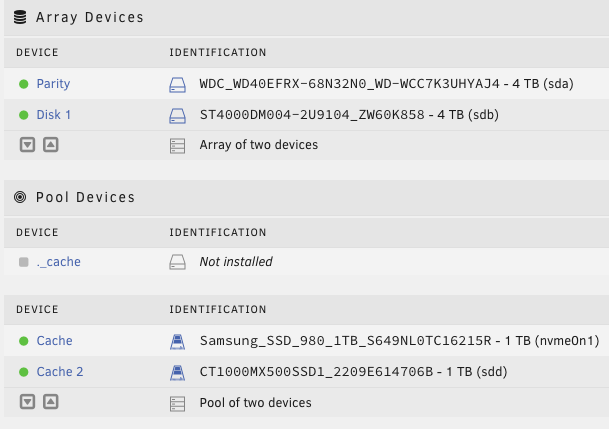
Vielen Dank für deine Unterstützung! Ich konnte meine Daten mittlerweile ohne Verlust wiederherstellen. Vorgehen wie von dir vorgeschlagen: Alle VMs stoppen. Alle Docker Container stoppen. Settings -> Docker und VM Manager deaktivieren. Daten sichern: rsync --archive --stats /mnt/cache/ /mnt/disk1/backup/20230408_cache &> /mnt/disk1/rsync.log & disown Auflösung des Cache Pools. NVMe als Single Cache Device mit XFS formatiert. Daten wiederherstellen: rsync --archive --stats /mnt/disk1/backup/20230408_cache/ /mnt/cache/ &> /mnt/disk1/rsync_back.log & disown Die SATA habe ich dann mit XFS formatiert und als ua-device eingehängt. Läuft jetzt seit einer Woche fehlerfrei.
-
Danke dir, das wird es bei mir auch gewesen sein. Ich habe den Cache Pool mittlerweile aufgelöst und die Crucial als unassigned device mit XFS eingehangen.
-
Hallo Forum, ich bin seit einigen Wochen stolzer Nutzer eines Unraid-Servers und habe seitdem alle meine Anwendungen (Docker, VMs) von zwei Raspi4 und einem QNAP nach Unraid umgezogen. Das lief bis dato auch alles sehr geschmeidig, aber nun fiel mir vorhin auf, dass /var/log vollgelaufen war. Das syslog ist auf einmal voll mit solchen Fehlern: Apr 7 23:53:19 UNRAID1 kernel: BTRFS error (device nvme0n1p1): bdev /dev/sdd1 errs: wr 135185293, rd 81385031, flush 321858, corrupt 9, gen 0 Apr 7 23:53:19 UNRAID1 kernel: BTRFS error (device nvme0n1p1): error writing primary super block to device 2 Apr 7 23:25:47 UNRAID1 kernel: BTRFS warning (device nvme0n1p1): i/o error at logical 929682395136 on dev /dev/sdd1, physical 133943234560, root 5, inode 260, offset 8012402688, length 4096, links 1 (path: system/docker/docker.img) Apr 7 23:24:37 UNRAID1 kernel: BTRFS warning (device nvme0n1p1): i/o error at logical 914604810240 on dev /dev/sdd1, physical 119939391488, root 5, inode 2476, offset 1934389248, length 4096, links 1 (path: domains/home_assistant/haos_ova-9.5.qcow2) Anscheinend ging es damit heute früh los: Apr 7 00:55:08 UNRAID1 kernel: ata1.00: exception Emask 0x0 SAct 0x0 SErr 0x0 action 0x6 frozen Apr 7 00:55:08 UNRAID1 kernel: ata1.00: failed command: DATA SET MANAGEMENT Apr 7 00:55:08 UNRAID1 kernel: ata1.00: cmd 06/01:01:00:00:00/00:00:00:00:00/a0 tag 19 dma 512 out Apr 7 00:55:08 UNRAID1 kernel: res 40/00:01:00:00:00/00:00:00:00:00/00 Emask 0x4 (timeout) Apr 7 00:55:08 UNRAID1 kernel: ata1.00: status: { DRDY } Apr 7 00:55:08 UNRAID1 kernel: ata1: hard resetting link Apr 7 00:55:13 UNRAID1 kernel: ata1: link is slow to respond, please be patient (ready=0) Apr 7 00:55:18 UNRAID1 kernel: ata1: COMRESET failed (errno=-16) Apr 7 00:55:18 UNRAID1 kernel: ata1: hard resetting link Apr 7 00:55:23 UNRAID1 kernel: ata1: link is slow to respond, please be patient (ready=0) Apr 7 00:55:28 UNRAID1 kernel: ata1: COMRESET failed (errno=-16) Apr 7 00:55:28 UNRAID1 kernel: ata1: hard resetting link Apr 7 00:55:33 UNRAID1 kernel: ata1: link is slow to respond, please be patient (ready=0) Apr 7 00:56:03 UNRAID1 kernel: ata1: COMRESET failed (errno=-16) Apr 7 00:56:03 UNRAID1 kernel: ata1: limiting SATA link speed to 3.0 Gbps Apr 7 00:56:03 UNRAID1 kernel: ata1: hard resetting link Apr 7 00:56:08 UNRAID1 kernel: ata1: COMRESET failed (errno=-16) Apr 7 00:56:08 UNRAID1 kernel: ata1: reset failed, giving up Apr 7 00:56:08 UNRAID1 kernel: ata1.00: disable device Apr 7 00:56:08 UNRAID1 kernel: ata1: EH complete Apr 7 00:56:08 UNRAID1 kernel: sd 2:0:0:0: [sdd] tag#14 UNKNOWN(0x2003) Result: hostbyte=0x04 driverbyte=DRIVER_OK cmd_age=0s Apr 7 00:56:08 UNRAID1 kernel: sd 2:0:0:0: [sdd] tag#14 CDB: opcode=0x28 28 00 15 ab b2 98 00 00 08 00 Apr 7 00:56:08 UNRAID1 kernel: I/O error, dev sdd, sector 363573912 op 0x0:(READ) flags 0x0 phys_seg 1 prio class 0 Apr 7 00:56:08 UNRAID1 kernel: BTRFS error (device nvme0n1p1): bdev /dev/sdd1 errs: wr 0, rd 1, flush 0, corrupt 0, gen 0 Apr 7 00:56:08 UNRAID1 kernel: sd 2:0:0:0: [sdd] tag#15 UNKNOWN(0x2003) Result: hostbyte=0x04 driverbyte=DRIVER_OK cmd_age=90s Apr 7 00:56:08 UNRAID1 kernel: sd 2:0:0:0: [sdd] tag#15 CDB: opcode=0x93 93 08 00 00 00 00 0e 6c 00 28 00 00 00 40 00 00 Apr 7 00:56:08 UNRAID1 kernel: BTRFS warning (device nvme0n1p1): direct IO failed ino 260 rw 0,0 sector 0x15abb298 len 0 err no 10 Apr 7 00:56:08 UNRAID1 kernel: I/O error, dev sdd, sector 241958952 op 0x3:(DISCARD) flags 0x800 phys_seg 1 prio class 0 Apr 7 00:56:08 UNRAID1 kernel: sd 2:0:0:0: [sdd] tag#16 UNKNOWN(0x2003) Result: hostbyte=0x04 driverbyte=DRIVER_OK cmd_age=0s Apr 7 00:56:08 UNRAID1 kernel: sd 2:0:0:0: [sdd] tag#16 CDB: opcode=0x28 28 00 15 ab b2 d8 00 00 08 00 Apr 7 00:56:08 UNRAID1 kernel: I/O error, dev sdd, sector 363573976 op 0x0:(READ) flags 0x0 phys_seg 1 prio class 0 Ein Scrub inkl. "Repair corrupted blocks" verlief wenig erfolgreich: btrfs srub error summary: read=36206647 super=3 Uncorrectable: 36206647 Spannend ist, dass alle Docker-Container sowie meine beiden VMs (Home Assistant und Loxberry) fehlerfrei zu laufen scheinen. Zum Aufbau: Ein "SMART short self-test" zeigt für nvme0n1 keine Fehler: === START OF SMART DATA SECTION === SMART overall-health self-assessment test result: PASSED SMART/Health Information (NVMe Log 0x02) Critical Warning: 0x00 Temperature: 60 Celsius Available Spare: 100% Available Spare Threshold: 10% Percentage Used: 0% Data Units Read: 6,421,646 [3.28 TB] Data Units Written: 7,740,431 [3.96 TB] Host Read Commands: 79,775,205 Host Write Commands: 64,814,314 Controller Busy Time: 295 Power Cycles: 16 Power On Hours: 149 Unsafe Shutdowns: 5 Media and Data Integrity Errors: 0 Error Information Log Entries: 0 Warning Comp. Temperature Time: 0 Critical Comp. Temperature Time: 0 Temperature Sensor 1: 60 Celsius Temperature Sensor 2: 81 Celsius Error Information (NVMe Log 0x01, 16 of 64 entries) No Errors Logged Wie geht ich jetzt am Besten vor, um diese Fehler zu bereinigen? Vielen Dank für eure Unterstützung!