





pidg30n
Members
-
Joined
-
Last visited
Everything posted by pidg30n
-
Hello, I had a linux OS installed before installing unraid. I am trying to passthrough the NVME and GPU to allow it to function like it did before I installed unraid on the system. I've enabled "Both" on the VM manager for PCIE passthru and checked the checkboxes for the NVME passthru underneath the other devices below USB. I've also selected the GPU and GPU sound card to be assigned. I've tried with and without a vbios file. I tried the community script to dump vbios but it dumps a tiny file that is too small.... The NVME is attempted to be passed through as the following device : Phison Electronics E16 PCIe4 NVMe Controller | Non-Volatile memory controller (3d:00.0) When I go to view logs the screen looks funky and I can't read the text, so I have to select all, and copy then paste to a notepad. It looks like this... Here is the recent error I pulled by copying pasting from the obfuscated logs page. -accel kvm \ -cpu host,migratable=on,host-cache-info=on,l3-cache=off \ -m size=16777216k \ -object '{"qom-type":"memory-backend-ram","id":"pc.ram","size":17179869184}' \ -overcommit mem-lock=off \ -smp 8,sockets=1,dies=1,clusters=1,cores=4,threads=2 \ -uuid ca707230-6f2b-014f-e083-651f8ffc44a3 \ -display none \ -no-user-config \ -nodefaults \ -chardev socket,id=charmonitor,fd=41,server=on,wait=off \ -mon chardev=charmonitor,id=monitor,mode=control \ -rtc base=utc,driftfix=slew \ -global kvm-pit.lost_tick_policy=delay \ -no-shutdown \ -boot strict=on \ -device '{"driver":"pcie-root-port","port":8,"chassis":1,"id":"pci.1","bus":"pcie.0","multifunction":true,"addr":"0x1"}' \ -device '{"driver":"pcie-root-port","port":9,"chassis":2,"id":"pci.2","bus":"pcie.0","addr":"0x1.0x1"}' \ -device '{"driver":"pcie-root-port","port":10,"chassis":3,"id":"pci.3","bus":"pcie.0","addr":"0x1.0x2"}' \ -device '{"driver":"pcie-root-port","port":11,"chassis":4,"id":"pci.4","bus":"pcie.0","addr":"0x1.0x3"}' \ -device '{"driver":"pcie-root-port","port":12,"chassis":5,"id":"pci.5","bus":"pcie.0","addr":"0x1.0x4"}' \ -device '{"driver":"pcie-root-port","port":13,"chassis":6,"id":"pci.6","bus":"pcie.0","addr":"0x1.0x5"}' \ -device '{"driver":"pcie-root-port","port":14,"chassis":7,"id":"pci.7","bus":"pcie.0","addr":"0x1.0x6"}' \ -device '{"driver":"qemu-xhci","p2":15,"p3":15,"id":"usb","bus":"pcie.0","addr":"0x7"}' \ -device '{"driver":"virtio-serial-pci","id":"virtio-serial0","bus":"pci.2","addr":"0x0"}' \ -netdev '{"type":"tap","fd":"42","id":"hostnet0"}' \ -device '{"driver":"virtio-net","netdev":"hostnet0","id":"net0","mac":"52:54:00:d7:dc:25","bus":"pci.1","addr":"0x0"}' \ -chardev pty,id=charserial0 \ -device '{"driver":"isa-serial","chardev":"charserial0","id":"serial0","index":0}' \ -chardev socket,id=charchannel0,fd=40,server=on,wait=off \ -device '{"driver":"virtserialport","bus":"virtio-serial0.0","nr":1,"chardev":"charchannel0","id":"channel0","name":"org.qemu.guest_agent.0"}' \ -audiodev '{"id":"audio1","driver":"none"}' \ -global ICH9-LPC.noreboot=off \ -watchdog-action reset \ -device '{"driver":"vfio-pci","host":"0000:01:00.0","id":"hostdev0","bus":"pci.7","multifunction":true,"addr":"0x0","romfile":"/mnt/user/isos/vbios/EVGA.RTX3090Ti.24576.220307_4.rom"}' \ -device '{"driver":"vfio-pci","host":"0000:01:00.1","id":"hostdev1","bus":"pci.7","addr":"0x0.0x1"}' \ -device '{"driver":"vfio-pci","host":"0000:3d:00.0","id":"hostdev2","bus":"pci.3","addr":"0x0"}' \ -device '{"driver":"usb-host","hostdevice":"/dev/bus/usb/001/006","id":"hostdev3","bus":"usb.0","port":"1"}' \ -device '{"driver":"usb-host","hostdevice":"/dev/bus/usb/001/004","id":"hostdev4","bus":"usb.0","port":"2"}' \ -fw_cfg opt/ovmf/X-PciMmio64Mb,string=65536 \ -sandbox on,obsolete=deny,elevateprivileges=deny,spawn=deny,resourcecontrol=deny \ -msg timestamp=on 2026-04-12 16:56:07.658+0000: Domain id=8 is tainted: high-privileges 2026-04-12 16:56:07.658+0000: Domain id=8 is tainted: custom-argv char device redirected to /dev/pts/0 (label charserial0) 2026-04-12T16:56:10.500035Z qemu-system-x86_64: VFIO_MAP_DMA failed: Invalid argument 2026-04-12T16:56:10.500075Z qemu-system-x86_64: vfio_container_dma_map(0x560570a206d0, 0x383000000000, 0x10000000, 0x154a70000000) = -2 (No such file or directory) 2026-04-12T16:56:10.500154Z qemu-system-x86_64: VFIO_MAP_DMA failed: Invalid argument 2026-04-12T16:56:10.500157Z qemu-system-x86_64: vfio_container_dma_map(0x560570a206d0, 0x383010000000, 0x2000000, 0x154a86000000) = -22 (Invalid argument) 2026-04-12T16:56:10.514203Z qemu-system-x86_64: VFIO_MAP_DMA failed: Invalid argument 2026-04-12T16:56:10.514214Z qemu-system-x86_64: vfio_container_dma_map(0x560570a206d0, 0x383000000000, 0x10000000, 0x154a70000000) = -22 (Invalid argument) 2026-04-12T16:56:10.514487Z qemu-system-x86_64: VFIO_MAP_DMA failed: Invalid argument 2026-04-12T16:56:10.514492Z qemu-system-x86_64: vfio_container_dma_map(0x560570a206d0, 0x383010000000, 0x2000000, 0x154a86000000) = -22 (Invalid argument) 2026-04-12T16:56:10.543535Z qemu-system-x86_64: VFIO_MAP_DMA failed: Invalid argument 2026-04-12T16:56:10.543547Z qemu-system-x86_64: vfio_container_dma_map(0x560570a206d0, 0x383000000000, 0x10000000, 0x154a70000000) = -22 (Invalid argument) 2026-04-12T16:56:10.543651Z qemu-system-x86_64: VFIO_MAP_DMA failed: Invalid argument 2026-04-12T16:56:10.543654Z qemu-system-x86_64: vfio_container_dma_map(0x560570a206d0, 0x383010000000, 0x2000000, 0x154a86000000) = -22 (Invalid argument) Here is my XML so far... <?xml version='1.0' encoding='UTF-8'?> <domain type='kvm' xmlns:qemu='http://libvirt.org/schemas/domain/qemu/1.0'> <name>PopOS</name> <uuid>ca707230-6f2b-014f-e083-651f8ffc44a3</uuid> <metadata> <vmtemplate xmlns="unraid" name="Linux" iconold="linux.png" icon="linux.png" os="linux" webui="" storage="default"/> </metadata> <memory unit='KiB'>16777216</memory> <currentMemory unit='KiB'>4194304</currentMemory> <memoryBacking> <nosharepages/> </memoryBacking> <vcpu placement='static'>8</vcpu> <cputune> <vcpupin vcpu='0' cpuset='0'/> <vcpupin vcpu='1' cpuset='1'/> <vcpupin vcpu='2' cpuset='2'/> <vcpupin vcpu='3' cpuset='3'/> <vcpupin vcpu='4' cpuset='4'/> <vcpupin vcpu='5' cpuset='5'/> <vcpupin vcpu='6' cpuset='6'/> <vcpupin vcpu='7' cpuset='7'/> </cputune> <os> <type arch='x86_64' machine='pc-q35-9.2'>hvm</type> <loader readonly='yes' type='pflash' format='raw'>/usr/share/qemu/ovmf-x64/OVMF_CODE-pure-efi.fd</loader> <nvram format='raw'>/etc/libvirt/qemu/nvram/ca707230-6f2b-014f-e083-651f8ffc44a3_VARS-pure-efi.fd</nvram> <boot dev='hd'/> </os> <features> <acpi/> <apic/> </features> <cpu mode='host-passthrough' check='none' migratable='on'> <topology sockets='1' dies='1' clusters='1' cores='4' threads='2'/> <cache mode='passthrough'/> </cpu> <clock offset='utc'> <timer name='hpet' present='no'/> <timer name='hypervclock' present='no'/> <timer name='pit' tickpolicy='delay'/> <timer name='rtc' tickpolicy='catchup'/> </clock> <on_poweroff>destroy</on_poweroff> <on_reboot>restart</on_reboot> <on_crash>restart</on_crash> <devices> <emulator>/usr/local/sbin/qemu</emulator> <controller type='usb' index='0' model='qemu-xhci' ports='15'> <address type='pci' domain='0x0000' bus='0x00' slot='0x07' function='0x0'/> </controller> <controller type='pci' index='0' model='pcie-root'/> <controller type='pci' index='1' model='pcie-root-port'> <model name='pcie-root-port'/> <target chassis='1' port='0x8'/> <address type='pci' domain='0x0000' bus='0x00' slot='0x01' function='0x0' multifunction='on'/> </controller> <controller type='pci' index='2' model='pcie-root-port'> <model name='pcie-root-port'/> <target chassis='2' port='0x9'/> <address type='pci' domain='0x0000' bus='0x00' slot='0x01' function='0x1'/> </controller> <controller type='pci' index='3' model='pcie-root-port'> <model name='pcie-root-port'/> <target chassis='3' port='0xa'/> <address type='pci' domain='0x0000' bus='0x00' slot='0x01' function='0x2'/> </controller> <controller type='pci' index='4' model='pcie-root-port'> <model name='pcie-root-port'/> <target chassis='4' port='0xb'/> <address type='pci' domain='0x0000' bus='0x00' slot='0x01' function='0x3'/> </controller> <controller type='pci' index='5' model='pcie-root-port'> <model name='pcie-root-port'/> <target chassis='5' port='0xc'/> <address type='pci' domain='0x0000' bus='0x00' slot='0x01' function='0x4'/> </controller> <controller type='pci' index='6' model='pcie-root-port'> <model name='pcie-root-port'/> <target chassis='6' port='0xd'/> <address type='pci' domain='0x0000' bus='0x00' slot='0x01' function='0x5'/> </controller> <controller type='virtio-serial' index='0'> <address type='pci' domain='0x0000' bus='0x02' slot='0x00' function='0x0'/> </controller> <controller type='sata' index='0'> <address type='pci' domain='0x0000' bus='0x00' slot='0x1f' function='0x2'/> </controller> <interface type='bridge'> <mac address='52:54:00:d7:dc:25'/> <source bridge='br0'/> <model type='virtio-net'/> <address type='pci' domain='0x0000' bus='0x01' slot='0x00' function='0x0'/> </interface> <serial type='pty'> <target type='isa-serial' port='0'> <model name='isa-serial'/> </target> </serial> <console type='pty'> <target type='serial' port='0'/> </console> <channel type='unix'> <target type='virtio' name='org.qemu.guest_agent.0'/> <address type='virtio-serial' controller='0' bus='0' port='1'/> </channel> <input type='mouse' bus='ps2'/> <input type='keyboard' bus='ps2'/> <audio id='1' type='none'/> <hostdev mode='subsystem' type='pci' managed='yes'> <driver name='vfio'/> <source> <address domain='0x0000' bus='0x01' slot='0x00' function='0x0'/> </source> <rom file='/mnt/user/isos/vbios/EVGA.RTX3090Ti.24576.220308.rom'/> <address type='pci' domain='0x0000' bus='0x03' slot='0x00' function='0x0'/> </hostdev> <hostdev mode='subsystem' type='pci' managed='yes'> <driver name='vfio'/> <source> <address domain='0x0000' bus='0x01' slot='0x00' function='0x1'/> </source> <address type='pci' domain='0x0000' bus='0x04' slot='0x00' function='0x0'/> </hostdev> <hostdev mode='subsystem' type='pci' managed='yes'> <driver name='vfio'/> <source> <address domain='0x0000' bus='0x3d' slot='0x00' function='0x0'/> </source> <address type='pci' domain='0x0000' bus='0x05' slot='0x00' function='0x0'/> </hostdev> <hostdev mode='subsystem' type='usb' managed='no'> <source> <vendor id='0x0b05'/> <product id='0x190e'/> </source> <address type='usb' bus='0' port='1'/> </hostdev> <hostdev mode='subsystem' type='usb' managed='no'> <source> <vendor id='0x1ea7'/> <product id='0x0066'/> </source> <address type='usb' bus='0' port='2'/> </hostdev> <watchdog model='itco' action='reset'/> <memballoon model='none'/> </devices> <qemu:commandline> <qemu:arg value='-fw_cfg'/> <qemu:arg value='opt/ovmf/X-PciMmio64Mb,string=65536'/> </qemu:commandline> </domain>

-
That's the support forum I was trying to get the new address for... I think I figured it out. I have to log on to my server, go to try to recover my license, then click "Get support" and now it takes me to https://support.unraid.net/support/tickets/ where previously I think the url was just /support/ ... Got it.
-
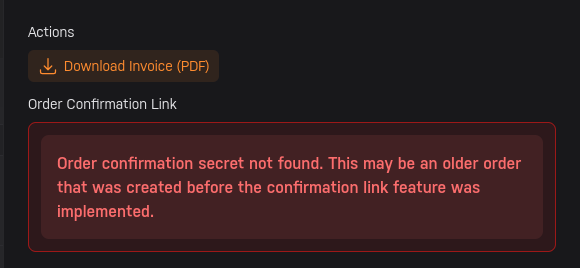
I also can see my invoice on the invoice page, but it fails to load license details. I can download the invoice but I can not view the license key.
-
The licensing page shows no license on my account. I don't understand, did they take away my license because I hadn't logged in in a while? My original purchase date was 02/26/2023 ... My understanding is I can run one Unraid server with this license.
-
What I get here is "Replace eligibilityCannot replace" I don't see any option to recover my old license. After I sign in I see only this. License stateNo Keyfile GUID••••12E2 Active OS version7.2.4 (stable) Key linked statusLinked Server IP displayed here... Replace eligibilityCannot replace Storage Devices4 device
-
Hello, I haven't used unraid in a while and am setting up my NAS again finally. I need to transfer my license onto a new USB. The last time I did this in 2023, there was a different forum which seems to no longer be available at https://forums.unraid.net/support Since this is no longer there, I'm not sure what the process is now. Can someone point me in the right direction?
-
Ah yes, I did and it is all working just fine now. Thank you. The previous configs were restored... much better than what I expected! This product continues to impress and surprise me.
-
I deleted and recreated. Looks like the service has started and I have no dockers. Well that sucks... Should I plan on periodically backing up my docker image so if it is corrupt in the future I don't lose all my docker containers?
-
Same issue... Here's some more diagnostics. docker.txt looking much more interesting now, but I have no idea what it means. [redacted files]
-
Attempting upgrade from "next" branch to "stable" branch, 6.12.4-rc19 .. maybe that will help?
-
Docker log: time="2023-08-29T08:05:49-07:00" level=warning msg="containerd config version `1` has been deprecated and will be removed in containerd v2.0, please switch to version `2`, see https://github.com/containerd/containerd/blob/main/docs/PLUGINS.md#version-header" failed to start daemon: failed to dial "/var/run/docker/containerd/containerd.sock": unknown service containerd.services.namespaces.v1.Namespaces: not implemented time="2023-08-29T08:22:51-07:00" level=warning msg="containerd config version `1` has been deprecated and will be removed in containerd v2.0, please switch to version `2`, see https://github.com/containerd/containerd/blob/main/docs/PLUGINS.md#version-header" failed to start daemon: failed to dial "/var/run/docker/containerd/containerd.sock": unknown service containerd.services.namespaces.v1.Namespaces: not implemented
-
"Docker Service failed to start." Diagnostics attached. [redacted files]
-
Check on the (managed) switch or gateway side. Look to see if flow control is enabled. The settings for flow control will affect the maximum throughput. If it's on, try disabling it. See what happens. Play with that control, if it's there.
-
Whatever works for you. I know a lot of folks have graphics cards already, for graphics. So for them it's not an extra expense. Although I'm not sure how well it integrates with docker. I'm totally with you on using AI to parse older data in a different way and add value to old collections. Happy to hear about progress as you make it.
-
I'm just gonna reinstall windows on that VM. Idk what happened other than a hard shutdown probably corrupted the VM's boot volume. Even removing the GPU passthrough, it still failed to boot.
-
Iit was working fine yesterday. Tried adjusting core count, thinking maybe I changed it at some point and the VM did not reboot.. so maybe it was unhappy after that? but I doubt that is the problem. I also tried removing, and replacing the VBIOS, but that had no effect. Gave it a bunch of reboots and explored the boot repair menu... but nothing there seems to have any effect either. The VM displays the following error on the monitor: > BDSDXE: loading Boot0004 "Windows Boot Manager" from HD(*1.6GPT~~~~~ twice. [Edit: Deleted diagnostics]
-
I also just found LibrePhotos. https://docs.librephotos.com/docs/installation/ Looks like it integrates with nextcloud, and uses https://github.com/ageitgey/face_recognition for facial recognition... which can use a GPU. Uses cuda instead of tensorflow.
-
What are your thoughts on Photoprism? See : https://hub.docker.com/r/photoprism/photoprism and : https://github.com/photoprism/photoprism Looks like facial recognition is done via tensorflow go. I haven't seen much about it in their documentation though... just a curosry search of the repo revealed that..
-
Yeah, that is quite concerning. Sad also that you had no replies. Set yourself up with a pfsense. Stop trusting that machine for now. Add snort, and subscribe to some snort rule sets. Tune your security. Add pfblockerng, and subscribe to some lists there too. Get the maxmind subscription and geoip block eastern Europe, China and Russia. That site is in the Czech republic. Maybe consider migrating your vms off, and wiping the server so it is fresh. Update the BIOS. Things like that have a tendency to poison anything vulnerable on your network. Although, the brazen nature of saturating your full upload bandwidth kinda tells you it's a n00b. More pro hackers would prefer to stay mostly in the background unnoticed.
-
I have opened a support case. Edit : All set. Support provided me with an updated license key URL, which I added to the registration page and my license was reactivated for the new USB GUID. Once that happened, I was able to assign my drives as I saw them in the screenshot ( Had to change the cache pool size from 1 to 2 ). After that, I started my array and I seemed to have no data loss at all. All my configs were present. My dockers and my VM... my VM XML was the same. I was surprised, nothing was really lost. This was the original content of the support case :
-
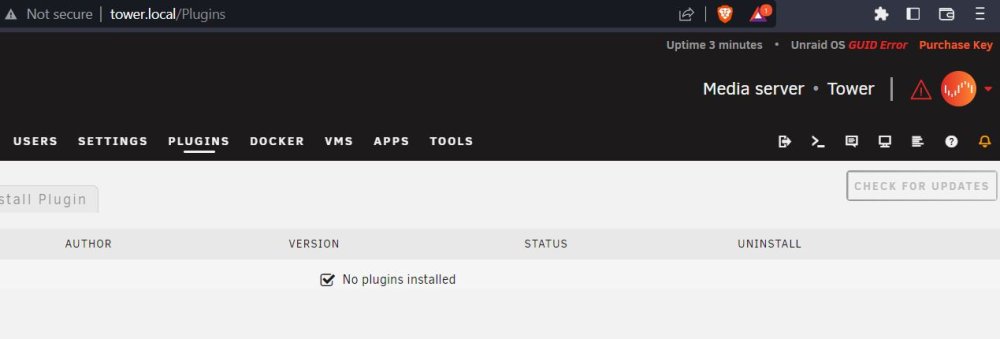
I must have read those instructions wrong... I'm supposed to upgrade a plugin to "2023.03.09.1140" or higher. In order to be able to replace my key... However, I don't have any plugins installed. So how do I update a plugin that I don't have installed? Edit : Added screenshot... also Maybe I need to start the array before I can see plugins? But one cannot start the array, without a license.
-
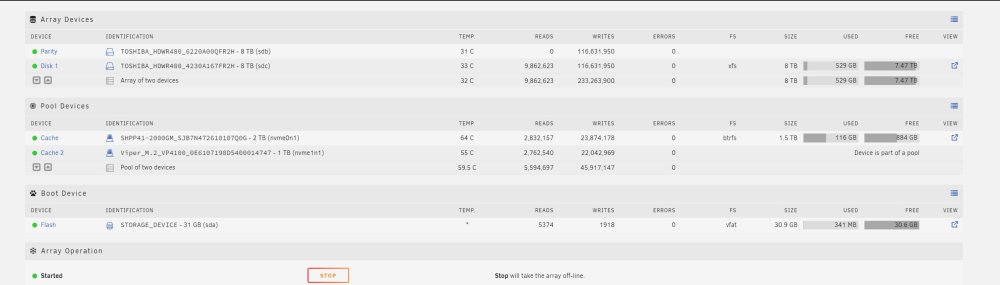
So, I took screenshots and flashed a new drive. Then rebooted to the new drive. I have a license error, and there is a button to "Replace Key". However, when I click it, I receive the following message rather than any key replacement. Funny thing is, I'm on the latest stable version. So I would have to upgrade to an unstable version to be able to replace my key? Currently on Version 6.11.5 2022-11-20 I'm gonna give that a try.... Upgrading to unRAIDServer-6.12.0-rc3-x86_64 now... Seems like a bit weird that there's not a GA update to include the updated account management for non beta users. As far as restoring my disk array. That part should be easy, as I grabbed a screenshot. One additional problem, I had a VM on my cache drive. I don't remember if it was on cache or cache 2... However, I seem to be unable to easily add my second drive to cache. When I add a second cache, it is in a whole new cache group... it looks nothing like the screenshot that I have... Is there a recommended way to restore cache without wiping the contents?
-
Still waiting on a brand new flash drive to arrive. In the meantime, I found another older 16GB HP flash drive, and flashed unraid to it. However, my unraid seems to not recognize it at all. It still shows the old 32GB drive, and says BLACKLISTED in the corner. Didn't say anything at all about the new drive. Still displays, "This USB Flash boot device has been blacklisted. This can occur as a result of transferring your license key to a replacement USB Flash device, and you are currently booted from your old USB Flash device. A USB Flash device may also be blacklisted if we discover the serial number is not unique – this is common with USB card readers." Is there no way to clear this out so it will search on the new flash drive? Did I make a mistake copying my Basic.key file to the config folder of the new flash drive? If this is still happening when my brand new flash drive arrives, I'm gonna have to reboot it and just lose whatever semblance of a config I have left in RAM, I guess.
-
Gotcha... well, I just bulk ordered a different set of USBs.. hopefully that will do. This one was a quil.com branded 16GB flash drive. The drive that failed was a 32GB PNY
-
I came home from a vacation to find my unraid server in a sad sate of flash failure. The flash drive is completely unrecognized in any of my other PCs. So I assume it has completely failed. I'm surprised unraid stayed on, as there were storms and tornados here while I was gone. My router, which has a UPS, was powered off and the UPS was totally freaked out. Yet Unraid, with no UPS remained on, and somehow my flash drive died. Anyways, I grabbed a screenshot of my array just in case I lose all my settings... I flashed a new drive, and added my license ( basic.key ) expecting I would get a pop-up to transfer the license to the new flash drive. But what happened instead was I got a message that said the flash is blacklisted. Perhaps as if I'm trying to pirate the software or something. So far, I don't have a super advanced config.... I did get GPU passthrough working about a week before I left for vacation. I'm regretting not making a backup now. What can I do? I'm uploading my diagnostics in case that can help. tower-diagnostics-20230415-0021.zip



