





gregoriko
Members
-
Joined
-
Last visited
Everything posted by gregoriko
-
No. I bought RPi. 😁
-
Hello I'll run piKVM as VM on Unraid but I don't know how. PiKVM are based on arch Linux. I have this image file https://files.pikvm.org/images/v2-hdmiusb-rpi4-latest.img.xz (HDMI-to-USB dongle). I was tried extract kernel and rootfs img but I think I did something wrong because files are large (256 and 512 MB). Can someone help me? Thanks. (Solution can be for other linux too)
-
It could be removed in Kernel 6.x
-
It's not solved (I have v6.12.3 and Linux 6.1.38). I'll try solution from Reddit today. I hope it will be fixed soon by Unraid team.
-
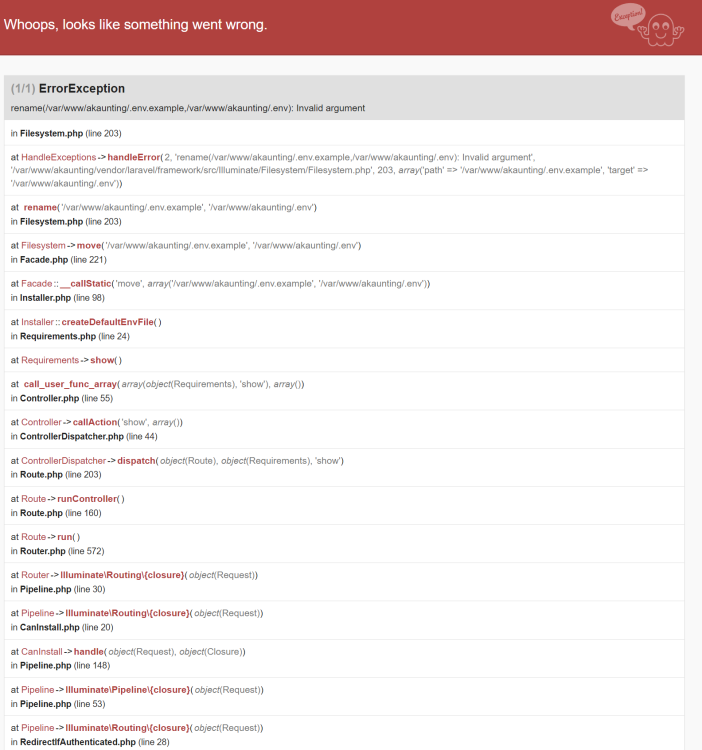
I need Install first. I use mariaDB. 1. With Setup Account: true docker shutdown. 2. Later i was changed Setup Account: true and used in docker terminal (with my data) php artisan install --db-host="localhost" --db-port="3306" --db-name="akaunting" --db-username="root" --db-password="" --db-prefix="ak3" --company-name="My Company" --company-email="myemailcompany@gmail" --admin-email="[email protected]" --admin-password="mypass" --locale="es-ES" Base table are created but I can't logg inn. service apache2 restart doesn't work, docker is closeing. I have log like in this post 3. I tried adding the new variables for DB_PORT and DB_NAME. It's same. 4. I tried install by portainer with integrate mariaDB: version: '2.1' services: akaunting: image: kuralabs/docker-akaunting:latest restart: always ports: - 5003:8080 environment: MYSQL_ROOT_PASSWORD: changeme #Change this password to something at least as long and complicated volumes: - /mnt/user/appdata/akaunting/mysql:/var/lib/mysql - /mnt/user/appdata/akaunting/logs:/var/log - /mnt/user/appdata/akaunting/config:/var/www/akaunting/config but I have other error (screenshot). I don't know what can I do.
-
Hi. Someone solved this problem? I was try all from this topic but nothing work. I was try ver. 3.0.0 too.
