





cmac1982
Members
-
Joined
-
Last visited
-
This worked wonders....2 completed checks since moving 1 SATA cable directly to the board have been more than 2x quicker. Thank you so much @JorgeB.

-
Unfortunately the board only has 4 SATA ports, so I will move 1 to the open port (I had an unused cable I removed and didn't think to move one from controller). Is it better to have specific drives connected directly to the board vs. not?
-
Hello - I recently updated my CPU/MB/RAM/GPU when my son built himself a new PC. Unfortunately I don't have the old specs, but the new specs are: MB: ASUSTeK COMPUTER INC. - PRIME B550M-A RAM: 32GB (4x8GB) DDR4 CPU: AMD Ryzen 5 2600 Six-Core Processor GPU: NVIDIA GeForce RTX 3060 None of the drives have changed (I replaced a bad cache drive since the HW upgrade, but nothing has changed with the speed of the parity check. The drives are a single 6TB parity drive, and 4 drives in the array (2x 6TB and 2x 4TB = 20TB) with a 500GB SSD Cache drive. Currently the parity check is running at <60 MB/sec, and will take ~30 hours at the current pace. Before the HW change, it would run ~110 MB/sec and finish 14-15 hours. ActionDateSizeDurationSpeedStatusErrors Parity-Check2024-08-20, 09:30:01 (Tuesday)6 TB1 day, 10 hr, 46 min, 49 sec47.9 MB/sOK0 Parity-Check2024-08-11, 20:54:26 (Sunday)6 TB1 day, 12 hr, 54 min, 25 sec45.2 MB/sOK0 Parity-Check2024-08-06, 18:53:07 (Tuesday)6 TB1 day, 12 hr, 51 min, 11 sec45.2 MB/sOK0 Parity-Check2024-08-04, 20:54:04 (Sunday)6 TB1 day, 12 hr, 54 min, 3 sec45.2 MB/sOK0 Parity-Check2024-07-23, 09:50:49 (Tuesday)6 TB1 day, 14 hr, 29 min, 11 sec43.3 MB/sOK0 *************NEW HW*********************** Parity-Check2024-07-13, 22:37:38 (Saturday)6 TB14 hr, 37 min, 37 sec114.0 MB/sOK0 Parity-Check2024-07-06, 22:42:52 (Saturday)6 TB14 hr, 42 min, 51 sec113.3 MB/sOK0 Parity-Check2024-06-30, 10:14:35 (Sunday)6 TB15 hr, 55 min, 48 sec104.6 MB/sOK0 Parity-Check2024-06-28, 15:56:51 (Friday)6 TB16 hr, 43 min, 5 sec99.7 MB/sOK0 I'm not sure whether something should be done, or what that would be, but I pulled diags when the most recent parity check started and have attached them here. Any advice greatly appreciated. tower-diagnostics-20240826-1508.zip
-
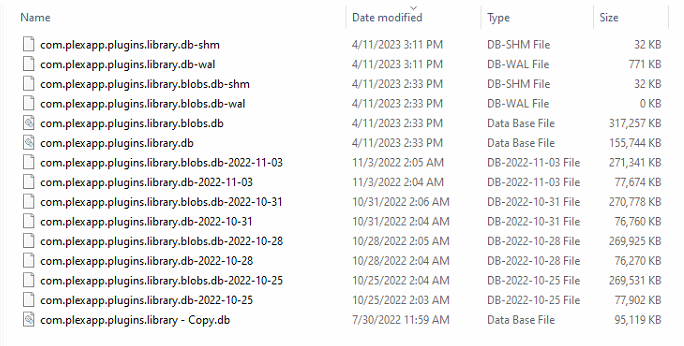
So I recently replaced my boot drive USB (somewhat recently....not in the same timeframe as I started experiencing these issues). I have also changed the Priviledged setting to ON, and I checked the backups. It doesn't look like there's been a successful backup here since November. The reboot problem only started within the last 6-8 weeks, so while it may be related to that, it didn't go as far back. Given the size of the DB that it's trying to back up on my 500 GB cache drive, I'm wondering if there could be a problem with the backup maxing out the available drive space?
-
@ugnaught This is very interesting. Following my last post, I was able to isolate the same thing, it's also Plex causing my reboot issues, and my scheduled tasks are set at 2AM as well. My Plex appdata is currently set to Prefer : Cache, but I also confirmed that all the data is on the cache drive.

-
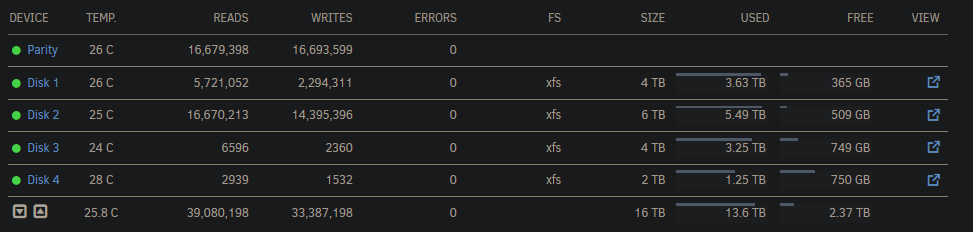
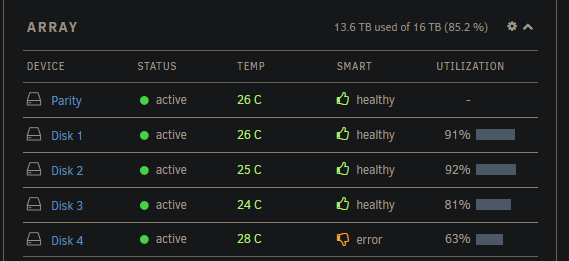
Here's the update today...I ran the server for most of the week in Safe Mode with all plugins and dockers disabled, and the server ran 5 days without restarting. The first day I re-enabled Plex/Sonarr/Radarr/NZBGet and the server again rebooted overnight. So tonight I will run only Plex + NetData to see if I have a reboot and if NetData can capture anything relevant. After @Dking00000's comment, I looked at the drives and while everything looks good on the Main tab: There is a smart error (thumbs down) for Disk 4 on the Dashboard: I've attached the log in case anyone can help with this error (and see if it's somehow related to me rebooting issues). tower-diagnostics-20230326-1325.zip
-
Hello All - Looking for some help/direction, I'm kind of at a loss. For approximately the last month, my Unraid server has been rebooting overnight, almost everyday. I upgrade the P/S from a 650W to a known working/brand new 850W unit, but there was no change. There are no scheduled tasks running on a time schedule (I have a couple that run on server start or shutdown), and the times aren't perfectly consistent. Here are the examples from the last few days: 3/15 - 3:46 AM 3/16 - no reboot 3/17 - 2:32 AM 3/18 - 3:14 AM Through some of the forum posts, I was able to set up a syslog server to capture the logs outside of the RAM, but there are gaps from the last event captured in the syslog to the time the reboot occurred: Mar 15 03:01:52 Tower kernel: [Hardware Error]: cache level: L1, tx: INSN, mem-tx: IRD Mar 15 03:46 REBOOT [not in syslog, added to show sequence] Mar 15 07:50:44 Tower root: Delaying execution of fix common problems scan for 10 minutes Mar 17 02:03:04 Tower crond[1241]: exit status 1 from user root /usr/local/sbin/mover &> /dev/null Mar 17 02:32 REBOOT [not in syslog, added to show sequence] Mar 17 07:25:44 Tower root: Delaying execution of fix common problems scan for 10 minutes Mar 18 03:00:09 Tower crond[1240]: exit status 1 from user root /usr/local/sbin/mover &> /dev/null Mar 18 03:14 REBOOT [not in syslog, added to show sequence] Mar 18 07:51:26 Tower root: Delaying execution of fix common problems scan for 10 minutes Hardware: AMD FX™-8300 Eight-Core @ 3300 MHz 16GB RAM NVIDIA GeForce GTX 1060 6GB Please let me know if there's other information I can provide to help. Thanks very much. C. syslog-192.168.0.203.zip


