minuzle
Members
-
Joined
-
Last visited
Everything posted by minuzle
-
I've had this error with my server ever since I formatted and reinstalled Windows on my desktop PC over a year ago, I just delete / move everything from the unraid console now if I need. I could never figure it out, created accounts, added the credentials to windows. I will note anything created after I did this I seem to be able to move/delete anything that existed on the server prior to my desktop PC re-format I get the permission denied error. I would love to know the fix for this - following.
-
I cleared the CMOS and I was able to get it to boot into unraid, I had a similar issue when I went from 16gb to 64gb a few years ago with this board. I just assumed that was the case with Supermicro / ECC Ram.
-
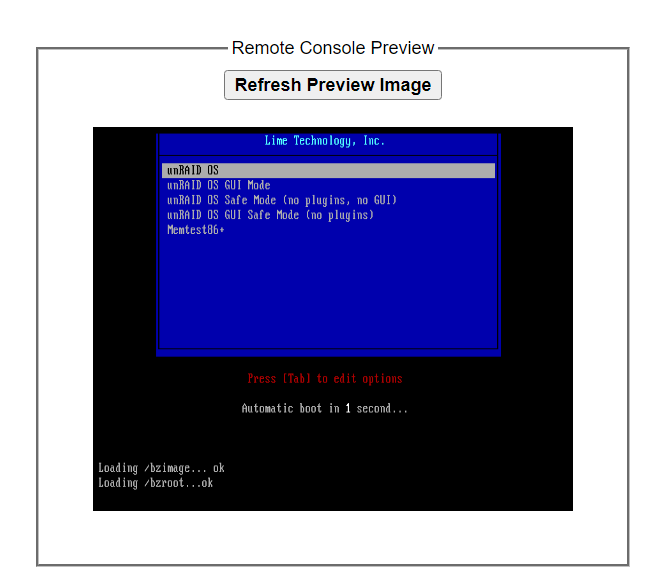
I had a stick of ECC ram throwing errors in slot DIMMC1 so I replaced it today with an identical stick and now I can't get it to boot after it says loading /bzroot ...OK I've tried a different USB drive, I've use the unraid USB creator to create a brand new one, same results. I put the old stick of ram back in and my system boots just fine. Motherboard: Supermicro X9DRL-iF CPU: 2x E5-2690v2 RAM: Micron PC3-14900R 2Rx4 8GB sticks (8 total) (MT36JSF1G72PZ-1G9K1HE) I'll upload diagnostics with the bad stick of ram if that helps anything. mediasrv-diagnostics-20240528-1706.zip
-
Thank you for the help. I now have a drive rebuilding that is mountable. Very much appreciated.
-
Ok I'll do that, I did just reboot about 45 minutes ago but I'll do it again and post new diagnostics. One other thing to note is my last few monthly parity checks have resulted in corrected errors. I assume that is because I have disk11 and disk19 starting to produce errors which was the reason I purchased all these drives originally. Thanks
-
I have also since downgraded to 6.11.1 and the issue persisted.
-
I rebooted before I saw your msg, I do have a diagnostics from last night I can post. Looking through dmesg I found this so now I'm leaning that maybe I have some bad ram, fix common problems is logging machine check errors. [ 850.788000] XFS (md9): Mounting V5 Filesystem [ 851.497628] XFS (md9): Metadata CRC error detected at xfs_agi_read_verify+0x85/0xfa [xfs], xfs_agi block 0x1b4a4cc3a [ 851.498140] XFS (md9): Unmount and run xfs_repair [ 851.498575] XFS (md9): First 128 bytes of corrupted metadata buffer: [ 851.499072] 00000000: 58 41 47 49 00 00 00 01 00 00 00 05 0d 26 27 2c XAGI.........&', [ 851.499534] 00000010: 00 00 00 40 00 00 00 01 00 00 00 01 00 00 00 1c ...@............ [ 851.500074] 00000020: 00 00 00 60 ff ff ff ff ff ff ff ff ff ff ff ff ...`............ [ 851.500542] 00000030: ff ff ff ff ff ff ff ff ff ff ff ff ff ff ff ff ................ [ 851.501072] 00000040: ff ff ff ff ff ff ff ff ff ff ff ff ff ff ff ff ................ [ 851.501506] 00000050: ff ff ff ff ff ff ff ff ff ff ff ff ff ff ff ff ................ [ 851.502016] 00000060: ff ff ff ff ff ff ff ff ff ff ff ff ff ff ff ff ................ [ 851.502472] 00000070: ff ff ff ff ff ff ff ff ff ff ff ff ff ff ff ff ................ [ 851.502999] XFS (md9): metadata I/O error in "xfs_read_agi+0xce/0x120 [xfs]" at daddr 0x1b4a4cc3a len 1 error 74 [ 851.503586] XFS (md9): Error -117 reserving per-AG metadata reserve pool. [ 851.503593] XFS (md9): Corruption of in-memory data (0x8) detected at xfs_fs_reserve_ag_blocks+0xa7/0xb8 [xfs] (fs/xfs/xfs_fsops.c:569). Shutting down filesystem. [ 851.504641] XFS (md9): Please unmount the filesystem and rectify the problem(s) [ 851.505289] XFS (md9): Ending clean mount [ 851.505312] XFS (md9): Error -5 reserving per-AG metadata reserve pool. mediasrv-diagnostics-20221108-1618.zip
-
If I use unassigned devices to format it anything but XFS I can mount it, if I select XFS it fails to mount. Nov 9 07:03:17 MediaSrv kernel: XFS (sdw1): Corruption warning: Metadata has LSN (1:915971) ahead of current LSN (1:915854). Please unmount and run xfs_repair (>= v4.3) to resolve. Nov 9 07:03:17 MediaSrv kernel: XFS (sdw1): log mount/recovery failed: error -22 Nov 9 07:03:17 MediaSrv kernel: XFS (sdw1): log mount failed Nov 9 07:03:17 MediaSrv unassigned.devices: Mount of 'sdw1' failed: 'mount: /mnt/disks/VGK4J81K: wrong fs type, bad option, bad superblock on /dev/sdw1, missing codepage or helper program, or other error. dmesg(1) may have more information after failed mount system call. ' I did try running xfs_repair but it just seems to run forever looking for a secondary superblock.
-
I am trying to upgrade 4TB drives to 8TB drives, I purchased 8, 2 were done on 6.11.1 and the others were all tried on 6.11.2. I'm now on 6.11.3 and they all still say that when trying to rebuild. Even after I've put my original drive in, created a new config, validated parity etc. The original drives mount just fine as soon as I put one of these other drives in I get the issue. I may just go down to 6.11.1 and see what happens.
-
It appears I still have to preclear all these disks as they come up unmountable even on 6.11.3
-
After days of fighting this issue as I'm trying to upgrade 8 different drives I came across this thread and noticed 6.11.3 was released today. I can now stop banging my head on my desk! Version 6.11.3 2022-11-08 This release is focused on bug fixes and minor improvements. In particular, we need to revert a base library due to a bug which prevents formatting devices >2TB in size. Management Reverted 'libpopt.so.0.0.1' to workaround 'sgdisk' bug used to format devices larger than 2TB.
-
Man these are awesome! I wish I knew more about css and js to be able to make my own.
-
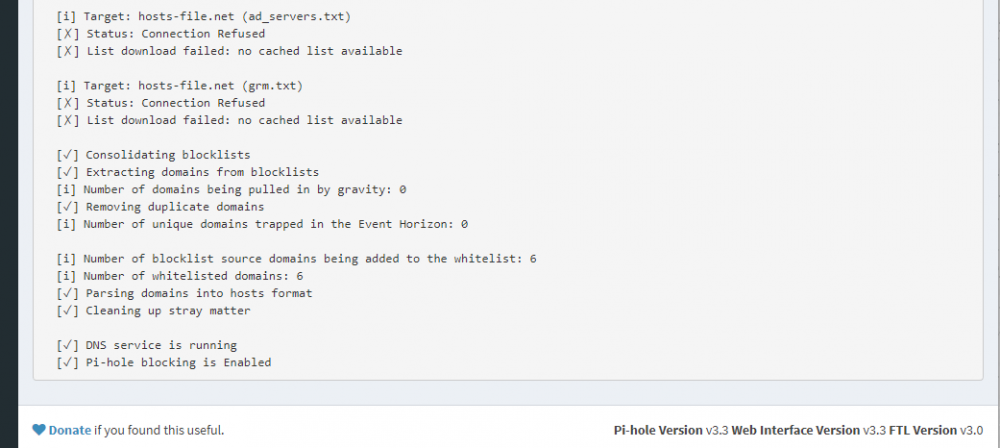
Well I'm not sure what changed but I tried changing the Extra Parameters to what yours says because mine is defaulted to --cap-add=NET_ADMIN It didn't work so I upgraded to rc3 from rc2 on 6.5.1 did a clean boot and when I went to go login to the PiHole admin page it listed domains in the blocklist. I'm not sure what it was as I rebooted my server many times yesterday but I appreciate your effort. Thanks
-
I get connection refused every time I run the block lists update. I'm running unraid 6.5 and have PiHole running on it's own IP. I've forwarded my dhcp servers DNS ip to the PiHole ip. Everything seems to be functioning except it isn't blocking anything. Thoughts?