





Sopranos
Members
-
Joined
-
Last visited
-
Just for others out there if they have the same issue: I was finally able to capture enough logs and feed them thru the AI: 06:58:09–10 — The host started resetting the passed-through GPU via VFIO (the vfio-pci 0000:01:00.0 resets), which is the normal process of returning a GPU from the VM back to the host. 06:58:11 — The Nvidia driver started reloading on the host side to reclaim the GPU. 06:58:13 — Kernel crash. A NULL pointer dereference occurred inside the Nvidia driver at nv_audio_dynamic_power, triggered by the qemu-event process (PID 18970). The crash note confirms: qemu-event[18970] exited with irqs disabled — a very bad state indicating the driver died mid-operation. The root cause is a bug in the Nvidia driver's GPU audio power management code during the VFIO passthrough teardown/reclaim cycle. When the GPU was handed back from the VM to the host, the Nvidia kernel module tried to manage the HDMI audio component's power state (nv_audio_dynamic_power) and dereferenced a null pointer — likely because the audio device's internal state was left in an inconsistent condition by the VFIO reset. Add video=efifb:off to the Unraid boot parameters to prevent the host from trying to use the GPU's framebuffer at all Use the vendor-reset kernel module, which does a more thorough GPU reset on passthrough teardown
-
Just to add this happens with the docker disabled as well. It just won't stop the array to properly reboot on it's own. I haven't tried disabling VM service, and I suspect it has something to do with it since the dashboard will completely lock up when I click on "VMS" tab but only while it's this crippled state of stopping the array.
-
Hello All, For the last three Unraid upgrades, I have not been able to reboot the system cleanly. Each time, the reboot process gets stuck at “Shutting down array” indefinitely, and after waiting 15 to 20 minutes I eventually have to power cycle the machine manually. Today, after upgrading to 7.3.1, I noticed it was again stuck at “Shutting Down Services - Shutting down array.” This time I was still able to log into the dashboard and collect some logs. However, as soon as I clicked on the VMs tab, the entire dashboard froze and became completely unresponsive. I checked again about 10 minutes later and the page was still frozen with no response at all. And no SSH Terminal open, so that wasn't the cause. Can someone please help in identifying what's causing this? I had no changes, didn't install any new plugins or apps. I could not generate the diagnostics but did catch some logs within System Log section. syslog.txt
-
Any ideas why this happens? is it a bug?
-
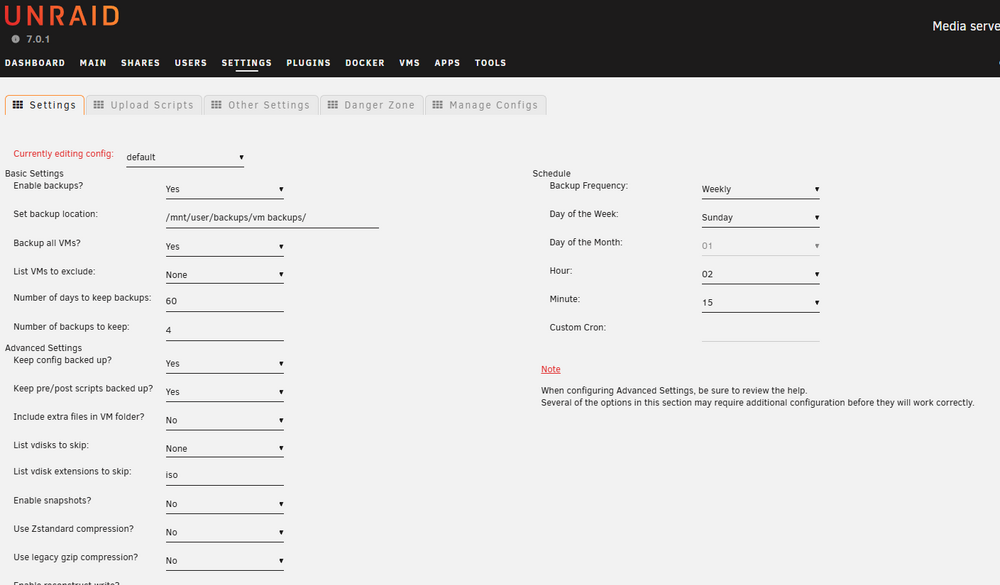
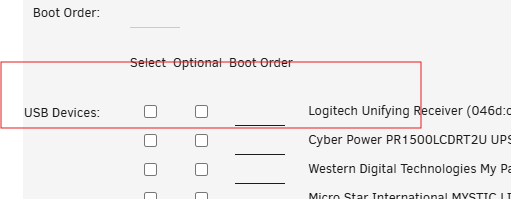
I have the VM backup scheduled to perform a backup of my only Windows 11 VM on Sunday mornings. So it'll do it's thing, it'll shut down the VM and once it's complete it starts it up. After that every time the USB devices need to be re-checked again in the VM settings. It's like it forgets to re-add those USB devices. I just tested it again with manually running that backup and exactly the same thing. If I reboot the VM on it's own the USB devices are automatically started up and checkmarks are there but after VM backup the checkmarks are removed and of course it doesn't start up those USB devices. I have to go in after each backup is run and select them manually and save. then everything is fine until next Sunday
-
Any ideas anyone and how to get Unraid to look into this? It's still happening with 7.0.1
-
Tested it with Friend's setup, identical issue and it seems like it's a bug within the Unraid. Hopefully it's rectified in a near future.
-
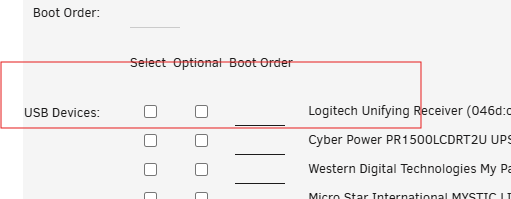
Hello All, Under VMs I only have one Win11 VM. For that VM I use a Logitech mouse, and for some strange reason after each reboot of the VM I have to go back into the VM settings and re-enable the driver for Logitech, see screenshot below. I'll put a checkmark under "Select", save and it'll work immediately....until the next reboot. Which happens every Sunday morning after it does the backup of the VM. I am not sure why this setting will not permanently stay and what can be done? Thank you
-
Upgraded ok, no problems at all. Thank you
-
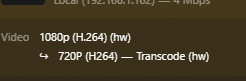
After the upgrade from 6.11.5 to 6.12.X (on 6.12.10 now) everything worked just fine including the Plex, mind you I never tried to convert the quality, always played the original quality and it worked no problem. I just tried to downgrade the quality of a movie, and it stops playing. after a min or two it throws an error msg on the client side - plex unknown error occurred 4294967279 All this time the Plex server is reporting all is well and it's transcoding yet it's not playing on the client side: Transcoding is enabled of course. Nothing really changed other than the upgrade. The settings inside the Plex container stayed the same, I do have: /dev/dri I am using linuxserver template, have been since day1 and it worked flawless. CoffeeLake-S GT2 [UHD Graphics 630] Not sure how to proceed here? I tried restarting Unraid server. Restarted the docker still no luck. It just doesn't seem to be playing anything if I change the video quality to anything other then the original. Weird issue or what? Any help is much appreciated. BTW there are some errors in the Plex Log file: May 03, 2024 07:42:58.000 [23395542666040] ERROR - [Req#15754/Transcode/eoqeqk7fd5f4lzu8lu4xtrvb/e19145de-0bb0-4c9b-8b45-d4971eeb029b] [eac3_eae @ 0x14b3a1ee4ac0] EAE timeout! EAE not running, or wrong folder? Could not read '/tmp/pms-1c5474fc-05a4-4e14-868f-f2de87162dc3/EasyAudioEncoder/Convert to WAV (to 8ch or less)/eoqeqk7fd5f4lzu8lu4xtrvb_8095-0-0.wav' May 03, 2024 07:42:58.000 [23395542666040] ERROR - [Req#1575b/Transcode/eoqeqk7fd5f4lzu8lu4xtrvb/e19145de-0bb0-4c9b-8b45-d4971eeb029b] [eac3_eae @ 0x14b3a1ee4ac0] error reading output: -5 (I/O error) May 03, 2024 07:42:58.001 [23395542666040] ERROR - [Req#1575c/Transcode/eoqeqk7fd5f4lzu8lu4xtrvb/e19145de-0bb0-4c9b-8b45-d4971eeb029b] Error while decoding stream #0:1: I/O error May 03, 2024 07:42:58.378 [23395452123960] DEBUG - Content-Length is -1 (of total: -1). May 03, 2024 07:42:58.378 [23395537922872] DEBUG - [TranscodeOutputStream] Input processing thread started at offset 0 for -1 bytes. May 03, 2024 07:43:03.000 [23395542666040] ERROR - [Req#1575d/Transcode/eoqeqk7fd5f4lzu8lu4xtrvb/e19145de-0bb0-4c9b-8b45-d4971eeb029b] [eac3_eae @ 0x14b3a1ee4ac0] EAE timeout! EAE not running, or wrong folder? Could not read '/tmp/pms-1c5474fc-05a4-4e14-868f-f2de87162dc3/EasyAudioEncoder/Convert to WAV (to 8ch or less)/eoqeqk7fd5f4lzu8lu4xtrvb_8095-0-1.wav' May 03, 2024 07:43:03.000 [23395452123960] ERROR - [Req#1575e/Transcode/eoqeqk7fd5f4lzu8lu4xtrvb/e19145de-0bb0-4c9b-8b45-d4971eeb029b] [eac3_eae @ 0x14b3a1ee4ac0] error reading output: -5 (I/O error) May 03, 2024 07:43:03.000 [23395542666040] ERROR - [Req#1575f/Transcode/eoqeqk7fd5f4lzu8lu4xtrvb/e19145de-0bb0-4c9b-8b45-d4971eeb029b] Error while decoding stream #0:1: I/O error
-
Thank you for that. It was driving me insane :)). I guess the only way around it is either to break the cache and have 2x1TB but not mirroring or to add larger capacity ie. 2x2TB and mirror.
-
Hi All, I don't even know how to properly categorize this issue, so I'll try the General Anyway, my current is setup is 2x1TB M.2 for Cache (1TB usable) and then I have 2x20TB for Parity and 6 drives for array (3 are 16TB and 3 are 8 TB) making it 72TB usable. SABNZBd is setup to download first to Cache, and then mover will move the data to array. This works excellent. When downloading I hit my max speed of just under 100MB/s. All is well. The issue ONLY arises when and if I am downloading something that's over 1TB. I'll get Cache low space alerts and all that. so if I want to download something that's 1TB I need to go into the data and set it up to use array instead of cache. Well then the download speed fluctuates from a few KB/s to 50-60-MB/s and it constantly goes up and down. For example: I am thinking it's something to do with the I/O since I am downloading directly to Array. Not sure why that would matter since I have 6 disks in array and even before Unraid I'd download stuff directly to HDDs without any issues whatsoever. I am positive the I/O can handle the speed of my max download, like I mentioned 100MB/s. Again, if I am downloading much smaller files to Cache, it flies. The post-processing also happens super fast and all is well. But with 1TB files I cannot download them into the cache (I tried and halfway thru I'd pause the SAB, then kick off the Mover, wait but since half data is downloaded it already started the extraction and because it's not done the mover doesn't move those to the array, until it's fully processed. What I am confused about is why downloading directly to the array causes soooo much D/L variance.... Thanks in advance for all your help.

-
Yep, changed to Both and now it's working...YAY!!! Thank you kindly
-
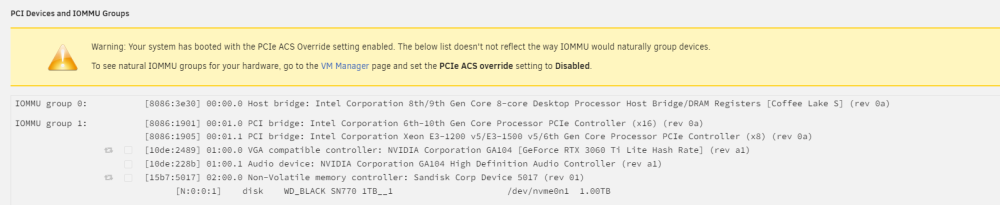
Hmm no go, same error: vfio 0000:01:00.0: group 1 is not viable Please ensure all devices within the iommu_group are bound to their vfio bus driver.
-
Will do, many thanks


