





RadRom
Members
-
Joined
-
Last visited
-
I received a message if this question has been answered.... Not yet. Will have an update soon. Array remains offline at the moment.
-
Thankyou! 🙂 Q/. If I were to format to XFS and then place into main array, would that rebuild or would I have to copy the data over? I'm just trying to understand what went wrong, how to prevent and how to fix. I don't trust parity/rebuild anymore... I have used it in the past and it worked great 🙂
-
Ok. Same error with a brand new disk. Ran pre-clear - logs attached. I triple checked procedures and settings, still getting this unformatted error in my array. Seems this will continue until I can resolve. Any ideas please? 🙂 Cause I'm lost and scratching my head here!! Recovery Explorer found files on both 4tb (prematurely formatted) and previous 8tb drive that had same unsupported format error. ** I found Recovery Explorer worked best and found files, whereas UFS Explorer could not find files on same formatted disk. Only difference I can tell between the two apps is one is priced in $USD the other is priced in €Euro. ** preclear_report_WD-CA3S6T2K_2024.05.26_11.07.34.txt



-
Update; this is works in progress: I just hope this thread helps some future person (and note to future-self) who sadly has a similar issue and can hopefully find a good solution 🙂 UFS Explorer under linux could not find any files on the 4tb I removed from the array and then prematurely formatted. <--- My bad there!! I hijacked a 4tb from another unRAID (backup) server I have, ran pre-clear (non docker version) on that, then plugged that HDD in to my main unRAID array and received this message: "The replacement disk must be as big or bigger than the original." Whilst Recovery Explorer on linux runs over my 8tb disk, it's now off to the computer shop for a new 8tb WD Red Pro or + to see if I can have that HDD rebuilt within my main array. The replacement/upgraded 8tb HDD I inserted that caused me this issue was a 8tb WD Red+ brand new from shop, unformatted and passed pre-clear and swapped as per docs ..... Unsure why it or XFS_Reapir has errors - Guess it happens. unRAID Version: 6.12.10 Format: XFS XFS set as default in disk settings. I'll check back in around 16+/- hours. ** I found no difference whatsoever between UFS Explorer and Recovery Explorer ---- Me thinks they're the exact same company You decide there!


-
Not concerned about the $65USD cost. UFS Explorer Standard or Recovery-Explorer Standard? Or they the same 'thing' essentially??
-
Just my Irish luck!! 🙂 Yes, but I formatted it to XFS, no data written to it, just formatted it far too quickly. I am hesitant to put that in incase I do lose data now. So I guess a new HDD and throw that in??
-
Last line reads "fatal error -- File system metadata writeout failed, err=117. Re-run xfs_repair." Now I'm getting nervous! Full log attached. XFS_Repair_Log.txt
-
I probably mis-interpreted that and did it while array was stopped and moreso out of paranoia of data protection... Annnnnd thinking it would work, apparently won't.
-
Running XFS_Repair without -n through GUI as exactly described in documentation. Will report back when it's finished.
-
As per documentation, stopped array and ran it in GUI terminal.
-
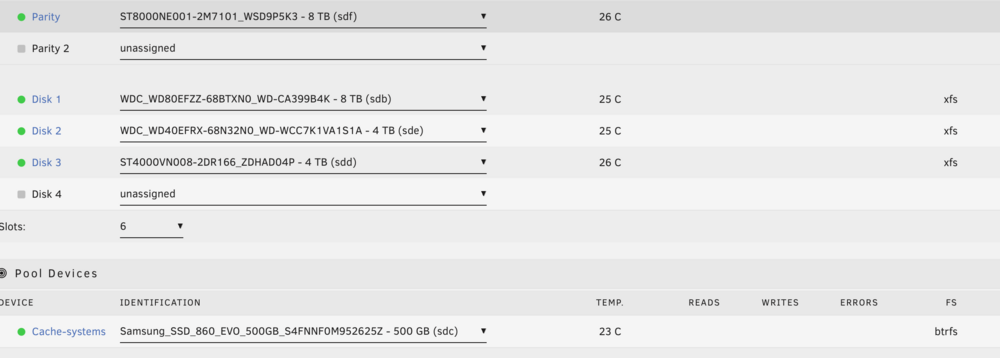
Hi 🙂 Swapped a 4tb drive for 8tb drive (disk-1). Ran pre-clear, default file system = XFS in disk settings, followed unRAID documentation and another post to change a data hard drive, ticked the box next to blue-box to rebuild from parity. 14hrs+ later I get "Unmountable: Unsupported or no file system" and drive is formatted to XFS - See attached photos. Ran XFS_Repair on disk1 and "Sorry, could not find valid secondary superblock". I'm unsure what to do after many hours reading posts and around the inter-webs. I do not want to destroy any data on data disk1 and I do not have another HDD to throw in + I live around 1hr & 10mins from nearest computer store. I did find this unRAID post/procedure, unsure if it'll work for me. Looking at using either UFS Explorer or Recovery-Explorer to examine the unmountable array disk on another machine. Annnd unfortunately I have formatted the 4tb. Array remains stopped until I know how to proceed. Is this fixable please? Thankyou in advance 🙂 Vers: 6.12.10 Diagnostics attached

-
Hi 🙂 How reliable is it to have unRAID with parity operating as a VM in Proxmox?? Just built a nice box hoping unRAID will VM Windows and macOS easily. But having lots of issues setting up unRAID VMs, so I'm looking to virtualise unRAID. Live in a bushfire area, so need to grab just one box and go. We also do weekly data backups to another unRAID machine. Mainly use unRAID as a NAS with internal only access to Nextcloud & OnlyOffice and our own Rustdesk server. Proxmox for light 3D simulator gaming and the workhorse is macOS (we live in the Apple eco-system). That's it in a nutshell 😄 (We live in a bushfire area, so we need to grab just one box and go.)
-
That failed for me on multiple reboots.
-
@Jumbo_Erdnuesse Thankyou so much for your helpful info. I was about to give up unRAID for something else. I bought a 6600XT because it works OOB with Monterey. Had to get Windows working first 🙂 Your changes to XML file + disabling re-BAR support in BIOS done it for me 😄. Installed a few test VMs and so far no issues... Now onto Monterey. Thankyou!!
-
Hi 🙂 Yes I did and changed VMs name as per SapceInvaderOne's YT instructions. I ended up re-installing unRAID and did a fresh install of everything with a newer flash drive back-up. Macinabox seems to be working fine now. Just ain't installed any macOS yet. Thankyou!!


