





RadRom
Members
-
Joined
-
Last visited
Everything posted by RadRom
-
I received a message if this question has been answered.... Not yet. Will have an update soon. Array remains offline at the moment.
-
Thankyou! 🙂 Q/. If I were to format to XFS and then place into main array, would that rebuild or would I have to copy the data over? I'm just trying to understand what went wrong, how to prevent and how to fix. I don't trust parity/rebuild anymore... I have used it in the past and it worked great 🙂
-
Ok. Same error with a brand new disk. Ran pre-clear - logs attached. I triple checked procedures and settings, still getting this unformatted error in my array. Seems this will continue until I can resolve. Any ideas please? 🙂 Cause I'm lost and scratching my head here!! Recovery Explorer found files on both 4tb (prematurely formatted) and previous 8tb drive that had same unsupported format error. ** I found Recovery Explorer worked best and found files, whereas UFS Explorer could not find files on same formatted disk. Only difference I can tell between the two apps is one is priced in $USD the other is priced in €Euro. ** preclear_report_WD-CA3S6T2K_2024.05.26_11.07.34.txt



-
Update; this is works in progress: I just hope this thread helps some future person (and note to future-self) who sadly has a similar issue and can hopefully find a good solution 🙂 UFS Explorer under linux could not find any files on the 4tb I removed from the array and then prematurely formatted. <--- My bad there!! I hijacked a 4tb from another unRAID (backup) server I have, ran pre-clear (non docker version) on that, then plugged that HDD in to my main unRAID array and received this message: "The replacement disk must be as big or bigger than the original." Whilst Recovery Explorer on linux runs over my 8tb disk, it's now off to the computer shop for a new 8tb WD Red Pro or + to see if I can have that HDD rebuilt within my main array. The replacement/upgraded 8tb HDD I inserted that caused me this issue was a 8tb WD Red+ brand new from shop, unformatted and passed pre-clear and swapped as per docs ..... Unsure why it or XFS_Reapir has errors - Guess it happens. unRAID Version: 6.12.10 Format: XFS XFS set as default in disk settings. I'll check back in around 16+/- hours. ** I found no difference whatsoever between UFS Explorer and Recovery Explorer ---- Me thinks they're the exact same company You decide there!


-
Not concerned about the $65USD cost. UFS Explorer Standard or Recovery-Explorer Standard? Or they the same 'thing' essentially??
-
Just my Irish luck!! 🙂 Yes, but I formatted it to XFS, no data written to it, just formatted it far too quickly. I am hesitant to put that in incase I do lose data now. So I guess a new HDD and throw that in??
-
Last line reads "fatal error -- File system metadata writeout failed, err=117. Re-run xfs_repair." Now I'm getting nervous! Full log attached. XFS_Repair_Log.txt
-
I probably mis-interpreted that and did it while array was stopped and moreso out of paranoia of data protection... Annnnnd thinking it would work, apparently won't.
-
Running XFS_Repair without -n through GUI as exactly described in documentation. Will report back when it's finished.
-
As per documentation, stopped array and ran it in GUI terminal.
-
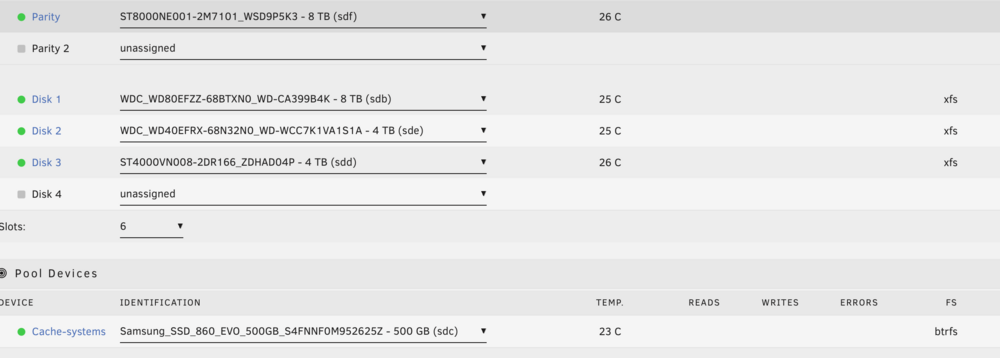
Hi 🙂 Swapped a 4tb drive for 8tb drive (disk-1). Ran pre-clear, default file system = XFS in disk settings, followed unRAID documentation and another post to change a data hard drive, ticked the box next to blue-box to rebuild from parity. 14hrs+ later I get "Unmountable: Unsupported or no file system" and drive is formatted to XFS - See attached photos. Ran XFS_Repair on disk1 and "Sorry, could not find valid secondary superblock". I'm unsure what to do after many hours reading posts and around the inter-webs. I do not want to destroy any data on data disk1 and I do not have another HDD to throw in + I live around 1hr & 10mins from nearest computer store. I did find this unRAID post/procedure, unsure if it'll work for me. Looking at using either UFS Explorer or Recovery-Explorer to examine the unmountable array disk on another machine. Annnd unfortunately I have formatted the 4tb. Array remains stopped until I know how to proceed. Is this fixable please? Thankyou in advance 🙂 Vers: 6.12.10 Diagnostics attached

-
Hi 🙂 How reliable is it to have unRAID with parity operating as a VM in Proxmox?? Just built a nice box hoping unRAID will VM Windows and macOS easily. But having lots of issues setting up unRAID VMs, so I'm looking to virtualise unRAID. Live in a bushfire area, so need to grab just one box and go. We also do weekly data backups to another unRAID machine. Mainly use unRAID as a NAS with internal only access to Nextcloud & OnlyOffice and our own Rustdesk server. Proxmox for light 3D simulator gaming and the workhorse is macOS (we live in the Apple eco-system). That's it in a nutshell 😄 (We live in a bushfire area, so we need to grab just one box and go.)
-
That failed for me on multiple reboots.
-
@Jumbo_Erdnuesse Thankyou so much for your helpful info. I was about to give up unRAID for something else. I bought a 6600XT because it works OOB with Monterey. Had to get Windows working first 🙂 Your changes to XML file + disabling re-BAR support in BIOS done it for me 😄. Installed a few test VMs and so far no issues... Now onto Monterey. Thankyou!!
-
Hi 🙂 Yes I did and changed VMs name as per SapceInvaderOne's YT instructions. I ended up re-installing unRAID and did a fresh install of everything with a newer flash drive back-up. Macinabox seems to be working fine now. Just ain't installed any macOS yet. Thankyou!!
-
Macinabox VMs do not show on console. Installed Macinabox, followed Squid's and chozeur's tutorials, ran into install issues (it just froze at 12 minute mark on install) and had to restart from the beginning . I removed Macinabox Monterey VM through the VM edit tab and then also manually in domains folder. Then removed Macinabox docker and also removed it from unRAID appdata folders. I also removed Macinabox docker template by using the "add container" button. Every time I go to re-install Macinabox, Macinabox shows as a docker, but none of the Monterey or Big Sur VMs show or their files, as did with first install. What have I messed up?!?!
-
"By way of explanation, macos no longer natively supports any wireless “cards” at all. It’s built in to the board/soc" Reference Intel devices compatibility link. WiFi & Bluetooth compatible devices list (relates more to Proxmox) link.
-
I did find this same issue as yours in a quick search:
-
Everything I am recently reading indicates Sonoma has issues with non-approved Apple BT devices. Sonoma is selective with BT and WiFi cards. Users report BT not working or dropping out, etc. It is recommended on one website (see if I can find it again) to buy a second-hand Mac BT/WiFi card and make your own to fit in your non-Apple product 🙂 Don't look pretty, but works. I just bought a Gigabyte 6600 XT to start to run Sonoma VM.... Which leads me to: How did you get Sonoma operating on unRAID? [<--- How I found your post]
-
Great and interesting video!! Thankyou Ed, Tom & Tiffany. We live in the unRAID world (x2 servers) just like we live in the Apple world... We just chose one or the other ;-). I upgrade because the upgrade is there. Otherwise if it is not broken... Why fix it? SO yep, I support the new licensing approach 🙂. Never thought previously about licensing, etc, until I listened to this podcast. It's great to hear how you're trying to grow the unRAID product. unRAID forums, SpaceInvader's videos and squid (Andrew) are priceless for IT dumbass people like me 🙂 Just on help and available community info Tom had in mind from the beginning; Feedback I can provide is unRAID is a wonderful community for help and 99.0% of time one can find the solution by committing just slight extra time to the forums "search" function. THANKYOU to the unRAID; team, contributors and moderators ---> I want to see you all do well in the future. EdITED BiT: Typo.
-
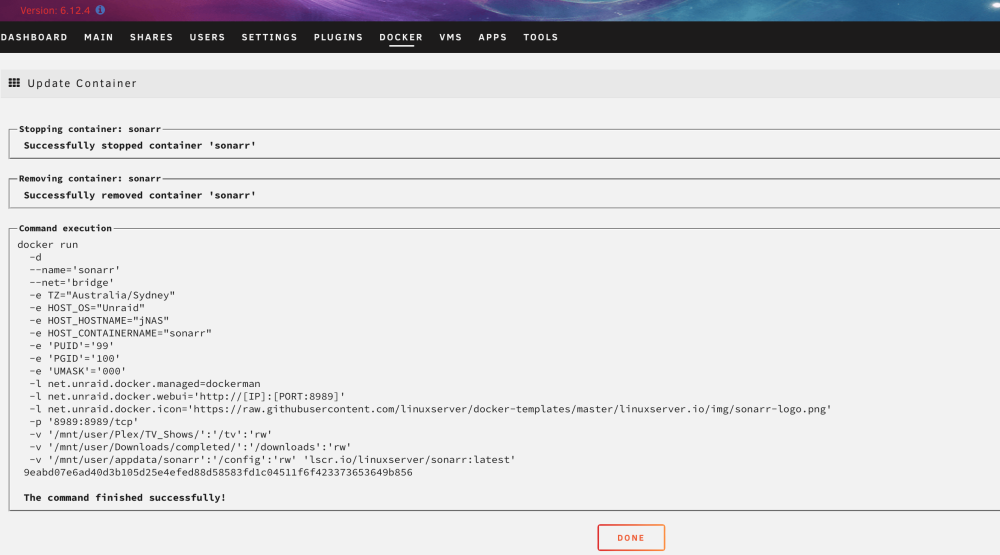
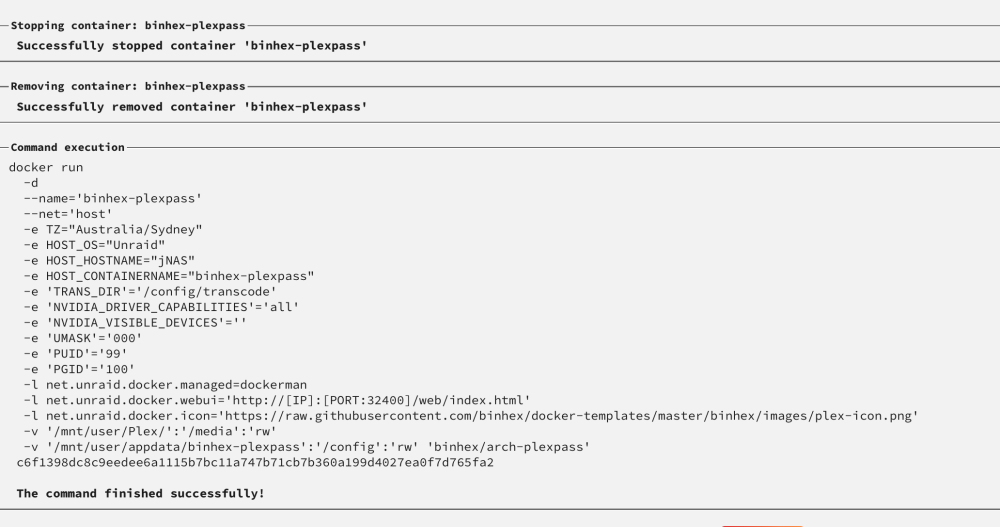
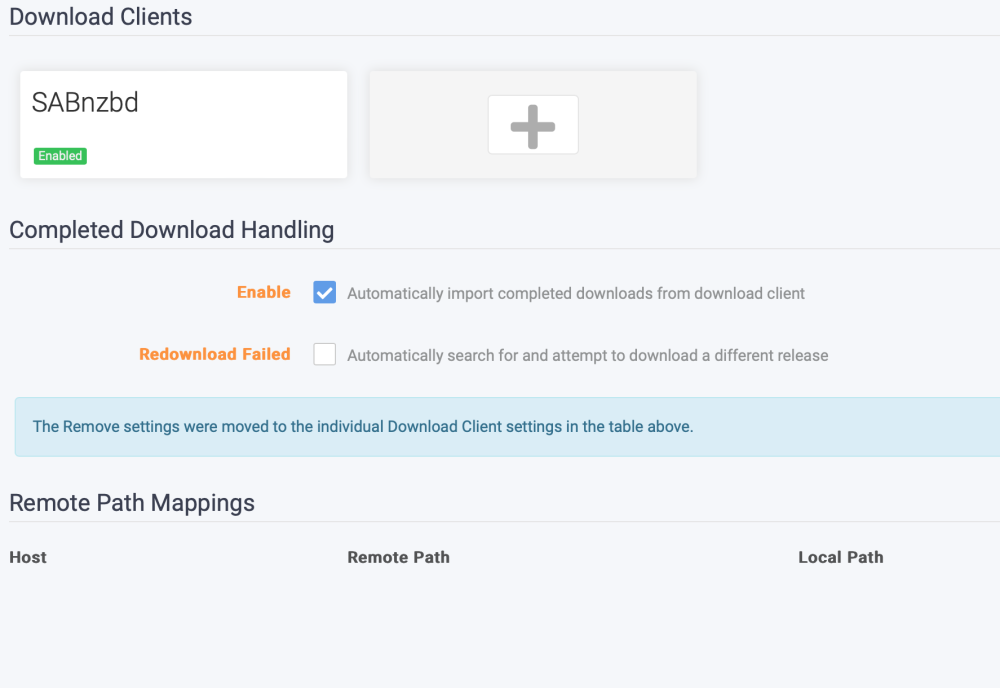
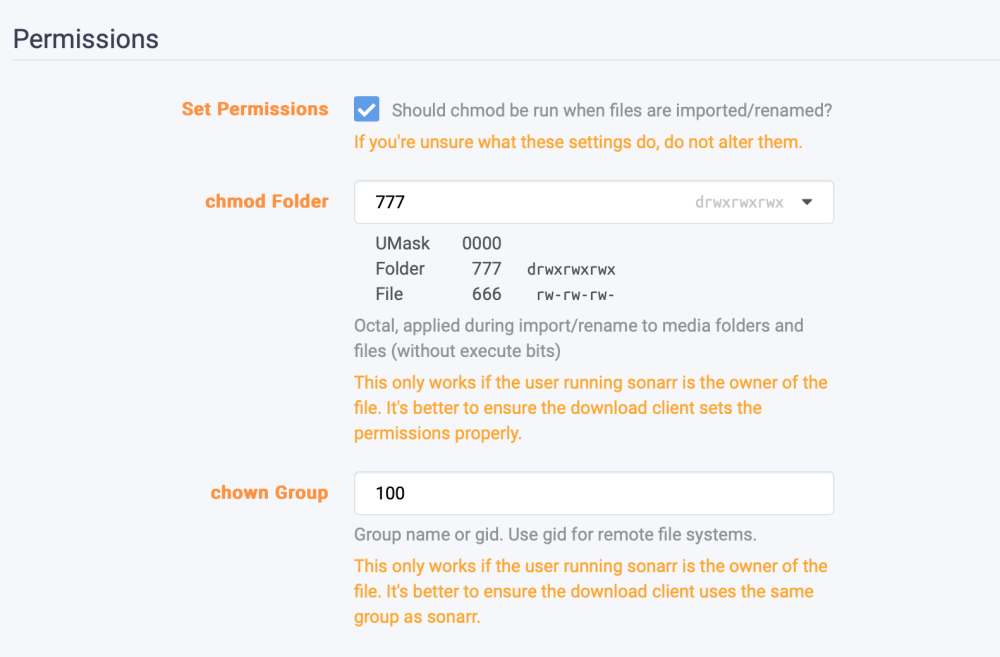
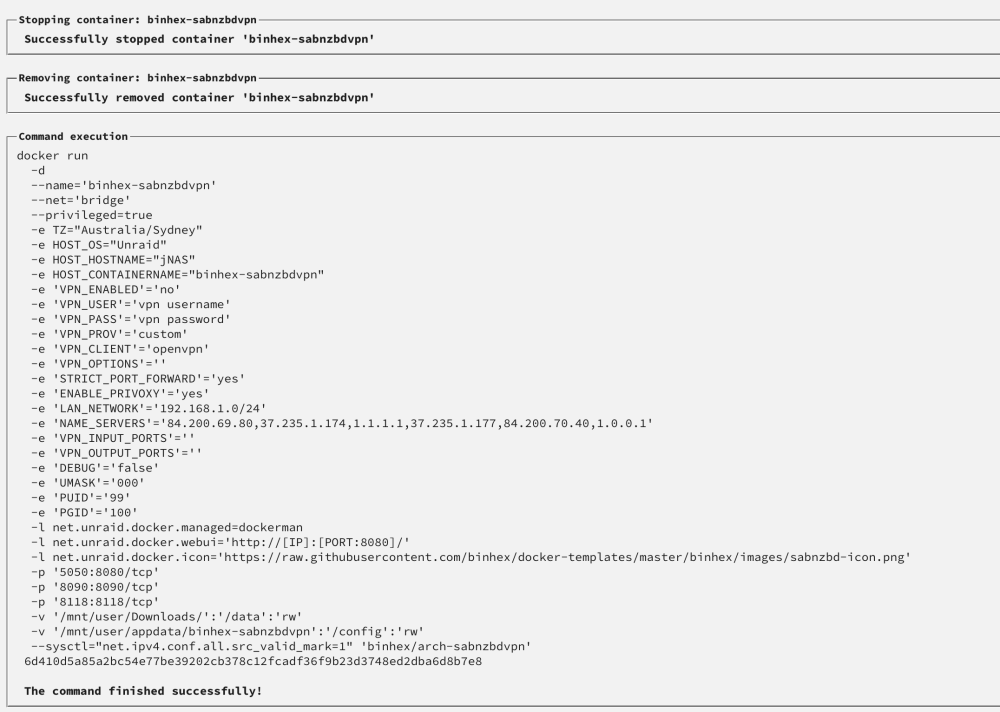
Hi 🙂 Thankyou. I have still been trying to fix now writer's strike is over. Plex, SABnzbdvpn & Sonarr commands and other: Where am I going wrong that Sonarr can't pick up the downloaded file and drag to Plex? Cheers 🙂 EDITED BIT: Uploaded incorrect pic, had creds.

-
This is doing my head in..... I'm sure it's such a simple as fix. I am unsure now where to start for problem-solving "No files found are eligible for import in /data/completed/tv/" Have followed instructions/advice all over the internet and unRAID forums. I cannot get LinuxServer Sonarr to interact with my SABnzbd to drag the file across to Plex. I need to start from scratch but need help please. Logs, permissions, remote pathways, containers, ports, data paths, etc all quadruple checked, dockers completely deleted from system then re-installed, and interrogated. Was all working fine until I decided to fresh install with latest unRAID OS. Where do I start??... Any advice please is highly welcome 🙂. It's doing my head in which makes me think the fix is super easy. Thankyou in advance.
-
Hi 🙂 Sorry to be a pain, I have searched. Q/. What causes this error and how to fix please? Unsure if it is related to LS-NextCloud or OnlyOffice. * I am trying to install Only Office app within LS-NC after a fresh NC install. I removed the old xml files in docker, placed NC into a new folder -- a complete fresh install. ** Other apps install and run fine, just not OnlyOffice. Latest unRAID OS. Appdata folder structure & permissions correct. Config.php pathways correct, etc. Thankyou 😄
-
I went through the same issue myself. Install unRAID Connect, sign in and replace your key that way. Remember to login to terminal window and run 'unraid-api restart' if you have any API issues, then you should be fine Hope this helps 😄
-
Found the answer finally... 04Y5H1 is MegaRAID and J7TNV is IT Mode. For others also researching, I found this Art Of Server YT video very helpful explaining controller cards and what is what.





