





wassereimer
Members
-
Joined
-
Last visited
Everything posted by wassereimer
-
After the automatic Update of Fix Common Problems this night, the Problem is gone. Thanks!
-
Thanks for the fast reply! I've left a comment over in the Fix Common Problems Support Thread.
-
Same Problem with Prometheus Node Exporter. The Author says he didn't change anything. The Plugin is still available in the community store.
-
Hi, since two or three days, the Fix Common Problems plugin reports: The plugin prometheus_node_exporter.plg is not known to Community Applications and is possibly incompatible with your server. Any ideas why and what to do?
-
That fixed it. Now I'm on the newest Version. Thank you!
-
I updated it daily for a while now and it's always on the same version and I always have an update available after updating.
-
Hi, I have to problem, that the Plugin always has an Update and can be installed infinite. After the Update, I have an update again. plugin: updating: disklocation-master.plg Executing hook script: pre_plugin_checks Removing old plugin data before installing, if they exists... Installing plugin... Plugin folder /boot/config/plugins/disklocation already exists Plugin folder /boot/config/plugins/disklocation-2024-edition already exists Checking existing package /boot/config/plugins/disklocation/disklocation.2025.02.08.zip... Extracting plugin package... Archive: /boot/config/plugins/disklocation/disklocation.2025.02.08.zip 6cee8f0cc1638b02a93f5e00bf9f3d329911da8d creating: /tmp/disklocation-packages/disklocation-2024-edition/ inflating: /tmp/disklocation-packages/disklocation-2024-edition/COPYING inflating: /tmp/disklocation-packages/disklocation-2024-edition/README.md inflating: /tmp/disklocation-packages/disklocation-2024-edition/disklocation-2024-edition.plg inflating: /tmp/disklocation-packages/disklocation-2024-edition/disklocation-master.plg inflating: /tmp/disklocation-packages/disklocation-2024-edition/disklocation.png creating: /tmp/disklocation-packages/disklocation-2024-edition/disklocation/ inflating: /tmp/disklocation-packages/disklocation-2024-edition/disklocation/DiskUtilities.page inflating: /tmp/disklocation-packages/disklocation-2024-edition/disklocation/README.md inflating: /tmp/disklocation-packages/disklocation-2024-edition/disklocation/disklocation.page inflating: /tmp/disklocation-packages/disklocation-2024-edition/disklocation/disklocationConfig_allocations.page inflating: /tmp/disklocation-packages/disklocation-2024-edition/disklocation/disklocationConfig_main.page inflating: /tmp/disklocation-packages/disklocation-2024-edition/disklocation/disklocationConfig_system.page inflating: /tmp/disklocation-packages/disklocation-2024-edition/disklocation/disklocation_dashboard-legacy.page inflating: /tmp/disklocation-packages/disklocation-2024-edition/disklocation/disklocation_dashboard.page inflating: /tmp/disklocation-packages/disklocation-2024-edition/disklocation/disklocation_devices.page inflating: /tmp/disklocation-packages/disklocation-2024-edition/disklocation/disklocation_info.page creating: /tmp/disklocation-packages/disklocation-2024-edition/disklocation/pages/ inflating: /tmp/disklocation-packages/disklocation-2024-edition/disklocation/pages/config.php inflating: /tmp/disklocation-packages/disklocation-2024-edition/disklocation/pages/config_system.php inflating: /tmp/disklocation-packages/disklocation-2024-edition/disklocation/pages/config_trayalloc.php inflating: /tmp/disklocation-packages/disklocation-2024-edition/disklocation/pages/cron_disklocation.php inflating: /tmp/disklocation-packages/disklocation-2024-edition/disklocation/pages/devices.php inflating: /tmp/disklocation-packages/disklocation-2024-edition/disklocation/pages/export_tsv.php inflating: /tmp/disklocation-packages/disklocation-2024-edition/disklocation/pages/functions.php inflating: /tmp/disklocation-packages/disklocation-2024-edition/disklocation/pages/info.php inflating: /tmp/disklocation-packages/disklocation-2024-edition/disklocation/pages/load_settings.php inflating: /tmp/disklocation-packages/disklocation-2024-edition/disklocation/pages/locate.php creating: /tmp/disklocation-packages/disklocation-2024-edition/disklocation/pages/script/ inflating: /tmp/disklocation-packages/disklocation-2024-edition/disklocation/pages/script/locate_script_bottom.js inflating: /tmp/disklocation-packages/disklocation-2024-edition/disklocation/pages/script/locate_script_top.js.php inflating: /tmp/disklocation-packages/disklocation-2024-edition/disklocation/pages/sqlite_tables.php creating: /tmp/disklocation-packages/disklocation-2024-edition/disklocation/pages/styles/ inflating: /tmp/disklocation-packages/disklocation-2024-edition/disklocation/pages/styles/disk.css.php inflating: /tmp/disklocation-packages/disklocation-2024-edition/disklocation/pages/styles/help.css inflating: /tmp/disklocation-packages/disklocation-2024-edition/disklocation/pages/styles/signals.dynamic.css inflating: /tmp/disklocation-packages/disklocation-2024-edition/disklocation/pages/styles/signals.static.css inflating: /tmp/disklocation-packages/disklocation-2024-edition/disklocation/pages/system.php Extraction done. Package file disklocation.2025.02.08.zip extracted. SIGNALS: signals.dynamic.css activated. Uptime is above 15 minutes: Force SMART must be started manually unless the files already exists. Installing cronjob... Plugin installed successfully! plugin: disklocation-master.plg updated Executing hook script: post_plugin_checks
-
That has nothing to do with the container. If you want files and folders to be written with specific permissions, you have to set this up - else they are the ones used in the container. Just add two variables to the container (if they don't exist). One "UID" with value "99" and one "GID" with value "100" (the Values should be Unraid standard I think - if it's not working, you must look them up in your system and use the ones from the user that needs access to them).
-
You can change the Logo-URL by yourself to see one and get rid of the error-message. Update Container -> Change to "Advanced View" in the upper right corner -> Change the URL in the field "Icon URL:" to the follwoing one: https://raw.githubusercontent.com/alexta69/metube/master/ui/src/assets/icons/android-chrome-384x384.png
-
@dixtdf I'm on Firefox 129 on Windows. I reinstalled it and got to the Plugin-Settings though settings->taglib. If I do a hard-refresh to clear the Browser-Cache, I can see a flicker from something - nothing more. firefox_2024-08-07_18-46-04.mp4
-
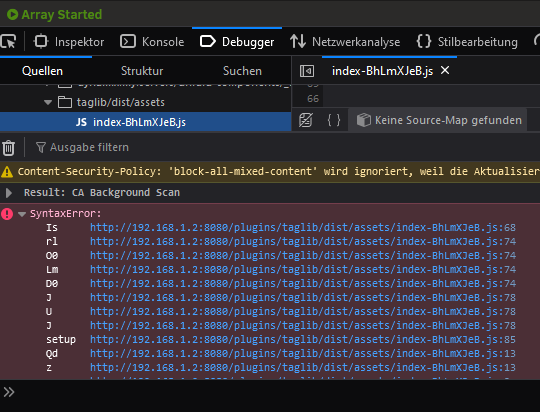
@dixtdfThe Settings-Page from the Plugin stays blank. In the Firefox Dev-Console i've got an error.
-
@dixtdf I can confirm that I can find the Plugin. Installation also works. I just can't set it up, because it's in Chinese. 😅 Also as an information: After installation on the App Site, if you click on Actions and then Settings: You land on a blank Page. Going through the Settings Page to your Plugin works. Would be great if the Plugin would be available in English. 🙂
-
Ist das nicht genau der genannte Fall?
-
Danke für eure Meinungen dazu. Dann werde ich das so lassen, wie es ist. Noch eine kurze Frage zur Parity: Bei zwei Parity-Platten mit x Daten-Platten können zwei Platten ausfallen, ohne dass man Daten verliert, richtig? Kann auch eine Parity- und eine Daten-Platte ausfallen?
-
Ein guter Hinweis mit der Schreibgeschwindigkeit, danke. Das hatte ich noch nicht auf dem Plan. Aber klar, schneller als das langsamste Gerät, die Parity HDDs, geht es nicht. Wobei ich grundsätzlich denke, dass das für mich nicht relevant ist. Ich weiß nicht warum, aber ich mag den Pool nicht. Und ich mag den Gedanken, dass die SSD Daten noch besser abgesichert sind. Ein Cache wäre auch ganz cool zur Beschleunigung; aber ich habe kein Platz mehr dafür. Zudem gibt die aktuelle Lizenz nur 6 Geräte her; würde also auch Geld sparen, die nicht erweitern zu müssen.
-
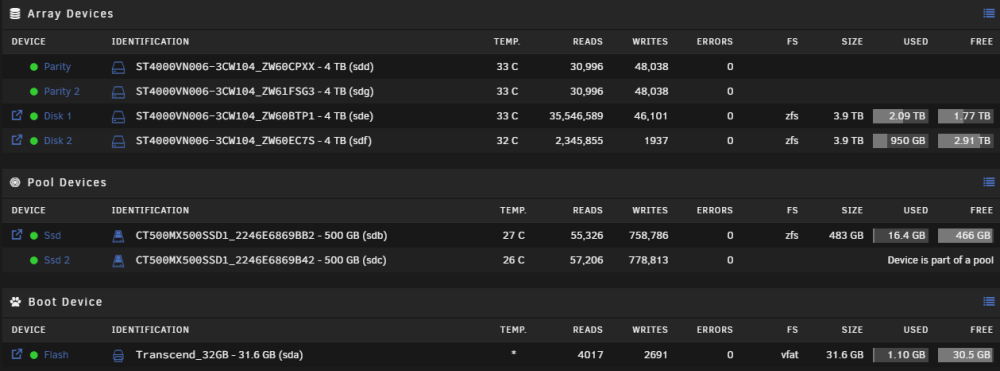
Moin, ich habe seit längerer Zeit folgende Konfiguration: Im HDD Array werden Daten (wenig Veränderung/Zugriffe) und Backups gespeichert. Im SSD Mirror Pool laufen 19 Docker Container. Ich überlege den Pool aufzulösen, eine SSD ins Array einzubinden und eine SSD als Cache zu verwenden. Die Shares kann ich ja den HDDs zuordnen und die Docker Container auf der SSD laufen lassen. Was habt ihr dazu für Gedanken? Kann ich erkennen, ob es zu viel Schreibaktivität auf den SSDs gibt, um das im Pool mit der HDD Parity laufen zu lassen? Habt ihr Vorschläge zur Optimierung? Viele Grüße
-
Are there any more information about what to do when you get the message "* This drive is part of a multi-drive pool or array."?
-
Thank you for the info. But for me, that doesn't fix it. 🤷♀️
-
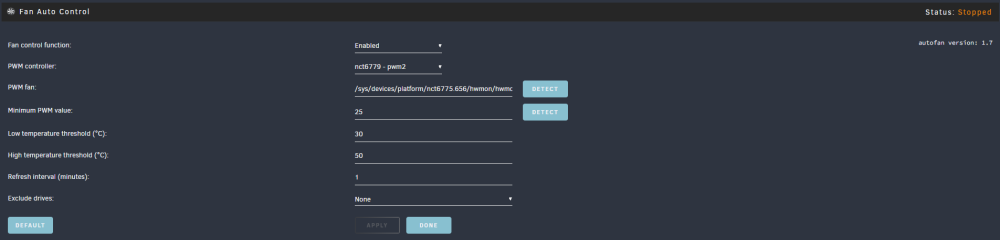
After a reboot, the Status of System AutoFan is "Stopped" and it won't start. I manually need to disable it. Then it's running again. After that, I need to enable it again. Newest Unraid and Plugin version.
-
It was just for my inner Monk. It was all lowercase and didn't fit in my structure as I like it. 😅 And since there is an option, I used it. 🙂 But yes, I had to change a lot of paths, but that was ok for me. I was just confused that the default will not be used. Thank you for the explanation! In as little as two or three cases, my path was used. But I wasn't able to tell why. Now I know the "why". 🙂 Also, thank you again for helping me out to fix my docker. I'm still not a fan of how the docker containers are added and controlled in the UI, but this works better at the moment. An official and basic docker compose support, without the need of the CAs, would be great and a good compromise I think.
-
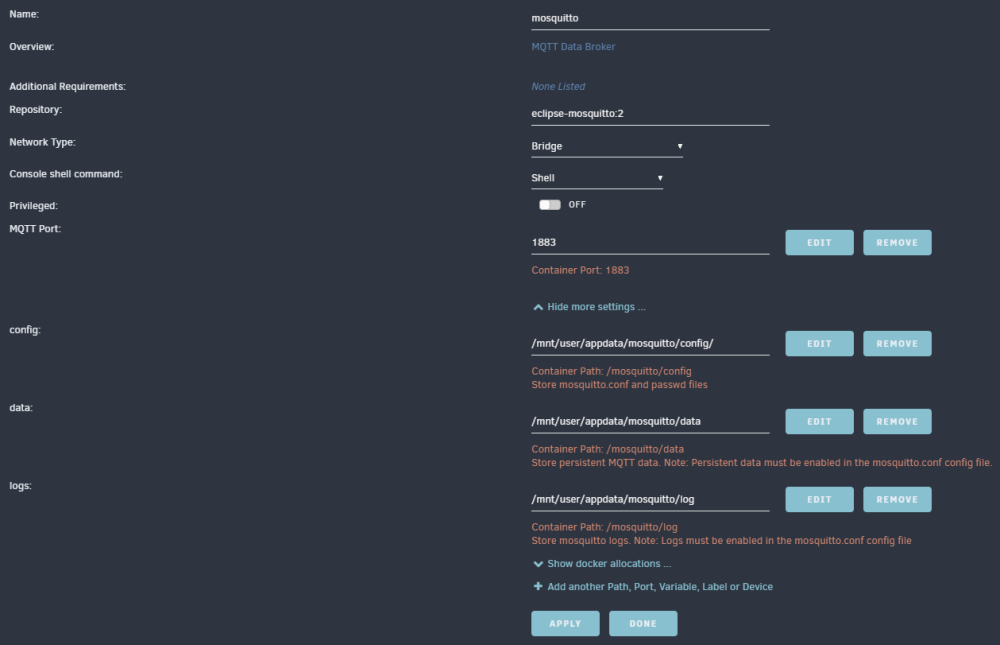
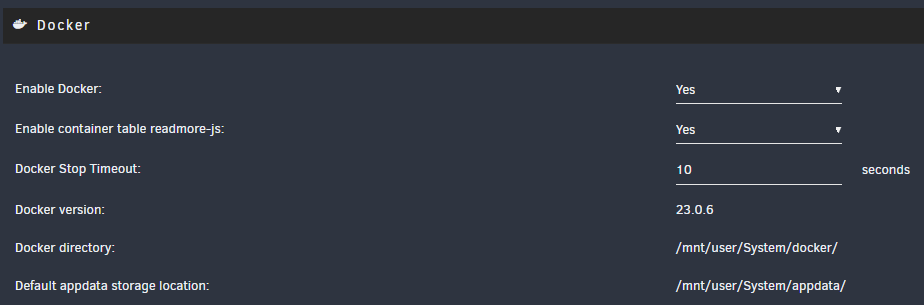
Example:
-
Is it normal that the CAs ignore the "Default appdata storage location" i have set to "/mnt/user/System/appdata/"? When i want to install one everything is set to "/mnt/user/appdata/[+ca+subfolder]".
-
Thank you. That helped to remove the old content. Then i will now install everything with CA. Hopefully everything is available. It's just so complicated instead of docker compose.... I hope there will be no more errors.
-
What do you mean with "may be a good idea to try a docker image instead of folder"? And nuking the docker folder means really deleting the complete docker directory? After that it will be newly installed?
-
Is there a way for this? I need the docker containers up and running.



