





MagickPistacho
Members
-
Joined
-
Last visited
-
Right, so if the mapping is something like, let's say for example: "/mnt/user/media/blablabla", it wouldn't create anything at the top level, as it is at a "lower level" than /user - /disk# -/poolname, correct? Anyway, I think I've found the culprit and it may well be the first suspect: ZFS Master and/or Sanoid. Until now each week (usually sunday and/or monday) that Media share would be created, but did not happen this time, finally. I think it had to do with an old snapshot that was pointing to something in Media instead of media, and now that I've cleaned most of the old snapshots because I've rearranged pools, it seems it no longer does it. I'll mark this as solved in a couple of days, see if everything is working fine and it does not start again. Thanks a lot for your time, JorgeB and trurl!
-
Good to know then. How do I know if a container has a host mapping at the top level then? Does that mean, basically, "if any container has a mapping to the root/name of a share"? Perfect! That was my understanding and always left them as they come, but I was getting doubts with this after all we were talking about.
-
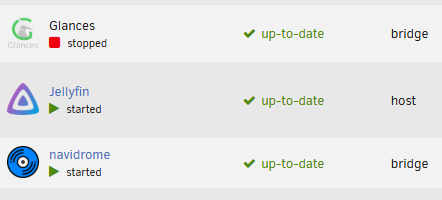
Thanks again for your answers, trurl. If I'm understanding this correctly, while there are several dockers with paths mapped that way, yes: but only Jellyfin seems to be configured as a host, as in the network level: Should I change it to something like /data/whateverthefolder, or are they fine as it is? Nonetheless, any docker path with mnt/user or mnt/poolname for the media share are "media", lower case, none of them "Media". There was one, a long time ago (I it was a path in Rmlint or Navidrome), I changed it thinking that would solve the situation, buuuut it changed nothing. I've searched on scripts as well, and nothing, and same with plugins. I'll take a further look in those, in case I've missed something.

-
Nope, it's empty as a void, just existing. But I think some files started to transfer there instead of media by mover a while back, when I didn't notice it was created. Hmmmm, how could I check that? Not sure I get it all, or what should be the correct mapping.
-
Oh, neat! There's so much going on at the same time, tough, and much of it does not have a clear indicator of what started it or what exactly is it doing, but it's great to be able to see jellyfin, navidrome and other docker or apps processes stated and sorted. Thanks! That's what I thought too, yeah. I found one a long time ago, changed it but did not solve the issue, must be somewhere else. I've been looking in every docker and app for this, with no luck. I'll try to look more carefully, and see if there's some clue in the diagnostics files. Thanks for your reply too!
-
Thanks JorgeB, I'll try to install iotop and see how it works. But lo-and-behold, I think I found the culprit just before going to bed yesterday: it seems there was an unsolicited scrubbing process going on my HDD, and it was taking forever. Stopping it seemed to do the trick, I'll see if it continues to behave by the time being. Now I just need to figure out how to delete old datasets occupying precious space that for some reason ZFS isn't letting me to destroy, and why one or twice a week a duplicate of the "media" share but named "Media", with capital M, appears suddenly. If the issue with the HDD doesn't revert back in a couple days, I'll come back and mark this one as solved.
-
Hello there! Long time user, Unraid's been fine most of the time but I've got my notable share of issues here and there. Still, I could solve them trying things, managing problem solving and reading threads here or in Reddit. Now I've stumbled upon something that's been persistent and does not want me to manage it, though! For several days now, one of my HDDs is always being read and written by something, by I can't for the life of me identify what it is. It's not only some kb/s here and there, most of the time it is at 20~50MB/s, but sometimes it goes up to 150 or 220 for a few minutes, and back then back to the previous. Parity disk seems to being read and written as well, constantly, and of course if I try to stop the array or shutdown the system, it takes several minutes, I'm talking perfectly in the range of 15 to 25 or more. Rebooting seems to be doing an unclean shutdown too. I've upgraded the array with 1 more HDD and added as well one more NVMe and 2 SATA SSDs, so now I have a new config regarding some shares and how I manage appdata, etc. But this has not happened right after I've done this, it was working just perfectly for several days, until it started behaving like this when I continued with some cleanup and configurations (I explain what may have caused it a bit below). I've tried uninstalling my most recent dockers and plugins (folder view+, and netdata, in an attempt to see what process is doing it, with no luck), disabling docker entirely, letting it do a complete parity check, starting the array in maintenance mode to restart without anything using the hard disk, and whatever I could think of, but I come empty handed everytime, the dreaded unstoppable read and write persists. At first I thought the disk was damaged, as a parity check with the array mounted was only at about 68-70MB/s... because something was still reading and writing, of course. But a parity check in maintenance mode let it go to maximum speed no problem. But of course, anything that needs to use that HDD now goes on forever. If it even starts. As it is being used by something else infinitely. My suspect is ZFS Master and the scripts for backing snapshots with Sanoid. As I changed my config recently, I had to move where files and shares were located; when everything was done, I let the system be to see if there were any problems (nothing apparently), and several days after I run the scripts to create the new replication of the datasets. Problem 1 is that these replications took forever; I get that one of them (music dataset) is almost 2TB, but still it was doing it for more than 8 or 10 hours, maybe more, and it wasn't finished yet. That is insane. Problem 2 is that ZFS Master doesn't let me delete most of the old datasets in the HDD dedicated to backups. So the HDD is at 75% and I cant free most of the space, while its usage keeps growing. And that's the HDD that's being assaulted day and night, you guessed right. Maybe the proble lies in that I stopped the script mid operation, and somehow it is still trying to make the backup somehow, or that ZFS/Sanoid is gone crazy and it's trying to complete it but can't because it's stopped, and is constantly reading and writting without knowing what to do? Pure speculation, but I can't think of anything else at this point. Is there any way of visualizing what apps or processes are causing this? What Unraid is doing "under the shadows"? What exactly is being written and read? Just something that tells me exactly "this are the background processes occurring right now, and this one is reading/writing in this HDD/share". I've tried System Log, Processes, Active Streams, File Activity, Glances, Netdata... but either nothing showed up, or everything was shown in a way that did not solved it whatsoever :( I'm at a loss, my only idea left is to erase ZFS Master, delete Sanoid, try to erase the deranged datasets then, and hope that a reinstall of ZFS Master/Sanoid sanitizes the system. But then my SSDs shares wouldn't be protected, and it scares me. Is that my only option? Any help would be welcome. I've attached my system diagnosis en case it could be of any use. Many, many thanks in advance! unraid-diagnostics-20260617-2208.zip
-
Hey! 🙂 Yeah, I've already tested that. In fact right now I have two NVMe (Samsung 970 Evo Plus 2TB) connected to the board and consumption with Powertop is about 9-10W still (3 HDDs, 2 NVMes, 1 USB, 3 fans), around 11-12W without it. With Powertop it certainly reaches C10. As for settings, it's been a while so I don't really recall and I can't look at it right now, sorry, but basically followed whatever seemed to be usable for other users and did some trial and error to see which of them affected consumption in a positive way. Hope this helps! I also bought another Gigabyte board and did more testing with both of the, some RAM modules and options, but had several problems with the new one, this works better. My idea was to post the results here, but these past months have been very rough, I'll see if I can manage to post in the near future.
-
Yeah, these measurements here were without any HDDs on the NAS, all of them disconected. That's why I find it strange that he can reach 4.5W, even with discs connected, and I can only go to 7-8W without HDDs. That information about those Seagate HDDs is very interesting though, totally explains how they can have such low consumption. A pity I'm stuck with my Toshiba's though. I'm gonna try tu upgrade Unraid to the latest version, maybe there's been an upgrade in the kernel, and if that doesn't change anything I'll look some more within the BIOS options.
-
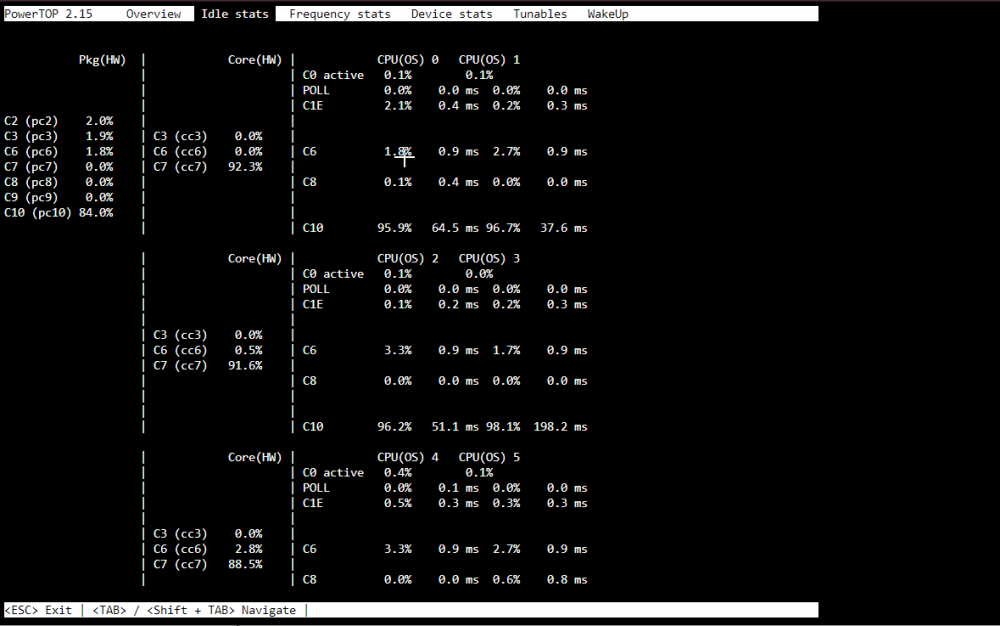
Well, I've changed my board now to a Gigabyte B660M DS3H DDR4 and the RAM to G.Skill Aegis F4 16GB 2400, and it reaches C10, even with the HDMI connected. Right now it sits at 9-10W on spindown, no HDMI, no keyboard or mouse, WebGUI closed. One disc spinning bumps it up to 13-14W, two around 25-35 it seems. I've tried with no discs and it goes down to about 7-8W, and without SSD and fans it makes little to no difference, 6-7 but sometimes 8 as well. It's not bad but this user here managed to reach 4.5W at idle and 9W with 2 HDDs spinning and the same board, CPU, PSU and RAM: https://www.hardwareluxx.de/community/threads/sparsamer-nas-mediaserver-neuling.1329924/#post-29668608 So I don't know what I'm doing wrong, maybe I need to change some settings on BIOS but I haven't found anything that could do the trick.
-
A shame, really... but even if with C8 I can reach that low consumption, it would be enough for me. I'll post results once I have the new configuration ready 🙂
-
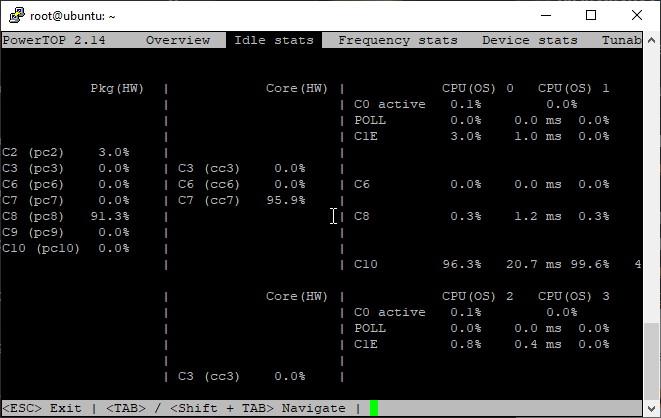
Yeah, I already tried my system without HDDs before and the results were the same on Unraid. But I've tried it again on Ubuntu following your suggestion. Same case, C8 max, but now this one's weird: I get 20W on Ubuntu without HDDs and with Powertop auto-tune while I get those 12-13W on Unraid with discs connected. I've already ordered a different mobo (Gigabyte B660M DS3H DDR4, another user managed to get around 5W with it), I'll try to reach C10/lower consumption with that one, we'll see. But the above was for sure not the result I expected! 🤣
-
Yep, then it seems that's it, my system can't go to C10, I'll have to change the motherboard and try with another one. Bummer, but at least I have some spotted thanks to hardwareluxx. And many thanks for the tips and help My post was misleading, I was comparing Unraid with spun down disks to Ubuntu as is. I thought Unraid used only about 25W while discs were spinning, but it seems that when all 3 are active it can go up to 35W too, so it should be about the same, sorry for the confusion.
-
Ok, I've managed to install the ssh server and powertop in Ubuntu, and yeah, seems that I can't reach C10... No HDMI and USB cables connected, only power, LAN and the USB stick. I don't know if I should've used a non-GUI mode or anything else to test this, didn't see the option while booting Ubuntu. Even then, while achieving C8 here, it uses about 34W instead of 13 like in UnRAID, is that normal?
-
Oh, I see. Thanks a lot. I'll have to investigate about installing a ssh server and managing it with Ubuntu, right now I don't know where to start with that, but I'll take a look as soon as I can. In the meantime, if it serves any purpose, I've tried this and everything checks as enabled:





