apsmith12
Members
-
Joined
-
Last visited
-
Yeah HAOS say its usling 3GB most of the time, unraid says the VM is at 7ish.
-
Ill do that, but I dont have immich.
-
Im having persistent issues with Out of Memory issues killing my VM and occasionally a docker container. Fix common problems suggested I ask for additional help here, as I am running out of ideas. Its a 32gb system with only one VM (12gb given) and only 17 running docker processes, only a few even occasionally do much. I have seen some post about '-m 4GB' in extra parameters as one thing to try and another messing with hugepages, but I am unsure on either. I could maybe also reduce the VM down from 12gb to 8gb, I dont think it would be a problem its just running HAOS with a handful of addons tower-diagnostics-20260422-1303.zip
-
Is there anyway to check if the cron jobs are actually working? I see both I have listed in the ffs cron file, but I see no evidence the process actually ran in any log.
-
It cant find anything to repair. I think the corruption while encrypted caused issues. Most of the data was on Disk 1, and I had backups of enough of what I am missing to be content for now.
-
I really don't see anyway to do that, but yes the one way I know how it wanted to format. I took the disk out and hooked it to a Linux system via USB thinking it would see it and let me put in pw, but it just tells me there are errors. Im wondering if the memory issues caused corruption to the encryption and that's why it wouldn't repair
-
tower-diagnostics-20260111-1122.zip
-
tower-diagnostics-20260110-2138.zip
-
So I replaced both DIMMS, and no memory errors. When I got back into the server, drive 3 fixed, so Drive 1 and 3 are working. Drive 2 still gives that same fix error, where it doesnt want to actually do anything. It also wont mount, says its not encrypted (it was and the rest of the array is) and the cache pool wont mount.
-
Can parity not help if I manage to fix 2 of the 3 drives? Can the one drive be considered failed?
-
Def seems to be some memory errors, that I assume would be the possible cause of the corruption, but doesn't help me recover the data correct? I also assume I gotta figure out which DIMM is at fault if not both?
-
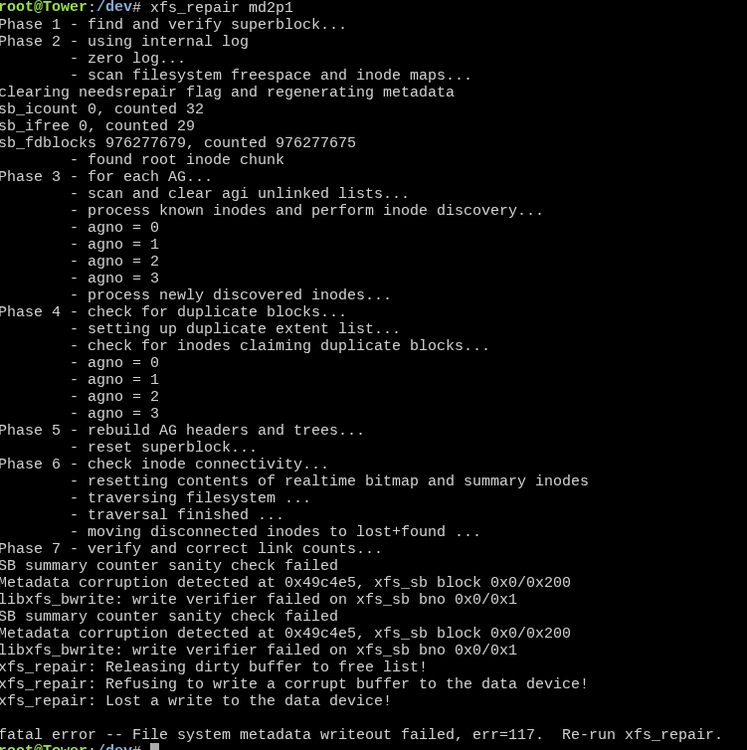
This afternoon I started to get massive BTRFS corruption for the second time, for no known reason on my 2 disk cache pool. I moved everything I could to the array, wiped the pool and restarted the 2 drives as a ZFS RAID1. I then went to restore everything. Was going well, until I got to my HA VM and things went off the rails during the HA restore backup. Now I am getting massive problems trying to start the array on the XFS drives. Ran the fix on the 3 drives, disk 1 seems ok, but disk 2 has the below failure during fix and 3 are currently going through fixes stuck on superblock issues. Those 2 drives wont unencrypt even into maintenance mode. The 2 disk pool is not mounted so I cannot run anything on that at this point. I think I have backups within the last week of most things, but I really dont want to lose any data and/or have to rebuild the server, HAOS etc. Diagnostic logs attached. Anything that can help! tower-diagnostics-20260110-0142.zip