





cltitus
Members
-
Joined
-
Last visited
-
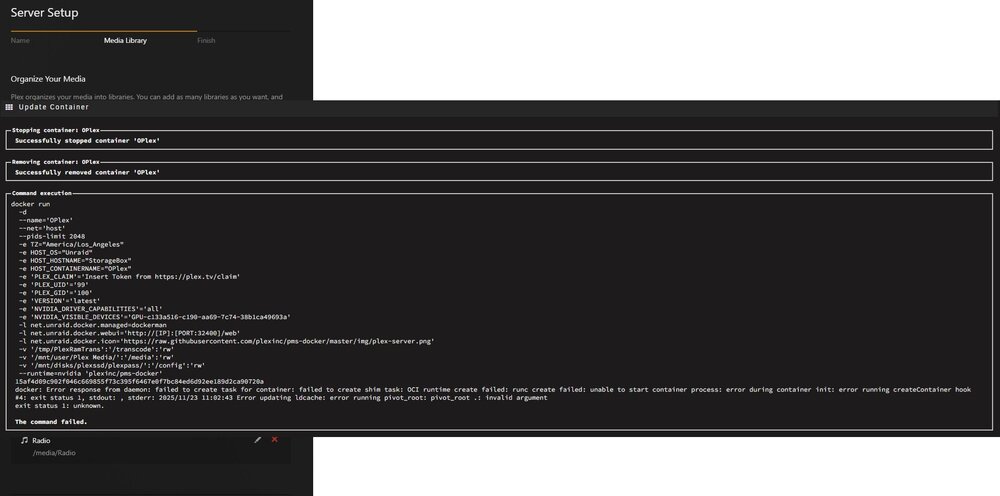
My plex docker broke so I started over. Everything is working fine but I need hardware encoding. I am using the official docker image of plex but when I go to add extra parameters "--runtime=nvidia" and hit apply this is the error I get. I even tried different version of plex dockers from ben and linux IO and this always shows up when I add the runtime. I am stumped everything was working until it updated the docker image from bens old plexpass from 4 years ago.
-
plugin: updating: community.applications.plg Executing hook script: pre_plugin_checks Cleaning Up Old Versions Fixing pinned apps Setting up cron for background notifications plugin: downloading: community.applications-2024.02.07-x86_64-1.txz ... plugin: community.applications-2024.02.07-x86_64-1.txz download failure: Generic error Executing hook script: gui_search_post_hook.sh Executing hook script: post_plugin_checks
-
Same issue. I am just going to RMA them and hopefully the new ones work
-
These are Seagate EXO 16TB would that still be an issue?
-
Okay I just wanted to add 2 drives to my array and my server is complete for what I do and need for my family. I have a 9300-16i they would not show up after shutdown and installed. Well I did everything swapped the connectors thinking it was them nope, tried the connectors on other drives they come up so its not the break out cable, swapped power cables nope did the same test and they power cables work. Though they were DOA nope put them in my USB 3 external enclosure windows found both. There is no firmware updates for them they came with the latest. I even switch to my supermicro 8i just for the disks the 2 new ones don't even show up I just have 2 SSD's on the 16i. I have switched every port on both cards they all work. I am stumped. I plug them into the mother board they show up but not in the HBA. They all have the latest IT mode software so I am at a cross roads of just getting a new 9400-16i storagebox-diagnostics-20231101-1239.zip
-
How would you do both at the same time
-
Yea I am rebuilding at the moment. It really sucks because it takes approximately 16 hours I gave 2 new drives coming in so I can finish this server. I will have enough space to last me a while a long with my families files. I am kind of scared to update this to a more efficient power setup.
-
Okay so finally got it working but now it keeps showing Parity 1 offline and Disk 3 Offline. Still 100% puzzled. I pulled all memory swapped cpu's from their sockets and moved all memory around. No more memory errors. Guessing bad seat now I am stumped on getting the drives back online I restart the server properly go in bios they show up in bios. Did smart test short and long no errors either disk showing offline. Also here is the current diage file from last restart. storagebox-diagnostics-20231020-2016.zip
-
So this is what happened. I turned off my system. Swapped out coolers removed my p2000 card because its going into a different system. Had a memory error in slots a1/2 replaced both. It booted into unraid and than just restarted out of no where. Now I am stuck on verifying bzfirmware checksum... Do I just wait. Do I download a backup of my unraid config file and change all the data. I am puzzled
.png.032c55ff8e0c081c5daf85a655eb7591.png)

.png.032c55ff8e0c081c5daf85a655eb7591.png)