



Skip to content
View in the app

A better way to browse. Learn more.

Unraid

A full-screen app on your home screen with push notifications, badges and more.

To install this app on iOS and iPadOS
  1. Tap the Share icon in Safari
  2. Scroll the menu and tap Add to Home Screen.
  3. Tap Add in the top-right corner.
To install this app on Android
  1. Tap the 3-dot menu (⋮) in the top-right corner of the browser.
  2. Tap Add to Home screen or Install app.
  3. Confirm by tapping Install.

jmarolf

Members
  • Joined

  • Last visited

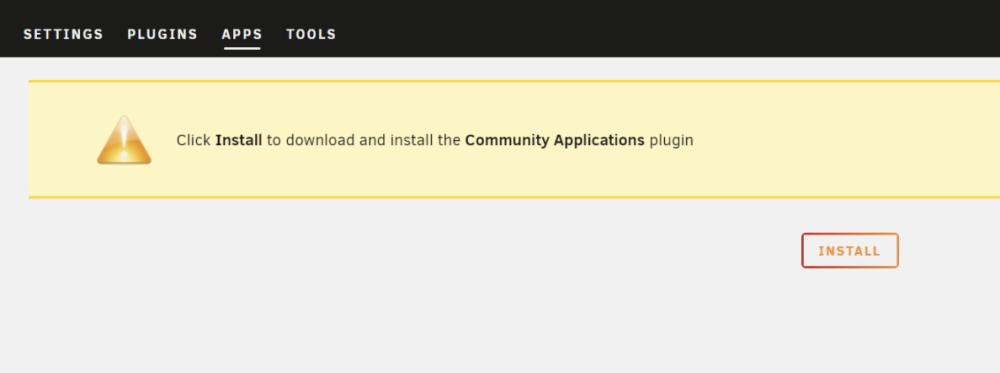
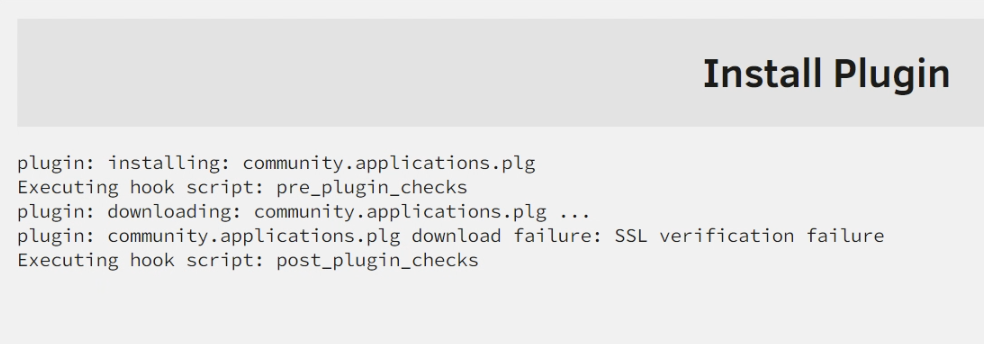
  1. 0. bought a lincense 1. Downloaded and create a USB 2. Plugged into machine, booted, and logging in at http://tower.local 3. Went to the "Apps" tab, am asked to install "Community Applications" 4. Click install, get SSL verification error NOTES: I really haven't modified any settings yet so its unclear how I resolve this. I'll try digging into the developer docs for extensions to see if I can install this plugin manually. Wget to https sites works so its unclear to me why this is failing
Account

Navigation

Search

Search

Configure browser push notifications

Chrome (Android)
  1. Tap the lock icon next to the address bar.
  2. Tap Permissions → Notifications.
  3. Adjust your preference.
Chrome (Desktop)
  1. Click the padlock icon in the address bar.
  2. Select Site settings.
  3. Find Notifications and adjust your preference.