




Skip to content
View in the app

A better way to browse. Learn more.

Unraid

A full-screen app on your home screen with push notifications, badges and more.

To install this app on iOS and iPadOS
  1. Tap the Share icon in Safari
  2. Scroll the menu and tap Add to Home Screen.
  3. Tap Add in the top-right corner.
To install this app on Android
  1. Tap the 3-dot menu (⋮) in the top-right corner of the browser.
  2. Tap Add to Home screen or Install app.
  3. Confirm by tapping Install.

mangotrash

Members
  • Joined

  • Last visited

  1. Thanks for the fast response, Squid. It looks like it worked 😄
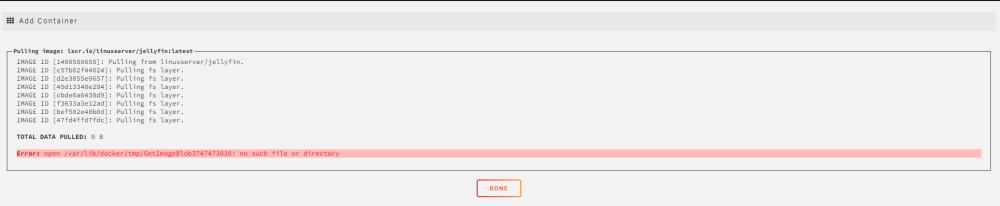
  2. Hello! I'm new to unRaid. I'm currently having trouble running my docker containers. Whenever I try starting a container, I can this error: Error: open /var/lib/docker/tmp/GetImageBlob3747473030: no such file or directory I've ran out of ideas on how to fix this. Things I've tried: Deleting the Docker image Restarting my unRaid server Deleting containers and running them again Sometimes this works for a few days, but when I restart the container, it doesn't work and gives a Server Error dialog I've attached my diagnostics and a screenshot of my error. Thank for you helping me out 🙏 tower-diagnostics-20230509-1644.zip
Account

Navigation

Search

Search

Configure browser push notifications

Chrome (Android)
  1. Tap the lock icon next to the address bar.
  2. Tap Permissions → Notifications.
  3. Adjust your preference.
Chrome (Desktop)
  1. Click the padlock icon in the address bar.
  2. Select Site settings.
  3. Find Notifications and adjust your preference.