sirtlks
Members
-
Joined
-
Last visited
Everything posted by sirtlks
-
补充信息: Unraid 6.12.10 macOS 15.1 文件管理器试过自带finder和qspace pro。
-
在macOS下挂载SMB共享的两块硬盘,发现硬盘间拷贝文件时是先下载到本地,然后在做上传的。 查询资料后得知,需要开启额外参数,但是我添加后始终不生效,无法实现server-side copy的效果。 有没有朋友有过相关经验? 参考Wiki: https://wiki.samba.org/index.php/Server-Side_Copy 参考帖子: Unraid SMB额外参数(在GUI【设置】-【SMB】-【SMB额外】): #unassigned_devices_start #Unassigned devices share includes #include = /tmp/unassigned.devices/smb-settings.conf #unassigned_devices_end [global] vfs objects = catia fruit streams_xattr fruit:copyfile = Yes fruit:nfs_aces = No fruit:zero_file_id = Yes fruit:metadata = stream fruit:encoding = native spotlight backend = tracker [disk1] path = /mnt/disk1 veto files = /._*/.DS_Store/ delete veto files = yes spotlight = yes fruit:copyfile = yes [disk3] path = /mnt/disk3 veto files = /._*/.DS_Store/ delete veto files = yes spotlight = yes fruit:copyfile = yes Unraid SMB参数输出: root@AurStation:~# testparm -s Load smb config files from /etc/samba/smb.conf lpcfg_do_global_parameter: WARNING: The "null passwords" option is deprecated Loaded services file OK. Weak crypto is allowed by GnuTLS (e.g. NTLM as a compatibility fallback) Server role: ROLE_STANDALONE # Global parameters [global] bind interfaces only = Yes disable spoolss = Yes host msdfs = No interfaces = 192.168.31.220 127.0.0.1 load printers = No logging = syslog@0 map to guest = Bad User max open files = 40960 multicast dns register = No ntlm auth = ntlmv1-permitted null passwords = Yes os level = 100 passdb backend = smbpasswd printcap name = /dev/null security = USER server min protocol = NT1 server multi channel support = No server string = My home nas show add printer wizard = No smb1 unix extensions = No fruit:encoding = native fruit:metadata = stream fruit:zero_file_id = Yes fruit:copyfile = Yes fruit:nfs_aces = No idmap config * : range = 3000-7999 idmap config * : backend = tdb acl allow execute always = Yes aio read size = 0 aio write size = 0 create mask = 0777 directory mask = 0777 hide dot files = No include = /etc/samba/smb-shares.conf invalid users = root spotlight backend = tracker use sendfile = Yes vfs objects = catia fruit streams_xattr wide links = Yes [disk1] delete veto files = Yes path = /mnt/disk1 spotlight = Yes valid users = admin veto files = /._*/.DS_Store/ write list = admin fruit:encoding = native [disk3] delete veto files = Yes path = /mnt/disk3 spotlight = Yes valid users = admin veto files = /._*/.DS_Store/ write list = admin fruit:encoding = native Unraid SMBSTATUS输出(4501为我的mac客户端,SMB协议为SMB3): # smbstatus Samba version 4.17.12 PID Username Group Machine Protocol Version Encryption Signing ---------------------------------------------------------------------------------------------------------------------------------------- 4501 admin users 192.168.31.142 (ipv4:192.168.31.142:61252) SMB3_11 - partial(AES-128-GMAC) 2696 admin users 192.168.31.250 (ipv4:192.168.31.250:15335) SMB3_11 - partial(AES-128-GMAC)
-
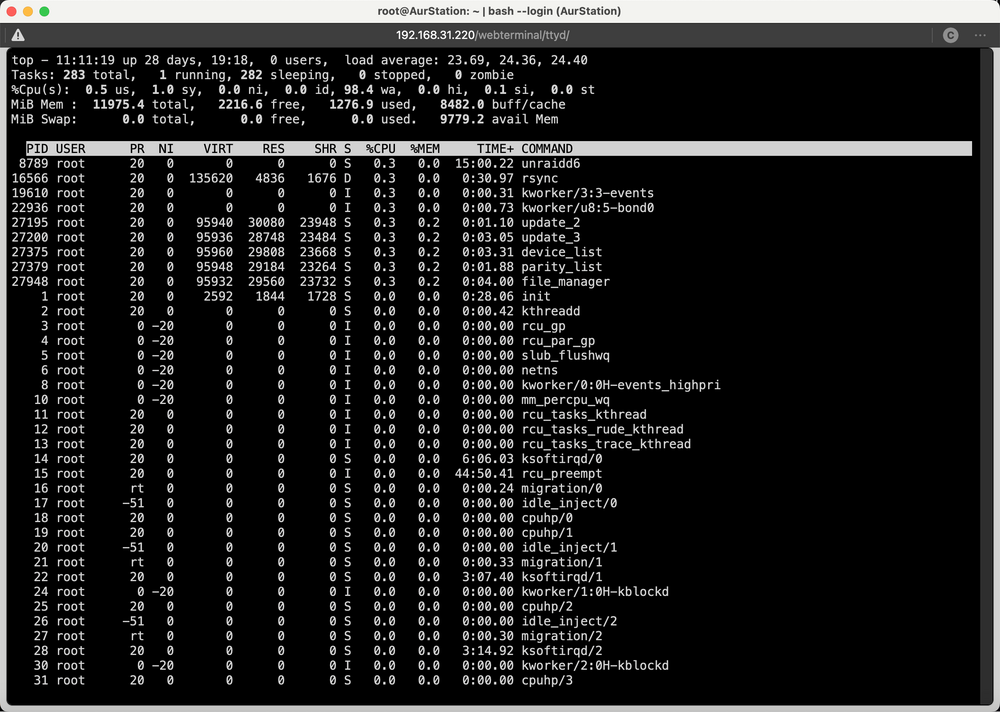
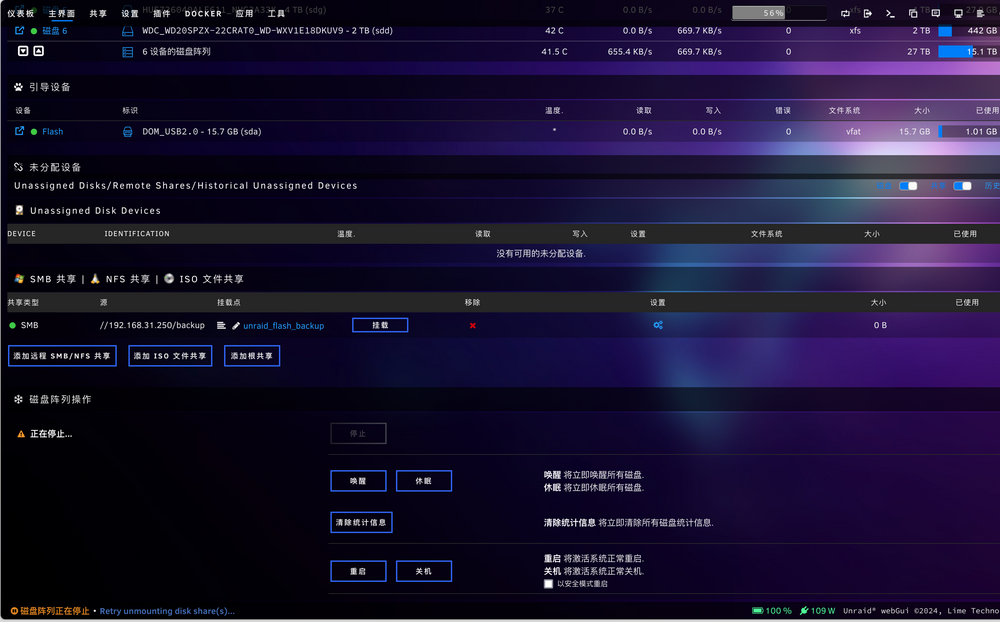
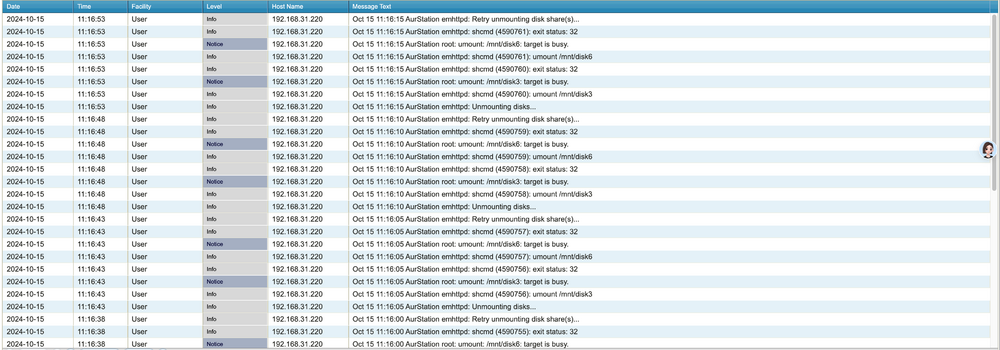
操作:先拷贝大文件,几个小时后发现进度很慢,就取消了文件拷贝任务。点击停止阵列按钮的时候,左下角会显示 【磁盘阵列正在停止•同步文件系统】、【 磁盘阵列正在停止•Retry unmounting disk share(s)...】,等待大概30分钟后,还是这样。 在此过程中所有共享是不可用的,可以看到有块盘在不停写入数据(300KB/s),此时CPU依然处于卡IO状态,wa 90%多。 基本情况:Unraid 6.12.10版本,开启磁盘共享,未使用缓存池功能,文件拷贝使用Dynamix File Manager,syslog见附件最后图。 感觉这是和rsync的文件拷贝机制有关? 我取消了文件拷贝,但是后台还在不断进行磁盘读写,导致我的设备长时间不可用?

-
我以前遇到过类似问题,解决方案是不使用Unraid自身SMB时间机器,换用docker时间机器。 https://github.com/mbentley/docker-timemachine
-
推荐使用linuxserver的nextcloud(CA搜索nextcloud第一个就是了),在模版中设置容器PUID、PGID的环境变量,就能避免很多权限问题。
-
Unraid有没有第三方应用/docker容器,可以实现类似群晖DSM的存储空间分析器(StorageAnalyzer)的功能? 定时对指定存储生成静态报告网页,即可查看也可用于归档。
-
可道云应该符合要求,能做到解压缩/压缩文件。具体可以到官网DEMO网站看看。
-
This topic is helpful. This is still the right approach today. ①Add it to config file /boot/config/docker.cfg DOCKER_OPTS="--storage-driver=btrfs -H unix:///var/run/docker.sock -H tcp://0.0.0.0:2375" ②restart dockerd service in terminal. /etc/rc.d/rc.docker restart
-
2023-7-27更新:最近查找资料搞定了XMP设置,在3200频率下跑了几遍MemTest86+都是PASS。 这段时间,作为虚拟机的Unraid6.11.5也没有出现死机、失联。所以目前我认为解决Unriad死机问题的最有效办法,就是不将其作为物理机底层系统来使用,专业的事情交给专业的系统去做。 总结:Unraid作为一款不那么稳定、无技术团队支援的商业化系统,只能说它仅适合喜欢玩的用户,在折腾的路上渐行渐远。
-
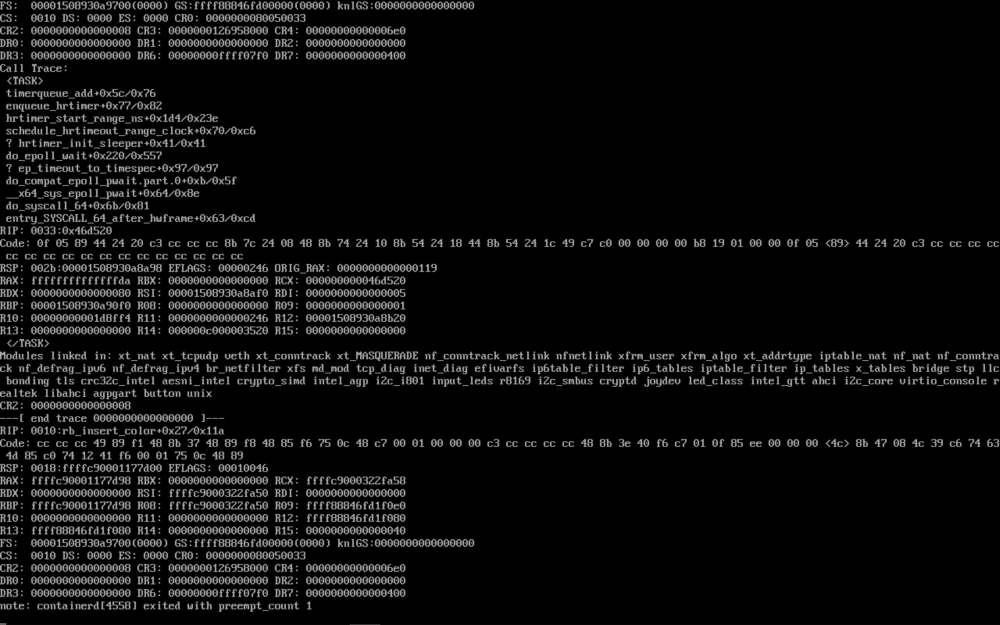
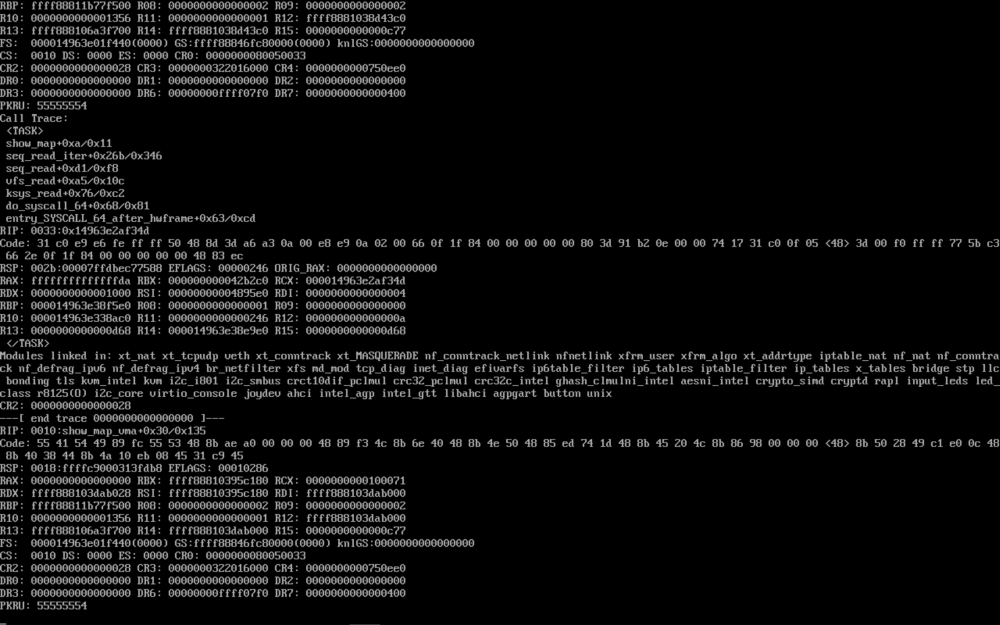
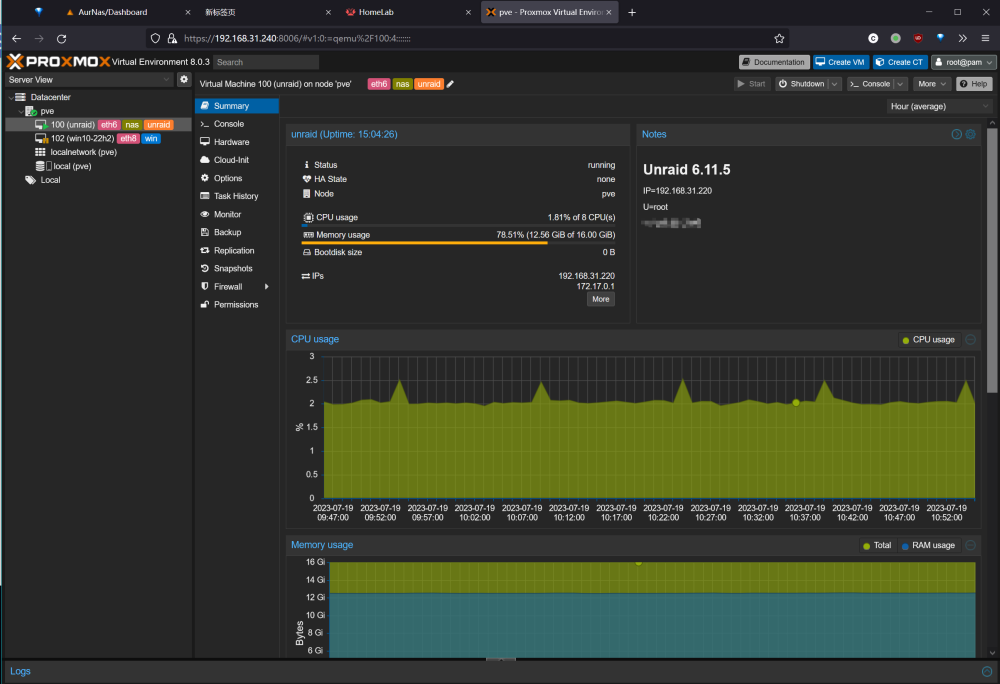
2023-07-19,记录一下最近的进展: 由于我的物理机使用Unraid的不稳定性,我决定在裸机安装了PVE8.0,将Unraid作为虚拟机运行,直通SATA控制器、网卡、USB引导到虚拟机。得益于Unraid的引导机制,此操作简单且顺利。 有意思的是,本帖反应的单个cpu核心占用100%问题,在此后都没有发生了!而且基于Debian的PVE,也是坚如磐石,没有出现过物理机卡死问题。 但是产生了新的问题:每隔几天会存在Unraid虚拟机卡死/失联问题,GUI和SSH都没有响应。此问题在论坛也存在相当多的帖子反馈,疑似从好几年前的版本,到最新的Release,都没有得到有效解决。我遇到此问题只能SSH到PVE,使用qm stop 100强行停止Unraid虚拟机。 我在控制台发现Unraid卡死时,存在以下异常信息: 异常① 异常② 其中异常①看不出来,异常②疑似与内存调用出错有关。我使用MemTest86+测试内存,果然检测出10个左右的错误。 推断问题:疑似主板、内存兼容存在问题,光威D4-3200的条子,在铭瑄B660M终结者的BIOS里启用XMP,是无法点亮的,默认只有2400的频率,所以我按照网上相关教程,关闭了XMP和自动内存频率,使用了手动拉高内存频率到3200。现在看来这个操作可能埋下了隐患。索性将此操作还原,使用2400的自动内存频率,再跑MemTest86+,就没有错误了。 鉴于以上硬件问题,我决定再使用观察一段时间,考察稳定性。后续会继续在本帖反馈。
-
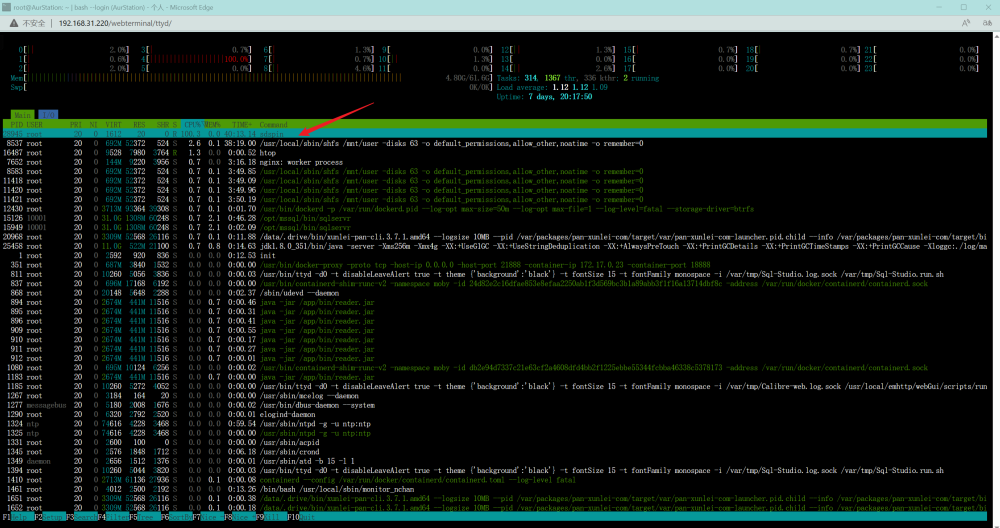
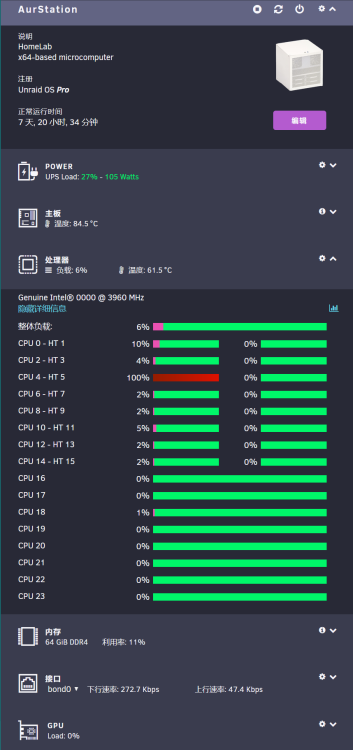
补充Dashboard截图:一颗核心满载,此时网络/内存的占用都很低。
-
自组的homeserver,硬件12900 es+铭瑄B660M终结者+64G RAM,系统为unraid 6.11.5,会有某个CPU核心长时间100%占用(而且占用的进程不一定是哪个,附件图片为一个示例,核心4满载),造成风扇猛转,占用进程无法通过命令行kill掉,也试过不管它,过几个小时或者一天才会正常。这样时不时的来一下,导致机器功耗很高。请问有没有大佬了解此情况产生原因,以及如何规避?