





zachlovescoffee
Members
-
Joined
-
Last visited
-
Hey that did it!

-
I guess I posted this in the wrong forum and they directed me here. Could someone help troubleshoot this issue? I tried to mount the disk manually. @JorgeB helped me troubleshoot but sent me here for more support. Any thoughts? ## I have a brand new Western Digital Black 1TiB NVME drive in an Asus Hyper m.2 PCiE container. unRAID recognizes the drive and it will allow me to format it. I try to format it with XFS file system and according to the logs everything happens fine. But then the drive isn't mountable and my only options are to Start PreClear or Clear disk. Any idea what's going on or how to troubleshoot? //SysLog Mar 29 12:48:43 unRaidServerName unassigned.devices: Format device '/dev/nvme2n1'. Mar 29 12:48:43 unRaidServerName unassigned.devices: Device '/dev/nvme2n1' block size: 1953525168. Mar 29 12:48:43 unRaidServerName unassigned.devices: Clearing partition table of disk '/dev/nvme2n1'. Mar 29 12:48:43 unRaidServerName unassigned.devices: Clear partition result: 1+0 records in 1+0 records out 2097152 bytes (2.1 MB, 2.0 MiB) copied, 0.00331975 s, 632 MB/s Mar 29 12:48:45 unRaidServerName unassigned.devices: Reloading disk '/dev/nvme2n1' partition table. Mar 29 12:48:45 unRaidServerName unassigned.devices: Reload partition table result: /dev/nvme2n1: re-reading partition table Mar 29 12:48:45 unRaidServerName unassigned.devices: Creating Unraid compatible mbr partition on disk '/dev/nvme2n1'. Mar 29 12:48:45 unRaidServerName unassigned.devices: Create mbr partition table result: write mbr signature done Mar 29 12:48:45 unRaidServerName kernel: nvme2n1: p1 Mar 29 12:48:47 unRaidServerName unassigned.devices: Reloading disk '/dev/nvme2n1' partition table. Mar 29 12:48:47 unRaidServerName kernel: nvme2n1: p1 Mar 29 12:48:47 unRaidServerName unassigned.devices: Reload partition table result: /dev/nvme2n1: re-reading partition table Mar 29 12:48:47 unRaidServerName unassigned.devices: Formatting disk '/dev/nvme2n1' with 'xfs' filesystem. Mar 29 12:48:47 unRaidServerName unassigned.devices: Format drive command: /sbin/mkfs.xfs -f '/dev/nvme2n1p1' 2>&1 Mar 29 12:48:49 unRaidServerName unassigned.devices: Format disk '/dev/nvme2n1' with 'xfs' filesystem: meta-data=/dev/nvme2n1p1 isize=512 agcount=4, agsize=61047598 blks = sectsz=512 attr=2, projid32bit=1 = crc=1 finobt=1, sparse=1, rmapbt=0 = reflink=1 bigtime=1 inobtcount=1 nrext64=0 data = bsize=4096 blocks=244190390, imaxpct=25 = sunit=0 swidth=0 blks naming =version 2 bsize=4096 ascii-ci=0, ftype=1 log =internal log bsize=4096 blocks=119233, version=2 = sectsz=512 sunit=0 blks, lazy-count=1 realtime =none extsz=4096 blocks=0, rtextents=0 Discarding blocks...Done. Mar 29 12:48:52 unRaidServerName unassigned.devices: Reloading disk '/dev/nvme2n1' partition table. Mar 29 12:48:52 unRaidServerName kernel: nvme2n1: p1 Mar 29 12:48:52 unRaidServerName unassigned.devices: Reload partition table result: /dev/nvme2n1: re-reading partition table

-
Okay will do. Looks like I cannot unmount it: umount /x umount: /x: target is busy.
-
I did all of that mkdir /x mount -v -t xfs /dev/nvme2n1p1 /x/ mount: /dev/nvme2n1p1 mounted on /x There's still nothing reflected in the Main tab and the device cannot be accessed Mar 29 13:41:56 unRaidServerName kernel: XFS (nvme2n1p1): Mounting V5 Filesystem Mar 29 13:41:56 daunRaidServerNamerkstar kernel: XFS (nvme2n1p1): Ending clean mount Mar 29 13:43:40 unRaidServerName emhttpd: spinning down /dev/sdf Mar 29 13:44:07 unRaidServerName emhttpd: spinning down /dev/sdh

-
Of course! 'blkid' /dev/sda1: LABEL_FATBOOT="UNRAID" LABEL="UNRAID" UUID="2736-60C3" BLOCK_SIZE="512" TYPE="vfat" /dev/loop1: TYPE="squashfs" /dev/sdf1: UUID="70895727-cbd9-4f05-88bd-9b040d71b047" BLOCK_SIZE="4096" TYPE="xfs" PARTUUID="09e80b50-d1da-4330-b631-24d3dd2355f6" /dev/nvme0n1p1: UUID="d97c3a72-5e97-4ce6-a2f7-b74483da65e7" UUID_SUB="be257797-56c9-4579-bcf6-5254860d7cfa" BLOCK_SIZE="4096" TYPE="btrfs" /dev/md2p1: UUID="82076f6a-830f-4cfa-8667-4042b6ff539f" BLOCK_SIZE="4096" TYPE="xfs" /dev/sdb1: UUID="dfc21330-793e-491d-9b1b-98b44e2b7100" BLOCK_SIZE="4096" TYPE="xfs" PARTUUID="0cc9956d-a1a7-49d1-8bac-8fd54f44fa08" /dev/sdi1: UUID="d5ede152-a684-4f8a-b020-064209041166" BLOCK_SIZE="512" TYPE="xfs" PARTUUID="b7225dea-29af-4837-8714-e58e88dca7eb" /dev/md1p1: UUID="dfc21330-793e-491d-9b1b-98b44e2b7100" BLOCK_SIZE="4096" TYPE="xfs" /dev/sdg1: UUID="3ad78dd3-3486-4412-950c-36eb4f74f32e" BLOCK_SIZE="4096" TYPE="xfs" PARTUUID="5e78a879-49ed-441e-b5b0-84c3d71317cb" /dev/md4p1: UUID="7079006d-a1d5-42b6-8ee0-9d6538bc7e40" BLOCK_SIZE="4096" TYPE="xfs" /dev/loop0: TYPE="squashfs" /dev/sde1: UUID="82b61dea-d867-42b3-b9ee-e31e28153da2" BLOCK_SIZE="512" TYPE="xfs" PARTUUID="5e5fc39d-69b6-4c83-b8f6-ee9f52d6e322" /dev/sdc1: UUID="7079006d-a1d5-42b6-8ee0-9d6538bc7e40" BLOCK_SIZE="4096" TYPE="xfs" PARTUUID="2ed89356-a705-4cb2-b9e3-06dd8d7d9ab7" /dev/nvme1n1p1: UUID="f447550d-cc6b-4ddd-8d3b-2731cb3d3209" BLOCK_SIZE="512" TYPE="xfs" /dev/md3p1: UUID="82b61dea-d867-42b3-b9ee-e31e28153da2" BLOCK_SIZE="512" TYPE="xfs" /dev/sdh1: UUID="82076f6a-830f-4cfa-8667-4042b6ff539f" BLOCK_SIZE="4096" TYPE="xfs" PARTUUID="7c131225-89f3-4dc5-9aed-c9c8ab201d44" /dev/sdd1: PARTUUID="308d308f-794b-4222-acd9-ddb34568bd8e" /dev/nvme2n1p1: UUID="4804f262-7594-4bd3-a5a5-7b1abaa91f03" BLOCK_SIZE="512" TYPE="xfs" /dev/loop2: UUID="4586c572-49b9-4c0e-b686-e9f84a56a5b2" UUID_SUB="6fe81130-695e-468b-add5-3e1c1261ad49" BLOCK_SIZE="4096" TYPE="btrfs" /dev/loop3: UUID="71038acb-dcdb-4777-b449-7b37613d7e0b" UUID_SUB="3dd59551-c7fc-4e3b-bfca-90cb6a3d5bb4" BLOCK_SIZE="4096" TYPE="btrfs" frisk -l /dev/nvme2n1 Disk /dev/nvme2n1: 931.51 GiB, 1000204886016 bytes, 1953525168 sectors Disk model: WD_BLACK SN770 1TB Units: sectors of 1 * 512 = 512 bytes Sector size (logical/physical): 512 bytes / 512 bytes I/O size (minimum/optimal): 512 bytes / 512 bytes Disklabel type: dos Disk identifier: 0x00000000 Device Boot Start End Sectors Size Id Type /dev/nvme2n1p1 2048 1953525167 1953523120 931.5G 83 Linux
-
Howdy, I have a brand new Western Digital Black 1TiB NVME drive in an Asus Hyper m.2 PCiE container. unRAID recognizes the drive and it will allow me to format it. I try to format it with XFS file system and according to the logs everything happens fine. But then the drive isn't mountable and my only options are to Start PreClear or Clear disk. Any idea what's going on or how to troubleshoot? //SysLog Mar 29 12:48:43 unRaidServerName unassigned.devices: Format device '/dev/nvme2n1'. Mar 29 12:48:43 unRaidServerName unassigned.devices: Device '/dev/nvme2n1' block size: 1953525168. Mar 29 12:48:43 unRaidServerName unassigned.devices: Clearing partition table of disk '/dev/nvme2n1'. Mar 29 12:48:43 unRaidServerName unassigned.devices: Clear partition result: 1+0 records in 1+0 records out 2097152 bytes (2.1 MB, 2.0 MiB) copied, 0.00331975 s, 632 MB/s Mar 29 12:48:45 unRaidServerName unassigned.devices: Reloading disk '/dev/nvme2n1' partition table. Mar 29 12:48:45 unRaidServerName unassigned.devices: Reload partition table result: /dev/nvme2n1: re-reading partition table Mar 29 12:48:45 unRaidServerName unassigned.devices: Creating Unraid compatible mbr partition on disk '/dev/nvme2n1'. Mar 29 12:48:45 unRaidServerName unassigned.devices: Create mbr partition table result: write mbr signature done Mar 29 12:48:45 unRaidServerName kernel: nvme2n1: p1 Mar 29 12:48:47 unRaidServerName unassigned.devices: Reloading disk '/dev/nvme2n1' partition table. Mar 29 12:48:47 unRaidServerName kernel: nvme2n1: p1 Mar 29 12:48:47 unRaidServerName unassigned.devices: Reload partition table result: /dev/nvme2n1: re-reading partition table Mar 29 12:48:47 unRaidServerName unassigned.devices: Formatting disk '/dev/nvme2n1' with 'xfs' filesystem. Mar 29 12:48:47 unRaidServerName unassigned.devices: Format drive command: /sbin/mkfs.xfs -f '/dev/nvme2n1p1' 2>&1 Mar 29 12:48:49 unRaidServerName unassigned.devices: Format disk '/dev/nvme2n1' with 'xfs' filesystem: meta-data=/dev/nvme2n1p1 isize=512 agcount=4, agsize=61047598 blks = sectsz=512 attr=2, projid32bit=1 = crc=1 finobt=1, sparse=1, rmapbt=0 = reflink=1 bigtime=1 inobtcount=1 nrext64=0 data = bsize=4096 blocks=244190390, imaxpct=25 = sunit=0 swidth=0 blks naming =version 2 bsize=4096 ascii-ci=0, ftype=1 log =internal log bsize=4096 blocks=119233, version=2 = sectsz=512 sunit=0 blks, lazy-count=1 realtime =none extsz=4096 blocks=0, rtextents=0 Discarding blocks...Done. Mar 29 12:48:52 unRaidServerName unassigned.devices: Reloading disk '/dev/nvme2n1' partition table. Mar 29 12:48:52 unRaidServerName kernel: nvme2n1: p1 Mar 29 12:48:52 unRaidServerName unassigned.devices: Reload partition table result: /dev/nvme2n1: re-reading partition table

-
Sorry to necro this thread but when you say 'management of unraid should be behind ... vpn" can you tell me what you mean? like the only way to SSH into unraid is through a VPN connection? Are there any guides you could recommend for setting that up?
-
The server is back up and everything appears to be operational except the docker service, which says "Docker service cannot be started". My cache drive appears to be totally full so I am invoking the mover to see if that sorts things out.
-
Figured out one problem - the unRAID USB creator for Mac does not appear to actually work. It creates corrupt disks. The windows unRAID USB creator appears to work. The disk is booting to the 5 menu options "Lime Tech" but because of the way the 'restore' from backup zip worked, it wrote the backup directory as a separate directory instead of creating everything in the primary directory with 'syslinux'. So, it doesn't know from where to boot. I'm now re-creating the boot drive from scratch and I'll copy over the old 'config' folder. **fingers crossed** will update
-
Trying a new USB drive to see if this works. Fingers-crossed. Edit: Tried a new key and getting the same non-bootable error.
-
Restoring using the unraid usb creator doesn't work. Still getting the error. So I tried doing a fresh install and it doesn't work. Same error as above. I've checked BIOS settings and it's set to legacy boot. Fast boot is disabled. I've tried a different USB port. No good :<
-
I was executing a bash script this morning and I noticed that when I listed the contents of the directory, which previously had executables in it (color coded) that they are all now 'grey' and there is a directory with the name "/ <-- quotation-forward-slash. See this post here as it was the same script and similar problem but it didn't affect the entire firesystem: https://www.reddit.com/r/unRAID/comments/17825wq/somehow_this_folder_got_created_and_i_have_no/ I'm really concerned because it appears to have affected every single directory in the system. All of the directories that used to be colored are now greyed out. How bad is this and can you recommend any way to fix this? I have a recent Appdata backup, which also backs up my flash drive too. I'm just a little concerned to do anything for fear of mucking it up fully. The contents of the array appear to be okay. But Docker containers are now throwing execution errors and won't open. Oh crumb. https://imgur.com/a/ofvAiWL Edit: the docker service now fails to start after rebooting the system Edit2: Restoring the flash drive from last night's back up using the UnRAID USB creator (local file) has not worked. The system is now saying "This is not a bootable disk. Please insert a bootable floppy and press any key to try again..." System: Running a SuperMicro X11SCL-F with an Intel Xeon 2126g and 64GB of RAM. Cache is on a 2TiB NVME. Two parity drives and 8 data disks.
-
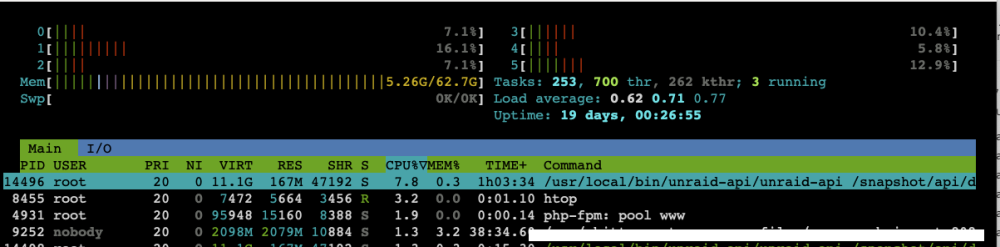
I had unRAID Connect installed but uninstalled it about two weeks. I happed to notice in 'htop' this morning that the API is still connecting and hitting resources. This shouldn't be the case. Any ideas why this is going on?
-
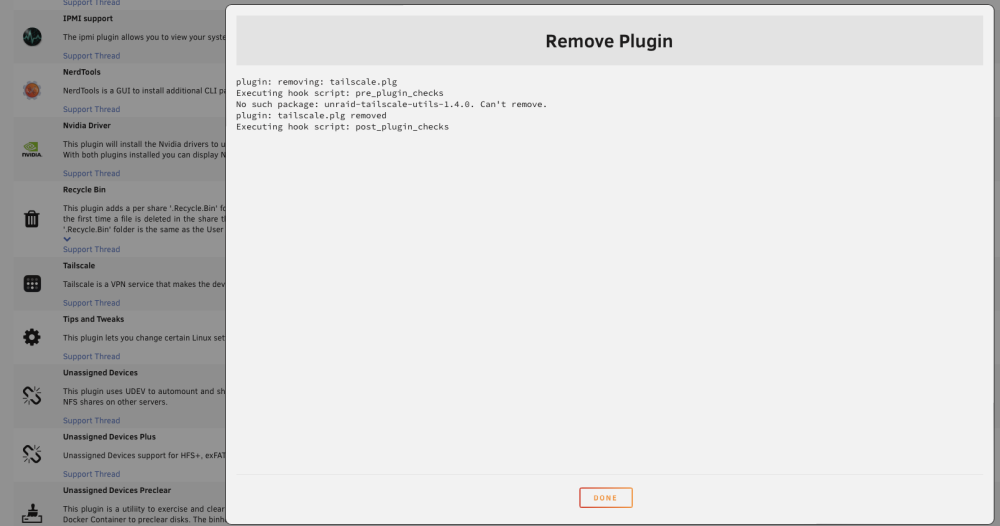
And then when attempting to uninstall it, the uninstaller says it's not even installed. Odd.
-
Tailscale Plugin seems to install but when going to settings, get a 404 server error (nginx) message. Totally weird, right?



