





buee
Members
-
Joined
-
Last visited
-
I tried searching for this but no dice. A few months back, a new version was released that wouldn't start properly, so I pinned the version. I'm now circling back and it appears that issue was fixed, but now I get a completely different error than I was receiving a while back. 2024-04-02 11:09:28,390 DEBG 'watchdog-script' stderr output: /home/nobody/qbittorrent.sh: line 70: 1975 Broken pipe timeout 10 yes 1976 Segmentation fault | nohup /usr/bin/qbittorrent-nox --webui-port="${WEBUI_PORT}" --profile=/config >> '/config/supervisord.log' 2>&1 So I shell into the container and run that script without the nohup: sh-5.2# /usr/bin/qbittorrent-nox --webui-port="${WEBUI_PORT}" --profile=/config *** Legal Notice *** qBittorrent is a file sharing program. When you run a torrent, its data will be made available to others by means of upload. Any content you share is your sole responsibility. No further notices will be issued. Press 'y' key to accept and continue... y WebUI will be started shortly after internal preparations. Please wait... "WebUI: Unable to bind to IP: 0.0.0.0/0, port: 8080. Reason: Unsupported socket operation" qBittorrent version: v4.6.4 Caught signal: SIGSEGV ``` 0# getStacktrace[abi:cxx11]() in /usr/bin/qbittorrent-nox 1# 0x0000556DF493900E in /usr/bin/qbittorrent-nox 2# 0x00001486C585A770 in /usr/lib/libc.so.6 3# 0x00001486C61B60B4 in /usr/lib/libQt6Core.so.6 4# 0x00001486C5F7B9C7 in /usr/lib/libQt6Core.so.6 5# QObjectPrivate::connectImpl(QObject const*, int, QObject const*, void**, QtPrivate::QSlotObjectBase*, int, int const*, QMetaObject const*) in /usr/lib/libQt6Core.so.6 6# QObject::connectImpl(QObject const*, void**, QObject const*, void**, QtPrivate::QSlotObjectBase*, Qt::ConnectionType, int const*, QMetaObject const*) in /usr/lib/libQt6Core.so.6 7# 0x0000556DF49307E5 in /usr/bin/qbittorrent-nox 8# 0x00001486C5F91599 in /usr/lib/libQt6Core.so.6 9# 0x00001486C5F91599 in /usr/lib/libQt6Core.so.6 10# QObject::~QObject() in /usr/lib/libQt6Core.so.6 11# 0x0000556DF49B78BB in /usr/bin/qbittorrent-nox 12# QObject::event(QEvent*) in /usr/lib/libQt6Core.so.6 13# QCoreApplication::notifyInternal2(QObject*, QEvent*) in /usr/lib/libQt6Core.so.6 14# QCoreApplicationPrivate::sendPostedEvents(QObject*, int, QThreadData*) in /usr/lib/libQt6Core.so.6 15# 0x00001486C6175BA4 in /usr/lib/libQt6Core.so.6 16# 0x00001486C4F20199 in /usr/lib/libglib-2.0.so.0 17# 0x00001486C4F7F3BF in /usr/lib/libglib-2.0.so.0 18# g_main_context_iteration in /usr/lib/libglib-2.0.so.0 19# QEventDispatcherGlib::processEvents(QFlags<QEventLoop::ProcessEventsFlag>) in /usr/lib/libQt6Core.so.6 20# QEventLoop::exec(QFlags<QEventLoop::ProcessEventsFlag>) in /usr/lib/libQt6Core.so.6 21# QCoreApplication::exec() in /usr/lib/libQt6Core.so.6 22# Application::exec() in /usr/bin/qbittorrent-nox 23# main in /usr/bin/qbittorrent-nox 24# 0x00001486C5843CD0 in /usr/lib/libc.so.6 25# __libc_start_main in /usr/lib/libc.so.6 26# _start in /usr/bin/qbittorrent-nox ``` Segmentation fault So it's not liking the port, right? The port is free at the time of container start I've also tried different ports. `netstat -ano | grep 8080` when the container is running shows it's in use, -tulnp shows me it's the docker-proxy service. I stop the container, the port is no longer in use. So it seems like the port is bound and then attempts to be bound again? Falling back to 4.5.5-1-04 (being the only change), it starts fine. 2024-04-02 11:35:17,015 DEBG 'watchdog-script' stdout output: [info] qBittorrent process listening on port 8080
-
I feel like I'm beating a dead horse here but I've been searching and trying methods for days and am getting nowhere. TL;DR: Is there a known, documented way to sync Google Photos content to my local machine without loss of quality, GPS, albums, shared albums, etc? I was dabbling with PhotoPrism and the [seemingly only] GooglePhotosSync docker container. Got it working, all appeared to be OK, but somehow my token expired despite my having a sync script setup to run every hour. It's a daunting task to obtain that. While I was working through it (unsuccessfully I might add), I noticed that the videos that were downloaded were reencoded to be 640x480. I was aware there was some loss of quality, but that's "not loss of quality", that's going back to 2002 cell phone quality. I've been trying alternatives but they all seem to be out of date, have poor documentation, don't work at all, or any combination of the above. I recognize that this is 100% Google's doing and wouldn't mind the sync being a one-time thing, then I use something else as my photo manager to get away from this bull**** but I still need the initial sync without the many, many drawbacks. Although, ideally, I'd like to maintain Google Photos usage while I ramp up knowledge on PhotoPrism or whatever other photo manager I want to use.
-
Okay, so the only way to do this is to backup data, kill the unraid array, redo it as RAIDz2, correct?
-
TL;DR: I want to reconfigure my array to get the fastest speeds while maintaining data duplication (parity/mirroring). I've been migrating away from Synology for close to 2 months now. I've mostly been waiting on 6.12.0 to come out with ZFS pool support. From my limited research (this will be my first ZFS filesystem), it seems like a RAIDz2 will do what I want with the safety net I want. What I have: 2 * WD 14TB drives (currently set as Unraid Parity) 2 * WD 10TB drives (currently set as Unraid data) 2 * WD 10TB drives still in the Synology, they can be pulled from the Synology and put into Unraid quickly 2 * Intel NVMe drives as cache pool (default configuration - BTRFS, only 1TB usable it seems so it must be mirrored?) 1 * 1TB 2.5" SSD as Docker backup storage 1 * 16GB flash drive for Unraid OS What I'm getting today that doesn't really affect the array directly: 4 * 4TB NVMe and an x16 card to house them. When I installed the 2 * Intel NVMe drives, I recall the x8 card having more room on the slot and think I recall the bifurcation settings having to go to x4x4x4x4 so I'm hoping it'll work. If not, I return the card and 2 of the drives, and use the 2 remaining drives to get at least 4TB of cache. What I'd ultimately like to do for cache: 8TB+ of cache. Parity would be nice Increase the speed of my main array, most importantly write. If there's no benefit to write performance, I probably won't bother with the array side Here's my thought (somewhat intentionally vague, see the questions below): For the array Put the 2 spare 10TB drives in Create a RAIDz2 pool Copy the data from my array to the RAIDz2 pool, which as I understand it should have a 2x speed increase, I'd just be bottlenecked by the read speed of the existing array Once the copy is done, remove the existing Unraid array Put the original 2 * 10TB into the RAIDz2 pool Put the 2 14TB drives in the RAIDz2 pool Questions that arise here: First and foremost, can you add to a RAIDz pool in Unraid and it work? I believe the answer is yes I suspect I won't be able to or shouldn't create a RAIDz2 pool with 2 10TB drives. If that's the case, what if I added one of the 14TB drives when I add the 2 10TB drives? At that point, my Unraid array and the RAIDz2 would be idential, each with a single 14TB drive and 2 * 10TB drives Would I actually see any speed advantage while copying data over? Of course, if the answer to 1 or 2 are in the negative, then the only way I can do what I want is to backup my data to an external drive, nuke everything, build the new ZFS pool then put everything back. The question is what's the best way to configure the new setup where I can get the fastest performance without sacrificing fault tolerance? I still, from my research, think RAIDz2 is the way to go, but please educate me if I'm wrong. Now, as for my cache: Copy all data off current cache Shut the system down Pull out the 2 * Intel drives and their card Put in the 4 * 4TB drives and their card Start it backup Now what? lol After figuring out how to configure the array and doing so, copy all the data back and spin my docker containers back up Questions: Do another RAIDz2? SpaceInvaderOne mentioned something in a video regarding ZFS pools about losing one drive to parity, so I'd have 12TB of cache striped with 1 drive as parity? That would give me a pretty good speed boost? Sorry if you're reading this and thinking these are newb questions, but I've copied this data 4x now and I'd really like to avoid having to do this again in a month. Particularly since I'll get 500GB-1TB into the transfer and my speeds go to about 1/4 of what I start with, even when copying from the array (no parity writing) to a USB drive. It's basically a 5 day process that I don't want to repeat any more than I have to. If I had enough drives to do a practice run (only 2 spares, 3 if I pull one of my parity drives out of the array). If you're asking yourself why I'm looking to bump the array speed, simple, it'll fall to 50MB/s or sometimes lower if I'm transferring a large amount of data. If you're asking yourself why go so big on cache, well that one's easier -> backups. I want to backup everything as quickly as possible. A great example of this is just now as I'm writing this, my desktop started backing up which dropped my Unraid data backup to 1.5MB/s.
-
I searched and see this has been reported. Add me to the list of failing backups due to the "Image cannot be deleted, in use by other containers" problem. The container in question is prowlarr and, as far as I know, it's not in use by other containers. Quite the contrary, other containers depend on it for communications, but as far as I know there's no image dependency. Anyone know how I can check that? The really weird thing is that it's stopped and left in a stopped state, so about 6 hours after the backup runs, I start getting health check notifications that it's down and I just manually start it again. Why not bring it back up? I'd like to see containers returned to the state they were found in after the backup runs if possible.
-
Ah, I was solely looking at permissions, users, and groups. Didn't even catch that. No idea how that did not get synced over with everything else. I rsynced it again, checked permissions, had to modify the app.ini file again to reflect the new IP/hostnames, etc. But it appears as though I can see the repos and push to them now. Thanks Kilrah!
-
Yup, same here, same username as the first share created. Perms look right, tree looks similar to yours: Everything in the ssh folder is owned by root:root and has 600 permissions which is what I'd expect for SSH keys My DB appears to be 644, I'm thinking that's (at least part of) the issue. I had issues with the container giving me the install page and had to copy over the DB alone to get out of that loop. Edit: Nope, that wasn't it, changed it, didn't work, changed it back. Also, when I was in Site Admin, there was an error about my root_url. Fixed the error, but still can't see the repos I see this within the Gitea System Notices May 15, 2023 Failed to health check repository (buee/gps_tracker): fork/exec /usr/bin/git: no such file or directory So I checked it: / # which git /usr/bin/git / # ls -alh /usr/bin/git -rwxr-xr-x 1 root root 2.7M Apr 25 17:13 /usr/bin/git root != buee The env var for USER is buee but it's still executable for anyone...
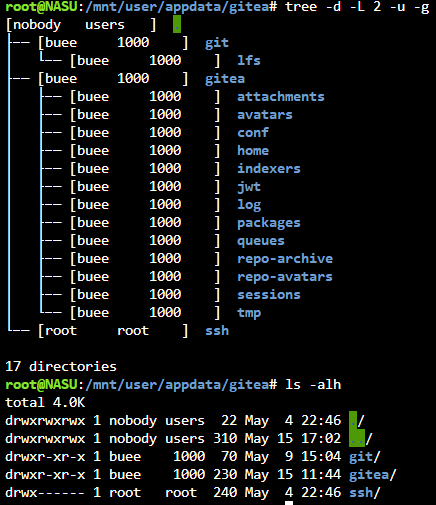
-
I'm in the process of switching from Synology to Unraid. One issue I'm having is getting Gitea operational again. Gitea was a docker container on Synology and obviously a docker container on Unraid, was hoping it'd be simple. I rsync'd over the appdata, had to tweak the web port from 3000 to 3001, ssh port is the same. Originally, I was getting the install web page, but I fixed that with some permissions. Now I can login with my normal username and password to the webui. Problem now is all my repos in the webui say: And when I try to push changes to a branch: Gitea: Incorrect configuration, no repository directory. Gitea: Internal error fatal: Could not read from remote repository. Please make sure you have the correct access rights and the repository exists. I deleted and re-added my SSH key from this particular machine, no joy. I imagine it has to be permissions related. Docker logs just show the API hits, no errors. Any advice? I really don't want to start over from scratch if it can be avoided.

-
Hello. I am currently attempting to switch from Synology to Unraid and have run into an issue. I'm trying to add a 2.5" SSD for Docker storage only. Plan was to buy the adapter tray, slap it in, make sure all shares are set to exclude the SSD while the Docker share only uses that disk. However, when I go to assign that device to the array, it won't let me start the array, saying "Invalid Expansion". I have: 2 x 1TB Intel NVMe in a cache pool 2 x 14TB WD mechanical drives for parity 2 x 10TB WD mechanical drives for data (will be adding 2 more once migration is done) 1 x Samsung 850 Evo that I had laying around that I'm trying to add as the SSD for Docker storage I have read that you shouldn't put SSDs in the array, although Unraid will let you do it. It messes with parity? Why can't I just add it and back it up myself? Is there a way to accomplish what I want to do with Unraid?

