






stevejjd
Members
-
Joined
-
Last visited
Everything posted by stevejjd
-
Hi all, quick question. I'm new to Unraid and I'm using it as a professional 3D artist working freelance. I needed a huge NAS but also with fast read write. At first my NAS was very snappy because it was all SSDs. Now I have a more complex setup with a 10TB drive as parity and 10TB drive as the disk. I have a mix of SSDs in a cache pool which effectively gives 6TB of SSD. I noticed very good performance when writing to my unraid NAS. But after the next day, when the cache data is moved to the disk, I experience extremely slow read performance. The dream is to have - High capacity storage - redundancy - cloud backup - high read write speed - can work on PC, MAC, Linux - an fpt and media server accessible from anywhere. So far I love Unraid, but I wish there was a way to use the SSD cache like optane. (I did very basic research on Optaine). It may be a preference to use the SSD pool as a storage place for commonly accessed files to enhance read/write performance. Is this possible or am I talking stupid? Would love for Unraid to be more performant for artists who seem to need everything. Thanks Steve
-
Okay great, thank you. I appreciate the help. I will call this issue solved and closed.
-
Sorry I missed this. I ended up using Dynamix file manager to move the files manually and then added the SSDs to a single pool. So far it seems to be working. I have noticed when mover logging is enabled, I run out of log ram space. Is it best to use move logging for debugging? or is it to be left on? Thanks
-
Hi all, me again (newb). I have a 10TB parity disk, and a 10TB disk. I have 100% parity. I have several SSDs configured in their own pools. I want to turn them into a single pool. There is data on the cache drives, even after I use the move function there is still data. I want confidence knowing that my data is safe before creating a new config and turning all the SSDs into a single SSD cache pool. Does having full parity mean absolutely all data is on the parity device and the disk? Thanks.
-
I purchased those two disks thinking they were new. They were advertised as new but came to me in a generic postage box, inside the two drives were enclosed in static bags. I think they must be advertising them as new but they must be used. I contacted the seller and will send them back. I will purchase new ones from a different store in person tomorrow. I can see all my data is still there by following your advice to add the SSD disks to respective cache pools. Thanks so much for helping me out. Unraid seems pretty damn robust.
-
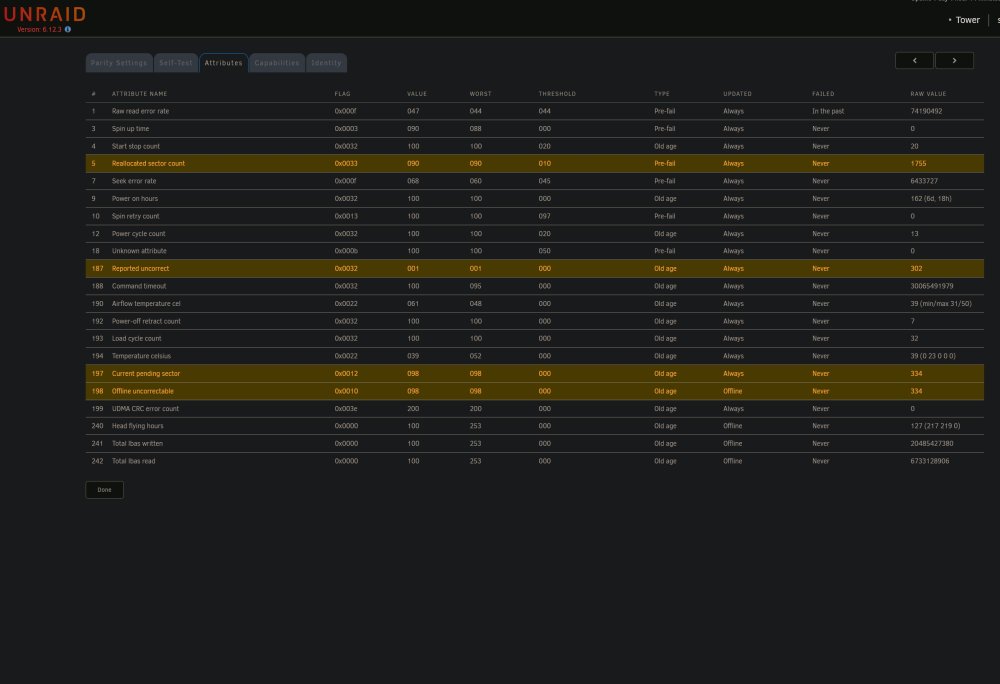
Another issue Im having is that one of my 10TB disks has a file system error. Parity ST10000NT001-3LY101_WP00XSQR - 10 TB (sde) does anyone know the best way to rebuild the file system for a disk?
-
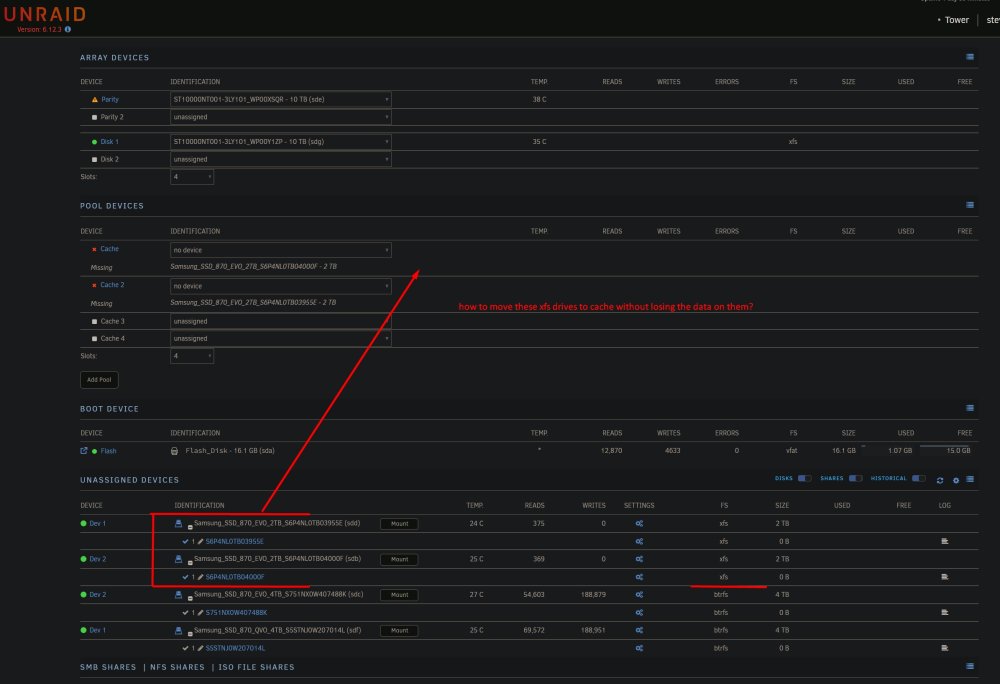
Thanks for helping me, I made a new config, I set the 10TB drive to parity and the other 10TB drive to disk. I left all the other drives out, because I want to protect the data on them. If I move the other SSD drives with the data on them to the cache pool, will I loose the data on them? If I move the other SSD drives with the data on them, and the data is preserved, will that data be moved to the parity and disk drives? Should I mount the unassigned drives and then use the unbalance app to move the data to the disk? Thank you.
-
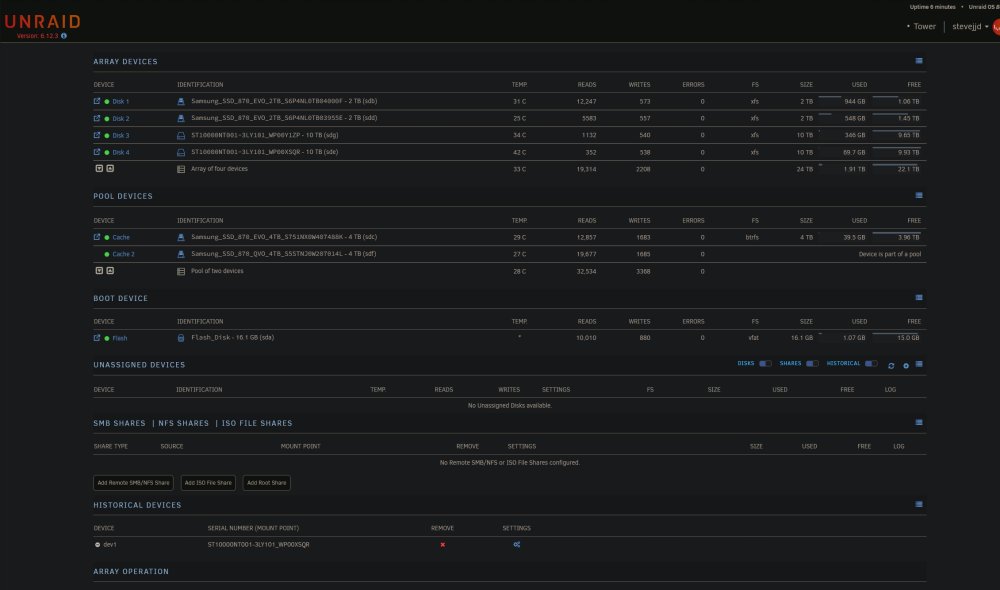
Hi, I tried to remove the two 10TB drives, but I cant start the server. When I remove them, it says, wrong disks. I'm very afraid of making a new config because I don't want to loose my data. The data is on the two Samsung 2TB drives. I don't want to loose it. I simply don't understand how to move things around and I fear loosing my important data. I want 10TB to be parity and 10TB to be disk and the SSDs to be cache. But I don't know how to move it around without losing data.
-
Hi all, I had a perfectly working unraid NAS but ran into the need to upgrade storage capacity. I purchased two new 10TB iron wolf drives and installed them. I wanted 10TB parity, 10TB Disk and the SSD drives would be the cache. I had an impossible time trying to make one of the 10TB drives the parity drive, and one of the new drives has errors. I don't know what I'm doing, very confused. I attached the tower diagnostics and the smart test results. I gave up trying to fix it because I have a lot of work to do. I thought the last thing to try was some forum help. - Is it okay to just leave the NAS with no parity drive? - Should I just leave it and wait till there are 24TB disks, and then buy one and use that as parity? - Should I use crashplan as by backup and redundancy solution until 24+ TB become available? - Is there an easy way to reconfigure my NAS without loosing my data. Any help would be greatly appreciated. Steve tower-diagnostics-20230803-1206.zip tower-smart-20230802-1907.zip
-
Oh cool, thank you
-
[update] - I removed the USB drive from the NAS. - I checked to see that the USB drive was functional by plugging it into my mac - I made a copy of the config folder as a backup - I plugged the usb drive back into the USB 2.0 port on the NAS - I shutdown the server from the web ui - I powered up the server using the power button on the PC - The PC boot but then went to a black screen - I reset the computer and it booted up into unraid - I saw some text fly past and saw some words like "cleaning dirty part", or something like that - I opened a web browser on my mac and logged into the server - I got a shock because nothing was there, but it turns out there was some error like "not connected to API", I clicked something and everything, like the drives and stuff came back as normal. I followed the help documentation to fix it and also FYI, the data is still there on the drives. - How can I create a backup of the config file every week or so?
-
Hi all, hope you are well. Everything was working well with my unraid NAS until this morning when I saw the following error message. " Your flash drive is corrupted or offline. Post your diagnostics in the forum for help. I would really appreciate any help looking at the attached diagnostics. tower-diagnostics-20230722-0904.zip




