






stevejjd
Members
-
Joined
-
Last visited
-
Hi all, I would like to be able to access my files from anywhere in the world using a web browser. Like my own private google drive. I don't want to have to use any special software to access my files. Is this possible to set up using unraid? Is this what an ftp server refers to? Any advice to help point me in the right direction would be appreciated. Steve
-
Hi everyone, Everything was running smoothly until a power outage knocked out my Unraid NAS. When I booted the NAS back up, it entered a loop with the message: "detected capacity change from 0 to 129944." To regain access to my data, I removed the USB device with Unraid installed, connected it to my Mac, and made a backup of it. I then reinstalled Unraid on the same USB device and successfully booted up with a fresh copy. I also recovered my Pro Key during this process. I used this guide https://docs.unraid.net/unraid-os/getting-started/quick-install-guide/ Before I proceed with creating a new config, my question is: can I upload the backup of my previous Unraid installation to this forum thread for some sort of diagnosis and repair or is that an insecure thing to do? I would really like to restore the previous configuration to avoid the hassle of manually setting everything up again. Is there a way to recover the previous config? Wasn't there some new way whereby the config was being backed up to the could? If so, how to recover that config? Thanks in advance for any help!
-
Go here, look through the issues. https://github.com/jlesage/docker-crashplan-pro/issues What worked for me was setting "CrashPlan Server Address" = SMB
-
Go here, look through the issues. https://github.com/jlesage/docker-crashplan-pro/issues What worked for me was setting "CrashPlan Server Address" = SMB
-
Thanks for pointing that out, but I already went over there and asked for support, but I didn't receive a reply.
-
I hope I can't get some feedback. Any help or nudge would be very appreciated.
-
Hi all, I'm unable to log into my CrashPlanPro Unraid Docker. I enter the correct Username, Password and entered "clients.us2.crashplan.com" as the Server Address. I get an "Unable to Sign in" error. Is there anything I can do to get crashplan working? Apologies for posting here. I posed in the crashplan thread, but haven't received a response. Any help would be greatly appreciated. Steve tower-diagnostics-20240430-1147.zip
-
I am unable to login. I enter the correct user name, password and used the server address of clients.us2.crashplan.com Is there anything I can do to get crashplan working?
-
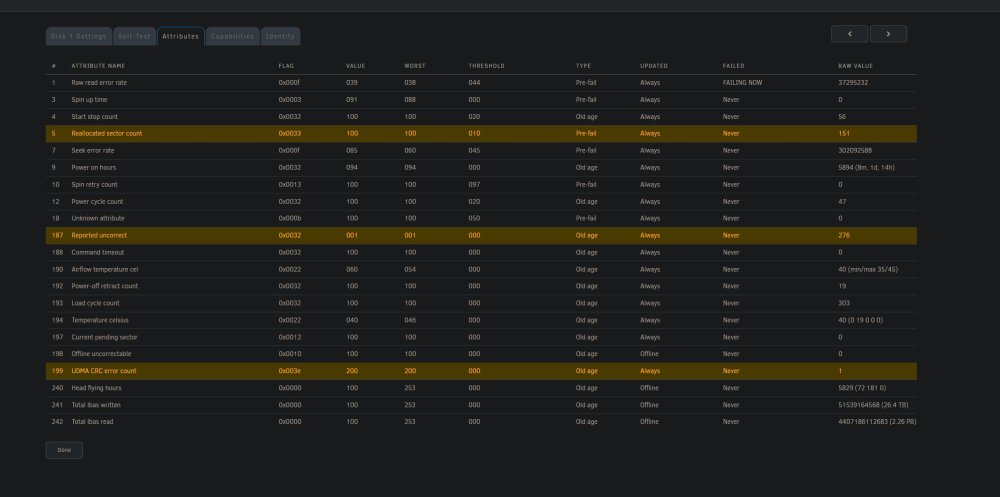
Hi all, I have this warning on my Dashboard > Array, "Array has 1 SMART error." Is it possible for me to fix this error? Any help would be appreciated. Thanks Steve tower-diagnostics-20240404-1115.zip
-
Oh wow I didn't see that. Thanks for pointing that out. (embarrassing). Lets this be a lesson not to play around with Unraid when you have a migraine.
-
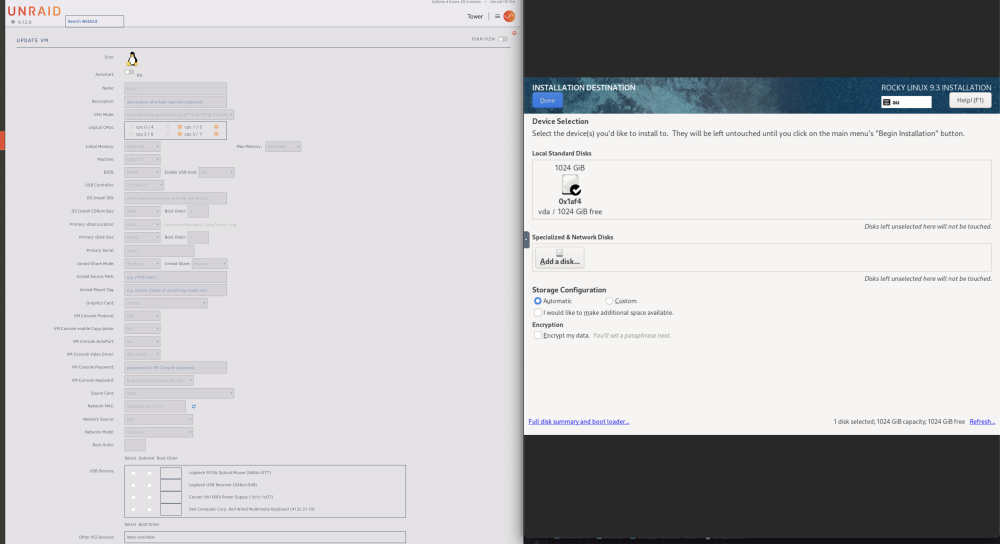
Im trying to install a VM. I set the size of the virtual disk to 1TB. I try to install the OS but the avalible disk size is extremely small.

-
Thanks so much for this feedback
-
Hi all, Does anyone have advice or can point me in a direction where I can set up my Unraid server to be accessible from anywhere in the world? Is this called an FTP server? Thanks
-
Thanks for pointing out the hourly scan. I set it to monthly. I think crashplan did crash during that set of diagnostics. I looked into the crashplan log and it said that it was running out of memory.
-
Hi all, Ive been running out of RAM on my unraid server. I found out thats why CrashPlanPro was crashing regularly. I have attached my diagnostics file. Any help would be appreciated. Thanks. tower-diagnostics-20231130-1122.zip


