





csb
Members
-
Joined
-
Last visited
-
Yeah, I just put all my "loose" containers into a Test-Fold and I see what the problem is. It zeros out and hides the - then empty - Uptime column. Makes sense. It's not really a lot of jitter, but it shifts a little when opening Folders, and it isn't exactly super smooth. It still beats the usability-monster that is horizontal scrolling by miles, though. I agree. I don't see anything really wrong with the current implementation other than it being about as rough around the edges as the entire rest of the Unraid interface - feels very native. 😅
-
I hope you can see that, while passionately making my point for the old and against the changed behavior, at no point did I resort to personal attacks or even demanded anything from you. I believe my feedback was sufficiently descriptive and constructive. Likewise, I truly value your time and contribution and at no point wanted to diminish that. In fact, I'm now genuinely trying to understand what you even tried to fix with it because I'm simply not seeing the "jitter" you were trying to address. Maybe you could tell me how to reproduce it? There may be better ways to address it.
-
Looks like we clicked "Submit" at the exact same moment. I guess I didn't need to write that fiery speech against this new behavior after all. Anyway, thank you so very much for listening - even anticipating. Can't wait for the next build. It certainly will make me very, very happy again. EDIT: I just upgraded to 2026.06.23 and all is well again. I'm seeing extremely little shifting when opening and closing folders, a pixel or two at most. Maybe all it takes for this to work smoothly is to have at least a single container not organized in a folder?
-
From the way you wrote and explained it, I believe I'm seeing exactly the new, intended behavior that you are describing. It's not behaving any differently, even after a hard refresh or inside a private window - so I doubt this is a caching issue. I'm merely stating that this new behavior has unintended and, at least for me, highly undesirable consequences. I know, but your immediate use assumption is already wrong: Not all of my containers are organized in folders! The primary and most important as well as any in progress of being configured and deployed ones are not, and I want to be able to immediately see their uptime and/or exit code when I load the docker page. This change no longer allows for that and requires horizontal scrolling to access it before even opening any folders. Seriously, trying to configure and deploying new and complex containers is made needlessly harder by this plugin now doing everything it can to constantly hide the exit code. The "jitter" I'm complaining about is the fact that the "Uptime" column and its content is visible during page load only to then jump outside the viewframe once the page has finished loading. I'm using the Docker view in "Advanced Mode" and FolderView3 in its "Classic" style defaults. Making vital information like Uptime and Exit Code only accessible via horizontal scrolling and making it impossible to see both the container name and its uptime at the same time on a 32" wide screen is an absolutely abysmal user experience. I understand what you are trying to solve with this, I really do. And you clearly value the information you are now hiding less than others. But you unintentionally created far more harm with this change than good, at least for my workflow. If this behavior remains the way it is, I can only revert to the previous build or fork my own private "FolderView4".
-
Alright, after wondering what on earth went wrong after the update, looking through the setting to see if I missed anything and navigating myself to this thread ... I'm here to say: Yes, that was a pretty catastrophic change, how on earth do I change this behavior? Exit code, exit time and uptime can be invaluable, at-a-glance, troubleshooting information. Hiding them by default is just awful. You also introduced pretty unpleasant jitter during every page-load where the Uptime column suddenly jumps off-screen. Whatever jitter you tried to fix never bothered me. But this change, if permanent, would bother me enough to no longer use the plugin.
-
I have the feeling that this will become a lot more popular within the coming weeks: https://languagetool.org/webextension/premium-announcement Self-hosting will soon be the only way to continue using LanguageTool for free. Luckily, this was a quick and mostly pain-free setup. @ArieDed The Java heap size Max default was set too low, and the server would crash with a memory error when making requests for German. Has anyone found a good solution to make this accessible via reverse proxy and with authentication?
-
That sounds like a sensible addition and would likely avoid my problem in the future. The restore from (the new, container-internal) backup worked well, by the way, and had the added benefit that it essentially took care of vacuuming as well. My DB shrank from 100gb to 75Gb. All is well. By the way, would you mind posting your current set of filters? Keeping your DB this slim is impressive.
-
I mean, if you trust your backups, and want to do it as simple as possible: Open your current container settings in a tab and leave it open (maybe make a screenshot just in case). "Remove" the existing container (it won't delete anything in appdata) Reinstall from CA with the same name, copy and paste the modified settings from the open tab. Close the open tab. It should come right back up without data loss.
-
Does it mark the container as unhealthy? If so, autoheal might have been the culprit. It's still restoring from backup, I'm not seeing anything to worry about at the moment though. I'm getting a bunch of 2025-12-27 15:37:14.782 CET [1049] LOG: skipping vacuum of "torrent_contents" --- lock not available 2025-12-27 15:37:14.782 CET [1049] LOG: skipping vacuum of "torrent_files" --- lock not available and in the beginning it threw the usual: 2025-12-27 14:45:07.413 CET [399] LOG: checkpoints are occurring too frequently (8 seconds apart) 2025-12-27 14:45:07.413 CET [399] HINT: Consider increasing the configuration parameter "max_wal_size". 2025-12-27 14:45:07.413 CET [399] LOG: checkpoint starting: wal Other than that, all appears well so far.
-
That's far more sensible. My DB is filtered and "only" a bit under 100gb in size, and db backups compress well below 10gb - so things were a bit more uncomfortable, but quite manageable. I pulled the new template and I found the POSTGRES_VACUUM_DB variable flag and set it to true, figuring that a full vacuum couldn't really hurt - I can live with the db being offline for a while. Boy was I wrong, either because of a panic loop or because of a health check restarting the container, the DB from under 100gb in size to well above 1600Gb. Which is quite an impressive feat on a 1TB cache drive - rarely have I been more thankful for ZFS compression. While I managed to cancel the vacuuming (gently), it didn't reclaim the space and my attempts at deleting only orphaned tables weren't successful - I'm restoring from backup while I'm writing this. I found no documentation on the new variables and their use. Clearly they aren't as safe as I would have hoped. Would you be able to give some better documentation?
-
I just stumbled upon what I believe is the same issue that has been described here before: The Fix Common Problems Plugin keeps telling me that "Error: Out Of Memory errors detected on your server". Because a malfunctioning container once actually caused a runaway memory issue and ultimately crashed my server, I had set up generous memory limits for each and every container. It turns out that one of them wasn't generous enough after experimenting with npmplus over npm: Aug 31 23:56:16 Server kernel: Memory cgroup out of memory: Killed process 3724576 (nginx) total-vm:718840kB, anon-rss:660372kB, file-rss:15968kB, shmem-rss:0kB, UID:99 pgtables:2172kB oom_score_adj:0 Aug 31 23:56:16 Server kernel: nginx invoked oom-killer: gfp_mask=0xcc0(GFP_KERNEL), order=0, oom_score_adj=0 Given that the server did not run out of memory and the container's memory limit worked like it should, I feel like this is warning is at the very least misleading. It would be nice to have different warnings for actual server out of memory issues and simply having a container hit a predefined limit.
-
I only just found that there is a new beta that may, finally, address the autostart settings issue. And only after FolderView2 now lost and jumbled all of my autostart settings for the third time. 😐 Given how serious the consequences of that bug are (not only does it lose autostart settings for the right containers, it also autostarts the wrong ones), this really needs to be pushed into production sooner rather than later. Also, is there any reason why code updates aren't being pushed to github?
-
That appears to be it. Should be higher priority given the impact on the logs and unnecessary CPU load. Mine fired multiple times a second and var/log filled up in just a few days.
-
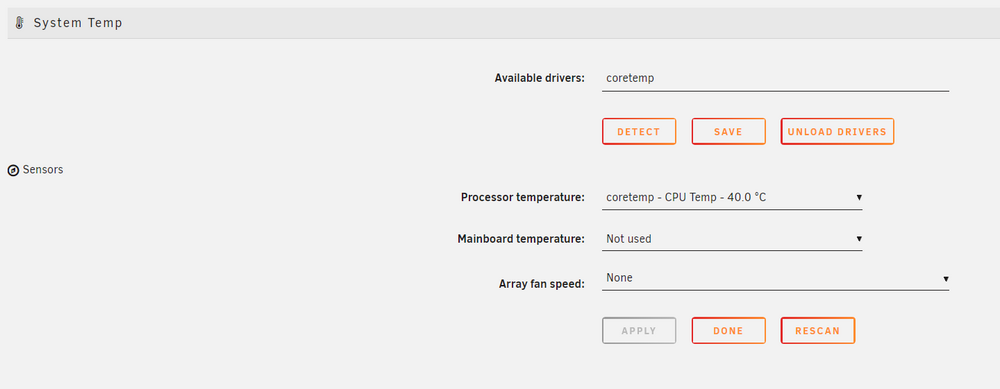
On Unraid 7.20-beta1, I believe the Dynamix System Temperature plugin 2024.07.10 started flooding my logs with the following error: [08-Aug-2025 08:59:56 Europe/Berlin] PHP Warning: Undefined array key 1 in /usr/local/emhttp/plugins/dynamix.system.temp/nchan/system_temp on line 78 [08-Aug-2025 08:59:57 Europe/Berlin] PHP Warning: Undefined array key 1 in /usr/local/emhttp/plugins/dynamix.system.temp/nchan/system_temp on line 78 [08-Aug-2025 08:59:58 Europe/Berlin] PHP Warning: Undefined array key 1 in /usr/local/emhttp/plugins/dynamix.system.temp/nchan/system_temp on line 78 [08-Aug-2025 08:59:58 Europe/Berlin] PHP Warning: Undefined array key 1 in /usr/local/emhttp/plugins/dynamix.system.temp/nchan/system_temp on line 78 [08-Aug-2025 08:59:58 Europe/Berlin] PHP Warning: Undefined array key 1 in /usr/local/emhttp/plugins/dynamix.system.temp/nchan/system_temp on line 78 [08-Aug-2025 08:59:59 Europe/Berlin] PHP Warning: Undefined array key 1 in /usr/local/emhttp/plugins/dynamix.system.temp/nchan/system_temp on line 78 [08-Aug-2025 09:00:00 Europe/Berlin] PHP Warning: Undefined array key 1 in /usr/local/emhttp/plugins/dynamix.system.temp/nchan/system_temp on line 78 [08-Aug-2025 09:00:00 Europe/Berlin] PHP Warning: Undefined array key 1 in /usr/local/emhttp/plugins/dynamix.system.temp/nchan/system_temp on line 78 [08-Aug-2025 09:00:00 Europe/Berlin] PHP Warning: Undefined array key 1 in /usr/local/emhttp/plugins/dynamix.system.temp/nchan/system_temp on line 78 [08-Aug-2025 09:00:00 Europe/Berlin] PHP Warning: Undefined array key 1 in /usr/local/emhttp/plugins/dynamix.system.temp/nchan/system_temp on line 78
-
Wow, there it is, thanks! That’s incredibly unintuitive. Not a hint or link on either the main site or inside the plugin settings.

