Skip to content
View in the app

A better way to browse. Learn more.

Unraid

A full-screen app on your home screen with push notifications, badges and more.

To install this app on iOS and iPadOS
  1. Tap the Share icon in Safari
  2. Scroll the menu and tap Add to Home Screen.
  3. Tap Add in the top-right corner.
To install this app on Android
  1. Tap the 3-dot menu (⋮) in the top-right corner of the browser.
  2. Tap Add to Home screen or Install app.
  3. Confirm by tapping Install.

georgie87

Members
  • Joined

  • Last visited

Everything posted by georgie87

  1. When I went to run that command, it failed with an error of not having enough space, this lead me to investigate the minimum free space setting of the share. Once I corrected that issue I was able to run the backup successfully! Thank you for pointing me in the in the right direction!
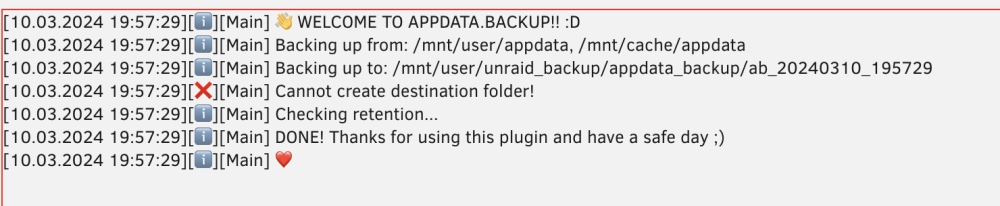
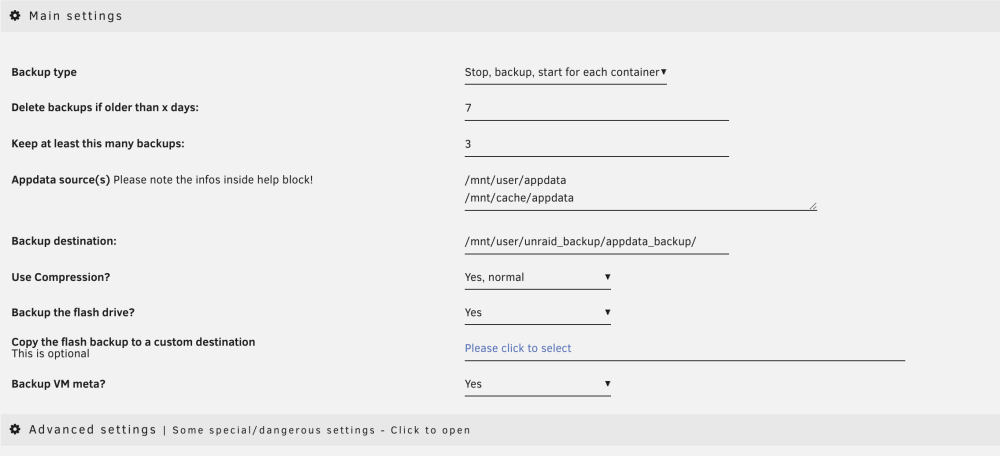
  2. I keep running into an error, cannot create the destination folder. Not sure what could be causing the issue. Any help would be appreciated!
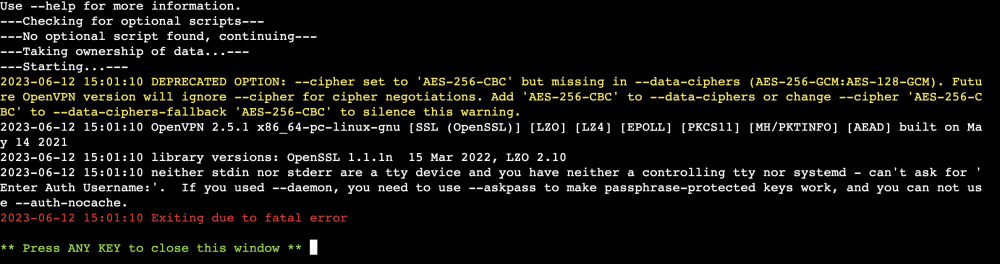
  3. I keep running into this fatal error when try to start the container after I move the openvpn config files into the folder. I'm trying to use ProtonVPN as well.

Account

Navigation

Search

Search

Configure browser push notifications

Chrome (Android)
  1. Tap the lock icon next to the address bar.
  2. Tap Permissions → Notifications.
  3. Adjust your preference.
Chrome (Desktop)
  1. Click the padlock icon in the address bar.
  2. Select Site settings.
  3. Find Notifications and adjust your preference.