





theJehud
Members
-
Joined
-
Last visited
-
Yeah I think probably where things get weird is somehow the assumed IP of some of the container apps being fixed at *.50 is somehow acting up and taking out Unraids accessibility when the IP changes, which is odd.
-
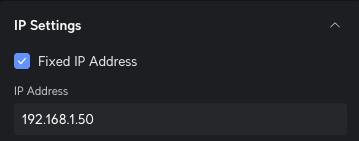
I was referring to the unifi dash there in the wired devices it shows but on the settings for that host in unifi, also if I search for that IP in the device list it finds the host showing as *.2 which is super odd I can ping both IPs even though I don't see any device in unifi with a .50. I can't ssh into either still though and nginx gives me a 4XX when I load it on *.2 and works as expected on *.50.

-
I got it back up but I don't really understand why the previous issues manifested. I had the idea to set the static ip back to what it had been previously before it had gotten reassigned dynamically and that seemed to work let me start the array again. A few of the docker app configs were pointing at that old IP and maybe when it wasn't at that address it caused issues? But I'm not really sure. What is odd, is in Unifi I can see the static ip for that asset is set .50 but it shows up as .2 in the dashboard. I can ping both IPs though successfully even though no .50 shows up in the device client list in unifi. I can't ssh to either IP though and I can see in the UX that the server seems to see itself as the right IP .50 etc.. Attached latest diagnostics. diagnostics-20250224-2116.zip
-
So I booted it with a screen attached (with the old drive), and logged in to tail the syslog then I mounted the disks from another computer via the dashboard. It seemed to mount the disk fine (in the logs) but then ended with a bunch of errors around nginx failing to bind to ports 80,443 etc.. I don't understand why though unless one of the dockers is conflicting with the main OS but that doesn't really make any sense to me. Does the nginx dashboard start and stop when you mount the arrays or something? I don't get why the dash gets wiped out on array start. The for new drive I made with the utility set to 7.0.0.0 it doesn't seem like it made it a bootable drive, because it doesn't kick in to the boot dialog I'm used to seeing. And just gives a non-system disk error and press any key to restart. If creating from Mac OSX I should be running the make bootable from Mac OSX too right?
-
So I created a new USB drive that I bought and put these files over from a backup I took, onto the new drive. I did run the make bootable script also after the first boot didn't work just to be sure although the hardware is pretty new. Files Restored from Backup on New Drive ======== config\super.dat config\Plus.key config\pools config\plugins\dockerMan\templates-user I'm running the unraid server headless though, and while the server starts up unraid doesn't seem to boot or become ping'able really. I can hook the computer up to a monitor but not till later in the week probably. At that stage I might be able to just see why the OS crashing with the current set up though. Anything else you can think I should try? Really bizarre this just started happening. I tried to boot with the new drive also without modifying it at all, ie still running make bootable, and Unraid isn't coming up (old drive with problems still boots fine just fails after you array start.).
-
Parity completed fine, fixed common problems is fine, rebooted(to apply a past plugin update) and started array same behavior can't ssh and dash stops loading. Because the disks aren't mounting I can't really see what's in the syslog file.
-
I have it up in maintenance mode finishing a parity check it's been up for 8 hours maybe and running fine, one disk is showing errors but not the parity. Do you mean this USB tool https://unraid.net/blog/new-usb-creator?
-
Not yet, was trying to exhaust options before getting too invasive because I haven't changed anything it just started doing this out of the blue.
-
The server seems to be working fine, until I start the array. Then I lose access to ssh(terminates my existing sessions) and nginx just starts giving me 4XX but it's still responding and the server is up.
-
I don't think there is a conflict now (not sure there was at any point, I do have it set to a fixed IP in unifi now). What was odd was I could access the unraid ux for a time at an IP I didn't see in unifi which was very strange. Now when unraid starts it seems like nginx is no longer loading the unraid dashboard for some reason, it's up but it doesn't load the /login and you can't get to /Main etc..
-
Even when I set the static ip in unifi for the host I get a 403 when I try and hit the dashboard or 404 for /login. I remember it used to be that there was an admin ip and then the main server dash ip. When the server first starts up I can access the dashboard but then it quickly goes away and I can't even ssh into the host at the IP I see on the network. I was able to ssh in to the ip even though the dashborad / nginx isn't accessible finally. I see the ip assigned on the br0 interface but not on eth0. Nothing in the logs on /var/log/nginx/error.log and nginx is running. I can see nginx listening on the ip from netstat which you'd expect given it's responding with 4XX but it's like it's not loading the unraid app or something.
-
yeah I definitely think the issue started after the upgrade.
-
I have had to reboot the server manually a couple times but then it happens again after every restart, like I can go to *.50 right now and see the Unraid dash (which doesn't show in my unifi console) but if I go to *.2 I get the nginx 403 message.
-
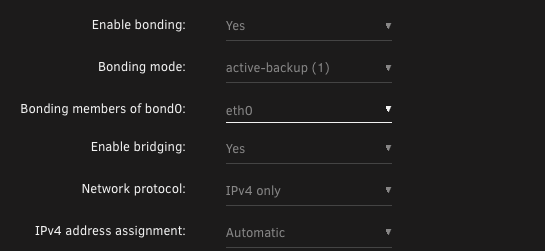
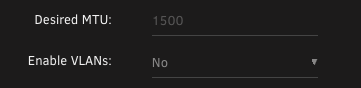
Server starts up and seems to be running fine but I can't access it on the IP registered in Unifi and I get403 and 404s when trying to access the main UX. I also don't seem to be able to ssh anymore into the host, even though ssh is enabled on port 22 in management settings. ssh -v root@[theIP] OpenSSH_9.6p1, LibreSSL 3.3.6 debug1: Reading configuration data /etc/ssh/ssh_config debug1: /etc/ssh/ssh_config line 21: include /etc/ssh/ssh_config.d/* matched no files debug1: /etc/ssh/ssh_config line 54: Applying options for * debug1: Authenticator provider $SSH_SK_PROVIDER did not resolve; disabling debug1: Connecting to [theIP] [theIP] port 22. debug1: connect to address [theIP] port 22: Connection refused ssh: connect to host [theIP] port 22: Connection refused As mentioned, I run unifi for networking and something I'm noticing is I can connect to the unraid server on an IP in the browser that doesn't show up in unifi as a client device ip anywhere (I can't SSH to that IP though either). The ip my unraid shows up as in unifi is different from the ip I can connect to the dashboard on. This started happening in the last week or so. I can see the IP address in the network settings on unraid that I'm connecting to as the one set but it's different than what I see in unifi. Not sure how to reconcile this difference or why it just started happening. I am now on Unraid 7.0.0 which is the only recent change I can think of. Attached the diagnostics also. diagnostics-20250220-0929.zip

-
yeah nothing new here yet unfortunately, will monitor
