





dcchillin46
Members
-
Joined
-
Last visited
-
How would I set it so it didn't interfere? Don't I have to select a split levele for the share?
-
Im building my media library and have run into a situation and im not sure how best to approach it. Right now I have 5x 8tb drives, and im copying all my blurays from physical disks. After some of them are copied I'm trying to set up a fileflow script to extract .hevc data, convert dolby vision 7.x to 8.1 (for stream compatibility), then stitch it back together with the main track. My issues comes in at disk space. Some of these files are 100GB+ so i really don't want to move them off of the array to process then back to array. I'd like to process in place on the source disk. I have set minimum free space to 80GB, but I think I will increase that to 105GB. I also have fill-up as distribution, and I'm not sure if that is overwriting my min free? Regardless mover keeps dumping files on to these disks and leaving me with <30GB, which means my scripts silently fail due to lack of space. I've done some digging and it seems there's no way to reserve disk space, and mover can only tell file size after a transfer finishes. Ive looked into mover tuning, but it looks like the "destination disk min free space" setting was removed in the past (if it ever existed, ai was my source for that info). Is there any way to approach this? I'd just like mover to fill disks, but leave 105GB so I can dump a temp file during fileflow script. I have a free 250GB sata ssd I can use as a last resort, but thats going to lengthen my script runs by 30min+ and I will likely have 100+ files to process Thanks for any advice.
-
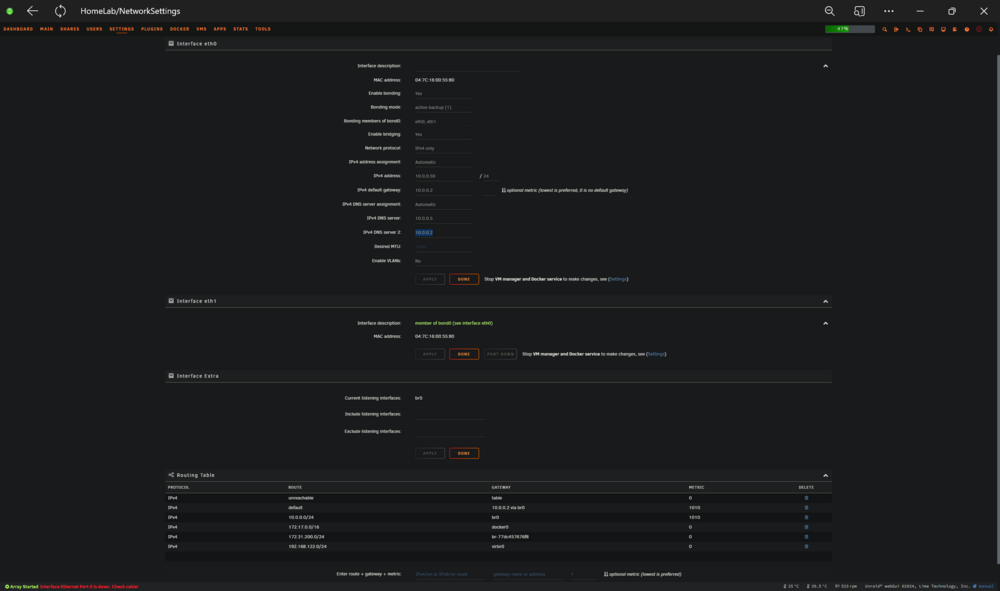
Ya no rules .cfg is spawned at boot. I can create it and the section partially populates in gui, but after power cycle any changes are cleared. I've also deleted all network cfgs and tried rebooting but it launches the same. Would removing/reinserting the card make any difference? Can I manually initialize or change 10g nic to eth0, maybe using server gui before adding network connection?
-
Added a new 10gb 82599 pcie nic. want to use it as eth0 and my mobo 2.5g as backup. interface rules section is not present in network setting. i can add the network-rules.cfg and the section will appear but is non-functional. Additions or changes don't persist past reboot even adding to the mounted directory on the usb drive (/boot/config). I've read numerous posts and tried to troubleshoot with no luck. Otherwise the nic work fines. I have it setup as slave in bond0 and disconnected the 2.5g, so its in use, but id really like to figure it out and learn how to fix and set up the 2.5 as slave. Some posts say its just a hardware combo with certain cards where the system doesnt recognize both nics and populate network-rules.cfg at boot. if you need any other information or have suggestions im all open to ideas. homelab-diagnostics-20250101-1642.zip
-
So im really at a loss at this point. I've spent the better part of a week trying to get a w11 vm up and running. Ive started at least 10 vms at this point trying every setting combo i can think of. I've got it functional, except whenever I go into a game the whole system hangs. Sometimes immediately, sometimes a few min into a benchmark run. The strange part is I've been able to run a 5min stress test through radeon software with 0 issue, but launching 3dmark right after causes it to hang. It passes through the gpu and hdmi audio to vfio. I've used 1440fx, q35, hyper visor and non, spice and vnc. I'm using gpu 1 as virtual so the web portal will launch, then running gpu 2 as my rx580. Windows device manager sees the device fine, drivers install fine, and 3dmark even recognizes it to start the benchmark. I've tried using a vbios, but it seems to be more stable without. I've even tried running it as gpu 1 and connecting via steam link, but thats a no go. I've also tried parsec, with the same results. I see all these posts and videos about the vm running close to bare metal, but I've put probably 15 hours into this so far and can't even get a benchmark to run. Upside is I've tried literally every setting in the unraid options, downside is I've tried every setting in the unraid options. it's so exhausting. Anyone who can help with troubleshooting or something I may be missing would be greatly appreciated. Between this and being unable to get containers running for my 3d printer, unraid is becoming very frustrating over the last week or two. Edit most recent attempt ends with this in the logs `2023-09-14T23:41:25.917890Z qemu-system-x86_64: vfio_dma_map(0x14e477e5e600, 0x381000000000, 0x200000000, 0x14e26ec00000) = -22 (Invalid argument)` `2023-09-14T23:41:25.918364Z qemu-system-x86_64: VFIO_MAP_DMA failed: Invalid argument` `2023-09-14T23:41:25.918371Z qemu-system-x86_64: vfio_dma_map(0x14e477e5e600, 0x381200000000, 0x200000, 0x14e26d800000) = -22 (Invalid argument)` `2023-09-14T23:41:25.982628Z qemu-system-x86_64: VFIO_MAP_DMA failed: Invalid argument` My xml: https://imgur.com/SAx6kFA
-
Spent the last couple of days trying to get a windows 11 vm up and running, still learning all this so bear with me. I've got everything functioning except sound at this point. I've passed through my gpu (amd rx580) and updated drivers. Device manager sees the audio drivers. I have even got windows to see an audio device by adding an audio=ich9 line, as well as downloading virtual audio cables. Both devices function in windows but have no sound output on my client device, currently android phone in web browser. Haven't got a chance to try it on a windows device yet, but I doubt that would make a difference? I originally launched the vm using 1440fx-7.1, but switched to q35-7.1 during troubleshooting, and now unraid won't let me switch back. Not sure if that matters, but the BTH video i followed originally used 1440fx and the audio ich9 code. Unraid yells about the xml pci index being in pcie-root rather than pci-root, but when I change them it tells me a different device can't be used as pci lol. Again, not sure any if that matters, everything works the same in q35 as it did in 1440fx, just kinda poking at things at this point because I'm out of ideas and Google things to try. I've never dealt with xml before but I've done my best to decipher it, idk what I'm missing. <?xml version='1.0' encoding='UTF-8'?> <domain type='kvm'> <name>Windows 11</name> <uuid>12837cc6-a9f0-fac1-58ee-7200f575d50b</uuid> <metadata> <vmtemplate xmlns="unraid" name="Windows 11" icon="windows11.png" os="windowstpm"/> </metadata> <memory unit='KiB'>16252928</memory> <currentMemory unit='KiB'>16252928</currentMemory> <memoryBacking> <nosharepages/> </memoryBacking> <vcpu placement='static'>10</vcpu> <cputune> <vcpupin vcpu='0' cpuset='10'/> <vcpupin vcpu='1' cpuset='11'/> <vcpupin vcpu='2' cpuset='12'/> <vcpupin vcpu='3' cpuset='13'/> <vcpupin vcpu='4' cpuset='14'/> <vcpupin vcpu='5' cpuset='15'/> <vcpupin vcpu='6' cpuset='16'/> <vcpupin vcpu='7' cpuset='17'/> <vcpupin vcpu='8' cpuset='18'/> <vcpupin vcpu='9' cpuset='19'/> </cputune> <os> <type arch='x86_64' machine='pc-q35-7.1'>hvm</type> <loader readonly='yes' type='pflash'>/usr/share/qemu/ovmf-x64/OVMF_CODE-pure-efi-tpm.fd</loader> <nvram>/etc/libvirt/qemu/nvram/12837cc6-a9f0-fac1-58ee-7200f575d50b_VARS-pure-efi-tpm.fd</nvram> </os> <features> <acpi/> <apic/> <hyperv mode='custom'> <relaxed state='on'/> <vapic state='on'/> <spinlocks state='on' retries='8191'/> <vendor_id state='on' value='none'/> </hyperv> </features> <cpu mode='host-passthrough' check='none' migratable='on'> <topology sockets='1' dies='1' cores='5' threads='2'/> <cache mode='passthrough'/> </cpu> <clock offset='localtime'> <timer name='hypervclock' present='yes'/> <timer name='hpet' present='no'/> </clock> <on_poweroff>destroy</on_poweroff> <on_reboot>restart</on_reboot> <on_crash>restart</on_crash> <devices> <emulator>/usr/local/sbin/qemu</emulator> <disk type='file' device='disk'> <driver name='qemu' type='raw' cache='writeback'/> <source file='/mnt/user/domains/Windows 11/vdisk1.img'/> <target dev='hdc' bus='virtio'/> <serial>vdisk1</serial> <boot order='1'/> <address type='pci' domain='0x0000' bus='0x03' slot='0x00' function='0x0'/> </disk> <disk type='file' device='cdrom'> <driver name='qemu' type='raw'/> <source file='/mnt/user/isos/Win11_22H2_English_x64v2.iso'/> <target dev='hda' bus='sata'/> <readonly/> <boot order='2'/> <address type='drive' controller='0' bus='0' target='0' unit='0'/> </disk> <disk type='file' device='cdrom'> <driver name='qemu' type='raw'/> <source file='/mnt/user/isos/virtio-win-0.1.229-1.iso'/> <target dev='hdb' bus='sata'/> <readonly/> <address type='drive' controller='0' bus='0' target='0' unit='1'/> </disk> <controller type='usb' index='0' model='ich9-ehci1'> <address type='pci' domain='0x0000' bus='0x00' slot='0x07' function='0x7'/> </controller> <controller type='usb' index='0' model='ich9-uhci1'> <master startport='0'/> <address type='pci' domain='0x0000' bus='0x00' slot='0x07' function='0x0' multifunction='on'/> </controller> <controller type='usb' index='0' model='ich9-uhci2'> <master startport='2'/> <address type='pci' domain='0x0000' bus='0x00' slot='0x07' function='0x1'/> </controller> <controller type='usb' index='0' model='ich9-uhci3'> <master startport='4'/> <address type='pci' domain='0x0000' bus='0x00' slot='0x07' function='0x2'/> </controller> <controller type='sata' index='0'> <address type='pci' domain='0x0000' bus='0x00' slot='0x1f' function='0x2'/> </controller> <controller type='pci' index='0' model='pcie-root'/> <controller type='pci' index='1' model='pcie-root-port'> <model name='pcie-root-port'/> <target chassis='1' port='0x10'/> <address type='pci' domain='0x0000' bus='0x00' slot='0x02' function='0x0' multifunction='on'/> </controller> <controller type='pci' index='2' model='pcie-root-port'> <model name='pcie-root-port'/> <target chassis='2' port='0x11'/> <address type='pci' domain='0x0000' bus='0x00' slot='0x02' function='0x1'/> </controller> <controller type='pci' index='3' model='pcie-root-port'> <model name='pcie-root-port'/> <target chassis='3' port='0x12'/> <address type='pci' domain='0x0000' bus='0x00' slot='0x02' function='0x2'/> </controller> <controller type='pci' index='4' model='pcie-root-port'> <model name='pcie-root-port'/> <target chassis='4' port='0x13'/> <address type='pci' domain='0x0000' bus='0x00' slot='0x02' function='0x3'/> </controller> <controller type='pci' index='5' model='pcie-root-port'> <model name='pcie-root-port'/> <target chassis='5' port='0x14'/> <address type='pci' domain='0x0000' bus='0x00' slot='0x02' function='0x4'/> </controller> <controller type='pci' index='6' model='pcie-root-port'> <model name='pcie-root-port'/> <target chassis='6' port='0x15'/> <address type='pci' domain='0x0000' bus='0x00' slot='0x02' function='0x5'/> </controller> <controller type='virtio-serial' index='0'> <address type='pci' domain='0x0000' bus='0x02' slot='0x00' function='0x0'/> </controller> <interface type='bridge'> <mac address='52:54:00:3d:dd:12'/> <source bridge='br0'/> <model type='virtio-net'/> <address type='pci' domain='0x0000' bus='0x01' slot='0x00' function='0x0'/> </interface> <serial type='pty'> <target type='isa-serial' port='0'> <model name='isa-serial'/> </target> </serial> <console type='pty'> <target type='serial' port='0'/> </console> <channel type='unix'> <target type='virtio' name='org.qemu.guest_agent.0'/> <address type='virtio-serial' controller='0' bus='0' port='1'/> </channel> <input type='tablet' bus='usb'> <address type='usb' bus='0' port='1'/> </input> <input type='mouse' bus='ps2'/> <input type='keyboard' bus='ps2'/> <tpm model='tpm-tis'> <backend type='emulator' version='2.0' persistent_state='yes'/> </tpm> <graphics type='vnc' port='-1' autoport='yes' websocket='-1' listen='0.0.0.0' keymap='en-us'> <listen type='address' address='0.0.0.0'/> </graphics> <sound model='ich9'> <address type='pci' domain='0x0000' bus='0x00' slot='0x1b' function='0x0'/> </sound> <audio id='1' type='none'/> <video> <model type='qxl' ram='65536' vram='65536' vgamem='16384' heads='1' primary='yes'/> <address type='pci' domain='0x0000' bus='0x00' slot='0x01' function='0x0'/> </video> <hostdev mode='subsystem' type='pci' managed='yes'> <driver name='vfio'/> <source> <address domain='0x0000' bus='0x01' slot='0x00' function='0x0'/> </source> <address type='pci' domain='0x0000' bus='0x04' slot='0x00' function='0x0'/> </hostdev> <hostdev mode='subsystem' type='pci' managed='yes'> <driver name='vfio'/> <source> <address domain='0x0000' bus='0x01' slot='0x00' function='0x1'/> </source> <address type='pci' domain='0x0000' bus='0x05' slot='0x00' function='0x0'/> </hostdev> <memballoon model='none'/> </devices> </domain> Thanks for any help
