Denis06061986
Members
-
Joined
-
Last visited
-
mega gut aber leider sind bei mir die Querbalken noch schwarz :(
-
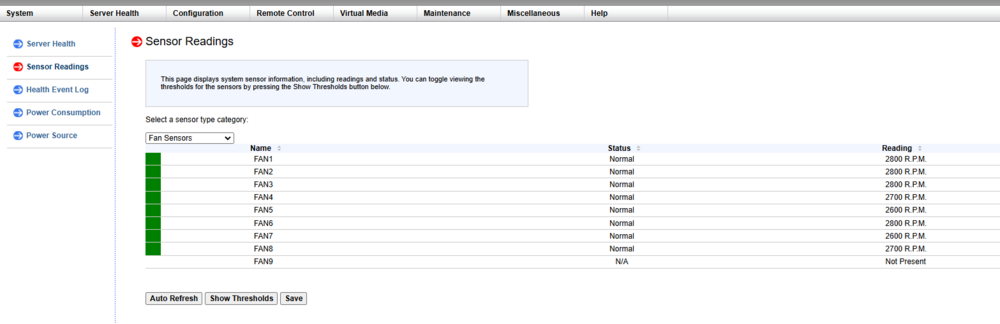
sorry my English isn't exactly the best I've just managed to get my IBMI access I then entered the data and now it seems to be working
-
I have but unfortunately I have no access to the IPMI because I bought the server used
-
yes cannot be changed either
-
ok with the unraid version I couldn't control anything from the fan, maybe it's related to my board Supermicro X10DRU-i+ Gen:10
-
Unfortunately I don't have the setting under fan which unraid version do you have?
-
what do you mean by splitter? I can't make any further settings
-
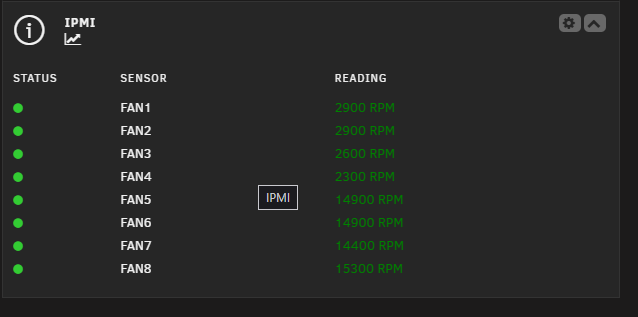
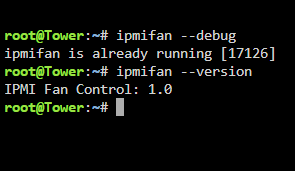
I have a problem. Unfortunately, only 4 out of 8 fans can be controlled. See the picture. Can someone help me? I'm pretty new to this. With this script, I can control all fans, but it's unfortunately inconvenient. #!/bin/bash #arrayStarted=true #clearLog=true #noParity=false # SuperMicro IPMI Auto(-ish) Fan Control # # This script checks current CPU package temps and drive temps, then updates # fan duty cycles based on adjustable thresholds. It was designed for Unraid, # but should be adaptable to your linux flavor of choice with some knowhow # # This requires "ipmitool" to be installed on your system # Unraid users can install this through the "NerdPack GUI" plugin # # It is HIGHLY recommended to set this script to run on a cron schedule # to be most effective (e.g. "*/5 * * * *" for every 5 minutes) # Choose "Custom" scheduling in User Scripts to set a cron schedule # #################### # VERY IMPORTANT: SuperMicro boards -REQUIRE- the fan mode be set to "Full Speed Mode" # for ipmitool to be able to control fan speeds. It is therefore recommended to use the # companion script I've included in this repository (ipmi_fans_startup.sh) to force this # mode on startup. If you try to put the required command at the beginning of this script, # then your fans will ramp to max speed for a second every single time this script runs. # That will cause a bunch of annoying sound level changes and prematurely wear out fans. # You can use "User Scripts" to run the companion script 'At Startup of Array' #################### ##### HOW TO CONFIGURE FOR YOUR SYSTEM # # Guide to navigate (line prefixes): # # ##### - Section header, documentation/explanation # ### - Variable to configure will be below # ## - Example configuration line(s) # ##### TEMPERATURE THRESHOLDS # # These are the thresholds for when fan speed should change (in degrees Celsius) # CPU Thresholds will change both fan zones. Drive thresholds will only change the # peripheral fan zone, and ONLY if at a higher threshold than the CPU threshold. # ### CPU TEMP THRESHOLDS temp_thresh_cpu_hot1=65 temp_thresh_cpu_hot2=70 temp_thresh_cpu_hot3=75 temp_thresh_cpu_crit=80 # ### DRIVE TEMP THRESHOLDS temp_thresh_drive_hot1=45 temp_thresh_drive_hot2=48 temp_thresh_drive_hot3=51 temp_thresh_drive_crit=55 ##### FAN DUTY CYCLES # # Fan Zones on SuperMicro boards are based on the Motherboard's fan header labels # The CPU Fan Zone (FAN1, FAN2, etc.) and Peripheral Fan Zone (FANA, FANB, etc.). # Duty cycles are declared per zone so you can tune them for different noise levels. # BOTH zones will get set every time this script is run. # # SuperMicro IPMI fan duty cycles are set with a value between '0x00'-'0x64' ## EXAMPLES: 0x00 = 0% duty cycle, 0x32 = 50%, 0x64 = 100% # NOTE: 'cool' cycles are for when temperatures are below 'hot1' thresholds # ### CPU FAN ZONE DUTY CYCLES fan_cpu_zone_cool='0x04' fan_cpu_zone_hot1='0x08' fan_cpu_zone_hot2='0x16' fan_cpu_zone_hot3='0x20' fan_cpu_zone_crit='0x28' # ### PERIPHERAL FAN ZONE DUTY CYCLES fan_peri_zone_cool='0x04' fan_peri_zone_hot1='0x08' fan_peri_zone_hot2='0x16' fan_peri_zone_hot3='0x20' fan_peri_zone_crit='0x28' ##### DRIVES SELECTION # # This will pull in all of your drives (excluding Unassigned Devices) # It will NOT spin up drives that are spun down. # # The script only supports a single set of tempoerature thresholds for all drives, so # I personally exclude my NVME cache drive because it always runs hotter then standard # HDDs, but never gets dangerously hot for NVME. # # NOTE: If you are not using Unraid, you will need to completely rewrite how this script # grabs drive temps. Unraid already stores these values within an .ini file for the web # interface to pull, and that is where I am parsing from to avoid spinning up the drives. # ### DRIVES TO IGNORE ## example: list_drives_ignored=("disk1" "parity" "parity2" "flash") ## to include all drives, just set this line to: list_drives_ignored=() list_drives_ignored=("flash" "cache_nvme") ##### CPU PACKAGE TEMPERATURE SENSORS # # I'm assuming the stock configuration will work with any SuperMicro system with up to 4 CPU # sockets (I have a 2-CPU Intel board myself). However, I'm providing the steps to modify the # sensor variables just in case, especially since I only have one system to test on. # # Open a console and run "sensors -j" and inspect the JSON output. # You need to find each CPU's JSON name (i.e. "coretemp-isa-0000") # -AND- it's corresponding Package temp name (i.e. "Package id 0") # and replace them in the cpu#temp variable(s) below # # To add MORE than 4 CPU sensors, you must add additional cpu#temp variables below # and also add the new variables into the cputemps array below the list # ## example: cpu0temp=$(sensors -j | jq '. | {temp1_input: ."coretemp-isa-0000"."Package id 0".temp1_input}' | awk 'match($0,/\"temp1_input\": ([0-9]+)/,a){print a[1]}') cpu0temp=$(sensors -j | jq '. | {temp1_input: ."coretemp-isa-0000"."Package id 0".temp1_input}' | awk 'match($0,/"temp1_input": ([0-9]+)/,a){print a[1]}') cpu1temp=$(sensors -j | jq '. | {temp1_input: ."coretemp-isa-0001"."Package id 1".temp1_input}' | awk 'match($0,/"temp1_input": ([0-9]+)/,a){print a[1]}') cpu2temp=$(sensors -j | jq '. | {temp1_input: ."coretemp-isa-0002"."Package id 2".temp1_input}' | awk 'match($0,/"temp1_input": ([0-9]+)/,a){print a[1]}') cpu3temp=$(sensors -j | jq '. | {temp1_input: ."coretemp-isa-0003"."Package id 3".temp1_input}' | awk 'match($0,/"temp1_input": ([0-9]+)/,a){print a[1]}') # cputemps=($cpu0temp $cpu1temp $cpu2temp $cpu3temp) ##################################################################### ### YOU DO NOT NEED TO MODIFY BELOW THIS IF YOU ARE USING UNRAID ### ##################################################################### get_max_number() { printf "%s\n" "$@" | sort -gr | head -n1 } # Gets the maximum CPU package temp echo "CPU temps found: " ${cputemps[@]} maxcputemp="$(get_max_number ${cputemps[@]})" echo "Max CPU Package temp determined: " $maxcputemp # Get CPU temperature threshold if [[ $maxcputemp -ge $temp_thresh_cpu_hot1 ]] then if [[ $maxcputemp -ge $temp_thresh_cpu_hot2 ]] then if [[ $maxcputemp -ge $temp_thresh_cpu_hot3 ]] then if [[ $maxcputemp -ge $temp_thresh_cpu_crit ]] then echo "ABOVE CRITICAL CPU TEMPERATURE THRESHOLD: " $temp_thresh_cpu_crit found_cpu_threshold=4 else echo "Above HOT3 CPU temperature threshold: " $temp_thresh_cpu_hot3 found_cpu_threshold=3 fi else echo "Above HOT2 CPU temperature threshold: " $temp_thresh_cpu_hot2 found_cpu_threshold=2 fi else echo "Above HOT1 CPU temperature threshold: " $temp_thresh_cpu_hot1 found_cpu_threshold=1 fi else echo "All CPUs are below " $temp_thresh_cpu_hot1 " degree HOT1 temperature threshold." found_cpu_threshold=0 fi # Gets list of disks (excluding list_drives_ignored) and their temperatures # This parsing of the ini file is a modified version of a script # posted by user Joseph Trice-Rolph on the Unraid forums declare -a list_drive_names while IFS='= ' read var val do if [[ $var == \[*] ]] then section=${var:2:-2} #echo ${section} if [[ ! " ${list_drives_ignored[@]} " =~ " ${section} " ]]; then list_drive_names+=($section) eval declare -A ${section}_data fi elif [[ $val ]] then if [[ $var == "temp" ]] then eval ${section}_data[temperature]=$val fi eval ${section}_data[$var]=$val fi done < /var/local/emhttp/disks.ini echo "Found the following potential drives: " ${list_drive_names[*]} echo "NOTE: It is normal for this to show the max number of array disks Unraid will support. Please do not open an issue for this." # Checks drive temperatures for drive in "${list_drive_names[@]}" do checkedtemp=0 temp=${drive}_data[temperature] if [[ ${!temp} =~ ^[0-9]+$ ]] then checkedtemp=${!temp} else checkedtemp="spundown or not present" fi # If you want to see the output for each drive, you can uncommon the next line #echo $drive - temperature = $checkedtemp if ! [[ $checkedtemp == 0 ]] | [[ $checkedtemp == "spundown or not present" ]] then list_drives_temps+=($checkedtemp) fi done echo "Active drive temps found: " ${list_drives_temps[*]} maxdisktemp="$(get_max_number ${list_drives_temps[@]})" echo "Max drive temp determined: " $maxdisktemp # Get disk temperature threshold if [[ $maxdisktemp -ge $temp_thresh_drive_hot1 ]] then if [[ $maxdisktemp -ge $temp_thresh_drive_hot2 ]] then if [[ $maxdisktemp -ge $temp_thresh_drive_hot3 ]] then if [[ $maxdisktemp -ge $temp_thresh_drive_crit ]] then echo "ABOVE CRITICAL DISK TEMPERATURE THRESHOLD: " $temp_thresh_drive_crit found_disk_threshold=4 else echo "Above HOT3 disk temperature threshold: " $temp_thresh_drive_hot3 found_disk_threshold=3 fi else echo "Above HOT2 disk temperature threshold: " $temp_thresh_drive_hot2 found_disk_threshold=2 fi else echo "Above HOT1 disk temperature threshold: " $temp_thresh_drive_hot1 found_disk_threshold=1 fi else echo "All disks are all below " $temp_thresh_drive_hot1 " degree HOT1 temperature threshold." found_disk_threshold=0 fi # Determine the fan speeds to set # CPU zone speed is always determined by CPU threshold new_cpu_fan_speed=$found_cpu_threshold # Peripheral zone gets set to the greater of the thresholds found new_peri_fan_speed="$(get_max_number $found_cpu_threshold $found_disk_threshold)" # Apply the fan speeds if [[ $new_cpu_fan_speed == 4 ]]; then ipmitool raw 0x30 0x70 0x66 0x01 0x00 $fan_cpu_zone_crit; fi if [[ $new_cpu_fan_speed == 3 ]]; then ipmitool raw 0x30 0x70 0x66 0x01 0x00 $fan_cpu_zone_hot3; fi if [[ $new_cpu_fan_speed == 2 ]]; then ipmitool raw 0x30 0x70 0x66 0x01 0x00 $fan_cpu_zone_hot2; fi if [[ $new_cpu_fan_speed == 1 ]]; then ipmitool raw 0x30 0x70 0x66 0x01 0x00 $fan_cpu_zone_hot1; fi if [[ $new_cpu_fan_speed == 0 ]]; then ipmitool raw 0x30 0x70 0x66 0x01 0x00 $fan_cpu_zone_cool; fi sleep 1 if [[ $new_peri_fan_speed == 4 ]]; then ipmitool raw 0x30 0x70 0x66 0x01 0x01 $fan_peri_zone_crit; fi if [[ $new_peri_fan_speed == 3 ]]; then ipmitool raw 0x30 0x70 0x66 0x01 0x01 $fan_peri_zone_hot3; fi if [[ $new_peri_fan_speed == 2 ]]; then ipmitool raw 0x30 0x70 0x66 0x01 0x01 $fan_peri_zone_hot2; fi if [[ $new_peri_fan_speed == 1 ]]; then ipmitool raw 0x30 0x70 0x66 0x01 0x01 $fan_peri_zone_hot1; fi if [[ $new_peri_fan_speed == 0 ]]; then ipmitool raw 0x30 0x70 0x66 0x01 0x01 $fan_peri_zone_cool; fi
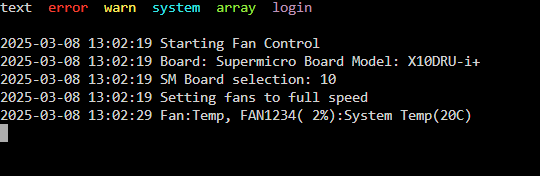
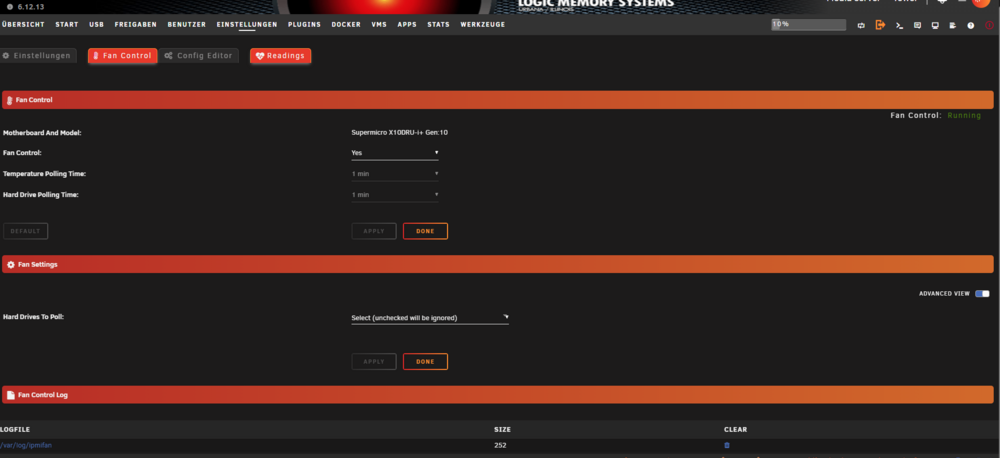
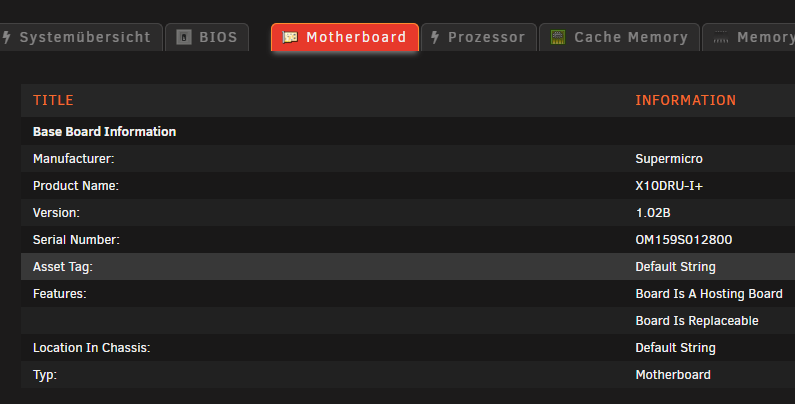
-
Grüße ich versuche schon seit einiger zeit telegraf zu istalieren bzw. zum laufen zu bekommen. Bei der istalation bekomme das Ausgeben docker run -d --name='telegraf' --net='host' --privileged=true -e TZ="America/Los_Angeles" -e HOST_OS="Unraid" -e HOST_HOSTNAME="Tower" -e HOST_CONTAINERNAME="telegraf" -e 'HOST_PROC'='/rootfs/proc' -e 'HOST_SYS'='/rootfs/sys' -e 'HOST_ETC'='/rootfs/etc' -e 'HOST_MOUNT_PREFIX'='/rootfs' -l net.unraid.docker.managed=dockerman -l net.unraid.docker.icon='https://github.com/atribe/unRAID-docker/raw/master/icons/telegraf.png' -v '/var/run/utmp':'/var/run/utmp':'ro' -v '/var/run/docker.sock':'/var/run/docker.sock':'ro' -v '/':'/rootfs':'ro' -v '/sys':'/rootfs/sys':'ro' -v '/etc':'/rootfs/etc':'ro' -v '/proc':'/rootfs/proc':'ro' -v '/mnt/user/appdata/telegraf/telegraf.conf':'/etc/telegraf/telegraf.conf':'rw' -v '/run/udev':'/run/udev':'ro' 'telegraf:latest' d212feb69917e3e733040bd67ff9fc315e06b6d5c37bfd2b13803bdf288413bb docker: Error response from daemon: failed to create shim task: OCI runtime create failed: runc create failed: unable to start container process: error during container init: error mounting "/mnt/user/appdata/telegraf/telegraf.conf" to rootfs at "/etc/telegraf/telegraf.conf": mount /mnt/user/appdata/telegraf/telegraf.conf:/etc/telegraf/telegraf.conf (via /proc/self/fd/6), flags: 0x5000: not a directory: unknown: Are you trying to mount a directory onto a file (or vice-versa)? Check if the specified host path exists and is the expected type. Der Befehl ist fehlgeschlagen. währe für jede Hilfe dankbar mfg
-
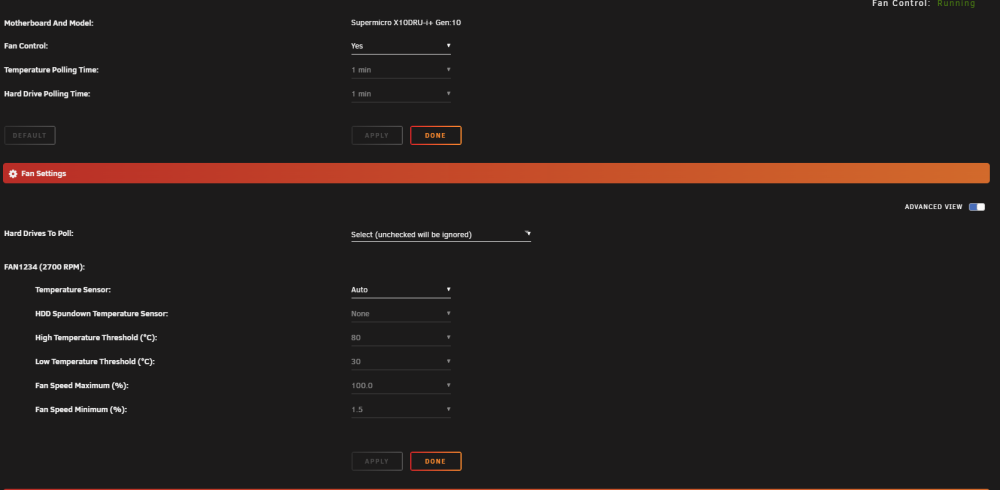
do you mean this?
-
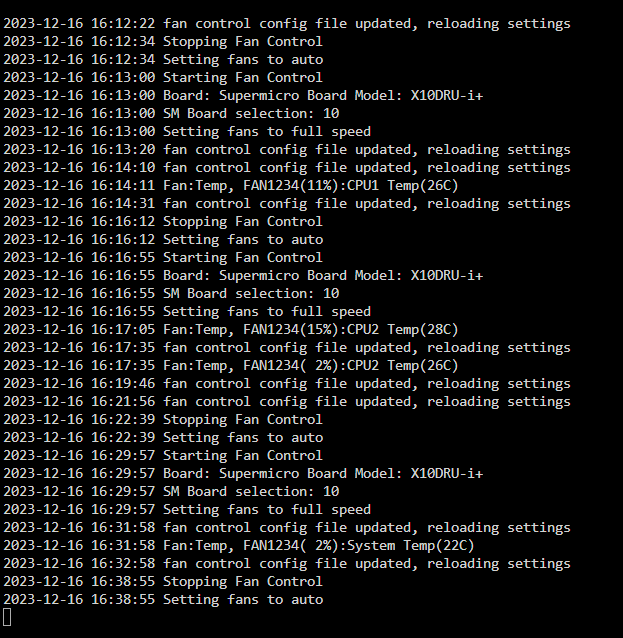
When I turn on the fan control, all the fans turn to MAX and stay there. If I then turn it off again, it will still remain at MAX Can anyone help me ? System : Supermicro X10DRU-I+ , Version 1.02B American Megatrends Inc., Version 3.5 BIOS Datum: Mittwoch, 27-04-2022 There are 8 fans installed I now have the fans via a script drove more smoothly