





jdobbs
Members
-
Joined
-
Last visited
Everything posted by jdobbs
-
I'm thinking it has to do something with Glances displaying physical mount points...
-
Yes, it's available:
-
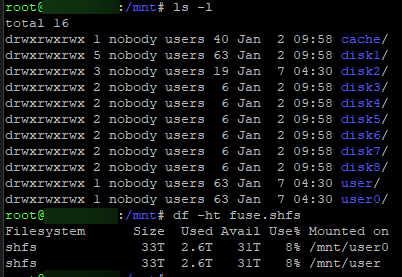
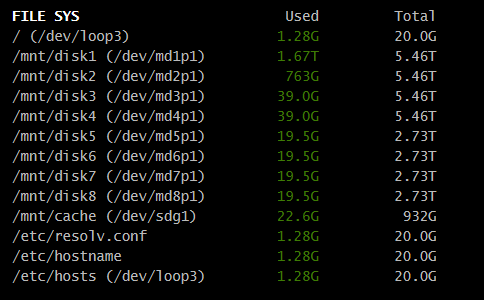
Recently been getting into Unraid and tinkering with things. I've used Glances in the past for monitoring and currently have it deployed from the community apps which places it in a docker container. Glances and access to it seems to be working as expected however I noticed it's providing the physical disk sizes and free space but the array isn't available. Is there any way of getting the array size and free space to report into Glances? From my understanding Unraid presents this as /mnt/user.
-
New to UNRAID, about 5 days in. I'm moving some older disks over and one of the drives is coming back with read failures during the short and extended tests. Everything else seems to be online and working as expected. I'm guessing it's one of those "keep an eye on it" situations however I wanted to get the experts thoughts before I dump too much data into this array and need to start replacing drives. I do have plans in next 6 months or so to replace drives, just not ready at this time. Attaching the log if someone would be so kind to take a look and let me know what I'm dealing with? Thank you! dob-nas01-smart-20230725-1416.zip
