





JUST-Plex
Members
-
Joined
-
Last visited
-
As simple as that! Thanks 🙂
-
Thanks for your quick reply! No, the new disk will join the data disks, and this pool (Plex_Transcode) must be deleted.
-
Hello, I had a 2nd pool made up of an SSD disk intended for Plex transcode. This disk had SMART errors and I would like to remove it from the configuration and replace it with a DATA disk. The new DATA disk is being pre-cleared. I stopped the array, assigned the “Plex_Transcode” disk as no-device and then physically disconnected this disk. It now appears as “Not Installed”. I have a basic license and I'm afraid that the new data disk can't be added as long as the “Plex_Transcode” disk is still displayed as “Not Installed”. What's the best way to do this? Do I need to go to Tools -> “New config” and re-arrange my drives? Thanks for your help
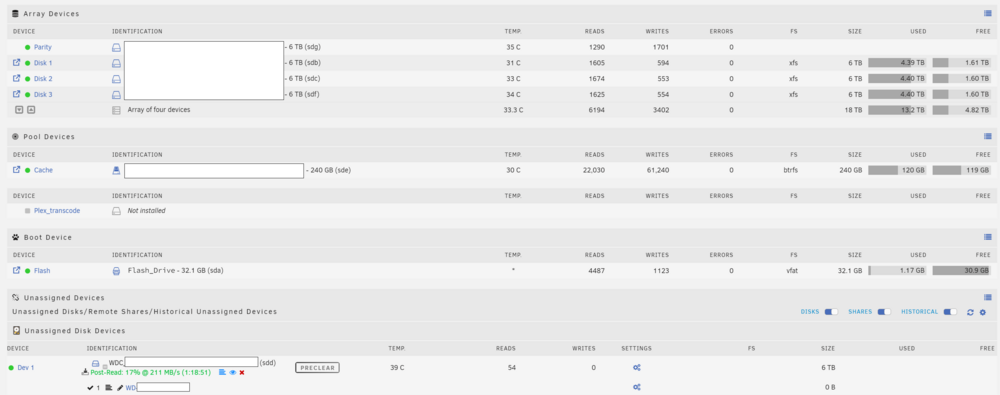
-
Everything looks good now. Thanks again for your help
-
Thanks to everyone. Parity is in progress
-
attached a new diag file fortress-diagnostics-20240810-1033.zip
-
After a full power cycle and verifying all connectivity, I have acces to SMART log and a full SMART test is successfull but the disk is still in error state. How can I recover this disk in a proper state?
-
Thank you ! I will try
-
Dumb question : What do you mean by "Full Power Cycle"? Does the GUI Shutdown button perform a Full Power Cycle? If I need to change the SATA cables, I'm planning to shut down the server anyway.

-
Ok, thanks itimpi. I will do that tonight
-
Hello I woke up this morning with an email from the unraid tower : Event: Unraid Parity disk error Subject: Alert [FORTRESS] - Parity disk in error state (disk dsbl) Description: WDC_WD60EFAX-68JH4N1_WD-WX42D51N5925 (sdg) Importance: alert Parity disk - WDC_WD60EFAX-68JH4N1_WD-WX42D51N5925 (sdg) (errors 2048) The SMART report of this disk is light : smartctl 7.4 2023-08-01 r5530 [x86_64-linux-6.1.79-Unraid] (local build) Copyright (C) 2002-23, Bruce Allen, Christian Franke, www.smartmontools.org Smartctl open device: /dev/sdg failed: No such device And I can not show the SMART error log as there is nothing to show: I can't start a SMART extended self-test. I haven't tested the sata connections yet, but I'll do that tonight. If you have any tips, I'd love to hear from you. Thanks for your help fortress-diagnostics-20240809-0830.zip fortress-smart-20240809-0827.zip


-
Thanks for your answer Where does the original archive come from? Does appdatabackup generate the “xxx-flash-backup-xxx.tar” file and then copy it, or does it take it from somewhere? I attached the debug log in my previous post
-
Hello, I use Appdata.backup to schedule my backups, especially the one of the USB flash drive. All the backups go well except when I have to copy the backup from the flash drive to the destination. It worked a while ago and I can't explain why it doesn't work anymore. The archive is corrupted at the destination, which is a cloud share mounted using rClone. Appdata.backup manages to copy a large 10Gb Plex archive to the destination. Debug log ID : 5474e375-f5ee-43fd-95e5-56008173f599 [21.07.2024 02:00:01][ℹ️][Main] 👋 WELCOME TO APPDATA.BACKUP!! :D [21.07.2024 02:00:01][ℹ️][Main] Backing up from: /mnt/user/appdata, /mnt/cache/appdata [21.07.2024 02:00:01][ℹ️][Main] Backing up to: /mnt/disks/Backups_Plex/BackupPlex/ab_20240721_020001 [21.07.2024 02:00:02][ℹ️][Main] Selected containers: JDownloader2, Plex-Media-Server, binhex-hexchat, chromium, tautulli, transmission [21.07.2024 02:00:02][ℹ️][Main] Saving container XML files... [21.07.2024 02:00:02][ℹ️][Main] Method: Stop/Backup/Start [21.07.2024 02:00:02][ℹ️][transmission] No stopping needed for transmission: Not started! [21.07.2024 02:00:02][ℹ️][transmission] Should NOT backup external volumes, sanitizing them... [21.07.2024 02:00:02][ℹ️][transmission] Calculated volumes to back up: /mnt/user/appdata/transmission [21.07.2024 02:00:02][ℹ️][transmission] Backing up transmission... [21.07.2024 02:00:02][ℹ️][transmission] Backup created without issues [21.07.2024 02:00:02][ℹ️][transmission] Verifying backup... [21.07.2024 02:00:02][ℹ️][transmission] Starting transmission is being ignored, because it was not started before (or should not be started). [21.07.2024 02:00:02][ℹ️][tautulli] Stopping tautulli... done! (took 2 seconds) [21.07.2024 02:00:04][ℹ️][tautulli] Should NOT backup external volumes, sanitizing them... [21.07.2024 02:00:04][ℹ️][tautulli] Calculated volumes to back up: /mnt/user/appdata/tautulli [21.07.2024 02:00:04][ℹ️][tautulli] Backing up tautulli... [21.07.2024 02:00:10][ℹ️][tautulli] Backup created without issues [21.07.2024 02:00:10][ℹ️][tautulli] Verifying backup... [21.07.2024 02:00:12][ℹ️][tautulli] Starting tautulli... (try #1) done! [21.07.2024 02:00:17][ℹ️][Plex-Media-Server] Stopping Plex-Media-Server... done! (took 9 seconds) [21.07.2024 02:00:26][ℹ️][Plex-Media-Server] Should NOT backup external volumes, sanitizing them... [21.07.2024 02:00:26][ℹ️][Plex-Media-Server] Calculated volumes to back up: /mnt/user/appdata/Plex-Media-Server [21.07.2024 02:00:26][ℹ️][Plex-Media-Server] Backing up Plex-Media-Server... [21.07.2024 02:07:56][ℹ️][Plex-Media-Server] Backup created without issues [21.07.2024 02:07:56][ℹ️][Plex-Media-Server] Verifying backup... [21.07.2024 02:10:57][ℹ️][Plex-Media-Server] Starting Plex-Media-Server... (try #1) done! [21.07.2024 02:11:01][ℹ️][binhex-hexchat] No stopping needed for binhex-hexchat: Not started! [21.07.2024 02:11:01][ℹ️][binhex-hexchat] Should NOT backup external volumes, sanitizing them... [21.07.2024 02:11:01][ℹ️][binhex-hexchat] Calculated volumes to back up: /mnt/user/appdata/binhex-hexchat [21.07.2024 02:11:01][ℹ️][binhex-hexchat] Backing up binhex-hexchat... [21.07.2024 02:11:13][ℹ️][binhex-hexchat] Backup created without issues [21.07.2024 02:11:13][ℹ️][binhex-hexchat] Verifying backup... [21.07.2024 02:11:29][ℹ️][binhex-hexchat] Starting binhex-hexchat is being ignored, because it was not started before (or should not be started). [21.07.2024 02:11:29][ℹ️][chromium] No stopping needed for chromium: Not started! [21.07.2024 02:11:29][ℹ️][chromium] Should NOT backup external volumes, sanitizing them... [21.07.2024 02:11:29][ℹ️][chromium] Calculated volumes to back up: /mnt/user/appdata/chromium [21.07.2024 02:11:29][ℹ️][chromium] Backing up chromium... [21.07.2024 02:11:31][ℹ️][chromium] Backup created without issues [21.07.2024 02:11:31][ℹ️][chromium] Verifying backup... [21.07.2024 02:11:33][ℹ️][chromium] Starting chromium is being ignored, because it was not started before (or should not be started). [21.07.2024 02:11:33][ℹ️][JDownloader2] Stopping JDownloader2... done! (took 2 seconds) [21.07.2024 02:11:35][ℹ️][JDownloader2] Should NOT backup external volumes, sanitizing them... [21.07.2024 02:11:35][ℹ️][JDownloader2] Calculated volumes to back up: /mnt/user/appdata/JDownloader2 [21.07.2024 02:11:35][ℹ️][JDownloader2] Backing up JDownloader2... [21.07.2024 02:11:41][ℹ️][JDownloader2] Backup created without issues [21.07.2024 02:11:41][ℹ️][JDownloader2] Verifying backup... [21.07.2024 02:11:45][ℹ️][JDownloader2] Starting JDownloader2... (try #1) done! [21.07.2024 02:11:49][ℹ️][Main] Backing up the flash drive. [21.07.2024 02:13:11][❌][Main] Copying flash backup to destination failed! [21.07.2024 02:13:14][ℹ️][Main] VM meta backup enabled! Backing up... [21.07.2024 02:13:14][❌][Main] Error while backing up VM XMLs. Please see debug log! [21.07.2024 02:13:16][ℹ️][Main] Checking retention... [21.07.2024 02:13:16][ℹ️][Main] Delete old backup: /mnt/disks/Backups_Plex/BackupPlex/ab_20240602_020001 [21.07.2024 02:13:23][ℹ️][Main] DONE! Thanks for using this plugin and have a safe day ;) [21.07.2024 02:13:23][ℹ️][Main] ❤️ appdatabackuperror.zip
-
Thanks for this information. I did not know that ! I'll try some changement
-
Hello I'm using this app for DCC download and when I have 4 or 5 XDCC launched, app it is like frozen for some times. I have to wait few minutes to get back control Am I the only one ? Thanks



